M_Glenn_M
Max Output Level: -65 dBFS

- Total Posts : 1276
- Joined: 2011/09/13 10:58:11
- Location: Comox BC
- Status: offline

Re:Why convert Midi to audio?
2013/03/07 23:31:02
(permalink)
Yes you did thanks. Good advice and I have done this for my other songs now that i lost my first attempt.
Still, it would be good to for me to be clear about the "right" thing to do to get both an audio and a midi version of a track.
I was under the impression that simply freezing a midi clip would create an audio clip as well as keep the midi.
My experience is that it only goes one way. IOW it does make an audio track but is not reversible.
I see that when I install a soft synth, it makes extra tracks that are empty.
I assumed we could somehow fill these with audio but have not found out how.
Producer Exp x1d Win XP, intel Core2 Duo CPU E4600 @ 2.4 GHz, 2 GHz RAM Nvidia gforce 8500 GT BR800 controller , DR880 drum machine. GR20 guitar synth, Alesis QX25 KRK 6 + 10" sub. Sennheiser HD280pro cans 2 Yamaki acoustics, Korean Strat, 60's Jazzmaster, 60's BF Deluxe Reverb,
|
Paul P
Max Output Level: -48.5 dBFS

- Total Posts : 2685
- Joined: 2012/12/08 17:15:47
- Location: Montreal
- Status: offline
Re:Why convert Midi to audio?
2013/03/08 00:21:26
(permalink)
First of all, there are two ways to set up a midi track. First, you can create a Simple Instrument Track, which will create a visible midi track and an invisible audio track. I'm not sure yet if the audio track actually exists at this point or not. The only option I get for freezing this track is the 'freeze synth', I can't 'freeze track' this track. If you 'freeze synth', the midi clip is replaced by a visible audio clip containing the generated waveform from your midi track. The midi clip is no longer visible. If you then unfreeze the track, the audio clip disappears and the midi clip reappears in its place. You can do this as many times as you want If you split the Simple Instrument Track, it's split into two tracks, a visible midi track and a (linked) visible audio track which will be empty. The freeze buttons of both tracks are linked and only offer the option to 'freeze synth'. Freezing generates the waverform in the audio track. The midi clip remains visible in the midi track. If you unfreeze, the audio track remains but its clip goes empty, the midi track remains unchanged. The second way is to create a midi track and an audio track separately, send you midi track to your synth/drum machine/etc and set the input of the audio track to same instrument. This will generate the same setup as you get when you split a Simple Instrument Track. All this to say that I don't see how you could have 'freeze track'ed a midi track or an audio track linked to a midi track. And if you 'freeze synth'd the track, you should get the midi clip back when you unfreeze it. Something else must have happened.
post edited by Paul P - 2013/03/08 00:31:40
|
M_Glenn_M
Max Output Level: -65 dBFS
- Total Posts : 1276
- Joined: 2011/09/13 10:58:11
- Location: Comox BC
- Status: offline
Re:Why convert Midi to audio?
2013/03/08 01:13:56
(permalink)
https://dl.dropbox.com/u/24683934/midi.jpg You can tell I'm just starting. I got midi going from various videos. Which is the one where you simply plug in your gear, add a soft synth and it does it all for you (adds midi and other tracks)? I have never started from the Inspector and created midi trax there, only thru the popup you get from adding a synth. I then play my keyboard and get the midi on one of the tracks. The other track (I assumed reserved for the eventual audio) never seems to be used except for the meter. Perhaps this is the problem? I need to get midi set up another way?
Producer Exp x1d Win XP, intel Core2 Duo CPU E4600 @ 2.4 GHz, 2 GHz RAM Nvidia gforce 8500 GT BR800 controller , DR880 drum machine. GR20 guitar synth, Alesis QX25 KRK 6 + 10" sub. Sennheiser HD280pro cans 2 Yamaki acoustics, Korean Strat, 60's Jazzmaster, 60's BF Deluxe Reverb,
|
Bristol_Jonesey
Max Output Level: 0 dBFS

- Total Posts : 16775
- Joined: 2007/10/08 15:41:17
- Location: Bristol, UK
- Status: offline
Re:Why convert Midi to audio?
2013/03/08 04:19:58
(permalink)
The recipe I have followed for years with total success is just to go Insert > Soft Synth from the Main Menu.
When the dialog box appears, make sure you DON'T have "Simple Instrument Track" checked, and make sure you also have "First Audio Output" selected.
The only time I need "All Audio Outputs" selected is when using something like BFD where I need separate Audio tracks for each kit piece.
CbB, Platinum, 64 bit throughoutCustom built i7 3930, 32Gb RAM, 2 x 1Tb Internal HDD, 1 x 1TB system SSD (Win 7), 1 x 500Gb system SSD (Win 10), 2 x 1Tb External HDD's, Dual boot Win 7 & Win 10 64 Bit, Saffire Pro 26, ISA One, Adam P11A,
|
M_Glenn_M
Max Output Level: -65 dBFS
- Total Posts : 1276
- Joined: 2011/09/13 10:58:11
- Location: Comox BC
- Status: offline
Re:Why convert Midi to audio?
2013/03/08 11:01:54
(permalink)
Thanks, I'll start doing this instead.
So can I assume the method of using the browser view of the soft synth to create the tracks means the ability to convert to audio and back is limited to one way?
Producer Exp x1d Win XP, intel Core2 Duo CPU E4600 @ 2.4 GHz, 2 GHz RAM Nvidia gforce 8500 GT BR800 controller , DR880 drum machine. GR20 guitar synth, Alesis QX25 KRK 6 + 10" sub. Sennheiser HD280pro cans 2 Yamaki acoustics, Korean Strat, 60's Jazzmaster, 60's BF Deluxe Reverb,
|
Bristol_Jonesey
Max Output Level: 0 dBFS
- Total Posts : 16775
- Joined: 2007/10/08 15:41:17
- Location: Bristol, UK
- Status: offline
Re:Why convert Midi to audio?
2013/03/08 11:36:21
(permalink)
Not sure I understand. You can, if you wish, add a synth via the synth rack and you'll get to the same options screen: 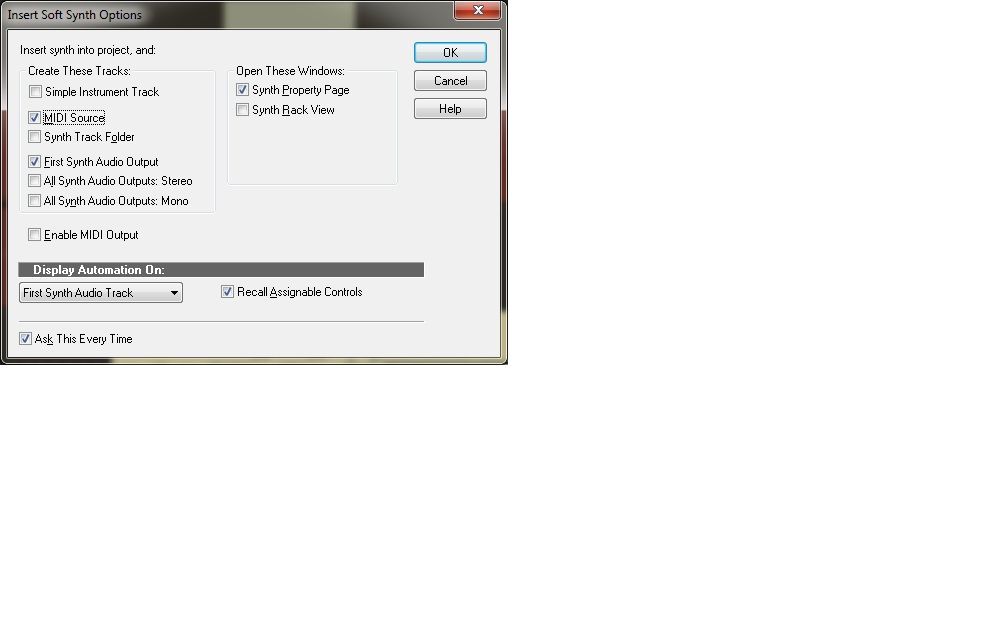
CbB, Platinum, 64 bit throughoutCustom built i7 3930, 32Gb RAM, 2 x 1Tb Internal HDD, 1 x 1TB system SSD (Win 7), 1 x 500Gb system SSD (Win 10), 2 x 1Tb External HDD's, Dual boot Win 7 & Win 10 64 Bit, Saffire Pro 26, ISA One, Adam P11A,
|
M_Glenn_M
Max Output Level: -65 dBFS
- Total Posts : 1276
- Joined: 2011/09/13 10:58:11
- Location: Comox BC
- Status: offline
Re:Why convert Midi to audio?
2013/03/08 11:49:18
(permalink)
Ah, gotcha. Different process, same result.
Ok, I guess my problem with the lost midi was an anomaly in this song.
Everyone else seems to have no problem going back and forth, audio to midi thru freezing.
Newbies always get the anomalies.
Producer Exp x1d Win XP, intel Core2 Duo CPU E4600 @ 2.4 GHz, 2 GHz RAM Nvidia gforce 8500 GT BR800 controller , DR880 drum machine. GR20 guitar synth, Alesis QX25 KRK 6 + 10" sub. Sennheiser HD280pro cans 2 Yamaki acoustics, Korean Strat, 60's Jazzmaster, 60's BF Deluxe Reverb,
|
M_Glenn_M
Max Output Level: -65 dBFS
- Total Posts : 1276
- Joined: 2011/09/13 10:58:11
- Location: Comox BC
- Status: offline
Re:Why convert Midi to audio?
2013/03/08 13:50:33
(permalink)
VariousArtist
You should be able to unfreeze and go back to MIDI.
Here's what I do btw:
- make a copy of the MIDI track
- freeze the copy to generate an audio track
- copy the frozen audio to a new track
- archive the original MIDI track and the frozen copy
I've been burnt too many times by going back to older projects only to find that one of the following has occurred:
- the MIDI synth no longer works, is not available, plays the sound differently, or 'what sound'
- the frozen track cannot be unfrozen
My approach works for me because at least I know I have a permanent copy of the audio the way I heard it when I was composing the MIDI track. I also like to know I have that original MIDI track archived should I need to work on it further. Keeping the frozen track might seem redundant, but I like to have it around just in case.
At the end of the day I trust no synth, no software, no bundle backup or older disks etc. to be able to recreate the audio sound from its components. I always, always render that audio as my ultimate fallback situation.
I wanted to say this has been very useful, thanks. I am still getting occasional anomalies going in and out of freezing, but the cloned tracks have been great comfort.
Producer Exp x1d Win XP, intel Core2 Duo CPU E4600 @ 2.4 GHz, 2 GHz RAM Nvidia gforce 8500 GT BR800 controller , DR880 drum machine. GR20 guitar synth, Alesis QX25 KRK 6 + 10" sub. Sennheiser HD280pro cans 2 Yamaki acoustics, Korean Strat, 60's Jazzmaster, 60's BF Deluxe Reverb,
|