anon125
Max Output Level: -89 dBFS

- Total Posts : 52
- Joined: 2011/09/10 13:35:30
- Status: offline
sonar x1 studio - no sound
I realise that sonar was made deliberately difficult to keep dabblers out...but no sound? e.g. why does this forum not allow one to simply attach an image from the computer? most other forums do - it keep the dabblers out - the sound card on the laptop works. ONLY sonar cannot seem to find it. i am using its own audiodemo1.cwp yes i have been thru the help files what are those preferences>audio>playback and recording>driver modes for? what do i do now? i have it connected to a old yamaha psr 4600 keyboard but i expect sonar has instruments silent buses detected - master - what the heck does this arcane message really say in english? the task was to change the sounds/instruments on a MP3 thanks fellow sufferers edit update - i have a midi file which used to play thru the yamaha - today i just hear a note here and there on the yamaha
post edited by anon125 - 2013/03/07 21:39:43
|
digi2ns
Max Output Level: -48.5 dBFS

- Total Posts : 2694
- Joined: 2010/11/24 14:27:12
- Location: MICHIGAN
- Status: offline

Re:sonar x1 studio - no sound
2013/03/08 07:31:34
(permalink)
"e.g. why does this forum not allow one to simply attach an image from the computer? most other forums do - it keep the dabblers out" http://i1211.photobucket....enShot_zpse9e1ddc5.png 'cntrl + Prnt Scr" Paste into Paint and Save Create an Account on Photobucket or something similar Upload pic to acct Copy Direct Link from acct Now look at pic with the Icon outlined in a RED square Select that icon and paste you Direct link in it 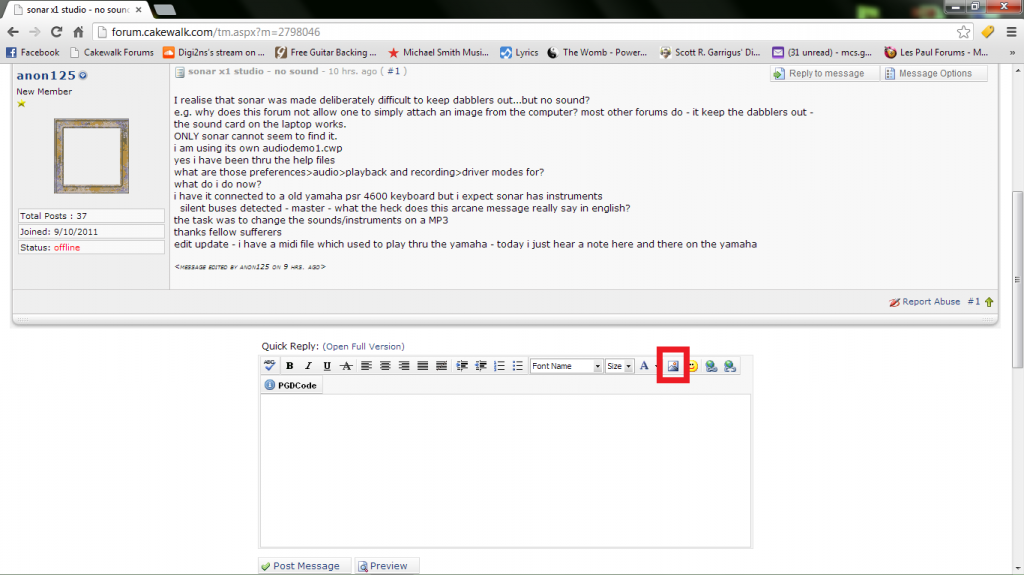
MIKE --Dell Studio XPS I7/870 2.93 Ghz, 8GB Mem, 2-2TB Barracuda HDs, 500 GB Ext.HDD, Win7/64 --X1 64 Pro Expanded, Dual 21" Monitors --PCR500 --MAUDIO FastTrack Ultra --Mackie 1604 VLZ PRO --Line6 X3 Live --Gibson, Fender, Takamine, Schecter, Washburn http://pogopoppa.wix.com/5thgear# http://soundcloud.com/digi2ns
|
Paul P
Max Output Level: -48.5 dBFS
- Total Posts : 2685
- Joined: 2012/12/08 17:15:47
- Location: Montreal
- Status: offline
Re:sonar x1 studio - no sound
2013/03/08 08:57:26
(permalink)
Using firefox, I don't even see that toolbar at the top of the message edit window.
I include images with the bracketing BB codes.
|
brundlefly
Max Output Level: 0 dBFS

- Total Posts : 14250
- Joined: 2007/09/14 14:57:59
- Location: Manitou Spgs, Colorado
- Status: offline
Re:sonar x1 studio - no sound
2013/03/08 09:48:46
(permalink)
what are those preferences>audio>playback and recording>driver modes for? They're to let SONAR see your soundcard.  Many built-in/onboard soundcards can only use MME drivers, so SONAR won't detect an audio interface available unless you set the driver mode to MME. Some can also use WDM drivers which is the mode SONAR defaults to on start-up. Few can use ASIO, which is generally the preferred mode for best performance (though WDM works better with some interfaces), and thus requires getting a "real" external audio interface. silent buses detected - master - what the heck does this arcane message really say in english? This error will go away when you get your audio interface working. All it's saying is that there are no physical audio outputs available to which the digital audio signal on the Master bus in SONAR can be routed.
post edited by brundlefly - 2013/03/08 09:57:06
SONAR Platinum x64, 2x MOTU 2408/PCIe-424 (24-bit, 48kHz) Win10, I7-6700K @ 4.0GHz, 24GB DDR4, 2TB HDD, 32GB SSD Cache, GeForce GTX 750Ti, 2x 24" 16:10 IPS Monitors
|
daveny5
Max Output Level: 0 dBFS
- Total Posts : 16934
- Joined: 2003/11/06 09:54:36
- Location: North Carolina
- Status: offline
Re:sonar x1 studio - no sound
2013/03/08 09:59:02
(permalink)
the task was to change the sounds/instruments on a MP3
You can't change the sounds or instruments on an MP3 file. You can only change them on a MIDI file.
Dave Computer: Intel i7, ASROCK H170M, 16GB/5TB+, Windows 10 Pro 64-bit, Sonar Platinum, TASCAM US-16x08, Cakewalk UM-3G MIDI I/F Instruments: SL-880 Keyboard controller, Korg 05R/W, Korg N1R, KORG Wavestation EX Axes: Fender Stratocaster, Line6 Variax 300, Ovation Acoustic, Takamine Nylon Acoustic, Behringer GX212 amp, Shure SM-58 mic, Rode NT1 condenser mic. Outboard: Mackie 1402-VLZ mixer, TC Helicon VoiceLive 2, Digitech Vocalist WS EX, PODXTLive, various stompboxes and stuff. Controllers: Korg nanoKONTROL, Wacom Bamboo Touchpad
|
anon125
Max Output Level: -89 dBFS
- Total Posts : 52
- Joined: 2011/09/10 13:35:30
- Status: offline
Re:sonar x1 studio - no sound
2013/03/08 14:05:19
(permalink)
thanks all - i will once agian give up on sonar.
imagine to use this forum i need an account at a photo website!
|
sharke
Max Output Level: 0 dBFS
- Total Posts : 13933
- Joined: 2012/08/03 00:13:00
- Location: NYC
- Status: offline
Re:sonar x1 studio - no sound
2013/03/08 15:08:49
(permalink)
digi2ns
"e.g. why does this forum not allow one to simply attach an image from the computer? most other forums do - it keep the dabblers out"
http://i1211.photobucket....enShot_zpse9e1ddc5.png
'cntrl + Prnt Scr"
Paste into Paint and Save
Create an Account on Photobucket or something similar
Upload pic to acct
Copy Direct Link from acct
Now look at pic with the Icon outlined in a RED square
Select that icon and paste you Direct link in it
I just use imgur.com - no need to create an account, you just upload the photo and it gives you a link. Quickest way to post a pic.
JamesWindows 10, Sonar SPlat (64-bit), Intel i7-4930K, 32GB RAM, RME Babyface, AKAI MPK Mini, Roland A-800 Pro, Focusrite VRM Box, Komplete 10 Ultimate, 2012 American Telecaster!
|
anon125
Max Output Level: -89 dBFS
- Total Posts : 52
- Joined: 2011/09/10 13:35:30
- Status: offline
Re:sonar x1 studio - no sound
2013/03/08 15:37:14
(permalink)
|
anon125
Max Output Level: -89 dBFS
- Total Posts : 52
- Joined: 2011/09/10 13:35:30
- Status: offline
Re:sonar x1 studio - no sound
2013/03/08 15:41:45
(permalink)
digi2ns
"e.g. why does this forum not allow one to simply attach an image from the computer? most other forums do - it keep the dabblers out"
http://i1211.photobucket.com/albums/cc436/Digi2ns/ForumScreenShot_zpse9e1ddc5.png
'cntrl + Prnt Scr"
Paste into Paint and Save
Create an Account on Photobucket or something similar
Upload pic to acct
Copy Direct Link from acct
Now look at pic with the Icon outlined in a RED square
Select that icon and paste you Direct link in it
http://www.flickr.com/photos/9232289@N04/8539383527/ does this work still no sound another one had OK on them all tell the webmaster that other forums have entered the 21st century and let users paste directly from computer to forum. if i save a mp3 as a midi do i use 1 or 0 - still nothing works thanks all
|
Paul P
Max Output Level: -48.5 dBFS
- Total Posts : 2685
- Joined: 2012/12/08 17:15:47
- Location: Montreal
- Status: offline
Re:sonar x1 studio - no sound
2013/03/08 15:44:15
(permalink)
anon125 : "tell the webmaster that other forums have entered the 21st century and let users paste directly from computer to forum. "
We, and they, are entirely aware of the situation so you can leave that out of the discussion :-)
|
anon125
Max Output Level: -89 dBFS
- Total Posts : 52
- Joined: 2011/09/10 13:35:30
- Status: offline
Re:sonar x1 studio - no sound
2013/03/08 15:45:08
(permalink)
computer is a toshiba satellite p500 pspgsc-01800t
are you folks saying this software wont work on it?
thanks
|
chuckebaby
Max Output Level: 0 dBFS
- Total Posts : 13146
- Joined: 2011/01/04 14:55:28
- Status: offline
Re:sonar x1 studio - no sound
2013/03/08 15:58:37
(permalink)
using windows ie9 and I cant get that ribbon to come up for the life of me.
every once in a while it flashes like it wants to show up but then its gone just as fast as I seen it.
id say it works for me 10% of the time.
Windows 8.1 X64 Sonar Platinum x64 Custom built: Asrock z97 1150 - Intel I7 4790k - 16GB corsair DDR3 1600 - PNY SSD 220GBFocusrite Saffire 18I8 - Mackie Control
|
digi2ns
Max Output Level: -48.5 dBFS
- Total Posts : 2694
- Joined: 2010/11/24 14:27:12
- Location: MICHIGAN
- Status: offline
Re:sonar x1 studio - no sound
2013/03/08 16:03:19
(permalink)
Yes I was able to view your pictures on Flicker
Im having probs reading your posts cause its hard to sort through what feels like anger and comments made toward everything there is.
We are here trying to help out of the goodness of our hearts
As far as no sound, Im sure others will jump in and give you a hand if they feel some sort of appreciation.
Not trying to sound rude, its just a feeling Im getting trying to read and help out
MIKE --Dell Studio XPS I7/870 2.93 Ghz, 8GB Mem, 2-2TB Barracuda HDs, 500 GB Ext.HDD, Win7/64 --X1 64 Pro Expanded, Dual 21" Monitors --PCR500 --MAUDIO FastTrack Ultra --Mackie 1604 VLZ PRO --Line6 X3 Live --Gibson, Fender, Takamine, Schecter, Washburn http://pogopoppa.wix.com/5thgear# http://soundcloud.com/digi2ns
|
digi2ns
Max Output Level: -48.5 dBFS
- Total Posts : 2694
- Joined: 2010/11/24 14:27:12
- Location: MICHIGAN
- Status: offline
Re:sonar x1 studio - no sound
2013/03/08 16:06:42
(permalink)
Hey Sharke, Ive never seen that-Ill check that out for future use Thank You Sir
MIKE --Dell Studio XPS I7/870 2.93 Ghz, 8GB Mem, 2-2TB Barracuda HDs, 500 GB Ext.HDD, Win7/64 --X1 64 Pro Expanded, Dual 21" Monitors --PCR500 --MAUDIO FastTrack Ultra --Mackie 1604 VLZ PRO --Line6 X3 Live --Gibson, Fender, Takamine, Schecter, Washburn http://pogopoppa.wix.com/5thgear# http://soundcloud.com/digi2ns
|
digi2ns
Max Output Level: -48.5 dBFS
- Total Posts : 2694
- Joined: 2010/11/24 14:27:12
- Location: MICHIGAN
- Status: offline
Re:sonar x1 studio - no sound
2013/03/08 16:10:58
(permalink)
Direct link as posted above works. (NOPE It didnt save after hitting post) Both BB Links tried below, one doesnt do nothing and the other just insert the link, not the pic How are you doing it Sharke-Thanks  TESTING TESTING 123 Nope cant get it to do right, Maybe its Chrome?
post edited by digi2ns - 2013/03/08 16:20:55
MIKE --Dell Studio XPS I7/870 2.93 Ghz, 8GB Mem, 2-2TB Barracuda HDs, 500 GB Ext.HDD, Win7/64 --X1 64 Pro Expanded, Dual 21" Monitors --PCR500 --MAUDIO FastTrack Ultra --Mackie 1604 VLZ PRO --Line6 X3 Live --Gibson, Fender, Takamine, Schecter, Washburn http://pogopoppa.wix.com/5thgear# http://soundcloud.com/digi2ns
|
daveny5
Max Output Level: 0 dBFS
- Total Posts : 16934
- Joined: 2003/11/06 09:54:36
- Location: North Carolina
- Status: offline
Re:sonar x1 studio - no sound
2013/03/08 16:31:09
(permalink)
I don't know why anyone would try to help you with your grouchy, cynical attitude. Lighten up. We don't work for Cakewalk.  I've been using Cakewalk and Sonar for at least 10 years and its a great program, but like anything worthwhile, there's a learning curve. It you just want something to just plug and play, download Audacity for free. Have you even looked at the Getting Started guide or the Help Menu? You also didn't mention what version of Windows you're using and whether it was 32 or 64-bit.. Since you're using the built-in sound chip on the laptop, you should set the driver mode to WDM or MME. I doubt it supports ASIO mode. To get the best results with Sonar, you should invest in an audio interface. Your computer is marginal to run this program. Go to Preferences - Audio - Devices and make sure your built-in sound device is selected. Probably Realtek or some other fifty cent sound chip. Sonar has lots of instruments called softsynths. Click on Insert-Softsynth and select the TTS-1. Its easy to use and I'll bet it sounds a lot better than the Yamaha. If you have a MIDI file (or load one of the Tutorial files that come with Sonar), set the output of the MIDI track to the TTS-1. Hit play and you should hear something assuming your soundcard is setup properly. Can you play audio files? Drag and drop a WAV file onto an audio track and see if that works. That will tell you if your soundcard is setup properly. People in these forums do try to help beginners out, but you need to cooperate and show at least a halfway decent attitude. Please.
Dave Computer: Intel i7, ASROCK H170M, 16GB/5TB+, Windows 10 Pro 64-bit, Sonar Platinum, TASCAM US-16x08, Cakewalk UM-3G MIDI I/F Instruments: SL-880 Keyboard controller, Korg 05R/W, Korg N1R, KORG Wavestation EX Axes: Fender Stratocaster, Line6 Variax 300, Ovation Acoustic, Takamine Nylon Acoustic, Behringer GX212 amp, Shure SM-58 mic, Rode NT1 condenser mic. Outboard: Mackie 1402-VLZ mixer, TC Helicon VoiceLive 2, Digitech Vocalist WS EX, PODXTLive, various stompboxes and stuff. Controllers: Korg nanoKONTROL, Wacom Bamboo Touchpad
|
sharke
Max Output Level: 0 dBFS
- Total Posts : 13933
- Joined: 2012/08/03 00:13:00
- Location: NYC
- Status: offline
Re:sonar x1 studio - no sound
2013/03/08 17:10:56
(permalink)
digi2ns
Direct link as posted above works. (NOPE It didnt save after hitting post)
Both BB Links tried below, one doesnt do nothing and the other just insert the link, not the pic
How are you doing it Sharke-Thanks
TESTING TESTING 123
Nope cant get it to do right,
Maybe its Chrome?
In the list of links, select "direct link." It gives you a standard URL. You can just click the icon to the left of it to copy it. Also note you can drag photos directly from your desktop to the imgur page and they will upload automatically.
JamesWindows 10, Sonar SPlat (64-bit), Intel i7-4930K, 32GB RAM, RME Babyface, AKAI MPK Mini, Roland A-800 Pro, Focusrite VRM Box, Komplete 10 Ultimate, 2012 American Telecaster!
|
digi2ns
Max Output Level: -48.5 dBFS
- Total Posts : 2694
- Joined: 2010/11/24 14:27:12
- Location: MICHIGAN
- Status: offline
Re:sonar x1 studio - no sound
2013/03/08 18:22:05
(permalink)
Yeah I can get them to load into imgur fine, I was hoping to just copy the Direct Link and post it in here and it would put the picture in the post. It dont seem to be working as far as posting it any way I try it. I was only successful at getting it to add a link to it. In the end I think Photobucket was fast and it is a free acct anyway. The thought was good though, I appreciate it http://i.imgur.com/lwXVFrt.jpg?1
MIKE --Dell Studio XPS I7/870 2.93 Ghz, 8GB Mem, 2-2TB Barracuda HDs, 500 GB Ext.HDD, Win7/64 --X1 64 Pro Expanded, Dual 21" Monitors --PCR500 --MAUDIO FastTrack Ultra --Mackie 1604 VLZ PRO --Line6 X3 Live --Gibson, Fender, Takamine, Schecter, Washburn http://pogopoppa.wix.com/5thgear# http://soundcloud.com/digi2ns
|
sharke
Max Output Level: 0 dBFS
- Total Posts : 13933
- Joined: 2012/08/03 00:13:00
- Location: NYC
- Status: offline
Re:sonar x1 studio - no sound
2013/03/08 23:08:01
(permalink)
digi2ns
Yeah I can get them to load into imgur fine,
I was hoping to just copy the Direct Link and post it in here and it would put the picture in the post.
It dont seem to be working as far as posting it any way I try it.
I was only successful at getting it to add a link to it.
In the end I think Photobucket was fast and it is a free acct anyway.
The thought was good though, I appreciate it
http://i.imgur.com/lwXVFrt.jpg?1
As far as I know you cannot post photos in this forum by the traditional BB forum method (i.e. the [IMG] tags). You have to use the "Insert an image" icon in the toolbar and paste a standard URL in the popup that appears. So you can do that with imgur, you just have to remember to use the normal image link instead the BB form one.
JamesWindows 10, Sonar SPlat (64-bit), Intel i7-4930K, 32GB RAM, RME Babyface, AKAI MPK Mini, Roland A-800 Pro, Focusrite VRM Box, Komplete 10 Ultimate, 2012 American Telecaster!
|
Paul P
Max Output Level: -48.5 dBFS
- Total Posts : 2685
- Joined: 2012/12/08 17:15:47
- Location: Montreal
- Status: offline
Re:sonar x1 studio - no sound
2013/03/08 23:11:15
(permalink)
I use the IMG tags with no problems. The bb codes are the only way I've found to use this forum with firefox. I'm getting pretty quick at typing the codes on the fly...
|
anon125
Max Output Level: -89 dBFS
- Total Posts : 52
- Joined: 2011/09/10 13:35:30
- Status: offline
Re:sonar x1 studio - no sound
2013/03/12 00:04:44
(permalink)
|
anon125
Max Output Level: -89 dBFS
- Total Posts : 52
- Joined: 2011/09/10 13:35:30
- Status: offline
Re:sonar x1 studio - no sound
2013/03/12 00:11:15
(permalink)
the computer does NOT connect to the internet so the help files are limited.
thanks
|
FastBikerBoy
Forum Host

- Total Posts : 11326
- Joined: 2008/01/25 16:15:36
- Location: Watton, Norfolk, UK
- Status: offline
Re:sonar x1 studio - no sound
2013/03/12 03:25:10
(permalink)
anon125
the computer does NOT connect to the internet so the help files are limited.
thanks
Open Preferences---->File----->Advanced and check the "Always use offline help" option. That will give you access to the full help file whether online or not.
|