musicfort
Max Output Level: -90 dBFS

- Total Posts : 1
- Joined: 2013/03/16 18:00:43
- Status: offline
Want to make EZ keys play Dimension Pro ??
I'm trying to get EZkeys to play Dimension pro. I wondering if because they are both plug-in's this might not be possible ??? However, Ezkeys has a midi out function and my thinking is that you should be able to change the input of Dimension pro to EZkeys. The alternative is for me to create the midi file I want in Ez keys and then drag it into dimension pro and it works fine. But if you have to edit the midi file for any-reason you kind of have to start over. I'm just wondering if anyone has had any success with this and if so how. I'm thinking the problem may lie in how you insert both synths as plugins in the set up. It would be nice to just have ezkeys play say dimension pro as a organ or strings. Thanks
|
rabeach
Max Output Level: -48 dBFS

- Total Posts : 2703
- Joined: 2004/01/26 14:56:13
- Status: offline

Re:Want to make EZ keys play Dimension Pro ??
2013/03/16 19:19:00
(permalink)
I don’t own this software but If you checked enable midi out when you inserted EZ keys and that didn't work then I believe a Virtual MIDI Cable/Driver like LoopBe1 will allow you to do what you wish.
|
Chappel
Max Output Level: -52.5 dBFS

- Total Posts : 2300
- Joined: 2009/07/11 14:55:32
- Location: California
- Status: offline
Re:Want to make EZ keys play Dimension Pro ??
2013/03/16 20:16:21
(permalink)
Here's something I haven't tried in a long time and not sure if it would work. When you insert the dimension synth, enable midi output for the track in the synth properties window, then use that as the input for the other track. Might be worth a try.
|
chuckebaby
Max Output Level: 0 dBFS

- Total Posts : 13146
- Joined: 2011/01/04 14:55:28
- Status: offline
Re:Want to make EZ keys play Dimension Pro ??
2013/03/16 21:25:14
(permalink)
easily,
open both plug ins (insert both soft synths)
on the soft synth preference menu screen that you are promt with directly after insert takes place be sure to select all outputs stereo and midi source.
its not that you need all outputs stereo but in order to configure your midi tracks to trigger the other they must be set this way.
go to ez keys track output drop down menu and select "Dimension pro"
you are essentially patching the synth.
not sure why one would want to take this approach but I can only guess its because of the record/edit features of ez keys.
im not here to judge but that's what the piano roll is for and 10XXX more flexible/powerful.
Windows 8.1 X64 Sonar Platinum x64 Custom built: Asrock z97 1150 - Intel I7 4790k - 16GB corsair DDR3 1600 - PNY SSD 220GBFocusrite Saffire 18I8 - Mackie Control
|
swamptooth
Max Output Level: -53 dBFS

- Total Posts : 2229
- Joined: 2012/04/16 15:44:21
- Status: offline
Re:Want to make EZ keys play Dimension Pro ??
2013/03/17 03:30:11
(permalink)
since ezkeys has a midi out function (i think you're not talking about midi export) then the steps are as follows:
in the synth browser, right-click ezkeys and select "enable midi output"
insert a new midi track
set the input source to ezkeys
set the output source to dimension pro
enable midi echo on the midi track
hth
Arvid H. PetersonSonar X3E Prod / X2A / X1PE | Cubase 9.5.1 | Reason 9.5 | Sibelius7 | Pure DataNative-Instruments Komplete 10 Ultimate and a smattering of other pluginsHome-brewed VSTs Toshiba Satellite S855-S5378 (16GB RAM, modified with 2x 750GB HDDs, Windows 8.1 x64) Samson Graphite 49, M-Audio Oxygen 49, Korg nanoPAD2, Webcam motion tracking programs M-Audio Fast Track UltraMember, ASCAP
|
auto_da_fe
Max Output Level: -56.5 dBFS

- Total Posts : 1866
- Joined: 2004/08/04 21:32:18
- Status: offline
Re:Want to make EZ keys play Dimension Pro ??
2014/03/04 21:16:36
(permalink)
Did anyone ever get this working ? I just bought EZ keys and there is no midi out.
WTF ??
JR
HP DV6T - 2670QM, 8 GB RAM, Sonar Platypus, Octa Capture, BFD2 & Jamstix3, Komplete 10 and Komplete Kontrol Win 10 64 SLS PS8R Monitors and KRK Ergo https://soundcloud.com/airportface
|
scook
Forum Host

- Total Posts : 24146
- Joined: 2005/07/27 13:43:57
- Location: TX
- Status: offline
Re:Want to make EZ keys play Dimension Pro ??
2014/03/04 21:24:56
(permalink)
A VST plug-in capable of MIDI output has generateEvents set to 1 in it's registry VST inventory entry by the VST scanner.
|
Guitarmech111
Max Output Level: -24.5 dBFS

- Total Posts : 5085
- Joined: 2003/11/06 10:18:53
- Location: Bayou City, TX
- Status: offline
Re:Want to make EZ keys play Dimension Pro ??
2014/03/04 21:27:55
(permalink)
EZkeys can generate midi clips when you have the song ready. I just drag copy the midi from the Ezkeys patterns to SONAR. Works like a charm.
Peace, Conley Shepherd Joyful Noise Productions PC config: (Win performance base score = 7.7) ASUS Sabertooth 990 FX -amd fx-8150 - core processor am3+ - 32G Corsair 1066 DDR3 - PNY GTX670 2g gddr5 - Corsair Force SSD 120G - Samsung 750G SATA drives - WD 1tb Black (Audio files) - WD 2TB for storage - RME UFX - USB ASIO 2/2016 drivers Win8  Without a mess, there is no message
|
mudgel
Max Output Level: 0 dBFS
- Total Posts : 12010
- Joined: 2004/08/13 00:56:05
- Location: Linton Victoria (Near Ballarat)
- Status: offline
Re:Want to make EZ keys play Dimension Pro ??
2014/03/04 21:38:34
(permalink)
I do it the same way Conley does.
Mike V. (MUDGEL) STUDIO: Win 10 Pro x64, SPlat & CbB x64, PC: ASUS Z370-A, INTEL i7 8700k, 32GIG DDR4 2400, OC 4.7Ghz. Storage: 7 TB SATA III, 750GiG SSD & Samsung 500 Gig 960 EVO NVMe M.2. Monitors: Adam A7X, JBL 10” Sub. Audio I/O & DSP Server: DIGIGRID IOS & IOX. Screen: Raven MTi + 43" HD 4K TV Monitor. Keyboard Controller: Native Instruments Komplete Kontrol S88.
|
bapu
Max Output Level: 0 dBFS

- Total Posts : 86000
- Joined: 2006/11/25 21:23:28
- Location: Thousand Oaks, CA
- Status: offline
Re:Want to make EZ keys play Dimension Pro ??
2014/03/04 21:58:39
(permalink)
Guitarmech111
EZkeys can generate midi clips when you have the song ready. I just drag copy the midi from the Ezkeys patterns to SONAR. Works like a charm.
mudgel
I do it the same way Conley does.
Yup. That's how to do it.
|
bapu
Max Output Level: 0 dBFS
- Total Posts : 86000
- Joined: 2006/11/25 21:23:28
- Location: Thousand Oaks, CA
- Status: offline
Re:Want to make EZ keys play Dimension Pro ??
2014/03/04 21:59:51
(permalink)
Depending on the patch you use in Dim-Pro you may need to edit the MIDI.
|
auto_da_fe
Max Output Level: -56.5 dBFS
- Total Posts : 1866
- Joined: 2004/08/04 21:32:18
- Status: offline
Re:Want to make EZ keys play Dimension Pro ??
2014/03/05 20:42:46
(permalink)
When I read this thread it sounded like enable midi out worked. Definitely should have done more research. I will once and for all put down here - Enable Midi Out does work in EZ Keys. You can not trigger an external vsti with the midi you create in EZ keys. If you must have this function, buy something else. As noted the only way to move the midi is to drag and drop. Interestingly in the demo version of EZ Keys, you can select enable midi out, it is just that nothing goes out. I assumed that it worked and it was just blocked in the demo version. When you authorize the full version, the enable midi out is grayed out and not even select-able. Not sure if this is by design or not, but it got me. If I knew there was no midi out of EZ keys, I would not have bought it. It still is pretty nice all in all, just a little disappointed that I could not have this trigger an external synth directly.. See below - I take it all back
post edited by auto_da_fe - 2014/03/08 22:56:17
HP DV6T - 2670QM, 8 GB RAM, Sonar Platypus, Octa Capture, BFD2 & Jamstix3, Komplete 10 and Komplete Kontrol Win 10 64 SLS PS8R Monitors and KRK Ergo https://soundcloud.com/airportface
|
Dave Modisette
Max Output Level: 0 dBFS
- Total Posts : 11050
- Joined: 2003/11/13 22:12:55
- Location: Brandon, Florida
- Status: offline
Re:Want to make EZ keys play Dimension Pro ??
2014/03/05 21:58:50
(permalink)
I assure you that EZkeys will send midi out to Dimension Pro if you know what you are doing. I had it set up and running within about 5 minutes. Here is the key thing: Do not use an instrument track. Use the separate midi and audio track option. Make sure you enable midi out in your INSERT SOFTSYNTH OPTIONS window when you add your EZkeys tracks. Then open your softsynth properties for EZkeys and select the Midi Out option in the EZkeys menu. Insert a softsynth again and choose Dim Pro. Load a sample set into Dim Pro. Make sure you are getting sound out of Dim Pro first. Now go back to the midi track for EZkeys and set the output to go to Dim Pro. Open the Synth Properties for EZkeys again and make sure FOLLOW HOST is selected. Now drag the midi clips from the EZkeys browser into the EZKeys songtrack. Turn down the volume on the EZKeys output knob. (EDIT: Actually, the knob setting won't matter if you have the EZkeys midi track output set to Dim Pro. In experimentation to see what you could have done wrong I ran into an issue where if the EZkeys midi track input was set to NONE, no midi would go to Dim Pro. However, if I set the Dim Pro input to Omni or EZkeys, I would get sound again. Another odd thing I discovered was that if I set the output of the EZKeys midi track to Dim Pro and the input of Dim Pro to EZkeys, it would double the volume. I think this could be a SONAR bug. ) Rewind SONAR and press play. You should now hear Dim Pro playing the content of the EZkeys Songtrack. Here's something to keep in consideration: Although there is one advantage to composing your midi keyboard track in EZkeys, there is also one drawback. EZkeys will be subject to latency from the midi output. So just like playing a live keyboard with a high latency setting in SONAR will cause the audio to come out delayed in any softsynth, you will have the same thing happen coming out of EZkeys. Therefore, do your keyboard tracks early and freeze the audio. Otherwise copy the midi in the EZkeys song track and drag it into SONAR.
post edited by Mod Bod - 2014/03/05 22:28:55
|
bapu
Max Output Level: 0 dBFS
- Total Posts : 86000
- Joined: 2006/11/25 21:23:28
- Location: Thousand Oaks, CA
- Status: offline
Re:Want to make EZ keys play Dimension Pro ??
2014/03/05 22:01:37
(permalink)
|
auto_da_fe
Max Output Level: -56.5 dBFS
- Total Posts : 1866
- Joined: 2004/08/04 21:32:18
- Status: offline
Re:Want to make EZ keys play Dimension Pro ??
2014/03/05 22:58:14
(permalink)
My Synth properties. I cannot enable midi out.
I also cannot seem to attach a screen capture to show you what I mean. man i hate this forum software.
HP DV6T - 2670QM, 8 GB RAM, Sonar Platypus, Octa Capture, BFD2 & Jamstix3, Komplete 10 and Komplete Kontrol Win 10 64 SLS PS8R Monitors and KRK Ergo https://soundcloud.com/airportface
|
auto_da_fe
Max Output Level: -56.5 dBFS
- Total Posts : 1866
- Joined: 2004/08/04 21:32:18
- Status: offline
Re:Want to make EZ keys play Dimension Pro ??
2014/03/08 09:27:39
(permalink)
 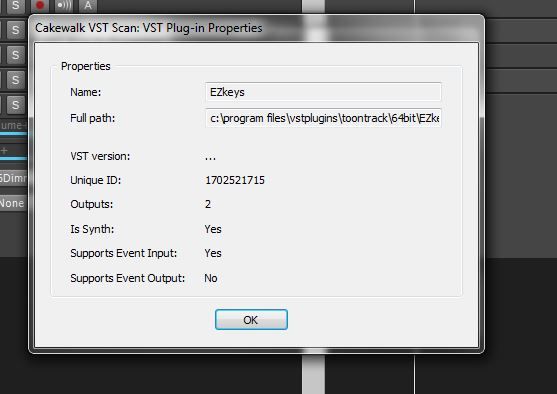 " /> This is what I see in synth properties details. As long as supports event output is NO, I m not sure how this would work. Mr Mod Bod, do you perhaps have some deluxe version of EZ keys that supports this ? JR
HP DV6T - 2670QM, 8 GB RAM, Sonar Platypus, Octa Capture, BFD2 & Jamstix3, Komplete 10 and Komplete Kontrol Win 10 64 SLS PS8R Monitors and KRK Ergo https://soundcloud.com/airportface
|
Dave Modisette
Max Output Level: 0 dBFS
- Total Posts : 11050
- Joined: 2003/11/13 22:12:55
- Location: Brandon, Florida
- Status: offline
Re:Want to make EZ keys play Dimension Pro ??
2014/03/08 10:23:08
(permalink)
That's not your Synth Properties Window. That is your Plug In Properties Window. Get to your Synth Properties via the Synth Rack. I have no special enhanced version of EZkeys. Sometimes I do but this isn't one of those times. You need to do a little study on the SONAR command INSERT SOFT SYNTH. EZkeys is a special instrument in that it also has it's own midi engine. That is why using the instrument track isn't advised on this one.
post edited by Mod Bod - 2014/03/08 10:34:28
|
Guitarmech111
Max Output Level: -24.5 dBFS
- Total Posts : 5085
- Joined: 2003/11/06 10:18:53
- Location: Bayou City, TX
- Status: offline
Re:Want to make EZ keys play Dimension Pro ??
2014/03/08 10:23:29
(permalink)
Dave forgot one important thing - "Input Echo" must be turned on. Once you enable input Echo, I think you will have better results. :-D
Peace, Conley Shepherd Joyful Noise Productions PC config: (Win performance base score = 7.7) ASUS Sabertooth 990 FX -amd fx-8150 - core processor am3+ - 32G Corsair 1066 DDR3 - PNY GTX670 2g gddr5 - Corsair Force SSD 120G - Samsung 750G SATA drives - WD 1tb Black (Audio files) - WD 2TB for storage - RME UFX - USB ASIO 2/2016 drivers Win8 Without a mess, there is no message
|
Guitarmech111
Max Output Level: -24.5 dBFS
- Total Posts : 5085
- Joined: 2003/11/06 10:18:53
- Location: Bayou City, TX
- Status: offline
Re:Want to make EZ keys play Dimension Pro ??
2014/03/08 10:24:45
(permalink)
btw - I have dimension Pro playing all kinds of patterns from EZKeys as direct input to DimPro without issue.
Peace, Conley Shepherd Joyful Noise Productions PC config: (Win performance base score = 7.7) ASUS Sabertooth 990 FX -amd fx-8150 - core processor am3+ - 32G Corsair 1066 DDR3 - PNY GTX670 2g gddr5 - Corsair Force SSD 120G - Samsung 750G SATA drives - WD 1tb Black (Audio files) - WD 2TB for storage - RME UFX - USB ASIO 2/2016 drivers Win8 Without a mess, there is no message
|
Dave Modisette
Max Output Level: 0 dBFS
- Total Posts : 11050
- Joined: 2003/11/13 22:12:55
- Location: Brandon, Florida
- Status: offline
Re:Want to make EZ keys play Dimension Pro ??
2014/03/08 10:40:18
(permalink)
Yes Conley, that is important. It's a given since all softsynths need to have that on if you want to hear them when you play your keyboard in real time. My input echo is automatically turned on when I insert a softsynth so I didn't think that was pertinent but in this case, I don't think you can assume anything.
Fact is, EZkeys works as intended. Guys like you (Conley) make sure of that (as best as you can) during the betatesting cycle.
|
Guitarmech111
Max Output Level: -24.5 dBFS
- Total Posts : 5085
- Joined: 2003/11/06 10:18:53
- Location: Bayou City, TX
- Status: offline
Re:Want to make EZ keys play Dimension Pro ??
2014/03/08 10:47:47
(permalink)
Thanks Dave, I have gotten bit a few times by input echo. Mine does not come on by default when inserting a synth. I remember plenty of times thinking what in the world is wrong here.
Another option that killed me was not realizing to echo current (midi) track too.
I do not feed synths from other synths in the project so I would not normally run into something like this.
Dave has laid out the foundation and is pretty clear. Follow those instructions with input echo and you will be jammin again in SONAR in no time!
Peace, Conley Shepherd Joyful Noise Productions PC config: (Win performance base score = 7.7) ASUS Sabertooth 990 FX -amd fx-8150 - core processor am3+ - 32G Corsair 1066 DDR3 - PNY GTX670 2g gddr5 - Corsair Force SSD 120G - Samsung 750G SATA drives - WD 1tb Black (Audio files) - WD 2TB for storage - RME UFX - USB ASIO 2/2016 drivers Win8 Without a mess, there is no message
|
auto_da_fe
Max Output Level: -56.5 dBFS
- Total Posts : 1866
- Joined: 2004/08/04 21:32:18
- Status: offline
Re:Want to make EZ keys play Dimension Pro ??
2014/03/08 12:06:46
(permalink)
I do not need to study up on "enable midi out". I was one of the principles in describing and proving the Multiple enable midi out bug that was fixed in the last release of Sonar.
I know that one can check enable midi out when you insert a soft synth or you can right click in the synth rack and check it. I know about input echo and I know that some synths work better without instrument tracks. I use Jamstix and catanya extensively. (jamstix to trigger EZ drummer, no less)
I sent the synth properties picture so that you call can see that my EZ keys will not allow turning on of midi out. I would assume that yours says yes and yes to events in and out ?
All my other soft synths I can toggle enable midi on and off.
I suspect that I have something stuck in registry from the demo version that disables midi out. I have tried a couple clean re-installs, but I do not think that ez keys does a clean un-install as I do not have to re-authorize each time.
Anyone know I) if the demo version had midi out disabled 2) how to do a 100% removal of EZ keys ?
JR
HP DV6T - 2670QM, 8 GB RAM, Sonar Platypus, Octa Capture, BFD2 & Jamstix3, Komplete 10 and Komplete Kontrol Win 10 64 SLS PS8R Monitors and KRK Ergo https://soundcloud.com/airportface
|
auto_da_fe
Max Output Level: -56.5 dBFS
- Total Posts : 1866
- Joined: 2004/08/04 21:32:18
- Status: offline
Re:Want to make EZ keys play Dimension Pro ??
2014/03/08 12:20:42
(permalink)
Figured it out....
Uninstall, clean re-install, Re-Scan VST, and voila, enable midi out is now there.
Definitely think the registry from the demo version was stuck some how...
Thanks all !
HP DV6T - 2670QM, 8 GB RAM, Sonar Platypus, Octa Capture, BFD2 & Jamstix3, Komplete 10 and Komplete Kontrol Win 10 64 SLS PS8R Monitors and KRK Ergo https://soundcloud.com/airportface
|
Dave Modisette
Max Output Level: 0 dBFS
- Total Posts : 11050
- Joined: 2003/11/13 22:12:55
- Location: Brandon, Florida
- Status: offline
Re:Want to make EZ keys play Dimension Pro ??
2014/03/08 17:18:11
(permalink)
Congrats! Glad you got it sorted out.
|
auto_da_fe
Max Output Level: -56.5 dBFS
- Total Posts : 1866
- Joined: 2004/08/04 21:32:18
- Status: offline
Re:Want to make EZ keys play Dimension Pro ??
2014/03/08 22:58:39
(permalink)
I edited my earlier post lest anyone think that midi out does not work in EZ keys.
Having a lot of fun with this synth !
HP DV6T - 2670QM, 8 GB RAM, Sonar Platypus, Octa Capture, BFD2 & Jamstix3, Komplete 10 and Komplete Kontrol Win 10 64 SLS PS8R Monitors and KRK Ergo https://soundcloud.com/airportface
|
lingyai
Max Output Level: -85 dBFS

- Total Posts : 259
- Joined: 2008/03/01 13:40:22
- Status: offline
Re:Want to make EZ keys play Dimension Pro ??
2015/02/26 16:47:30
(permalink)
Dave Modisette
I assure you that EZkeys will send midi out to Dimension Pro if you know what you are doing. I had it set up and running within about 5 minutes.
Here is the key thing: Do not use an instrument track. Use the separate midi and audio track option. Make sure you enable midi out in your INSERT SOFTSYNTH OPTIONS window when you add your EZkeys tracks.
Then open your softsynth properties for EZkeys and select the Midi Out option in the EZkeys menu.
Insert a softsynth again and choose Dim Pro. Load a sample set into Dim Pro. Make sure you are getting sound out of Dim Pro first.
Now go back to the midi track for EZkeys and set the output to go to Dim Pro.
Open the Synth Properties for EZkeys again and make sure FOLLOW HOST is selected. Now drag the midi clips from the EZkeys browser into the EZKeys songtrack. Turn down the volume on the EZKeys output knob.
(EDIT: Actually, the knob setting won't matter if you have the EZkeys midi track output set to Dim Pro.
In experimentation to see what you could have done wrong I ran into an issue where if the EZkeys midi track input was set to NONE, no midi would go to Dim Pro. However, if I set the Dim Pro input to Omni or EZkeys, I would get sound again. Another odd thing I discovered was that if I set the output of the EZKeys midi track to Dim Pro and the input of Dim Pro to EZkeys, it would double the volume. I think this could be a SONAR bug. )
Rewind SONAR and press play. You should now hear Dim Pro playing the content of the EZkeys Songtrack.
Here's something to keep in consideration: Although there is one advantage to composing your midi keyboard track in EZkeys, there is also one drawback. EZkeys will be subject to latency from the midi output. So just like playing a live keyboard with a high latency setting in SONAR will cause the audio to come out delayed in any softsynth, you will have the same thing happen coming out of EZkeys. Therefore, do your keyboard tracks early and freeze the audio.
Otherwise copy the midi in the EZkeys song track and drag it into SONAR.
Big thanks for this -- saved me loads of time, and opens up a major new angle on using EZKeys!
|