dryan08
Max Output Level: -90 dBFS

- Total Posts : 33
- Joined: 2004/06/22 15:40:30
- Location: San Antonio, TX
- Status: offline
Can't get Kontakt 5 Player w/ Session Horns to work
Hey, all:
I bought NI Session Horns after seeing a couple of demos of the sounds and really liking them. At the same time I installed the free Kontakt 5 player.
I won't go through everything I've already done trying to get the damned thing to work with Sonar X2 Producer, but it hasn't been pleasant, and I still can't seem to get it to work, even playing back a MIDI stream from horn parts that have already been recorded.
I add it to my list of tracks as a soft synth; direct the output of the MIDI track to that synth, etc. - and . . . NOTHING!
I've been using Battery for a couple of years now, with zero problems, but I can't get this to work.
Anybody have any basic setup hints that I can try?
Thanks,
- DR
|
robert_e_bone
Moderator

- Total Posts : 8968
- Joined: 2007/12/26 22:09:28
- Location: Palatine, IL
- Status: offline

Re:Can't get Kontakt 5 Player w/ Session Horns to work
2013/03/28 15:02:07
(permalink)
I think you would insert the Kontakt Player as the synth, and then load up the Session Horns as an instrument within the Kontakt Player.
Have you tried that?
Please do detail what you have tried, as well as where things currently are - in terms of any tweaks that you have tried (if any).
Thanks,
Bob Bone
Wisdom is a giant accumulation of "DOH!" Sonar: Platinum (x64), X3 (x64) Audio Interfaces: AudioBox 1818VSL, Steinberg UR-22 Computers: 1) i7-2600 k, 32 GB RAM, Windows 8.1 Pro x64 & 2) AMD A-10 7850 32 GB RAM Windows 10 Pro x64 Soft Synths: NI Komplete 8 Ultimate, Arturia V Collection, many others MIDI Controllers: M-Audio Axiom Pro 61, Keystation 88es Settings: 24-Bit, Sample Rate 48k, ASIO Buffer Size 128, Total Round Trip Latency 9.7 ms
|
robert_e_bone
Moderator
- Total Posts : 8968
- Joined: 2007/12/26 22:09:28
- Location: Palatine, IL
- Status: offline
Re:Can't get Kontakt 5 Player w/ Session Horns to work
2013/03/28 15:08:48
(permalink)
According to the Session Horns documentation - it is access through the performance section WITHIN KONTAKT PLAYER or within Kontakt. Here is the NI link to the page with a tutorial video you can watch (link is in upper left of page): http://www.native-instrum...hestral/session-horns/ And, down at the bottom of that page, there is also a link to download the Session Horns user manual, which is where I read about it living within Kontakt and/or Kontakt Player. I would suggest you get it working properly outside of Sonar, starting with the user manual, and then following along with the tutorial video, and THEN I would look to use it within Sonar. Hope any of the above helps, Bob Bone
Wisdom is a giant accumulation of "DOH!" Sonar: Platinum (x64), X3 (x64) Audio Interfaces: AudioBox 1818VSL, Steinberg UR-22 Computers: 1) i7-2600 k, 32 GB RAM, Windows 8.1 Pro x64 & 2) AMD A-10 7850 32 GB RAM Windows 10 Pro x64 Soft Synths: NI Komplete 8 Ultimate, Arturia V Collection, many others MIDI Controllers: M-Audio Axiom Pro 61, Keystation 88es Settings: 24-Bit, Sample Rate 48k, ASIO Buffer Size 128, Total Round Trip Latency 9.7 ms
|
tomixornot
Max Output Level: -58.5 dBFS

- Total Posts : 1674
- Joined: 2011/03/05 11:31:26
- Status: offline
Re:Can't get Kontakt 5 Player w/ Session Horns to work
2013/03/29 01:06:59
(permalink)
As Bob said, you need to insert Kontakt Player 5 as soft synth, and click on Session Horn inside the player to begin. I also have some Scarbee Basses, and all of them are loaded the same way. No issue.
Albert i7 2600K @ 3.40GHz / MB Intel DP67BG / 16GB Ram- ADATA 250GB SSD (Boot)- Samsung Spinpoint F1 1TB HDD (Samples)Audio interface : Motu 828 MK ii i7 6700K @ 4.00GHz / MB Asrock Z170 / 16GB Ram- Samsung EVO 850 120GB / 500 GB SSD
Audio interface : Roland Quad Capture Win 10 Pro / Sonar Platinum
|
robert_e_bone
Moderator
- Total Posts : 8968
- Joined: 2007/12/26 22:09:28
- Location: Palatine, IL
- Status: offline
Re:Can't get Kontakt 5 Player w/ Session Horns to work
2013/03/29 09:30:03
(permalink)
@DR
Can you please post back with results? And, if it is indeed fixed, please update the subject line for your initial post for the thread, and add the word 'Solved' to it. It helps folks not have to go into threads thinking there are things still needing resolution and is kind of a nice guy/gal etiquette thing. If you pull up the initial post for the thread, you will see Message Options in the middle right of the page, and one of those options is to edit the message, at which point you can change the subject line.
Thanks, I am hoping this will work for you now,
Bob Bone
Wisdom is a giant accumulation of "DOH!" Sonar: Platinum (x64), X3 (x64) Audio Interfaces: AudioBox 1818VSL, Steinberg UR-22 Computers: 1) i7-2600 k, 32 GB RAM, Windows 8.1 Pro x64 & 2) AMD A-10 7850 32 GB RAM Windows 10 Pro x64 Soft Synths: NI Komplete 8 Ultimate, Arturia V Collection, many others MIDI Controllers: M-Audio Axiom Pro 61, Keystation 88es Settings: 24-Bit, Sample Rate 48k, ASIO Buffer Size 128, Total Round Trip Latency 9.7 ms
|
dryan08
Max Output Level: -90 dBFS
- Total Posts : 33
- Joined: 2004/06/22 15:40:30
- Location: San Antonio, TX
- Status: offline
Re:Can't get Kontakt 5 Player w/ Session Horns to work
2013/05/02 18:03:34
(permalink)
Sorry for the delay in replying, all. I thought I had my profile set so that I would get an e-mail when there was a reply, but apparently not.
Anyway, I will work on all of your suggestions and let you know what happens.
I DO load Kontakt as the soft synth, and I DO load Session Horns as the instrument. I then direct the MIDI stream for the horn part(s) I want to use to Kontakt. That's where the whole thing fails.
I can use the on-screen keyboard to "play" the horn section, so the instrument seems to be loading up ok. I just don't know why it won't play back the MIDI stream.
I'm viewing the tutorial as I type this, so maybe that will give me the answer.
Thanks very much for your help, and I'll let you all know if this becomes "solved" at some point.
- DR
|
razor
Max Output Level: -59.5 dBFS

- Total Posts : 1557
- Joined: 2004/05/10 16:53:27
- Location: Irvine, CA
- Status: offline
Re:Can't get Kontakt 5 Player w/ Session Horns to work
2013/05/02 18:15:24
(permalink)
I use the free Kontakt 5 player with Abbey Road Modern drummer and based on what you've said so far, it sounds like you need change the output of the K5 player to your sound card (not to kontakt).
Split the track if you don't already have the MIDI track and the audio tracks separate (this might not be necessary in X2). The In on the MIDI track should be your MIDI controller (set everything in SONAR and K5 to OMNI for the MIDI channel until you get it working--then you can assign a MIDI channel later).
The Out of your MIDI track should go to the instance of Kontakt you're using. Over to the audio track, the In should be the associated MIDI track, and the Out should be your sound card (or a bus in Sonar if that's what you want).
To troubleshoot, make sure everything works with the K5 player and your horn samples in stand-alone mode first. If that doesn't work, you need to check your hardware settings IN STAND ALONE MODE. I found that I cannot access all of the settings when K5 is a plug-in as I can when it's stand-alone. Make sure you set the sound card and MIDI devices in K5 properly.
Let us know how it goes.
Stephen Davis Cakewalk by Bandlab Windows 7 Pro 64-Bit ADK DAW - (out of business 2018) Intel i7 4930K CPU Core i7 SB-E MOBO 16 GB DDR3 RAM 7 TB Storage Layla 3G SoundCard (11.5 ms Roundtrip Latency) UAD-2 DSP WaveLab 8 Pro 64-bit Sound Forge 10 Pro
|
tomixornot
Max Output Level: -58.5 dBFS
- Total Posts : 1674
- Joined: 2011/03/05 11:31:26
- Status: offline
Re:Can't get Kontakt 5 Player w/ Session Horns to work
2015/06/09 12:48:21
(permalink)
I used to run Session Horns fine, but now it wont' load. I follow the instruction to Control Service Center, and my Kontakt Player is up to date. Anyone with Session Horns + Kontakt Player care to test run your version ? 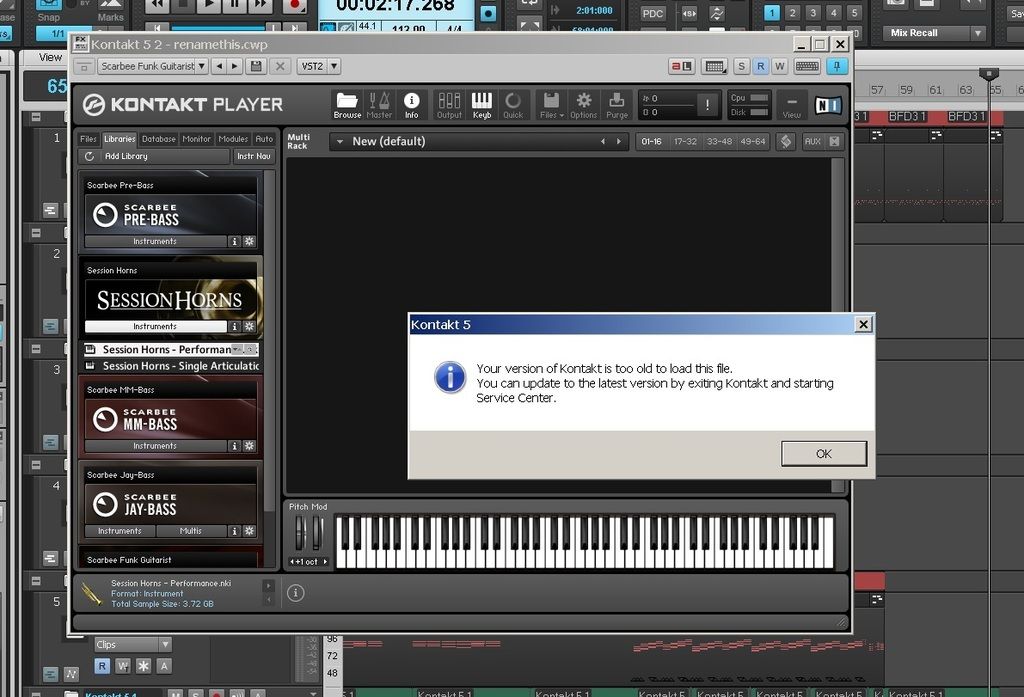
post edited by tomixornot - 2015/06/09 13:31:16
Albert i7 2600K @ 3.40GHz / MB Intel DP67BG / 16GB Ram- ADATA 250GB SSD (Boot)- Samsung Spinpoint F1 1TB HDD (Samples)Audio interface : Motu 828 MK ii i7 6700K @ 4.00GHz / MB Asrock Z170 / 16GB Ram- Samsung EVO 850 120GB / 500 GB SSD
Audio interface : Roland Quad Capture Win 10 Pro / Sonar Platinum
|
Doktor Avalanche 
Max Output Level: -32.5 dBFS

- Total Posts : 4294
- Joined: 2015/03/26 18:02:02
- Status: offline
Re:Can't get Kontakt 5 Player w/ Session Horns to work
2015/06/09 14:07:41
(permalink)
Old thread alert/off topic, would have been better if you started a new thread rather than piggyback (can host split thread?). Works for me as a plugin in Sonar as well as Kontakt standalone. So try Kontakt stand alone, if it works I suspect your Kontakt VST DLL is not upgrading for some reason. You should be running 3.1.0.4 for both versions of Kontakt. Also just by runnning Kontakt standalone first could fix the issue, if you update NI software it's always advisable to run the standalone version straight afterwards before you try the VST's.
post edited by Doktor Avalanche - 2015/06/09 14:18:16
Sonar Platinum(64 bit),Win 8.1(64 bit),Saffire Pro 40(Firewire),Mix Control = 3.6,Firewire=VIA,Dell Studio XPS 8100(Intel Core i7 CPU 2.93 Ghz/16 Gb),2 x 1TB SSD (Samsung EVO 850),GeForce GTX 460,Yamaha DGX-505 keyboard,Roland A-300PRO,Roland SPD-30 V2,FD-8,Triggera Krigg,Shure SM7B,Yamaha HS5. Rap Pro,Maschine Studio+Komplete 9 Ultimate+Kontrol Z1,Addictive Keys,Waves Silver,Izotope Nectar elements,Overloud Bundle,Geist,Acronis True Image 2015.
|
tomixornot
Max Output Level: -58.5 dBFS
- Total Posts : 1674
- Joined: 2011/03/05 11:31:26
- Status: offline
Re:Can't get Kontakt 5 Player w/ Session Horns to work
2015/06/10 13:18:34
(permalink)
Just following up after I got a reply from NI support. The info was correct (Kontakt Player was old) and a newer version is now available, Kontakt Player 5.5.1. I've also notice the update date was 10-June, and could be the reason my NI Service Center didn't find any update earlier. I just run the Service Center, and it's able to find the update and I'm downloading it now.
Albert i7 2600K @ 3.40GHz / MB Intel DP67BG / 16GB Ram- ADATA 250GB SSD (Boot)- Samsung Spinpoint F1 1TB HDD (Samples)Audio interface : Motu 828 MK ii i7 6700K @ 4.00GHz / MB Asrock Z170 / 16GB Ram- Samsung EVO 850 120GB / 500 GB SSD
Audio interface : Roland Quad Capture Win 10 Pro / Sonar Platinum
|