gelybar
Max Output Level: -90 dBFS

- Total Posts : 23
- Joined: 2012/04/24 10:27:43
- Status: offline
How to automate track gain?
According to the manual it should be possible, but I just can't seem to do it. I can't create an automation laneand can't record fader movements. Any thoughts?
Thanks
|
Frostysnake
Max Output Level: -76 dBFS

- Total Posts : 722
- Joined: 2006/10/26 14:31:38
- Status: offline

Re:How to automate track gain?
2013/04/03 09:30:46
(permalink)
Did enable write automation?
Sonar Platinum Windows 7 64-bit 1 TB Hard Drive\Seagate 500 GB Slave VS-100 MOTU 2408 MK3 A-Pro 800
|
gelybar
Max Output Level: -90 dBFS
- Total Posts : 23
- Joined: 2012/04/24 10:27:43
- Status: offline
Re:How to automate track gain?
2013/04/03 10:18:10
(permalink)
Frostysnake
Did enable write automation?
Yes, and with other parameters it works fine.
|
vintagevibe
Max Output Level: -51 dBFS

- Total Posts : 2446
- Joined: 2003/12/15 21:45:06
- Location: Atlanta, Ga
- Status: offline
Re:How to automate track gain?
2013/04/03 11:09:49
(permalink)
gelybar
Frostysnake
Did enable write automation?
Yes, and with other parameters it works fine.
I always though that gain was not automatable by design so that you can raise or lower the entire track volume while keeping your relative volume automation changes.
|
gelybar
Max Output Level: -90 dBFS
- Total Posts : 23
- Joined: 2012/04/24 10:27:43
- Status: offline
Re:How to automate track gain?
2013/04/03 11:17:48
(permalink)
|
brconflict
Max Output Level: -56.5 dBFS

- Total Posts : 1891
- Joined: 2012/10/05 21:28:30
- Status: offline
Re:How to automate track gain?
2013/04/03 11:38:34
(permalink)
You can fully automate Gain, but you have to do so outside an Automation Lane. In either a Track or Take Lane, select Clip Gain, and you should see a Red envelope. That can be edited with the pencil tool, or, like I do, with precision dots. Unfortunately, I don't think you can automate Gain by the knob, which I don't care to.
I prefer Gain automation to Volume Automation, simply because I can get this right before beginning the mixing process, and never, EVER have to worry about automating volume afterward. If I need to bring up the level of a guitar for an entire mix, I just grab the fader and change it. Never needed Automation lanes for that.
Beware, though, that there are some very easily found cosmetic bugs in X2a for Clip Gain views in Take Lanes. You may have to select between Clips and Clip Gain at times when the Take Lane doesn't display what the View calls for (i.e. Still see the Gain envelope when you shouldn't).
Brian Sonar Platinum, Steinberg Wavelab Pro 9, MOTU 24CoreIO w/ low-slew OP-AMP mods and BLA external clock, True P8, Audient ASP008, API 512c, Chandler Germ500, Summit 2ba-221, GAP Pre-73, Peluso 22251, Peluso 2247LE, Mackie HR824, Polk Audio SRS-SDA 2.3tl w/upgraded Soniccraft crossovers and Goertz cables, powered by Pass-X350. All wiring Star-Quad XLR or Monster Cable. Power by Monster Power Signature AVS2000 voltage stabilizer and Signature Pro Power 5100 PowerCenter on a 20A isolation shielded circuit.
|
Freex
Max Output Level: -81 dBFS

- Total Posts : 478
- Joined: 2010/11/23 11:10:50
- Location: Northern Ireland
- Status: offline
Re:How to automate track gain?
2013/04/03 11:58:49
(permalink)
BY "GAIN" are you talking about the input gain knob at the very top of each track in console? If so, AFAIA, this is as it says for adusting the input signal, it can also be used to adjust the overall volume automation, to save you having to re-write a tracks whole automation, if say by the end of mixing it's getting lost a little, or is sticking out a bit too much. Or talking about Clip gain? which is edited on a clip by clip basis
post edited by Freex - 2013/04/03 12:40:04
Asus P9X79, Intel i7-3930k, 32GB RAM ,Windows 7, RME RayDat, Presonus Firestudio, Presonus Digimax FS, Mackie MCU, Mackie XT, Makcie C4, KRK Rokit 6 How To Setup A Drum Map...The Easy Way.PDF
|
CJaysMusic
Max Output Level: 0 dBFS

- Total Posts : 30423
- Joined: 2006/10/28 01:51:41
- Location: Miami - Fort Lauderdale - Davie
- Status: offline
Re:How to automate track gain?
2013/04/03 12:09:36
(permalink)
You need to enable the write mode on that track and it will record your fader movements. You also need to enable the envelope the volume envelope.
The volume envelope automated the fader. The gain envelope doesn't! There 2 different envelopes and gain stages.
CJ
|
brconflict
Max Output Level: -56.5 dBFS
- Total Posts : 1891
- Joined: 2012/10/05 21:28:30
- Status: offline
Re:How to automate track gain?
2013/04/03 12:59:00
(permalink)
Freex
BY "GAIN"
are you talking about the input gain knob at the very top of each track in console?
If so, AFAIA, this is as it says for adusting the input signal,
it can also be used to adjust the overall volume automation, to save you having to re-write a tracks whole automation, if say by the end of mixing it's getting lost a little, or is sticking out a bit too much.
Or talking about Clip gain? which is edited on a clip by clip basis
The gain I'm referring to is Clip Gain (Editable Gain per clip). To my knowledge, the main difference is that Volume is Post-Effects (in most cases), whereas Gain is Pre-Effects. This plays a vital role if you're using Gain automation vs. Volume Automation on say, a Floor Tom with a Noise-Gate. If using Gain Automation here, it affects the Input of a Noise-Gate, or another effect. You have to keep an eye on your FX, not to overload them. But it certainly makes fader management SO MUCH easier to deal with!
Brian Sonar Platinum, Steinberg Wavelab Pro 9, MOTU 24CoreIO w/ low-slew OP-AMP mods and BLA external clock, True P8, Audient ASP008, API 512c, Chandler Germ500, Summit 2ba-221, GAP Pre-73, Peluso 22251, Peluso 2247LE, Mackie HR824, Polk Audio SRS-SDA 2.3tl w/upgraded Soniccraft crossovers and Goertz cables, powered by Pass-X350. All wiring Star-Quad XLR or Monster Cable. Power by Monster Power Signature AVS2000 voltage stabilizer and Signature Pro Power 5100 PowerCenter on a 20A isolation shielded circuit.
|
Freex
Max Output Level: -81 dBFS
- Total Posts : 478
- Joined: 2010/11/23 11:10:50
- Location: Northern Ireland
- Status: offline
Re:How to automate track gain?
2013/04/03 13:21:43
(permalink)
AFAIK In X2 you can only automate Clip Gain from inside takelanes, and thats manually.
Asus P9X79, Intel i7-3930k, 32GB RAM ,Windows 7, RME RayDat, Presonus Firestudio, Presonus Digimax FS, Mackie MCU, Mackie XT, Makcie C4, KRK Rokit 6 How To Setup A Drum Map...The Easy Way.PDF
|
brconflict
Max Output Level: -56.5 dBFS
- Total Posts : 1891
- Joined: 2012/10/05 21:28:30
- Status: offline
Re:How to automate track gain?
2013/04/03 13:39:14
(permalink)
Freex
AFAIK In X2 you can only automate Clip Gain from inside takelanes, and thats manually.
Same here. But I prefer that manual Gain Automation editing than trying to use Volume Automation by recording fader movements or trying to use the pencil tool. The Faders are simply too small for fast, meanwhile accurate adjustments. The pencil tool is a bit over-zealous with points, and is difficult to maneuver in a tiny take lane without some serious Zoom. Forget Touch. With the current Sonar X2 interface, trying to Automate with Touch is definitely a no-go.
Brian Sonar Platinum, Steinberg Wavelab Pro 9, MOTU 24CoreIO w/ low-slew OP-AMP mods and BLA external clock, True P8, Audient ASP008, API 512c, Chandler Germ500, Summit 2ba-221, GAP Pre-73, Peluso 22251, Peluso 2247LE, Mackie HR824, Polk Audio SRS-SDA 2.3tl w/upgraded Soniccraft crossovers and Goertz cables, powered by Pass-X350. All wiring Star-Quad XLR or Monster Cable. Power by Monster Power Signature AVS2000 voltage stabilizer and Signature Pro Power 5100 PowerCenter on a 20A isolation shielded circuit.
|
gelybar
Max Output Level: -90 dBFS
- Total Posts : 23
- Joined: 2012/04/24 10:27:43
- Status: offline
Re:How to automate track gain?
2013/04/03 14:02:04
(permalink)
Thank you all! If I understand correctly, track gain can't be automated, so it seems the manual is wrong.
|
swamptooth
Max Output Level: -53 dBFS

- Total Posts : 2229
- Joined: 2012/04/16 15:44:21
- Status: offline
Re:How to automate track gain?
2013/04/04 12:12:33
(permalink)
the manual is actually correct because they are referring to volume as gain. if you group the volume control on a track it is called gain not volume. the buses section of the manual correctly state input gain as a parameter that can be automated - and that is not referred to in the track section.
Arvid H. PetersonSonar X3E Prod / X2A / X1PE | Cubase 9.5.1 | Reason 9.5 | Sibelius7 | Pure DataNative-Instruments Komplete 10 Ultimate and a smattering of other pluginsHome-brewed VSTs Toshiba Satellite S855-S5378 (16GB RAM, modified with 2x 750GB HDDs, Windows 8.1 x64) Samson Graphite 49, M-Audio Oxygen 49, Korg nanoPAD2, Webcam motion tracking programs M-Audio Fast Track UltraMember, ASCAP
|
brconflict
Max Output Level: -56.5 dBFS
- Total Posts : 1891
- Joined: 2012/10/05 21:28:30
- Status: offline
Re:How to automate track gain?
2013/04/04 12:46:12
(permalink)
Now I'm thoroughly confused. Why would any DAW maker call Volume, Gain yet give them each their own respective controls? If this is what they did, then I'm tossing the manual out--its confusing enough as it is.
Brian Sonar Platinum, Steinberg Wavelab Pro 9, MOTU 24CoreIO w/ low-slew OP-AMP mods and BLA external clock, True P8, Audient ASP008, API 512c, Chandler Germ500, Summit 2ba-221, GAP Pre-73, Peluso 22251, Peluso 2247LE, Mackie HR824, Polk Audio SRS-SDA 2.3tl w/upgraded Soniccraft crossovers and Goertz cables, powered by Pass-X350. All wiring Star-Quad XLR or Monster Cable. Power by Monster Power Signature AVS2000 voltage stabilizer and Signature Pro Power 5100 PowerCenter on a 20A isolation shielded circuit.
|
CJaysMusic
Max Output Level: 0 dBFS
- Total Posts : 30423
- Joined: 2006/10/28 01:51:41
- Location: Miami - Fort Lauderdale - Davie
- Status: offline
Re:How to automate track gain?
2013/04/04 15:08:41
(permalink)
Lets make this very simple. There is a gain envelope and a volume envelope. The volume envelope controls the track fader and the gain envelope doesn't.
The gain envelope can be automated and the volume envelope can be automated. Now, when you enable the WRITE Mode and let sonar record your movements, it records is as the volume envelope, not the gain envelope.
Understand?
Cj
|
swamptooth
Max Output Level: -53 dBFS
- Total Posts : 2229
- Joined: 2012/04/16 15:44:21
- Status: offline
Re:How to automate track gain?
2013/04/04 23:21:06
(permalink)
but be careful, because if you add volume and gain to a group then volume is shown as gain and gain is shown as volume. same confusion with midi tracks  - except they don't show a name for volume or pan and only velocity is clearly labeled.
Arvid H. PetersonSonar X3E Prod / X2A / X1PE | Cubase 9.5.1 | Reason 9.5 | Sibelius7 | Pure DataNative-Instruments Komplete 10 Ultimate and a smattering of other pluginsHome-brewed VSTs Toshiba Satellite S855-S5378 (16GB RAM, modified with 2x 750GB HDDs, Windows 8.1 x64) Samson Graphite 49, M-Audio Oxygen 49, Korg nanoPAD2, Webcam motion tracking programs M-Audio Fast Track UltraMember, ASCAP
|
CJaysMusic
Max Output Level: 0 dBFS
- Total Posts : 30423
- Joined: 2006/10/28 01:51:41
- Location: Miami - Fort Lauderdale - Davie
- Status: offline
Re:How to automate track gain?
2013/04/05 14:04:48
(permalink)
Swamp, now you really confused the poor soul :)
Cj
|
swamptooth
Max Output Level: -53 dBFS
- Total Posts : 2229
- Joined: 2012/04/16 15:44:21
- Status: offline
Re:How to automate track gain?
2013/04/06 20:15:06
(permalink)
imagine how i felt first time i added midi volume to a group and midi pan to a group. ugh. 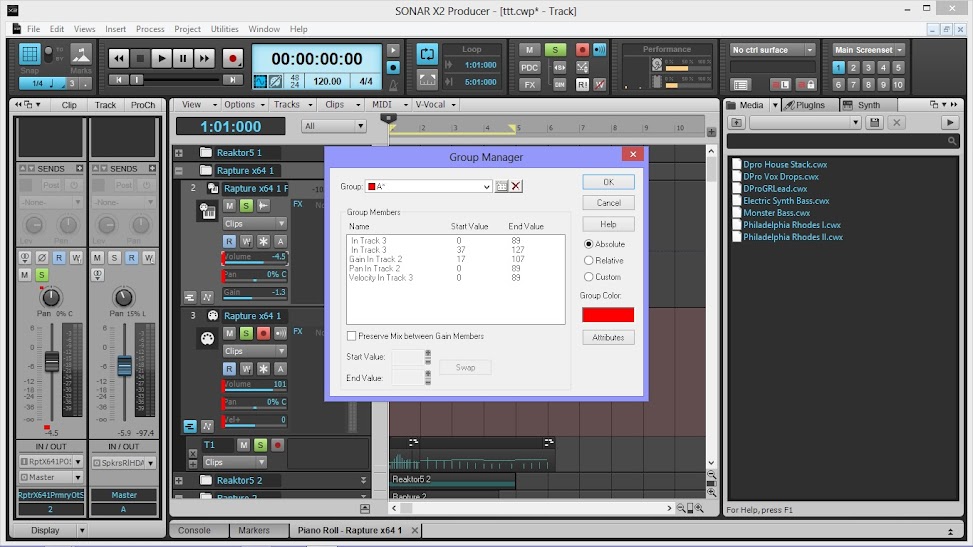
Arvid H. PetersonSonar X3E Prod / X2A / X1PE | Cubase 9.5.1 | Reason 9.5 | Sibelius7 | Pure DataNative-Instruments Komplete 10 Ultimate and a smattering of other pluginsHome-brewed VSTs Toshiba Satellite S855-S5378 (16GB RAM, modified with 2x 750GB HDDs, Windows 8.1 x64) Samson Graphite 49, M-Audio Oxygen 49, Korg nanoPAD2, Webcam motion tracking programs M-Audio Fast Track UltraMember, ASCAP
|
rir1
Max Output Level: -89 dBFS

- Total Posts : 93
- Joined: 2004/11/04 15:34:20
- Status: offline
Re:How to automate track gain?
2014/07/09 23:46:20
(permalink)
I just saw this and wanted to jump in - because I've got X2 and CANNOT get the faders to do volume automation; I have had sonar a long time and NO trouble with this - write enable, read enable, move the faders and sonar remembers them - X2 it's not happening - I CAN write nodes on the track and X2 sees and remembers those - but it will not let me make moves with the fader, it does not remember them - this was NEVER the case before in Sonar - I would like to think I've just got something on I shouldn't but I cannot figure out why it is not recording the fader volume moves - so if anybody has seen this problem or knows something about it I'd love some help - again, I've got the track write enabled and read enabled, and I can draw nodes - but nothing with the faders.
|
Bristol_Jonesey
Max Output Level: 0 dBFS
- Total Posts : 16775
- Joined: 2007/10/08 15:41:17
- Location: Bristol, UK
- Status: offline
Re:How to automate track gain?
2014/07/10 07:52:13
(permalink)
Have you tried right-clicking the fader you want to automate and set it to "write" from there?
CbB, Platinum, 64 bit throughoutCustom built i7 3930, 32Gb RAM, 2 x 1Tb Internal HDD, 1 x 1TB system SSD (Win 7), 1 x 500Gb system SSD (Win 10), 2 x 1Tb External HDD's, Dual boot Win 7 & Win 10 64 Bit, Saffire Pro 26, ISA One, Adam P11A,
|
WallyG
Max Output Level: -74 dBFS

- Total Posts : 833
- Joined: 2013/05/03 11:37:52
- Location: Arizona
- Status: offline
Re:How to automate track gain?
2014/07/10 09:04:42
(permalink)
swamptooth
but be careful, because if you add volume and gain to a group then volume is shown as gain and gain is shown as volume. same confusion with midi tracks - except they don't show a name for volume or pan and only velocity is clearly labeled.
No! Who is on first! What is on second...
Roland Jupiter 80, Roland D50, Roland Integra 7, Roland BK-7m, Yamaha Montage 6, ARP Odyssey, Excelsior Continental Artist, Roland FR-8X, 1967 Fender Jaguar, Fender Strat, Fender 1965 Twin Reverb reissue, Selmer Trumpet, Akai EWI, Studio One 4 Professional, Melodyne Studio 4, Behringer X-Touch, RME Fireface UCX, MOTU MIDI Express XT - ADK Pro Audio Hex Xtreme 6 Core i7 4.5GHz, 64GB, 480GB SS, 3 X 3TB Hard Drives, Win 10, 2 X 27" & 1X 46" Monitors, My WEB site - www.gontowski.com/music
|
gswitz
Max Output Level: -18.5 dBFS

- Total Posts : 5694
- Joined: 2007/06/16 07:17:14
- Location: Richmond Virginia USA
- Status: offline
Re:How to automate track gain?
2014/07/10 20:49:31
(permalink)
This is probably not what you are after, but it's not a bad idea.
From Eli Krantzberg's X1 Groove3 video...
You can use the Pro Channel Tube Plugin with Drive turned all the way down. Then use the input and output to do gain staging. In the video, Eli used the draw tools to draw automation on the output control on the tube Pro Channel module.
By doing it this way, he could still use the track fader to adjust the overall level of the track, but could draw in time specific fader oscillations. I thought it was a nice trick. Before I noticed this, I sometimes would draw in complex fader automations and then be selecting large ranges and moving them up and down.
Alternatively to the Tube PC Module, you could use the Controls Tab of the FX Chain PC Module to adjust gain.
A nice thing about these methods is that it enables you to adjust the gain anywhere in the signal chain. You can even use the FX Chain in the FX Bin to adjust the input gain.
From my understanding, the input gain on the track itself cannot be automated. I have wanted this in the past also. I often record whole concerts at once and some songs are quieter than others. For those quiet songs, I might want to bring up the gains to keep the levels right into all the FX I'm using to mix the gig. So, in these cases, I often use the gain not to get the levels set about where I want then fine the loudest moment in the track and then normalize to -? whatever the loudest moment is. This kinda cements the gain into that track for that tune. So then as I move on down the line, I don't have to remember what gain levels I used for what tracks.
StudioCat > I use Windows 10 and Sonar Platinum. I have a touch screen. I make some videos. This one shows how to do a physical loopback on the RME UCX to get many more equalizer nodes.
|