charles kasler
Max Output Level: -87 dBFS

- Total Posts : 192
- Joined: 2004/11/19 20:08:43
- Status: offline
raise the level of automation curve?
HI - Is there a way to raise the level of a clip that has automation without disrupting the contour of the curve? Thanks!
Paresh Dell Inspiron 5775, AMD Ryzen 5 2500U @2 GHz, Win 10, 16Gb ram,Sonar Platinum, 1 TB SSD
|
Guitarhacker
Max Output Level: 0 dBFS

- Total Posts : 24398
- Joined: 2007/12/07 12:51:18
- Location: NC
- Status: offline

Re:raise the level of automation curve?
2013/05/06 13:54:19
(permalink)
I don't use a curve with lots of nodes in it. I opt to make linear envelope movements. Although it is possible to use a curve between 2 nodes.... I like the linear straight lines. Generally my lines are short fades so a curve is not needed. Of course you know you can grab between two nodes and move the level up or down, IDK, but with a multi-node envelope such as a written fader move, I'm thinking you might be able to lasso a number of nodes and move them as a group.... I would need to look that up though since I tend to have precise surgical envelope edits as seen below. I enter all my nodes manually. 
My website & music: www.herbhartley.com MC4/5/6/X1e.c, on a Custom DAW Focusrite Firewire Saffire Interface BMI/NSAI "Just as the blade chooses the warrior, so too, the song chooses the writer "
|
Paul P
Max Output Level: -48.5 dBFS

- Total Posts : 2685
- Joined: 2012/12/08 17:15:47
- Location: Montreal
- Status: offline
Re:raise the level of automation curve?
2013/05/06 14:07:01
(permalink)
From the manual p.488
"To raise/lower selected envelope nodes
1. Set the track’s Edit Filter control to the desired automation parameter (Track Automation or Clip Automation).
2. Do one of the following:
• With the Smart tool, position the pointer near the top center of the track/clip, then drag up/down.
• With the Edit tool, position the pointer near the top center of the track/clip, then drag up/down.
Sonar Platinum [2017.10], Win7U x64 sp1, Xeon E5-1620 3.6 GHz, Asus P9X79WS, 16 GB ECC, 128gb SSD, HD7950, Mackie Blackjack
|
TraceyStudios
Max Output Level: -78 dBFS

- Total Posts : 603
- Joined: 2005/10/13 12:40:33
- Location: Chandler, AZ
- Status: offline
Re:raise the level of automation curve?
2013/05/06 15:54:06
(permalink)
maybe not the best option, but I automate tracks and then send them to a bus so if I need to adjust overall volume I can, however this only works with volume.
AMD FX-6100 six-core processor 3.3GHz 8 Gig RAM SONAR X3 Producer Tascam FW1884 Mackie Blackbird Presonus Digimax Avalon U5 BFD2 SL Trigger Alesis DM8 Pro drums KRK Rokit 8s KRK 10s ARC2 Folgers Dark Roast, a bit of crazy :) & lots of help from the forums! http://www.reverbnation.com/blakkmire
|
charles kasler
Max Output Level: -87 dBFS
- Total Posts : 192
- Joined: 2004/11/19 20:08:43
- Status: offline
Re:raise the level of automation curve?
2013/05/06 17:01:13
(permalink)
Paresh Dell Inspiron 5775, AMD Ryzen 5 2500U @2 GHz, Win 10, 16Gb ram,Sonar Platinum, 1 TB SSD
|
bitflipper
01100010 01101001 01110100 01100110 01101100 01101

- Total Posts : 26036
- Joined: 2006/09/17 11:23:23
- Location: Everett, WA USA
- Status: offline
Re:raise the level of automation curve?
2013/05/06 17:06:52
(permalink)
You can always apply a clip gain envelope. Note that this is may be impractical if there is a compressor in the track fx bin, as the clip gain is applied pre-fx and will affect the compressor's sensitivity.
I am more likely to simply grab all the automation nodes and move them up or down as a group.
 All else is in doubt, so this is the truth I cling to. My Stuff
|
lawajava
Max Output Level: -55 dBFS

- Total Posts : 2040
- Joined: 2012/05/31 23:23:55
- Location: Seattle
- Status: offline
Re:raise the level of automation curve?
2013/05/06 21:41:39
(permalink)
bitflipper - thanks for reminding of the sequence. I use clip automation a lot, so that's a good reminder.
Two internal 2TB SSDs laptop stuffed with Larry's deals and awesome tools. Studio One is the cat's meow as a DAW now that I've migrated off of Sonar. Using BandLab Cakewalk just to grab old files when migrating songs.
|
bitflipper
01100010 01101001 01110100 01100110 01101100 01101
- Total Posts : 26036
- Joined: 2006/09/17 11:23:23
- Location: Everett, WA USA
- Status: offline
Re:raise the level of automation curve?
2013/05/07 00:06:28
(permalink)
Another comment on clip gain envelopes while I'm at it: if you use automation for de-essing and taming resonances and such, be sure to use a clip gain envelope rather than a track volume envelope. It'll make your compressor work less hard, allowing gentler ratios on your vocal tracks.
Hey, lawajava - 81 degrees today here at my place. Pretty all right, eh? All day I was humming "hot town, summer in the city...".
All else is in doubt, so this is the truth I cling to. My Stuff
|
dcumpian
Max Output Level: -34 dBFS

- Total Posts : 4124
- Joined: 2005/11/03 15:50:51
- Status: offline
Re:raise the level of automation curve?
2013/05/07 08:25:18
(permalink)
Correct me if I'm wrong, but isn't this a perfect instance where offset mode is actually useful?
Regards,
Dan
Mixing is all about control. My music: http://dancumpian.bandcamp.com/ or https://soundcloud.com/dcumpian Studiocat Advanced Studio DAW (Intel i5 3550 @ 3.7GHz, Z77 motherboard, 16GB Ram, lots of HDDs), Sonar Plat, Mackie 1604, PreSonus Audiobox 44VSL, ESI 4x4 Midi Interface, Ibanez Bass, Custom Fender Mexi-Strat, NI S88, Roland JV-2080 & MDB-1, Komplete, Omnisphere, Lots o' plugins.
|
garrigus
Max Output Level: 0 dBFS
- Total Posts : 8599
- Joined: 2003/11/05 17:23:21
- Location: www.garrigus.com
- Status: offline
Re:raise the level of automation curve?
2013/05/07 09:24:24
(permalink)
|
konradh
Max Output Level: -42 dBFS

- Total Posts : 3325
- Joined: 2006/01/16 16:07:06
- Status: offline
Re:raise the level of automation curve?
2013/05/07 13:46:38
(permalink)
Scott, For clarity, are you saying that if you hover near the top of an audio clip, you can drag the volume automation for the whole track?
I frequently have the need to keep the curves but bring the whole track up or down—example: converting working mix to final mix—and I find Offset Mode extremely confusing and unpredictable.
Konrad Current album and more: http://www.themightykonrad.com/ Sonar X1d Producer. V-Studio 700. PC: Intel i7 CPU 3.07GHz, 12 GB RAM. Win 7 64-bit. RealGuitar, RealStrat, RealLPC, Ivory II, Vienna Symphonic, Hollywood Strings, Electr6ity, Acoustic Legends, FabFour, Scarbee Rick/J-Bass/P-Bass, Kontakt 5. NI Session Guitar. Boldersounds, Noisefirm. EZ Drummer 2. EZ Mix. Melodyne Assist. Guitar Rig 4. Tyros 2, JV-1080, Kurzweil PC2R, TC Helicon VoiceWorks+. Rode NT2a, EV RE20. Presonus Eureka. Rokit 6s.
|
charles kasler
Max Output Level: -87 dBFS
- Total Posts : 192
- Joined: 2004/11/19 20:08:43
- Status: offline
Re:raise the level of automation curve?
2013/05/07 14:14:48
(permalink)
Wow lots of ideas. Yes i meant raise the level of the entire clip, maintaining the ups & downs of the automation curve.
Paresh Dell Inspiron 5775, AMD Ryzen 5 2500U @2 GHz, Win 10, 16Gb ram,Sonar Platinum, 1 TB SSD
|
groovey1
Max Output Level: -85 dBFS

- Total Posts : 288
- Joined: 2008/09/30 20:00:28
- Location: W. Canada
- Status: offline
Re:raise the level of automation curve?
2013/05/07 14:22:20
(permalink)
I was trying to figure out how to do this the other day (change the level of an entire envelope). Any chance somebody can post a picture of the mouse pointer shape so I know what to look for? Thanks,
|
Bristol_Jonesey
Max Output Level: 0 dBFS
- Total Posts : 16775
- Joined: 2007/10/08 15:41:17
- Location: Bristol, UK
- Status: offline
Re:raise the level of automation curve?
2013/05/07 15:14:03
(permalink)
This is hugely exaggerated and on the wrong colour background, but you should get the general idea: 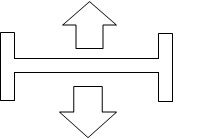
CbB, Platinum, 64 bit throughoutCustom built i7 3930, 32Gb RAM, 2 x 1Tb Internal HDD, 1 x 1TB system SSD (Win 7), 1 x 500Gb system SSD (Win 10), 2 x 1Tb External HDD's, Dual boot Win 7 & Win 10 64 Bit, Saffire Pro 26, ISA One, Adam P11A,
|
groovey1
Max Output Level: -85 dBFS
- Total Posts : 288
- Joined: 2008/09/30 20:00:28
- Location: W. Canada
- Status: offline
Re:raise the level of automation curve?
2013/05/07 17:07:53
(permalink)
Thanks for the info. This looks like the same shape I use when I select a time region and pull down the volume envelope for the selected area. Does this mean if you don't have anything selected, it applies to the whole envelope? Or do you have to select it first? (Just thinking out loud ... I'll have to try it tonight.) BTW I found some good info on envelope editing here and a nice summary of mouse pointer shapes here
|
stevec
Max Output Level: 0 dBFS
- Total Posts : 11546
- Joined: 2003/11/04 15:05:54
- Location: Parkesburg, PA
- Status: offline
Re:raise the level of automation curve?
2013/05/07 17:19:38
(permalink)
I know some people don't care for it, but I find Offset Mode to be the simplest way to make an overall change to a control that already has automation assigned. Type "O", see a "+" added to the control, make your change, then type "O" again. Easy peasy. YMMV and all that. 
SteveC https://soundcloud.com/steve-cocchi http://www.soundclick.com/bands/pagemusic.cfm?bandID=39163 SONAR Platinum x64, Intel Q9300 (2.5Ghz), Asus P5N-D, Win7 x64 SP1, 8GB RAM, 1TB internal + ESATA + USB Backup HDDs, ATI Radeon HD5450 1GB RAM + dual ViewSonic VA2431wm Monitors; Focusrite 18i6 (ASIO); Komplete 9, Melodyne Studio 4, Ozone 7 Advanced, Rapture Pro, GPO5, Valhalla Plate, MJUC comp, MDynamic EQ, lots of other freebie VST plugins, synths and Kontakt libraries
|
Lynn
Max Output Level: -14 dBFS

- Total Posts : 6117
- Joined: 2003/11/12 18:36:16
- Location: Kansas City, MO
- Status: offline
Re:raise the level of automation curve?
2013/05/07 17:55:22
(permalink)
I second that notion. That's what offset mode is all about. Much easier than trying to make that smart tool change shapes. stevec
I know some people don't care for it, but I find Offset Mode to be the simplest way to make an overall change to a control that already has automation assigned. Type "O", see a "+" added to the control, make your change, then type "O" again. Easy peasy. YMMV and all that.
|
stevec
Max Output Level: 0 dBFS
- Total Posts : 11546
- Joined: 2003/11/04 15:05:54
- Location: Parkesburg, PA
- Status: offline
Re:raise the level of automation curve?
2013/05/07 18:19:33
(permalink)
Much easier than trying to make that smart tool change shapes. Hehehe... yup. I do frequently use the "hover over the top" technique to modify envelopes after selecting ranges, because I usually (but not always) find it easier than manually adding nodes. But for overall changes I prefer to use something simpler that requires no manual dexterity or accuracy.
SteveC https://soundcloud.com/steve-cocchi http://www.soundclick.com/bands/pagemusic.cfm?bandID=39163 SONAR Platinum x64, Intel Q9300 (2.5Ghz), Asus P5N-D, Win7 x64 SP1, 8GB RAM, 1TB internal + ESATA + USB Backup HDDs, ATI Radeon HD5450 1GB RAM + dual ViewSonic VA2431wm Monitors; Focusrite 18i6 (ASIO); Komplete 9, Melodyne Studio 4, Ozone 7 Advanced, Rapture Pro, GPO5, Valhalla Plate, MJUC comp, MDynamic EQ, lots of other freebie VST plugins, synths and Kontakt libraries
|
garrigus
Max Output Level: 0 dBFS
- Total Posts : 8599
- Joined: 2003/11/05 17:23:21
- Location: www.garrigus.com
- Status: offline
Re:raise the level of automation curve?
2013/05/07 21:36:50
(permalink)
|