doncolga
Max Output Level: -60 dBFS

- Total Posts : 1519
- Joined: 2006/01/03 17:15:48
- Location: Statesboro, GA USA
- Status: offline

Simplified User Interface Suggestions
Hey all,
Do any of you all make it a point to set up your user interface so there's less stuff there? I need to investigate that a bit. I've spent much less time on Sonar the last couple of years and today I had a look at Music Creator, so I guess in a way my visuals perceptions have been "reset". I really like the way MC6 looks in that it seems so simple, so my focus is on making music and being creative. I almost thought about buying it, but surely I can make X1 PE look more like MC6..or is that just crazy talk? Thoughts or considerations?
Along with this and on a more personal level, I feel like I've been in a complete creativity black hole since December 2011, and I think it impacts everything. Not that I'm not able to come up with anything, I just haven't spent any time with it. Kind of like reading the Bible and praying...you know you need to, and you want to, you just don't prioritize it. It's just really good for my well being to create music and I really need to spend time with it each day. I've sorely missed it. Heck...even coming back here and browsing and posting feels good.
Donny
HP Z220 Workstation I7 3770, 8 GB RAM, Windows 10, Sonar Platinum, RME Multiface II via PCIe, JBL 4326 w/sub, AvanTone MixCubes
|
garrigus
Max Output Level: 0 dBFS

- Total Posts : 8599
- Joined: 2003/11/05 17:23:21
- Location: www.garrigus.com
- Status: offline
Re: Simplified User Interface Suggestions
2013/06/20 18:29:21
(permalink)
Welcome back, Donny! Not exactly sure what you're wanting from the MC6 interface, but in SONAR X1 you can adjust some things like views, track widgets, etc. You can also hide many of the main interface components. For example, press C, I, D, B to hide the Control Bar, Inspector, MultiDock, and Browser so all you have left is the Track view. Scott -- Scott R. Garrigus - http://garrigus.com - SONAR X2 Power! - http://garrigus.com/?SonarX2Power* Author of the Cakewalk Sonar and Sony Sound Forge Power book series: http://garrigus.com/?PowerBooks* Author of the Cakewalk Sonar ProAudioTutor video tutorial series: http://garrigus.com/?ProAudioTutor* Publisher of the DigiFreq free music technology newsletter: http://digifreq.com/?DigiFreq* Publisher of the NewTechReview free consumer technology newsletter: http://newtechreview.com/?NewTechReview
|
doncolga
Max Output Level: -60 dBFS
- Total Posts : 1519
- Joined: 2006/01/03 17:15:48
- Location: Statesboro, GA USA
- Status: offline
Re: Simplified User Interface Suggestions
2013/06/20 18:40:41
(permalink)
Aha...so simple...like it. Thanks man! Getting reacquainted with all this will be handy too.
HP Z220 Workstation I7 3770, 8 GB RAM, Windows 10, Sonar Platinum, RME Multiface II via PCIe, JBL 4326 w/sub, AvanTone MixCubes
|
Thatsastrat
Max Output Level: -65 dBFS

- Total Posts : 1267
- Joined: 2004/05/09 02:20:19
- Status: offline
Re: Simplified User Interface Suggestions
2013/06/20 18:45:42
(permalink)
Be warned that MC6 can only record 2 tracks at a time. That may not be important to you, but it might be!
Sonar Platimum, Win10 32bit, Quad Q6600,4G DDR2 Ram, BCF2000, Lexicon Lambda interface,Tascam US 1800, WD 500 GB HD, M-Audio AV40 Monitors, Line 6 DI Gold, Guitar Rig 5 Pro, hand full of guitars, Kawia PH50 Keyboard,Digitech GNX3 http://www.soundclick.com/thatsastrat/%3C/a%3E http://www.myspace.com/thatsastrat/music
|
John
Forum Host

- Total Posts : 30467
- Joined: 2003/11/06 11:53:17
- Status: offline
Re: Simplified User Interface Suggestions
2013/06/20 19:46:38
(permalink)
If you have X1 you already have more power in it then you will ever get with MC6. Also going to X2 is a breeze from X1.
As far as making it simple. With X2 or X1 you can have it so nothing is showing except the track view and also no headers. Just waves in the tracks. Or you can have it so everything shows and anything in between. Its up to you. Here screen sets can be a real help to quickly switching from one view to another.The more you use it the more it will become simple.
|
John
Forum Host
- Total Posts : 30467
- Joined: 2003/11/06 11:53:17
- Status: offline
Re: Simplified User Interface Suggestions
2013/06/20 20:25:49
(permalink)
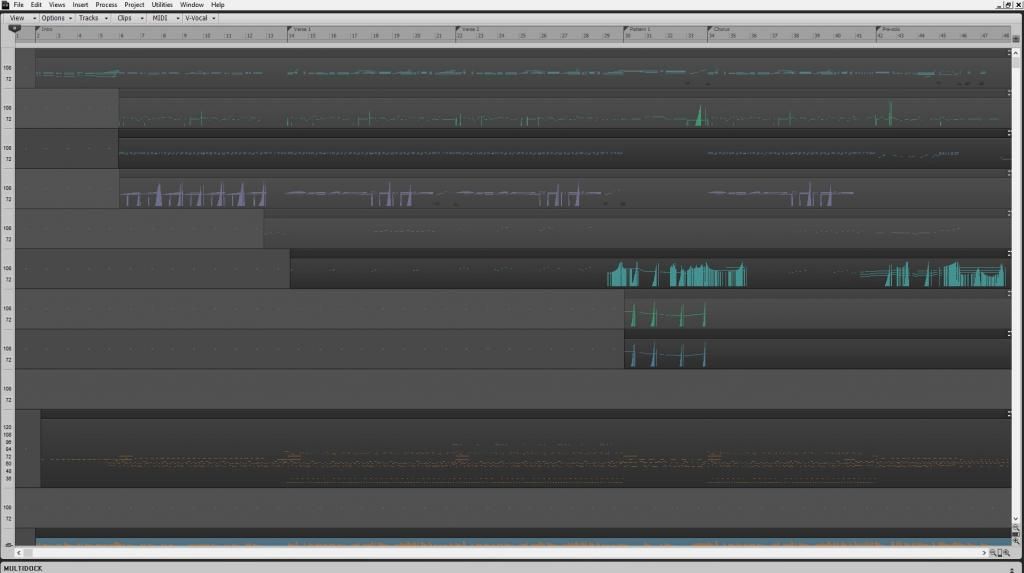 Here its about as simple as it gets
|
doncolga
Max Output Level: -60 dBFS
- Total Posts : 1519
- Joined: 2006/01/03 17:15:48
- Location: Statesboro, GA USA
- Status: offline
Re: Simplified User Interface Suggestions
2013/06/20 20:43:20
(permalink)
Awesome. I appreciate the ability to do that. I've had Sonar since like version 3 I believe and I've always felt it did WAY more than I needed. I guess I just like being able to turn stuff off until I learn how it may be useful for me.
HP Z220 Workstation I7 3770, 8 GB RAM, Windows 10, Sonar Platinum, RME Multiface II via PCIe, JBL 4326 w/sub, AvanTone MixCubes
|
jb101
Max Output Level: -46 dBFS

- Total Posts : 2946
- Joined: 2011/12/04 05:26:10
- Status: offline
Re: Simplified User Interface Suggestions
2013/06/20 20:45:05
(permalink)
Nicely demonstrated, John.
That's why I love the X series - with screensets, multidock, browser, control bar etc. so easily configurable at the press of a button, it makes working a breeze.
|
John
Forum Host
- Total Posts : 30467
- Joined: 2003/11/06 11:53:17
- Status: offline
Re: Simplified User Interface Suggestions
2013/06/20 21:19:36
(permalink)
Well said JB.
Yes it is a bit on the awesome side. LOL Everything is just a key press away.
Don, it will do anything you want, really. I should make it clear I am using X2 Producer with the A patch in that picture. X1 can get about 99% of the way to that point. it just has no F11 key to remove the window title. Keep in mind that is a complete unedited screen capture.
|
chuckebaby
Max Output Level: 0 dBFS
- Total Posts : 13146
- Joined: 2011/01/04 14:55:28
- Status: offline
Re: Simplified User Interface Suggestions
2013/06/20 21:53:42
(permalink)
doncolga
Awesome. I appreciate the ability to do that. I've had Sonar since like version 3 I believe and I've always felt it did WAY more than I needed. I guess I just like being able to turn stuff off until I learn how it may be useful for me.
I know it looks intimidating but its really not to bad. at first glance one can be a little overwhelmed with the bells and whistles but it can also double as a basic audio recording software. my advise is check out some of these vids http://www.cakewalk.com/CakeTV/SONARU.aspx/Get-Started these are from the cakewalk site, there all about just getting into some of the basics. best of luck man.
Windows 8.1 X64 Sonar Platinum x64 Custom built: Asrock z97 1150 - Intel I7 4790k - 16GB corsair DDR3 1600 - PNY SSD 220GBFocusrite Saffire 18I8 - Mackie Control
|
doncolga
Max Output Level: -60 dBFS
- Total Posts : 1519
- Joined: 2006/01/03 17:15:48
- Location: Statesboro, GA USA
- Status: offline
Re: Simplified User Interface Suggestions
2013/06/20 22:06:39
(permalink)
Thanks very much guys. I'll have a look at those vids.
HP Z220 Workstation I7 3770, 8 GB RAM, Windows 10, Sonar Platinum, RME Multiface II via PCIe, JBL 4326 w/sub, AvanTone MixCubes
|