ahmo
Max Output Level: -86 dBFS

- Total Posts : 242
- Joined: 2007/03/18 13:50:16
- Location: Chicago Area
- Status: offline
yOU GUYS GOTTA HELP ME WITH MIDI DRUM TRACK
I cannot figure out how to include the midi drum track in the finished exported mp3 track. I hear it when I listen in Cakewalk, but when it's exported to my desktop the drums are not included. Also, Now I've clicked on something that turned the drums into a piano that doesn't match the song at all. I've tried highlighting all the tracks by clicking on the track number twice. I've tried highlighting the time scale bar at the top of the track wave view and exporting. When I export I click on "what you hear". That doesn't work either. I can't figure it out for the life of me.
Still trying to get used to the new forum view also.
Help!!
Our Music: www.nimbitmusic.com/intheweeds
-SHS6XL
-Windows 8.1
-750 GB HD
-2 TB External HD
-Intel Core i3
-6 GB RAM
-Presonus 1818VSL AudioBox
Gretsch 5 pc acoustic drums
Dean Acoustic/Electric Baritone Guitar
|
scook
Forum Host

- Total Posts : 24146
- Joined: 2005/07/27 13:43:57
- Location: TX
- Status: offline

Re: yOU GUYS GOTTA HELP ME WITH MIDI DRUM TRACK
2013/06/22 15:15:09
(permalink)
When a drum track suddenly changes to piano that usually means the MIDI channel changed from 10 to 1. The fact that you cannot export the drums sounds like you are not using a softsynth but are playing the track through the Microsoft GS Wavetable Synth. In order to create a drum track that you can export you need to use a softsynth to generate your drum sounds.
|
paulo
Max Output Level: -13 dBFS

- Total Posts : 6218
- Joined: 2007/01/30 05:06:57
- Status: offline
Re: yOU GUYS GOTTA HELP ME WITH MIDI DRUM TRACK
2013/06/22 19:11:08
(permalink)
No, actually we don't gotta to help you..............
we might though, if you learn to ask nicely. ;)
|
ahmo
Max Output Level: -86 dBFS
- Total Posts : 242
- Joined: 2007/03/18 13:50:16
- Location: Chicago Area
- Status: offline
Re: yOU GUYS GOTTA HELP ME WITH MIDI DRUM TRACK
2013/06/22 19:18:40
(permalink)
Sorry Paulo, I was just freakin out.
Scook, is it possible to put a new drum in that sounds the same even though I've already overdubbed bass, guitar and vox?
Our Music: www.nimbitmusic.com/intheweeds
-SHS6XL
-Windows 8.1
-750 GB HD
-2 TB External HD
-Intel Core i3
-6 GB RAM
-Presonus 1818VSL AudioBox
Gretsch 5 pc acoustic drums
Dean Acoustic/Electric Baritone Guitar
|
scook
Forum Host
- Total Posts : 24146
- Joined: 2005/07/27 13:43:57
- Location: TX
- Status: offline
Re: yOU GUYS GOTTA HELP ME WITH MIDI DRUM TRACK
2013/06/22 19:20:51
(permalink)
Since it is a MIDI track you can put in any drum sound you have at your disposal. The other audio tracks will not be affected by your choice of synth for the MIDI track.
|
paulo
Max Output Level: -13 dBFS
- Total Posts : 6218
- Joined: 2007/01/30 05:06:57
- Status: offline
Re: yOU GUYS GOTTA HELP ME WITH MIDI DRUM TRACK
2013/06/22 19:53:43
(permalink)
ahmo
Sorry Paulo, I was just freakin out.
He, he - no worries. What are you using for drums ?
|
RobertB
Max Output Level: 0 dBFS

- Total Posts : 11256
- Joined: 2005/11/19 23:40:50
- Location: Fort Worth, Texas
- Status: offline
Re: yOU GUYS GOTTA HELP ME WITH MIDI DRUM TRACK
2013/06/23 01:34:11
(permalink)
That's the $64 question.
I believe scook may be spot on with his assessment.
Adam, did you get sorted out with Session Drummer 2? That will be your best sounding option for synths included with SHS6XL.
TTS-1 would also be a viable choice. Both are GM mapped, so the drums would be triggered correctly.
I would suggest going to Options>MIDI Devices, and deselect the Wavetable synth as an output, so it will not be available to SHS6.
My Soundclick Page SONAR Professional, X3eStudio,W7 64bit, AMD Athlon IIx4 2.8Ghz, 4GB RAM, 64bit, AKAI EIE Pro, Nektar Impact LX61,Alesis DM6,Alesis ControlPad,Yamaha MG10/2,Alesis M1Mk2 monitors,Samson Servo300,assorted guitars,Lava Lamp Shimozu-Kushiari or Bob
|
ahmo
Max Output Level: -86 dBFS
- Total Posts : 242
- Joined: 2007/03/18 13:50:16
- Location: Chicago Area
- Status: offline
Re: yOU GUYS GOTTA HELP ME WITH MIDI DRUM TRACK
2013/06/23 15:30:39
(permalink)
OK i got a the Session drums open, I dragged the little note to the track. I extended the rectangle track with dashes on it. But it wont play drums unless i go to the SD2 control surface and press play. I can't export it to an mp3 either.
This is frustrating. I'm an acoustic drummer, this stuff is all foreign to me. Please hELP
Our Music: www.nimbitmusic.com/intheweeds
-SHS6XL
-Windows 8.1
-750 GB HD
-2 TB External HD
-Intel Core i3
-6 GB RAM
-Presonus 1818VSL AudioBox
Gretsch 5 pc acoustic drums
Dean Acoustic/Electric Baritone Guitar
|
paulo
Max Output Level: -13 dBFS
- Total Posts : 6218
- Joined: 2007/01/30 05:06:57
- Status: offline
Re: yOU GUYS GOTTA HELP ME WITH MIDI DRUM TRACK
2013/06/24 06:19:12
(permalink)
ahmo
OK i got a the Session drums open, I dragged the little note to the track. I extended the rectangle track with dashes on it. But it wont play drums unless i go to the SD2 control surface and press play. I can't export it to an mp3 either.
This is frustrating. I'm an acoustic drummer, this stuff is all foreign to me. Please hELP
Ok, I'm a little confused by what you are saying here. I was under the impression that you already had your midi track and just wanted it to play. This being so, you don't need to drag anything anywhere, just point your existing midi track (output) to SD2 and you should be done. You don't say whether or not you have a controller keyboard, if you do, select your drum midi track - are you able to play the drums using the keys ?
|
ahmo
Max Output Level: -86 dBFS
- Total Posts : 242
- Joined: 2007/03/18 13:50:16
- Location: Chicago Area
- Status: offline
Re: yOU GUYS GOTTA HELP ME WITH MIDI DRUM TRACK
2013/06/24 13:18:10
(permalink)
I do not have any kind of midi controller. I have gotten a song exported before with a drum machine on it, I just don't remember how.
Our Music: www.nimbitmusic.com/intheweeds
-SHS6XL
-Windows 8.1
-750 GB HD
-2 TB External HD
-Intel Core i3
-6 GB RAM
-Presonus 1818VSL AudioBox
Gretsch 5 pc acoustic drums
Dean Acoustic/Electric Baritone Guitar
|
ahmo
Max Output Level: -86 dBFS
- Total Posts : 242
- Joined: 2007/03/18 13:50:16
- Location: Chicago Area
- Status: offline
Re: yOU GUYS GOTTA HELP ME WITH MIDI DRUM TRACK
2013/06/24 13:26:47
(permalink)
In the mean time, I've inserted another track and dragged and dropped the 8 bar drum patterns. I've tried looking at the tutorials but found it confusing.
I've opened the synth rack and gotten the SD2 to play but cannot get it exported
Our Music: www.nimbitmusic.com/intheweeds
-SHS6XL
-Windows 8.1
-750 GB HD
-2 TB External HD
-Intel Core i3
-6 GB RAM
-Presonus 1818VSL AudioBox
Gretsch 5 pc acoustic drums
Dean Acoustic/Electric Baritone Guitar
|
scook
Forum Host
- Total Posts : 24146
- Joined: 2005/07/27 13:43:57
- Location: TX
- Status: offline
Re: yOU GUYS GOTTA HELP ME WITH MIDI DRUM TRACK
2013/06/24 13:31:50
(permalink)
Sound from SD2 will only export there is MIDI data on the MIDI or Simple Instrument Track and in the case of a MIDI track have Audio Track(s) associated with it. Playing SD2 by hand is for audition purposes only.
|
paulo
Max Output Level: -13 dBFS
- Total Posts : 6218
- Joined: 2007/01/30 05:06:57
- Status: offline
Re: yOU GUYS GOTTA HELP ME WITH MIDI DRUM TRACK
2013/06/24 15:52:08
(permalink)
paulo
select your drum midi track - are you able to play the drums using the keys ?
scook
Sound from SD2 will only export there is MIDI data on the MIDI or Simple Instrument Track and in the case of a MIDI track have Audio Track(s) associated with it. Playing SD2 by hand is for audition purposes only.
Yeah, I was trying to establish if his midi track is correctly routed to SD2. @ ahmo Try something....... open a fresh blank project, insert SD2 as simple instrument track option and copy/paste the drum midi track data onto it. Does that work ?
|
RobertB
Max Output Level: 0 dBFS
- Total Posts : 11256
- Joined: 2005/11/19 23:40:50
- Location: Fort Worth, Texas
- Status: offline
Re: yOU GUYS GOTTA HELP ME WITH MIDI DRUM TRACK
2013/06/25 00:40:29
(permalink)
Good idea, but SHS6 didn't have simple instrument tracks. We can still roll with a new project, though. Adam, for SD2 ( or any softsynth) to work in SHS6, you must have two important tracks. The Synth Audio Output and the MIDI Source Track. The Synth Audio Output brings the sound from the softsynth into Sonar. It is just like an audio track that you would use to record guitar, vocals, etc. DO NOT drag your patterns from SD2 into this track. It is an output, and the synth cannot read the MIDI data from here. Be sure to drag the patterns to the MIDI track. It has the round icon that looks like a 5-pin DIN MIDI plug. If you have SD2 inserted properly, it should look like this: 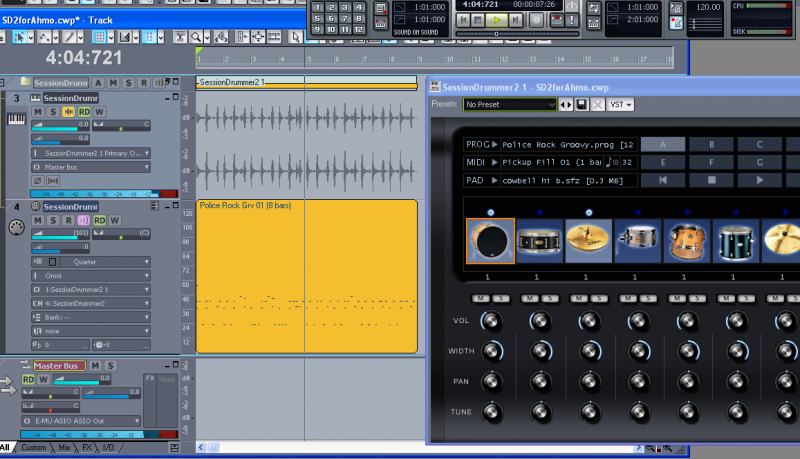 Be sure to hit the All tab(bottom left corner) so you can see all of your track options. The most critical option is the MIDI track output. Be sure it is set to Session Drummer 2. Channel 10 is the GM convention for drums, but it can be any channel. Here, I am using Channel 4. Bank and Patch are not relevant with SD2. If you have everything set up correctly, the synth will play when you hit the play button in the transport , or the spacebar.
My Soundclick Page SONAR Professional, X3eStudio,W7 64bit, AMD Athlon IIx4 2.8Ghz, 4GB RAM, 64bit, AKAI EIE Pro, Nektar Impact LX61,Alesis DM6,Alesis ControlPad,Yamaha MG10/2,Alesis M1Mk2 monitors,Samson Servo300,assorted guitars,Lava Lamp Shimozu-Kushiari or Bob
|
RobertB
Max Output Level: 0 dBFS
- Total Posts : 11256
- Joined: 2005/11/19 23:40:50
- Location: Fort Worth, Texas
- Status: offline
Re: yOU GUYS GOTTA HELP ME WITH MIDI DRUM TRACK
2013/06/25 00:40:48
(permalink)
edit:double post
post edited by RobertB - 2013/06/25 00:42:14
My Soundclick Page SONAR Professional, X3eStudio,W7 64bit, AMD Athlon IIx4 2.8Ghz, 4GB RAM, 64bit, AKAI EIE Pro, Nektar Impact LX61,Alesis DM6,Alesis ControlPad,Yamaha MG10/2,Alesis M1Mk2 monitors,Samson Servo300,assorted guitars,Lava Lamp Shimozu-Kushiari or Bob
|
ahmo
Max Output Level: -86 dBFS
- Total Posts : 242
- Joined: 2007/03/18 13:50:16
- Location: Chicago Area
- Status: offline
Re: yOU GUYS GOTTA HELP ME WITH MIDI DRUM TRACK
2013/06/25 02:59:32
(permalink)
I just remembered what I did last time. I mixed it down the old fashioned way on to a minidisc 4 track I had. Then bounced it back to my DAW. Thanks for the help. Now I know how to do it v
Our Music: www.nimbitmusic.com/intheweeds
-SHS6XL
-Windows 8.1
-750 GB HD
-2 TB External HD
-Intel Core i3
-6 GB RAM
-Presonus 1818VSL AudioBox
Gretsch 5 pc acoustic drums
Dean Acoustic/Electric Baritone Guitar
|
ahmo
Max Output Level: -86 dBFS
- Total Posts : 242
- Joined: 2007/03/18 13:50:16
- Location: Chicago Area
- Status: offline
Re: yOU GUYS GOTTA HELP ME WITH MIDI DRUM TRACK
2013/06/25 17:10:43
(permalink)
Thanks Rob B. I'll try it when I get some time this weekend. I work a ton of hours. Thank you so much for the help. I hope it works. It's much easier to use Session Drummer 2 than record drums for a quick fun project with my 9 year old daughter on vocals. Thanks again.
Our Music: www.nimbitmusic.com/intheweeds
-SHS6XL
-Windows 8.1
-750 GB HD
-2 TB External HD
-Intel Core i3
-6 GB RAM
-Presonus 1818VSL AudioBox
Gretsch 5 pc acoustic drums
Dean Acoustic/Electric Baritone Guitar
|
ahmo
Max Output Level: -86 dBFS
- Total Posts : 242
- Joined: 2007/03/18 13:50:16
- Location: Chicago Area
- Status: offline
Re: yOU GUYS GOTTA HELP ME WITH MIDI DRUM TRACK
2013/07/04 15:01:59
(permalink)
Rob,
"Adam, for SD2 ( or any softsynth) to work in SHS6, you must have two important tracks.
The Synth Audio Output and the MIDI Source Track."
How do I get those tracks into my project?
Our Music: www.nimbitmusic.com/intheweeds
-SHS6XL
-Windows 8.1
-750 GB HD
-2 TB External HD
-Intel Core i3
-6 GB RAM
-Presonus 1818VSL AudioBox
Gretsch 5 pc acoustic drums
Dean Acoustic/Electric Baritone Guitar
|
ahmo
Max Output Level: -86 dBFS
- Total Posts : 242
- Joined: 2007/03/18 13:50:16
- Location: Chicago Area
- Status: offline
Re: yOU GUYS GOTTA HELP ME WITH MIDI DRUM TRACK
2013/07/04 15:26:00
(permalink)
Please walk me through it step by step. I'm almost there, I can see the light at the end of the tunnel!!
Our Music: www.nimbitmusic.com/intheweeds
-SHS6XL
-Windows 8.1
-750 GB HD
-2 TB External HD
-Intel Core i3
-6 GB RAM
-Presonus 1818VSL AudioBox
Gretsch 5 pc acoustic drums
Dean Acoustic/Electric Baritone Guitar
|
Soundblend
Max Output Level: -76 dBFS

- Total Posts : 726
- Joined: 2011/08/15 14:01:14
- Location: Norway
- Status: offline
Re: yOU GUYS GOTTA HELP ME WITH MIDI DRUM TRACK
2013/07/04 18:40:19
(permalink)
To have drums: 1. you need to have 1 midi track "containing midi data" for drums. 2. You need to load up one Drum vst. 3. then you need to, go to the " drum miditrack " and set the output to the, drum vst. and select channel 10 for the midi output. you should now be able to hear the drums, if done right when you hit spacebar ( play ). When exporting all the audio and vsti's, you first select all your tracks, (lit blue on the track numbers.) then you go to: file-export-audio be sure all the mix enables are selected, ( besides the 64bit engine ? ) Select filetype / bit dept / sample rate. name your file. Hit Export Edit : Eeeek forgot its home studio ;-) , but i think it should be similar... , anyway hope this helps.
post edited by Soundblend - 2013/07/04 18:52:02
|
ahmo
Max Output Level: -86 dBFS
- Total Posts : 242
- Joined: 2007/03/18 13:50:16
- Location: Chicago Area
- Status: offline
Re: yOU GUYS GOTTA HELP ME WITH MIDI DRUM TRACK
2013/07/04 19:39:13
(permalink)
How do I get the midi and the audio tracks into the project and connected like it looks in your screan shot?
Our Music: www.nimbitmusic.com/intheweeds
-SHS6XL
-Windows 8.1
-750 GB HD
-2 TB External HD
-Intel Core i3
-6 GB RAM
-Presonus 1818VSL AudioBox
Gretsch 5 pc acoustic drums
Dean Acoustic/Electric Baritone Guitar
|
RobertB
Max Output Level: 0 dBFS
- Total Posts : 11256
- Joined: 2005/11/19 23:40:50
- Location: Fort Worth, Texas
- Status: offline
Re: yOU GUYS GOTTA HELP ME WITH MIDI DRUM TRACK
2013/07/04 20:19:23
(permalink)
Hang in there, bud. This is the key to unlocking the power of all of your soft synths. From the tool bar, click Insert>Soft Synths>Vstplugins>Session Drummer 2. You should be presented with this dialogue box: 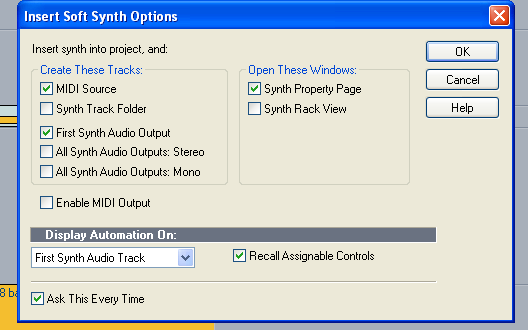 By default, you will see this. If you have unchecked the Ask This Every Time box, you won't see the dialogue, and we will have to do something slightly different. If you do see it, make sure you have check marks in all of the boxes shown. I am standing by. Let me know what you see. edit: If you are able to include a screen shot, that will really help me see what you see.
post edited by RobertB - 2013/07/04 20:44:39
My Soundclick Page SONAR Professional, X3eStudio,W7 64bit, AMD Athlon IIx4 2.8Ghz, 4GB RAM, 64bit, AKAI EIE Pro, Nektar Impact LX61,Alesis DM6,Alesis ControlPad,Yamaha MG10/2,Alesis M1Mk2 monitors,Samson Servo300,assorted guitars,Lava Lamp Shimozu-Kushiari or Bob
|
ahmo
Max Output Level: -86 dBFS
- Total Posts : 242
- Joined: 2007/03/18 13:50:16
- Location: Chicago Area
- Status: offline
Re: yOU GUYS GOTTA HELP ME WITH MIDI DRUM TRACK
2013/07/05 00:35:52
(permalink)
OK, I was at the fireworks show. I'm going to try it now. Are you still there?
Our Music: www.nimbitmusic.com/intheweeds
-SHS6XL
-Windows 8.1
-750 GB HD
-2 TB External HD
-Intel Core i3
-6 GB RAM
-Presonus 1818VSL AudioBox
Gretsch 5 pc acoustic drums
Dean Acoustic/Electric Baritone Guitar
|
ahmo
Max Output Level: -86 dBFS
- Total Posts : 242
- Joined: 2007/03/18 13:50:16
- Location: Chicago Area
- Status: offline
Re: yOU GUYS GOTTA HELP ME WITH MIDI DRUM TRACK
2013/07/05 00:40:46
(permalink)
OK, I've Session Drummer loaded in. Now what?
Our Music: www.nimbitmusic.com/intheweeds
-SHS6XL
-Windows 8.1
-750 GB HD
-2 TB External HD
-Intel Core i3
-6 GB RAM
-Presonus 1818VSL AudioBox
Gretsch 5 pc acoustic drums
Dean Acoustic/Electric Baritone Guitar
|
57Gregy
Max Output Level: 0 dBFS
- Total Posts : 14404
- Joined: 2004/05/31 17:04:17
- Location: Raleigh, North Carolina
- Status: offline
Re: yOU GUYS GOTTA HELP ME WITH MIDI DRUM TRACK
2013/07/05 09:37:57
(permalink)
If you used the default options as in RobertB's image, you should have seen a MIDI track and the soft synth track appear in the project.
The MIDI track should already have it's output set to the synth.
Open either the Piano Roll view or Staff view and enter notes. You should hear the synth play as the notes are clicked in.
Or set the input to the MIDI track to your MIDI device and play your keyboard/controller (if you have one). You should hear the synth play.
To record what you're playing with the keyboard, click Arm in the MIDI track, then the Record button; play.
|
ahmo
Max Output Level: -86 dBFS
- Total Posts : 242
- Joined: 2007/03/18 13:50:16
- Location: Chicago Area
- Status: offline
Re: yOU GUYS GOTTA HELP ME WITH MIDI DRUM TRACK
2013/07/07 18:11:20
(permalink)
I DID IT!!
Thank you guys!
If you want to hear it let me know.
Our Music: www.nimbitmusic.com/intheweeds
-SHS6XL
-Windows 8.1
-750 GB HD
-2 TB External HD
-Intel Core i3
-6 GB RAM
-Presonus 1818VSL AudioBox
Gretsch 5 pc acoustic drums
Dean Acoustic/Electric Baritone Guitar
|
RobertB
Max Output Level: 0 dBFS
- Total Posts : 11256
- Joined: 2005/11/19 23:40:50
- Location: Fort Worth, Texas
- Status: offline
Re: yOU GUYS GOTTA HELP ME WITH MIDI DRUM TRACK
2013/07/07 22:45:24
(permalink)
Sweet.
I love seeing that message.
For sure, post us a link.
My Soundclick Page SONAR Professional, X3eStudio,W7 64bit, AMD Athlon IIx4 2.8Ghz, 4GB RAM, 64bit, AKAI EIE Pro, Nektar Impact LX61,Alesis DM6,Alesis ControlPad,Yamaha MG10/2,Alesis M1Mk2 monitors,Samson Servo300,assorted guitars,Lava Lamp Shimozu-Kushiari or Bob
|