Marc2109
Max Output Level: -89 dBFS

- Total Posts : 75
- Joined: 2012/11/21 15:03:13
- Status: offline
Tempo Change not working
I'm inserting a **** using the draw line tool in the tempo view. The new values display in the Tempo List pane, but the transport does not reflect the tempo change, nor does the tempo display. Am I missing something here?
|
Marc2109
Max Output Level: -89 dBFS
- Total Posts : 75
- Joined: 2012/11/21 15:03:13
- Status: offline

Re: Tempo Change not working
2013/06/26 14:54:32
(permalink)
not sure why**** is in my post. I typed ritard for ritardando.
|
Bristol_Jonesey
Max Output Level: 0 dBFS

- Total Posts : 16775
- Joined: 2007/10/08 15:41:17
- Location: Bristol, UK
- Status: offline
Re: Tempo Change not working
2013/06/26 15:14:05
(permalink)
Probably because it's a banned word? Do you mean you entering a new tempo here: 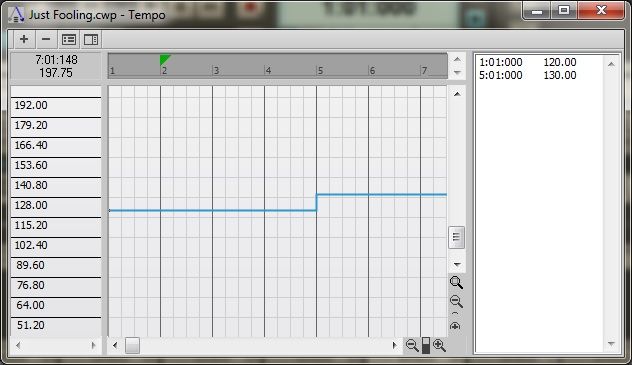 but the change isn't reflected in the music, or any visual display?
CbB, Platinum, 64 bit throughoutCustom built i7 3930, 32Gb RAM, 2 x 1Tb Internal HDD, 1 x 1TB system SSD (Win 7), 1 x 500Gb system SSD (Win 10), 2 x 1Tb External HDD's, Dual boot Win 7 & Win 10 64 Bit, Saffire Pro 26, ISA One, Adam P11A,
|
Marc2109
Max Output Level: -89 dBFS
- Total Posts : 75
- Joined: 2012/11/21 15:03:13
- Status: offline
Re: Tempo Change not working
2013/06/26 15:20:50
(permalink)
Problem solved...for some reason, although I used the draw tool to insert the rit. starting at m19 and stopping at meas 20, it started in 19 and jumped to m38. I hadn't noticed this on the tempo list. I have no clue why it did that, but i deleted and started over with success. THanks for the responses.
|
Bristol_Jonesey
Max Output Level: 0 dBFS
- Total Posts : 16775
- Joined: 2007/10/08 15:41:17
- Location: Bristol, UK
- Status: offline
Re: Tempo Change not working
2013/06/26 15:36:24
(permalink)
No problem. Thanks for letting me know.
Edit the title of your thread and add the word *** SOLVED ***
CbB, Platinum, 64 bit throughoutCustom built i7 3930, 32Gb RAM, 2 x 1Tb Internal HDD, 1 x 1TB system SSD (Win 7), 1 x 500Gb system SSD (Win 10), 2 x 1Tb External HDD's, Dual boot Win 7 & Win 10 64 Bit, Saffire Pro 26, ISA One, Adam P11A,
|
Skyline_UK
Max Output Level: -54 dBFS

- Total Posts : 2133
- Joined: 2004/04/15 17:55:09
- Location: Midlands, UK
- Status: offline
Re: Tempo Change not working
2013/06/26 15:45:17
(permalink)
Does this forum software really mistake ritard for the similar word that has an 'e' as its second letter?
Edit: No I see. The OP must have accidentally typed ****.
My stuff Intel Sandy Bridge i7 2600 @ 3.4GHz, 4 cores, 8 threads, 16GB RAM.OS & Programs drive: 240GB SSD
Data drives: 1 x 1TB drive RAID mirrored, plus extra 1TB data drive
Windows 10 Home 64 bit
Cakewalk by BandLab 64 bit, Studio One 3, Band In A Box 2016, Ozone 8+ too many other pluginsBandLab page
|
Kev999
Max Output Level: -36 dBFS

- Total Posts : 3922
- Joined: 2007/05/01 14:22:54
- Location: Victoria, Australia
- Status: offline
Re: Tempo Change not working
2013/06/26 15:52:10
(permalink)
Bristol_Jonesey
Edit the title of your thread and add the word *** SOLVED *** No need to do that any more. The new forum flags answered threads if you click on ""Best Answer" for one of the posts within the thread.
SonarPlatinum∞(22.11.0.111)|Mixbus32C(4.3.19)|DigitalPerformer(9.5.1)|Reaper(5.77)FractalDesign:DefineR5|i7-6850k@4.1GHz|16GB@2666MHz-DDR4|MSI:GamingProCarbonX99a|Matrox:M9148(x2)|UAD2solo(6.5.2)|W7Ult-x64-SP1
Audient:iD22+ASP800|KRK:VXT6|+various-outboard-gear|+guitars&basses, etc.
Having fun at work lately
|
Bristol_Jonesey
Max Output Level: 0 dBFS
- Total Posts : 16775
- Joined: 2007/10/08 15:41:17
- Location: Bristol, UK
- Status: offline
Re: Tempo Change not working
2013/06/26 16:21:16
(permalink)
Ah. I've not come across that yet.
CbB, Platinum, 64 bit throughoutCustom built i7 3930, 32Gb RAM, 2 x 1Tb Internal HDD, 1 x 1TB system SSD (Win 7), 1 x 500Gb system SSD (Win 10), 2 x 1Tb External HDD's, Dual boot Win 7 & Win 10 64 Bit, Saffire Pro 26, ISA One, Adam P11A,
|