ston
Max Output Level: -71 dBFS

- Total Posts : 965
- Joined: 2008/03/04 12:28:40
- Status: offline

FAO Cakewalk, X3 issues to look at
Current issues I've found with Sonar X3, carried over from X2. The only change made from X2 to X3 that I was really looking forward to is the QuadCurve zoom. I don't really care about the other changes, as wonderful as they may be, but I do care about the following and would really like to see them implemented/fixed. 1/ Behaviour of smart tool for drawing notes does not make sense with how the Event Draw Duration works. One cannot: a) Simply walk into Mordor b) Simply click to place a note So one has to drag at least a little to draw a note but this does not draw a note to the length specified by Event Draw Duration, rather it changes Event Draw Duration to the length of note drawn. What then is the purpose of Event Draw Duration when drawing notes with the smart tool? Why can't the smart tool draw notes just by clicking as the draw tool can? If you click and drag just a tiny bit, to less than whatever the snap grid is set to, then a note of Event Draw Duration will be created, but this is too hypersensitive; it's far too easy to override this duration, create a note of the wrong duration and change Event Draw Duration. Clicking and dragging to the left is also odd; first of all a note of Event Draw Duration is created then extended to the left. However, the resultant note's duration is always shown afterwards in Event Draw Duration as a number of ticks, never as a note value. I do not know off the top of my head what the '5280' ticks is. It should at least make an effort to work out what the note value is if possible. Also, when in the piano roll, dragging across velocity tails for notes using the smart tool (as the draw tool) does not only affect selected notes, it affects all notes! I think this behaviour changes to how the draw tool works if you hold down shift while this is done, but the behaviour is erratic. In summary, make the smart tool behave as the draw tool if the draw tool icon is showing. 2/ Vertical zoom limitation in piano roll view is still way too limited. I rarely want to see five octaves at a time and that's the most zoomed in it can go! Please remove this limitation, allow me to zoom in like I can in the track PRV. All the notes look really squashed together. I don't want to use the magnifying glass, I just want to be able to zoom in further. Please allow this, it can't be anything harder than changing a single limit variable in the code as the software is already capable of zooming in and out smoothly. The code already allows one to zoom out to a ridiculous level, see: 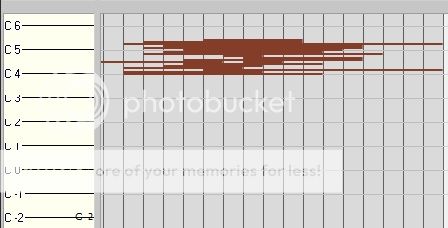 How is that useful? That only occupies like a 3rd of the vertical height of the screen. I'm not saying get rid of this, just that there should be a similar lack of restriction on the vertical zoom *in* limit. 3/ As above, vertical zoom limitation in track view Automation Lanes is also still way too restrictive. Why? It makes it really fiddly if not impossible to make fine automation adjustments. Please remove this limitation. The software can already smoothly scale the height of the automation pane, so why the restriction? Just change the limit variable already. 4/ Still unable to apply a custom name to an Automation Lane. Please implement this as for Take Lanes. If you have a large number of esoterically named automation lanes, it can be next to impossible to find the one you're looking for. Something like this: 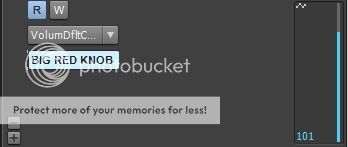 Pretty trivial but very useful workflow change. 5/ Grid lines in track view still make no sense and are useless as guides. If the zoom level permits, make the track view grid lines follow the snap grid settings. Also, grid lines in the piano roll should also follow the snap grid settings. This *sometimes* happens, but the way that the main snap setting and the piano roll's 'independent' snap setting work together is broken. Try playing around a bit with them to see what I mean. For instance, in piano roll, turn off the independent snap setting. Change the main one and you'll see the grid follow it. All well and good thus far. Now chose a triplet setting. Now the grid does not follow the main setting. Why the difference in behaviour? Now re-enable the independent snap setting. Set it to the same triplet value (e.g. 8th triplets). The grid still does not update. Now change the main snap setting to some other triplet setting, e.g. 1/4 note triplets. Only now does the grid update and show the 8th note triplets. Basically, you need to need be updating the grid state machine whenever there's a change of state in either the main or local snap settings, and that includes enable/disable. More to follow...probably...
|
Freex
Max Output Level: -81 dBFS

- Total Posts : 478
- Joined: 2010/11/23 11:10:50
- Location: Northern Ireland
- Status: offline
Re: FAO Cakewalk, X3 issues to look at
2013/09/29 06:11:42
(permalink)
To solve two of your issues right off the bat,
Alt+click will and a midi note in prv, without having to move to draw
Z+(click to draw a box) will zoom in on box sized window, zoom away to your hearts content :)
Asus P9X79, Intel i7-3930k, 32GB RAM ,Windows 7, RME RayDat, Presonus Firestudio, Presonus Digimax FS, Mackie MCU, Mackie XT, Makcie C4, KRK Rokit 6 How To Setup A Drum Map...The Easy Way.PDF
|
icontakt
Max Output Level: -32.5 dBFS

- Total Posts : 4266
- Joined: 2012/03/04 08:18:02
- Location: Tokyo
- Status: offline
Re: FAO Cakewalk, X3 issues to look at
2013/09/29 07:27:20
(permalink)
Freex
Z+(click to draw a box) will zoom in on box sized window, zoom away to your hearts content :)
But he's talking about the vertical zoom limitation...
Tak T. Primary Laptop: Core i7-4710MQ CPU, 16GB RAM, 7200RPM HDD, Windows 7 Home Premium OS (Japanese) x64 SP1Secondary Laptop: Core2 Duo CPU, 8GB RAM, 7200RPM HDD, Windows 7 Professional OS (Japanese) x64 SP1Audio Interface: iD14 (ASIO)Keyboard Controller/MIDI Interface: A-800PRODAW: SONAR Platinum x64 (latest update installed)
|
Freex
Max Output Level: -81 dBFS
- Total Posts : 478
- Joined: 2010/11/23 11:10:50
- Location: Northern Ireland
- Status: offline
Re: FAO Cakewalk, X3 issues to look at
2013/09/29 08:06:30
(permalink)
Jlien X
But he's talking about the vertical zoom limitation...
Yeah, my bad, is it not also resolution dependant as well, ie you'd see less on a smaller screen and vice versa. Guess it was only one off the bat, other was a foul ball 
Asus P9X79, Intel i7-3930k, 32GB RAM ,Windows 7, RME RayDat, Presonus Firestudio, Presonus Digimax FS, Mackie MCU, Mackie XT, Makcie C4, KRK Rokit 6 How To Setup A Drum Map...The Easy Way.PDF
|
icontakt
Max Output Level: -32.5 dBFS
- Total Posts : 4266
- Joined: 2012/03/04 08:18:02
- Location: Tokyo
- Status: offline
Re: FAO Cakewalk, X3 issues to look at
2013/09/29 08:14:19
(permalink)
Freex
Jlien X
But he's talking about the vertical zoom limitation...
Yeah, my bad, is it not also resolution dependant as well, ie you'd see less on a smaller screen and vice versa.
Guess it was only one off the bat, other was a foul ball
Judging from this thread, I think he wants to make the notes this fat:  The daw in the image is Studio One.
Tak T. Primary Laptop: Core i7-4710MQ CPU, 16GB RAM, 7200RPM HDD, Windows 7 Home Premium OS (Japanese) x64 SP1Secondary Laptop: Core2 Duo CPU, 8GB RAM, 7200RPM HDD, Windows 7 Professional OS (Japanese) x64 SP1Audio Interface: iD14 (ASIO)Keyboard Controller/MIDI Interface: A-800PRODAW: SONAR Platinum x64 (latest update installed)
|
Freex
Max Output Level: -81 dBFS
- Total Posts : 478
- Joined: 2010/11/23 11:10:50
- Location: Northern Ireland
- Status: offline
Re: FAO Cakewalk, X3 issues to look at
2013/09/29 08:23:52
(permalink)
if he reduced the size of the multidock, he could have 2 octaves displayed, which seems quite enough for me... it's not like it has suddenly changed.
As for the pix, not even sure why you'd want to zoom in that far.
Asus P9X79, Intel i7-3930k, 32GB RAM ,Windows 7, RME RayDat, Presonus Firestudio, Presonus Digimax FS, Mackie MCU, Mackie XT, Makcie C4, KRK Rokit 6 How To Setup A Drum Map...The Easy Way.PDF
|
Beepster
Max Output Level: 0 dBFS

- Total Posts : 18001
- Joined: 2012/05/11 19:11:24
- Status: offline
Re: FAO Cakewalk, X3 issues to look at
2013/09/29 08:31:05
(permalink)
Smart Tool in PRV for trying to input data is a pain. That's why I use that keyboard tool toggle feature (I forget the binding now it's been so long but I need to look it back up because I'm finally doing stuff again). One key press and I bounce back and forth between the Draw and Smart Tool or Move Tool. Also T to open the HUD to change note length exactly where am on screen instead of having to meander around the GUI breaking my flow and/or losing my place on the timeline.
Once I got into that workflow I was plowing through stuff in PRV np. Would be nice if you could customize the Smart Tool. Maybe you can but I haven't come across it in my journeys.
|
stevec
Max Output Level: 0 dBFS
- Total Posts : 11546
- Joined: 2003/11/04 15:05:54
- Location: Parkesburg, PA
- Status: offline
Re: FAO Cakewalk, X3 issues to look at
2013/09/29 11:49:47
(permalink)
FWIW, you can also double-click to add notes.
If a single click were the default for adding notes, you wouldn't be able to single click to drag around or navigate. I personally prefer it this way, although I suppose a little customization ala SONAR 7 wouldn't be bad.
SteveC https://soundcloud.com/steve-cocchi http://www.soundclick.com/bands/pagemusic.cfm?bandID=39163 SONAR Platinum x64, Intel Q9300 (2.5Ghz), Asus P5N-D, Win7 x64 SP1, 8GB RAM, 1TB internal + ESATA + USB Backup HDDs, ATI Radeon HD5450 1GB RAM + dual ViewSonic VA2431wm Monitors; Focusrite 18i6 (ASIO); Komplete 9, Melodyne Studio 4, Ozone 7 Advanced, Rapture Pro, GPO5, Valhalla Plate, MJUC comp, MDynamic EQ, lots of other freebie VST plugins, synths and Kontakt libraries
|
Beepster
Max Output Level: 0 dBFS
- Total Posts : 18001
- Joined: 2012/05/11 19:11:24
- Status: offline
Re: FAO Cakewalk, X3 issues to look at
2013/09/29 13:13:10
(permalink)
When I'm writing an epic metal drum track double click gets VERY tedious which is why I prefer the Draw Tool for inputting notes. I just zip around tossing everything in and use undo if I drop a note in the wrong spot. Also double clicking every time gives me twice the chance to screw up. I use a very sensitive free floating trackball so the second click itself can throw me off my mark.
|
stevec
Max Output Level: 0 dBFS
- Total Posts : 11546
- Joined: 2003/11/04 15:05:54
- Location: Parkesburg, PA
- Status: offline
Re: FAO Cakewalk, X3 issues to look at
2013/09/29 13:34:06
(permalink)
Ah... I use a five button mouse so assigned one of the buttons to a double-click. So for me it essentially is a single-click, just using a different button.
SteveC https://soundcloud.com/steve-cocchi http://www.soundclick.com/bands/pagemusic.cfm?bandID=39163 SONAR Platinum x64, Intel Q9300 (2.5Ghz), Asus P5N-D, Win7 x64 SP1, 8GB RAM, 1TB internal + ESATA + USB Backup HDDs, ATI Radeon HD5450 1GB RAM + dual ViewSonic VA2431wm Monitors; Focusrite 18i6 (ASIO); Komplete 9, Melodyne Studio 4, Ozone 7 Advanced, Rapture Pro, GPO5, Valhalla Plate, MJUC comp, MDynamic EQ, lots of other freebie VST plugins, synths and Kontakt libraries
|
mgh
Max Output Level: 0 dBFS
- Total Posts : 8594
- Joined: 2007/05/10 05:15:56
- Location: betwixt and between
- Status: offline
Re: FAO Cakewalk, X3 issues to look at
2013/09/29 13:42:23
(permalink)
Beepster
When I'm writing an epic metal drum track double click gets VERY tedious which is why I prefer the Draw Tool for inputting notes. I just zip around tossing everything in and use undo if I drop a note in the wrong spot. Also double clicking every time gives me twice the chance to screw up. I use a very sensitive free floating trackball so the second click itself can throw me off my mark.
I agree which is why I use the step sequencer...much easier and quicker I find...
|
Beepster
Max Output Level: 0 dBFS
- Total Posts : 18001
- Joined: 2012/05/11 19:11:24
- Status: offline
Re: FAO Cakewalk, X3 issues to look at
2013/09/29 14:07:14
(permalink)
stevec
Ah... I use a five button mouse so assigned one of the buttons to a double-click. So for me it essentially is a single-click, just using a different button.
You know this thing has four big fat programmable buttons. I may look into that. I think those other buttons made Sonar do other cool stuff by default but it's been a while. I'll have to check it out again. Cheers. mgh
I agree which is why I use the step sequencer...much easier and quicker I find...
I have a hard time making that thing do what I want in general but I'm going for Neil Peart/Lombardo type mayhem so I just gave up on the SS and use the PRV exclusively.
|
stevec
Max Output Level: 0 dBFS
- Total Posts : 11546
- Joined: 2003/11/04 15:05:54
- Location: Parkesburg, PA
- Status: offline
Re: FAO Cakewalk, X3 issues to look at
2013/09/29 15:44:37
(permalink)
Beepster
stevec
Ah... I use a five button mouse so assigned one of the buttons to a double-click. So for me it essentially is a single-click, just using a different button.
You know this thing has four big fat programmable buttons. I may look into that. I think those other buttons made Sonar do other cool stuff by default but it's been a while. I'll have to check it out again. Cheers.
Np, Beeps. It really does help IMO.
SteveC https://soundcloud.com/steve-cocchi http://www.soundclick.com/bands/pagemusic.cfm?bandID=39163 SONAR Platinum x64, Intel Q9300 (2.5Ghz), Asus P5N-D, Win7 x64 SP1, 8GB RAM, 1TB internal + ESATA + USB Backup HDDs, ATI Radeon HD5450 1GB RAM + dual ViewSonic VA2431wm Monitors; Focusrite 18i6 (ASIO); Komplete 9, Melodyne Studio 4, Ozone 7 Advanced, Rapture Pro, GPO5, Valhalla Plate, MJUC comp, MDynamic EQ, lots of other freebie VST plugins, synths and Kontakt libraries
|
ston
Max Output Level: -71 dBFS
- Total Posts : 965
- Joined: 2008/03/04 12:28:40
- Status: offline
Re: FAO Cakewalk, X3 issues to look at
2013/10/01 07:50:57
(permalink)
Cheers for the note input ideas to all! I shall give them a try :-)
> "More to follow...probably..."
Whilst Cakewalk are hard at work addressing the above set of issues, here's a couple more:
o Allow more than one instance of the QuadCurve EQ to be in a single ProChannel
This would be really cool. Sometimes 4 bands ain't enough. (Or 6 if you count the LP and HP filters). It's a really good EQ, let us use more of them!
o Allow individual ProChannel effects to be able to save and load their own presets.
This would be equally cool, if not more so.
Cakewalk, you know this makes sense. Crack on!
|
FastBikerBoy
Forum Host

- Total Posts : 11326
- Joined: 2008/01/25 16:15:36
- Location: Watton, Norfolk, UK
- Status: offline
Re: FAO Cakewalk, X3 issues to look at
2013/10/01 08:13:05
(permalink)
ston
Current issues I've found with Sonar X3, carried over from X2. The only change made from X2 to X3 that I was really looking forward to is the QuadCurve zoom. I don't really care about the other changes, as wonderful as they may be, but I do care about the following and would really like to see them implemented/fixed.
1/
Behaviour of smart tool for drawing notes does not make sense with how the Event Draw Duration works.
One cannot:
a) Simply walk into Mordor
b) Simply click to place a note
So one has to drag at least a little to draw a note but this does not draw a note to the length specified by Event Draw Duration, rather it changes Event Draw Duration to the length of note drawn. What then is the purpose of Event Draw Duration when drawing notes with the smart tool? Why can't the smart tool draw notes just by clicking as the draw tool can? This one is a setup/understanding one............ If you have "last touched" checked (Available from the draw resolution drop down)then a single left click and drag does change the resolution, that's the wholepoint of last touched. If you uncheck it then it doesn't. A double click or Alt + click adds a note at the specified draw resolution.
If you click and drag just a tiny bit, to less than whatever the snap grid is set to, then a note of Event Draw Duration will be created, but this is too hypersensitive; it's far too easy to override this duration, create a note of the wrong duration and change Event Draw Duration.
Try using the magnetic strength setting to adjust the effectiveness of it. Remember there are two different snap settings (Ctrl+Shift+N) to use as well as snap on/off (N).
Also, when in the piano roll, dragging across velocity tails for notes using the smart tool (as the draw tool) does not only affect selected notes, it affects all notes! I think this behaviour changes to how the draw tool works if you hold down shift while this is done, but the behaviour is erratic.
In summary, make the smart tool behave as the draw tool if the draw tool icon is showing.
Hold down the ALt key that's the modifier for only affecting selected notes. HTH
|
ston
Max Output Level: -71 dBFS
- Total Posts : 965
- Joined: 2008/03/04 12:28:40
- Status: offline
Re: FAO Cakewalk, X3 issues to look at
2013/10/01 09:29:55
(permalink)
Cheers Karl!
So ALT is it? I could have sworn that SHIFT worked for me. I'll check it out when I get home later on.
|
Royal Yaksman
Max Output Level: -83 dBFS

- Total Posts : 361
- Joined: 2013/06/06 00:52:02
- Status: offline
Re: FAO Cakewalk, X3 issues to look at
2013/10/01 10:37:47
(permalink)
If you're not happy working with this sort of note range: 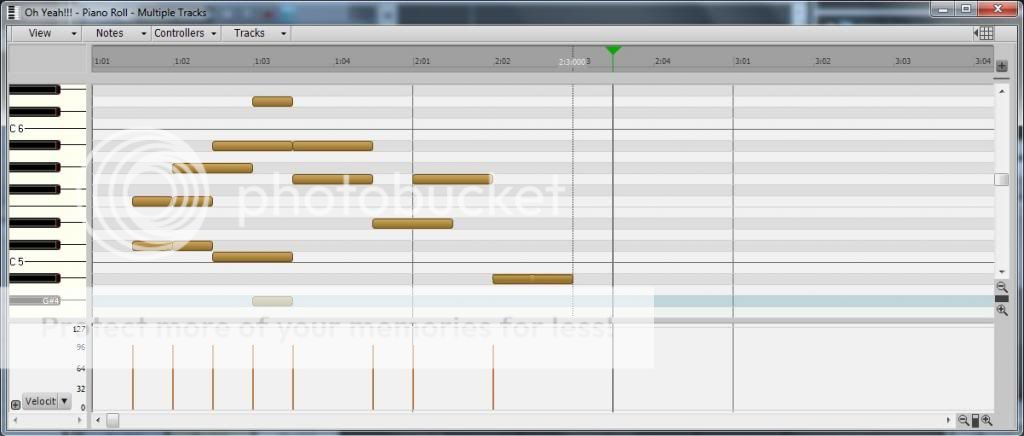 You can enable MIDI Microscope under 'View' in the piano roll and the section you are hovering over does this: 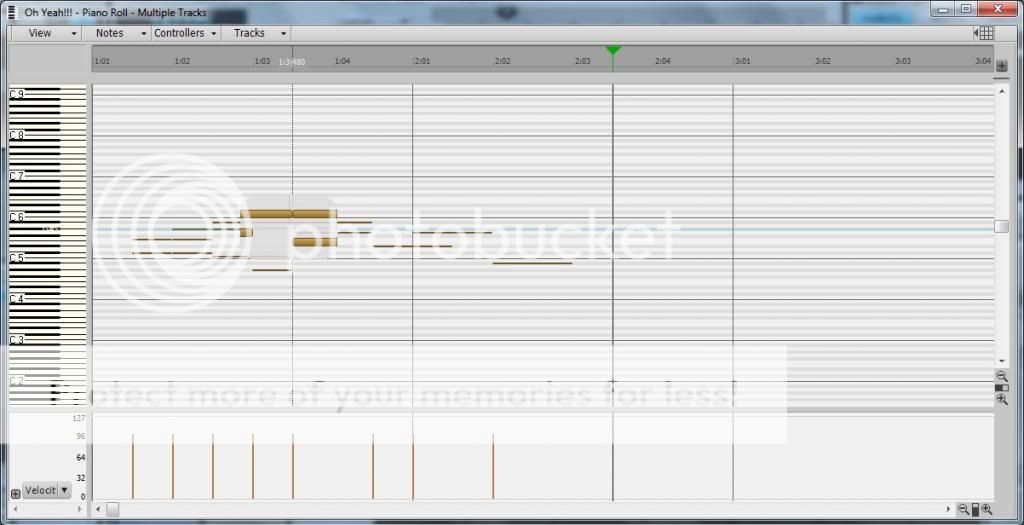
Royal Yaksman HP Phoenix i7 3.9ghz 7600 - Roland Quad Capture - CbB - SD2 Metal Foundry/Roots Stix - NI Komplete 8 - Amplitube 3 & 4 - Addictive Drums 2 - Halion 6 - Izotope Musician Bundle - Waves Stuff - Melodyne Studio - AIR 3 - Revoice 3 - Sssshhhhh don't tell anyone but also Studio One 4 - Cubase 9.5 - Samplitude Pro X3 - FL Studio 20 - Mixbus 4 - Reaper 5 - And a big arsed pocket full of dreams (deceased or otherwise.)
|
icontakt
Max Output Level: -32.5 dBFS
- Total Posts : 4266
- Joined: 2012/03/04 08:18:02
- Location: Tokyo
- Status: offline
Re: FAO Cakewalk, X3 issues to look at
2013/10/01 10:59:59
(permalink)
Tak T. Primary Laptop: Core i7-4710MQ CPU, 16GB RAM, 7200RPM HDD, Windows 7 Home Premium OS (Japanese) x64 SP1Secondary Laptop: Core2 Duo CPU, 8GB RAM, 7200RPM HDD, Windows 7 Professional OS (Japanese) x64 SP1Audio Interface: iD14 (ASIO)Keyboard Controller/MIDI Interface: A-800PRODAW: SONAR Platinum x64 (latest update installed)
|
ston
Max Output Level: -71 dBFS
- Total Posts : 965
- Joined: 2008/03/04 12:28:40
- Status: offline
Re: FAO Cakewalk, X3 issues to look at
2013/10/02 11:58:07
(permalink)
Yes! Delicious fat notes.
Make it so #1.
|
stevec
Max Output Level: 0 dBFS
- Total Posts : 11546
- Joined: 2003/11/04 15:05:54
- Location: Parkesburg, PA
- Status: offline
Re: FAO Cakewalk, X3 issues to look at
2013/10/02 13:49:25
(permalink)
☄ Helpfulby Royal Yaksman 2013/10/03 05:45:13
Dude... this is 2013. You really should be looking for a low-fat PRV. Just sayin'. Except if it's a Becan PRV. 
SteveC https://soundcloud.com/steve-cocchi http://www.soundclick.com/bands/pagemusic.cfm?bandID=39163 SONAR Platinum x64, Intel Q9300 (2.5Ghz), Asus P5N-D, Win7 x64 SP1, 8GB RAM, 1TB internal + ESATA + USB Backup HDDs, ATI Radeon HD5450 1GB RAM + dual ViewSonic VA2431wm Monitors; Focusrite 18i6 (ASIO); Komplete 9, Melodyne Studio 4, Ozone 7 Advanced, Rapture Pro, GPO5, Valhalla Plate, MJUC comp, MDynamic EQ, lots of other freebie VST plugins, synths and Kontakt libraries
|
wizard71
Max Output Level: -74 dBFS

- Total Posts : 836
- Joined: 2012/02/12 05:45:05
- Location: UK
- Status: offline
Re: FAO Cakewalk, X3 issues to look at
2013/10/02 13:51:59
(permalink)
I hate the smart tool in PRV. It rarely does what I want.. I expect I'm using it wrong. Wouldn't surprise me one little bit.
http://www.youtube.com/SpaceTimeAceshttps://soundcloud.com/space-time-acesSonar Platinum - Win 8.1 x64 - Haswell 4770k - ASrock Z87 pro3 - 32gb ram - Fractal design R4 case - 3x HDD 1 USB 2.0 external 1x cr M4 ssd for samples - Octa-capture - Sontronics Aria - Sontronics STC-1s - BX8 monitors - ARC 2 system - Kawai CA63 piano - Kawai MP6 Stage piano - Fender custom Telecaster FMT - Yamaha LL6 - Fender P bass
|
Beepster
Max Output Level: 0 dBFS
- Total Posts : 18001
- Joined: 2012/05/11 19:11:24
- Status: offline
Re: FAO Cakewalk, X3 issues to look at
2013/10/02 13:52:32
(permalink)
stevec
Dude... this is 2013. You really should be looking for a low-fat PRV. Just sayin'.
Except if it's a Becan PRV.
I enjoy a nice cup of probiotic PRV every morning and now my tracks are wicked regular like BAM!
|
stevec
Max Output Level: 0 dBFS
- Total Posts : 11546
- Joined: 2003/11/04 15:05:54
- Location: Parkesburg, PA
- Status: offline
Re: FAO Cakewalk, X3 issues to look at
2013/10/02 13:55:17
(permalink)
Yes, PRV regularity is very important!
What were we talking about again?
SteveC https://soundcloud.com/steve-cocchi http://www.soundclick.com/bands/pagemusic.cfm?bandID=39163 SONAR Platinum x64, Intel Q9300 (2.5Ghz), Asus P5N-D, Win7 x64 SP1, 8GB RAM, 1TB internal + ESATA + USB Backup HDDs, ATI Radeon HD5450 1GB RAM + dual ViewSonic VA2431wm Monitors; Focusrite 18i6 (ASIO); Komplete 9, Melodyne Studio 4, Ozone 7 Advanced, Rapture Pro, GPO5, Valhalla Plate, MJUC comp, MDynamic EQ, lots of other freebie VST plugins, synths and Kontakt libraries
|
Beepster
Max Output Level: 0 dBFS
- Total Posts : 18001
- Joined: 2012/05/11 19:11:24
- Status: offline
Re: FAO Cakewalk, X3 issues to look at
2013/10/02 13:57:51
(permalink)
IDK. Something about vintage Pong consoles.
|
stevec
Max Output Level: 0 dBFS
- Total Posts : 11546
- Joined: 2003/11/04 15:05:54
- Location: Parkesburg, PA
- Status: offline
Re: FAO Cakewalk, X3 issues to look at
2013/10/02 13:59:54
(permalink)
SteveC https://soundcloud.com/steve-cocchi http://www.soundclick.com/bands/pagemusic.cfm?bandID=39163 SONAR Platinum x64, Intel Q9300 (2.5Ghz), Asus P5N-D, Win7 x64 SP1, 8GB RAM, 1TB internal + ESATA + USB Backup HDDs, ATI Radeon HD5450 1GB RAM + dual ViewSonic VA2431wm Monitors; Focusrite 18i6 (ASIO); Komplete 9, Melodyne Studio 4, Ozone 7 Advanced, Rapture Pro, GPO5, Valhalla Plate, MJUC comp, MDynamic EQ, lots of other freebie VST plugins, synths and Kontakt libraries
|
ston
Max Output Level: -71 dBFS
- Total Posts : 965
- Joined: 2008/03/04 12:28:40
- Status: offline
Re: FAO Cakewalk, X3 issues to look at
2013/10/03 04:37:23
(permalink)
stevec
Except if it's a Becan PRV.
I think this would work rather well: 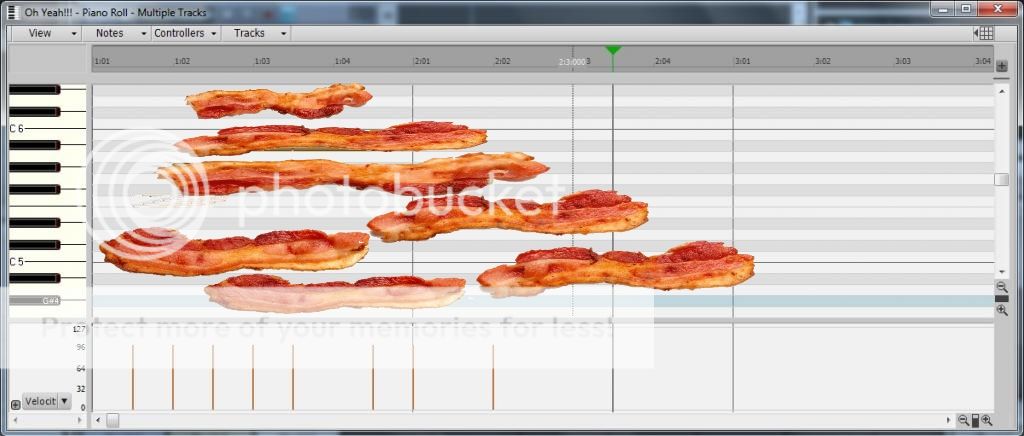
|
Grem
Max Output Level: -19.5 dBFS

- Total Posts : 5562
- Joined: 2005/06/28 09:26:32
- Location: Baton Rouge Area
- Status: offline
Re: FAO Cakewalk, X3 issues to look at
2013/10/03 07:49:57
(permalink)
wizard71
I hate the smart tool in PRV. It rarely does what I want.. I expect I'm using it wrong. Wouldn't surprise me one little bit.
I didn't care much for the smart tool at first. And I have only recently gotten used to using it in the manner it was intended to be used in. It really is worth the effort to adapt to. Seriously! Make the effort and you will see!
Grem
Michael Music PC i7 2600K; 64gb Ram; 3 256gb SSD, System, Samples, Audio; 1TB & 2TB Project Storage; 2TB system BkUp; RME FireFace 400; Win 10 Pro 64; CWbBL 64, Home PCAMD FX 6300; 8gb Ram; 256 SSD sys; 2TB audio/samples; Realtek WASAPI; Win 10 Home 64; CWbBL 64 Surface Pro 3Win 10 i7 8gb RAM; CWbBL 64
|
stevec
Max Output Level: 0 dBFS
- Total Posts : 11546
- Joined: 2003/11/04 15:05:54
- Location: Parkesburg, PA
- Status: offline
Re: FAO Cakewalk, X3 issues to look at
2013/10/03 10:49:01
(permalink)
SteveC https://soundcloud.com/steve-cocchi http://www.soundclick.com/bands/pagemusic.cfm?bandID=39163 SONAR Platinum x64, Intel Q9300 (2.5Ghz), Asus P5N-D, Win7 x64 SP1, 8GB RAM, 1TB internal + ESATA + USB Backup HDDs, ATI Radeon HD5450 1GB RAM + dual ViewSonic VA2431wm Monitors; Focusrite 18i6 (ASIO); Komplete 9, Melodyne Studio 4, Ozone 7 Advanced, Rapture Pro, GPO5, Valhalla Plate, MJUC comp, MDynamic EQ, lots of other freebie VST plugins, synths and Kontakt libraries
|
Royal Yaksman
Max Output Level: -83 dBFS
- Total Posts : 361
- Joined: 2013/06/06 00:52:02
- Status: offline
Re: FAO Cakewalk, X3 issues to look at
2013/10/03 11:03:25
(permalink)
Did someone say golden bacon? 
Royal Yaksman HP Phoenix i7 3.9ghz 7600 - Roland Quad Capture - CbB - SD2 Metal Foundry/Roots Stix - NI Komplete 8 - Amplitube 3 & 4 - Addictive Drums 2 - Halion 6 - Izotope Musician Bundle - Waves Stuff - Melodyne Studio - AIR 3 - Revoice 3 - Sssshhhhh don't tell anyone but also Studio One 4 - Cubase 9.5 - Samplitude Pro X3 - FL Studio 20 - Mixbus 4 - Reaper 5 - And a big arsed pocket full of dreams (deceased or otherwise.)
|