mettelus
Max Output Level: -22 dBFS

- Total Posts : 5321
- Joined: 2005/08/05 03:19:25
- Location: Maryland, USA
- Status: offline
[Solved] Annoying X3 change
X3 has the mute/solo/record/echo buttons BELOW the header bar for audio tracks. For soft synths it is still in the header. Initially this was only problematic since the files I was looking at had few tracks, but now this is becoming cumbersome with projects that were "sandboxes" to develop things. I need to double the real estate taken to see these now :( I have many saved files showing only the headers, and now cannot simply look at them to see what state they are in. This is adding additional workload I was not expecting to see. To me, this is a "bug" but I have never reported one before. Is there an official method to report this (in hopes that is can be fixed)? Michael
post edited by mettelus - 2013/10/06 23:50:17
ASUS ROG Maximus X Hero (Wi-Fi AC), i7-8700k, 16GB RAM, GTX-1070Ti, Win 10 Pro, Saffire PRO 24 DSP, A-300 PRO, plus numerous gadgets and gizmos that make or manipulate sound in some way.
|
John
Forum Host

- Total Posts : 30467
- Joined: 2003/11/06 11:53:17
- Status: offline

Re: Annoying X3 change
2013/10/05 19:39:15
(permalink)
I have mine in the title bar. 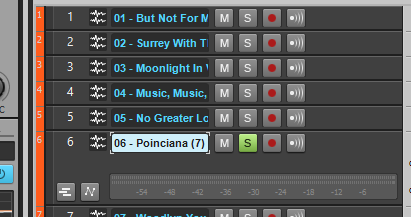
|
riojazz
Max Output Level: -64 dBFS

- Total Posts : 1337
- Joined: 2004/02/26 13:23:02
- Location: Mid-Hudson Valley, NY
- Status: offline
Re: Annoying X3 change
2013/10/05 20:37:43
(permalink)
☼ Best Answerby mettelus 2013/10/08 01:37:23
If you widen the window with the track number and name, don't you have what you need on one line (as in John's illustration above)?
Software: Cakewalk by Bandlab; Adobe Audition; Band-in-A-Box audiophile; Izotope Ozone; Encore; Melodyne; Win 10 Pro, 64-bit. Hardware: Focusrite Scarlett 18i20 2nd; Roland Integra-7; TCE Finalizer; Presonus Central Station, Behringer X-Touch. Home built i7 with 16 GB RAM, SSDs.
|
brundlefly
Max Output Level: 0 dBFS

- Total Posts : 14250
- Joined: 2007/09/14 14:57:59
- Location: Manitou Spgs, Colorado
- Status: offline
Re: Annoying X3 change
2013/10/05 21:07:06
(permalink)
It appears there is a change from X2 that you have to have a lot more space between the end of the track name field and the end of the track header (or peak indicators and vertical meters) in order for the MSR and Echo buttons to be displayed on the top line. You can see all the wasted space to the right of the buttons in John's screenshot. X2 will fit them in with only a tiny bit of extra space needed. Theses screenshots are from a new project saved from X3, and opened in X2:  
post edited by brundlefly - 2013/10/05 21:21:41
SONAR Platinum x64, 2x MOTU 2408/PCIe-424 (24-bit, 48kHz) Win10, I7-6700K @ 4.0GHz, 24GB DDR4, 2TB HDD, 32GB SSD Cache, GeForce GTX 750Ti, 2x 24" 16:10 IPS Monitors
|
bapu
Max Output Level: 0 dBFS

- Total Posts : 86000
- Joined: 2006/11/25 21:23:28
- Location: Thousand Oaks, CA
- Status: offline
Re: Annoying X3 change
2013/10/05 21:14:29
(permalink)
mettelus
To me, this is a "bug" but I have never reported one before.
Feel free to call it a bug if you wish. But to me (a software developer) a bug is: a) something that causes the program to stop working b) something that is clearly not working as intended What you described (to me) is a "change" that differs from how you would like it to. If I were you I'd fill out a feature request, not a bug report. Go to the top of this forum and see the thread called "How To Contact Cakewalk Directly". 3rd link in that thread is for a feature request.
|
mettelus
Max Output Level: -22 dBFS
- Total Posts : 5321
- Joined: 2005/08/05 03:19:25
- Location: Maryland, USA
- Status: offline
Re: Annoying X3 change
2013/10/05 21:21:21
(permalink)
LOL... I have never altered the width of that window in all of the versions of SONAR I have owned. Once I found the separator, it does restore them, thank you. If only the echo button had wrapped I would have caught on, but those 5 pixels wrapped everything :(
ASUS ROG Maximus X Hero (Wi-Fi AC), i7-8700k, 16GB RAM, GTX-1070Ti, Win 10 Pro, Saffire PRO 24 DSP, A-300 PRO, plus numerous gadgets and gizmos that make or manipulate sound in some way.
|
StepD
Max Output Level: -79 dBFS

- Total Posts : 594
- Joined: 2003/11/08 01:03:52
- Status: offline
Re: Annoying X3 change
2013/10/05 21:27:27
(permalink)
Yeah, I think John just happened to have his track header set wider than it needs to be in his screenshot. It's probably that strip on the left side you click to change the header color the requires a few more pixels in the header width in X3.
|
brundlefly
Max Output Level: 0 dBFS
- Total Posts : 14250
- Joined: 2007/09/14 14:57:59
- Location: Manitou Spgs, Colorado
- Status: offline
Re: Annoying X3 change
2013/10/05 22:02:10
(permalink)
bapu
But to me (a software developer) a bug is:
a) something that causes the program to stop working
b) something that is clearly not working as intended
Given the behavior is so different from earlier versions, and wastes so much space, I think there's no question it was not intended.
SONAR Platinum x64, 2x MOTU 2408/PCIe-424 (24-bit, 48kHz) Win10, I7-6700K @ 4.0GHz, 24GB DDR4, 2TB HDD, 32GB SSD Cache, GeForce GTX 750Ti, 2x 24" 16:10 IPS Monitors
|
bapu
Max Output Level: 0 dBFS
- Total Posts : 86000
- Joined: 2006/11/25 21:23:28
- Location: Thousand Oaks, CA
- Status: offline
Re: Annoying X3 change
2013/10/05 22:05:38
(permalink)
brundlefly
bapu
But to me (a software developer) a bug is:
a) something that causes the program to stop working
b) something that is clearly not working as intended
Given the behavior is so different from earlier versions, and wastes so much space, I think there's no question it was not intended.
Possibly. But until a baker weighs in I'd be inclined to say there may have been reasoning behind it. I'm a benefit of the doubt kind of guy....... unless I say it's a bug. 
|
StepD
Max Output Level: -79 dBFS
- Total Posts : 594
- Joined: 2003/11/08 01:03:52
- Status: offline
Re: Annoying X3 change
2013/10/05 22:30:28
(permalink)
It's definitely as intended. There's not really any waste of space. There are just extra pixels on the left side for the color bar.
|
swamptooth
Max Output Level: -53 dBFS

- Total Posts : 2229
- Joined: 2012/04/16 15:44:21
- Status: offline
Re: Annoying X3 change
2013/10/05 23:37:33
(permalink)
brundlefly
It appears there is a change from X2 that you have to have a lot more space between the end of the track name field and the end of the track header (or peak indicators and vertical meters) in order for the MSR and Echo buttons to be displayed on the top line. You can see all the wasted space to the right of the buttons in John's screenshot. X2 will fit them in with only a tiny bit of extra space needed.
Theses screenshots are from a new project saved from X3, and opened in X2:
that's because of the color picker at the beginning of the track, it stole about 20 pixels edit - so, i didn't read all the posts... and just noticed the one before mine. :/ lol.
Arvid H. PetersonSonar X3E Prod / X2A / X1PE | Cubase 9.5.1 | Reason 9.5 | Sibelius7 | Pure DataNative-Instruments Komplete 10 Ultimate and a smattering of other pluginsHome-brewed VSTs Toshiba Satellite S855-S5378 (16GB RAM, modified with 2x 750GB HDDs, Windows 8.1 x64) Samson Graphite 49, M-Audio Oxygen 49, Korg nanoPAD2, Webcam motion tracking programs M-Audio Fast Track UltraMember, ASCAP
|
Saxon1066
Max Output Level: -78 dBFS

- Total Posts : 619
- Joined: 2004/02/04 01:23:25
- Location: Ohigho
- Status: offline
Re: Annoying X3 change
2013/10/06 00:06:54
(permalink)
X2 had less space for the track title than X1 or 8.5 (which was unlimited, I think). How is the amount of title space in X3?
|
brundlefly
Max Output Level: 0 dBFS
- Total Posts : 14250
- Joined: 2007/09/14 14:57:59
- Location: Manitou Spgs, Colorado
- Status: offline
Re: Annoying X3 change
2013/10/06 01:43:55
(permalink)
StepD
It's definitely as intended. There's not really any waste of space. There are just extra pixels on the left side for the color bar.
I guess you're right. It seemed when I first checked that I had to add much more length to the header to get the MSR buttons to show up, but I guess I was mistaken. Carry on.
SONAR Platinum x64, 2x MOTU 2408/PCIe-424 (24-bit, 48kHz) Win10, I7-6700K @ 4.0GHz, 24GB DDR4, 2TB HDD, 32GB SSD Cache, GeForce GTX 750Ti, 2x 24" 16:10 IPS Monitors
|
icontakt
Max Output Level: -32.5 dBFS

- Total Posts : 4266
- Joined: 2012/03/04 08:18:02
- Location: Tokyo
- Status: offline
Re: Annoying X3 change
2013/10/06 02:56:32
(permalink)
Saxon1066
X2 had less space for the track title than X1 or 8.5 (which was unlimited, I think). How is the amount of title space in X3?
Same as X2, I think (see below). Was it unlimited in X1? I don't remember. 
Tak T. Primary Laptop: Core i7-4710MQ CPU, 16GB RAM, 7200RPM HDD, Windows 7 Home Premium OS (Japanese) x64 SP1Secondary Laptop: Core2 Duo CPU, 8GB RAM, 7200RPM HDD, Windows 7 Professional OS (Japanese) x64 SP1Audio Interface: iD14 (ASIO)Keyboard Controller/MIDI Interface: A-800PRODAW: SONAR Platinum x64 (latest update installed)
|
Sanderxpander
Max Output Level: -36.5 dBFS

- Total Posts : 3873
- Joined: 2013/09/30 10:08:24
- Status: offline
Re: Annoying X3 change
2013/10/06 03:19:53
(permalink)
Slightly annoying when you multi out things like Addictive Drums. Until you rename them, of course.
|
mettelus
Max Output Level: -22 dBFS
- Total Posts : 5321
- Joined: 2005/08/05 03:19:25
- Location: Maryland, USA
- Status: offline
Re: Annoying X3 change
2013/10/06 23:47:38
(permalink)
Wow... I didn't think this thread would continue, but since it did I will throw in my two cents quick about the "bug" debate...
To me, this is a bug, since the header (which I never altered in any version of SONAR) in previous versions included those buttons. In X3, of course the left edge now has the ability to custom color the track (great enhancement), and it is about 20 pixels.... BUT... I only needed to scoot the right edge about 3 pixels to get the buttons back. So, I assume it was "accounted" for, but not correctly (i.e. the right edge WAS scooted automatically, but 3 pixels shy of the mark to make it transparent to casual users like myself).
The bigger concern for why I consider this a bug is even simpler... if a user opens up a piece of work from a previous version they spent hours (or more) to create and their first reaction is "Where is everything I had here??" That is VERY bad. Impressing the end user is good, shocking them is not so good.
As far as "criticality" of this bug... it is LOW, I agree, but I think it was not "intended."
Michael
ASUS ROG Maximus X Hero (Wi-Fi AC), i7-8700k, 16GB RAM, GTX-1070Ti, Win 10 Pro, Saffire PRO 24 DSP, A-300 PRO, plus numerous gadgets and gizmos that make or manipulate sound in some way.
|
tunekicker
Max Output Level: -65 dBFS

- Total Posts : 1261
- Joined: 2005/10/28 14:39:50
- Location: Grand Junction, CO
- Status: offline
Re: Annoying X3 change
2013/10/07 00:00:14
(permalink)
I always use short names to minimize this. You could also change from Custom to one of the other views to show only what you really want to see.
|
cliffr
Max Output Level: -80 dBFS

- Total Posts : 539
- Joined: 2010/02/19 21:44:43
- Location: Wellington, New Zealand
- Status: offline
Re: Annoying X3 change
2013/10/07 00:06:23
(permalink)
C'mon, that is not a bug.
It's not even really a change in behaviour.
It's simply a change in the display header to accomodate added functionality ... and that's all it is.
And with that, comes the need to widen the divider if it's not already set wide enough to accomodate the new header format.
Is anything broken ?.
Sheesh, it's stretching things a bit beyond reality to interpret that as a bug.
What you got is extra functionality that users have been screaming for, that takes a little more horizontal space to display. Nothing more ... Nothing less :-)
Cheers - Cliff
i7-950 24 GB, GTX 580, W7/64 Ultimate, Sonar Platinum, Alesis MasterControl, KRK Rokit RP8g2s Some Real piano, basses, and guitars, Komplete 8Ultimate, Ibanez guitars, MusicLab RG/Strat/LPC, Trilian, Omnisphere, RMX, EWQL SO Platinum, Pianos, Choirs, VOP, Gypsy, Goliath, SD2, MOR, Ra, HS, HB, too many plugs, Midi controllers, and all kinds of weird gadgets My Soundclick Page
|
John
Forum Host
- Total Posts : 30467
- Joined: 2003/11/06 11:53:17
- Status: offline
Re: Annoying X3 change
2013/10/07 03:08:36
(permalink)
I recall having to change the width of the track header in various versions to see buttons and widgets. It seems second nature with Sonar.
|