sifidis
Max Output Level: -89 dBFS

- Total Posts : 90
- Joined: 2008/09/25 22:09:03
- Location: Thessaloniki, Greece.
- Status: offline
tempo question
i'm trying to set up a drum loop, composed of snares hihats and kicks. i'm using the piano roll view. i want to set the kick every sec. i'm then groove-clipping. the time i hear the kick is not one sec but longer.
the tempo is 120 4/4. is that the problem?
|
sifidis
Max Output Level: -89 dBFS
- Total Posts : 90
- Joined: 2008/09/25 22:09:03
- Location: Thessaloniki, Greece.
- Status: offline

Re: tempo question
2013/11/07 02:15:54
(permalink)
i think that the measurement in piano roll 1,2,3 etc are not seconds. is it? and how can i make it seconds?
|
2:43AM
Max Output Level: -68 dBFS

- Total Posts : 1147
- Joined: 2013/06/24 07:59:49
- Location: PHX
- Status: offline
Re: tempo question
2013/11/07 07:31:05
(permalink)
Just adjust your tempo accordingly?
120 BPM = 120 beats per minutes, or 2 beats per second. (120 divided by 60s = 2).
60 BPM = 60 beats per minute, or 1 beat per second. (60 divided by 60s = 1).
I don't think it's possible to change the Time Ruler on top of the Track View to seconds. You can, however, change the Track View Now Time meter to display various time/beat formats.
|
sifidis
Max Output Level: -89 dBFS
- Total Posts : 90
- Joined: 2008/09/25 22:09:03
- Location: Thessaloniki, Greece.
- Status: offline
Re: tempo question
2013/11/07 07:53:27
(permalink)
i adjusted the time view to h:m:s and it works fine but when the needle shows 00:00:01 sec the piano roll needle shows 1/2 sec. it's the piano roll time meter i wanna change and don't know how
|
sifidis
Max Output Level: -89 dBFS
- Total Posts : 90
- Joined: 2008/09/25 22:09:03
- Location: Thessaloniki, Greece.
- Status: offline
Re: tempo question
2013/11/09 00:36:03
(permalink)
|
brundlefly
Max Output Level: 0 dBFS

- Total Posts : 14250
- Joined: 2007/09/14 14:57:59
- Location: Manitou Spgs, Colorado
- Status: offline
Re: tempo question
2013/11/09 00:41:14
(permalink)
You can right-click either time ruler and change the format or add a format by clicking the + button at the righthand end.
SONAR Platinum x64, 2x MOTU 2408/PCIe-424 (24-bit, 48kHz) Win10, I7-6700K @ 4.0GHz, 24GB DDR4, 2TB HDD, 32GB SSD Cache, GeForce GTX 750Ti, 2x 24" 16:10 IPS Monitors
|
scook
Forum Host

- Total Posts : 24146
- Joined: 2005/07/27 13:43:57
- Location: TX
- Status: offline
Re: tempo question
2013/11/09 00:44:43
(permalink)
|
sifidis
Max Output Level: -89 dBFS
- Total Posts : 90
- Joined: 2008/09/25 22:09:03
- Location: Thessaloniki, Greece.
- Status: offline
Re: tempo question
2013/11/09 02:51:29
(permalink)
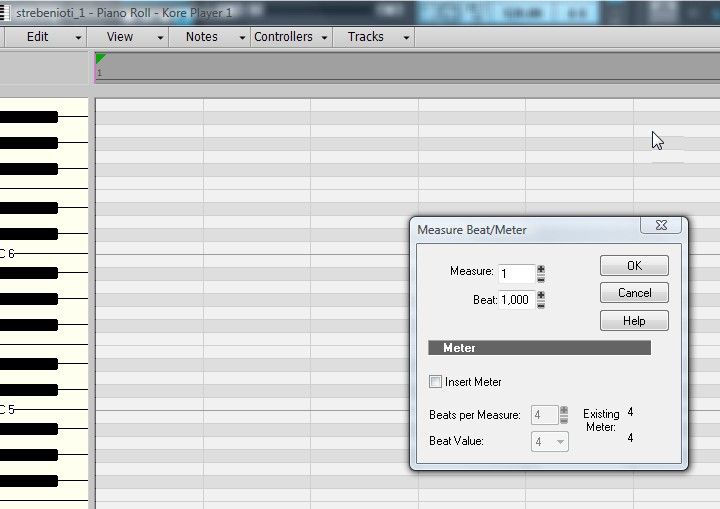  i right-clicked. this is the menu (photo). what next?
|
brundlefly
Max Output Level: 0 dBFS
- Total Posts : 14250
- Joined: 2007/09/14 14:57:59
- Location: Manitou Spgs, Colorado
- Status: offline
Re: tempo question
2013/11/09 02:57:19
(permalink)
That's the Set Measure/Beat At Now dialog which is one of the options in the timeline's context menu; Time Ruler Format is at the bottom of that menu. However, it appears X3 has a little bug with this, and is not allowing ruler format changes in the PRV. But you can still add the format you want and then remove the M:B:T format.
SONAR Platinum x64, 2x MOTU 2408/PCIe-424 (24-bit, 48kHz) Win10, I7-6700K @ 4.0GHz, 24GB DDR4, 2TB HDD, 32GB SSD Cache, GeForce GTX 750Ti, 2x 24" 16:10 IPS Monitors
|
sifidis
Max Output Level: -89 dBFS
- Total Posts : 90
- Joined: 2008/09/25 22:09:03
- Location: Thessaloniki, Greece.
- Status: offline
Re: tempo question
2013/11/09 03:11:05
(permalink)
 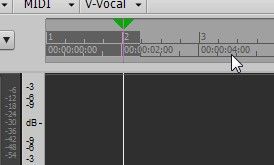 " /> i did as you said, still the piano roll( together with the ruler in track view) show 1,2,3 etc every 2 seconds and not every sec.
|
rontarrant
Max Output Level: -78 dBFS

- Total Posts : 643
- Joined: 2010/06/21 06:26:09
- Location: Ottawa, Ontario
- Status: offline
Re: tempo question
2013/11/09 03:18:28
(permalink)
If there's a bug keeping you from doing the m:s:t thing, couldn't you set the time ruler to 60 bbm and then lay down a kick every beat?
Or set your time ruler to 240 bbm and lay down a kick every bar?
|
sifidis
Max Output Level: -89 dBFS
- Total Posts : 90
- Joined: 2008/09/25 22:09:03
- Location: Thessaloniki, Greece.
- Status: offline
Re: tempo question
2013/11/09 03:23:20
(permalink)
|
Kalle Rantaaho
Max Output Level: -5 dBFS

- Total Posts : 7005
- Joined: 2006/01/09 13:07:59
- Location: Finland
- Status: offline
Re: tempo question
2013/11/09 13:10:12
(permalink)
It's the tempo, beats per minute - Bpm.
As mentioned above, if your tempo is 60 bpm then every beat is one second long, obviously, and a 4/4 bar is four seconds long. It depends on where in the bar you want to put the kicks what tempo you must use to get the kick every second.
To make the time ruler show accurately enough you need to zoom out enough to make the digits fit on the screen.
I think you're overthinking this somehow. It should be really simple. You think you're kicks in seconds, just as the beats per minute tempo setting does.
SONAR PE 8.5.3, Asus P5B, 2,4 Ghz Dual Core, 4 Gb RAM, GF 7300, EMU 1820, Bluetube Pre - Kontakt4, Ozone, Addictive Drums, PSP Mixpack2, Melda Creative Pack, Melodyne Plugin etc. The benefit of being a middle aged amateur is the low number of years of frustration ahead of you.
|
chuckebaby
Max Output Level: 0 dBFS
- Total Posts : 13146
- Joined: 2011/01/04 14:55:28
- Status: offline
Re: tempo question
2013/11/09 13:18:32
(permalink)
Windows 8.1 X64 Sonar Platinum x64 Custom built: Asrock z97 1150 - Intel I7 4790k - 16GB corsair DDR3 1600 - PNY SSD 220GBFocusrite Saffire 18I8 - Mackie Control
|
rontarrant
Max Output Level: -78 dBFS
- Total Posts : 643
- Joined: 2010/06/21 06:26:09
- Location: Ottawa, Ontario
- Status: offline
Re: tempo question
2013/11/10 22:31:13
(permalink)
Yup, lots of tutorials on YouTube. Just go there and do a search. You'll find tutorials for lots of subjects.
Or try CakeTV.
|
Living Room Rocker
Max Output Level: -77 dBFS

- Total Posts : 675
- Joined: 2009/09/16 22:10:24
- Status: offline
Re: tempo question
2013/11/10 23:22:26
(permalink)
Maybe I am not getting the issue here because of the OP's terminology, but the Ruler in the RRV can be changed just like that of the Track Pane/View's. If the tempo is 120 then every other beat would be at a second in time (just as 2:43AM described). Below is a screenshot showing the H:M:S:F Rulers in both the TV and PRV with the beat every second synced in both views. Is this what you are expecting to see, Lefteris?  Please clarify, anyone? Kind regards, Living Room Rocker
post edited by Living Room Rocker - 2013/11/11 00:57:59
|