One New
Max Output Level: -90 dBFS

- Total Posts : 8
- Joined: 2013/08/15 23:53:58
- Location: Atlanta
- Status: offline
None of my projects will play anymore.
I'm using Sonar 7 with Windows XP and none of my projects will play anymore. When I open a project and click play it plays for about one second and then it stops and says dropout. I ran check disc and it says there are no bad sectors. I cloned the hard drive and the cloned drive does exactly the same thing. When do I "control alt delete" it shows two Sonar 7s are running for some reason. Could my Sonar be corrupted? Should I uninstall Sonar and reinstall it? I have about five years worth of projects on this drive.
|
Kalle Rantaaho
Max Output Level: -5 dBFS

- Total Posts : 7005
- Joined: 2006/01/09 13:07:59
- Location: Finland
- Status: offline

Re: None of my projects will play anymore.
2013/08/16 05:29:10
(permalink)
Welcome to the forum!
It would be nice to have your PC specs with a question like this.
Do you have several HDDs - samples, audio, OS? What type (speed, green..?) of HDDs and how full were they when the problem started? Were they defragged regularily? Are other programs working fine? Could a memory comb have gone bad or something?
You are sure nothing was done to the system when the problem started - new software, drivers...?
What kind of an interface are you using and with what drivers?
If you really see two instances of SONAR running simultaneously, it's propably due to too much clicking when launching, if so, try launching SONAR by right clicking the icon and selecting open/run. I don't think you can install the same program twice.
SONAR PE 8.5.3, Asus P5B, 2,4 Ghz Dual Core, 4 Gb RAM, GF 7300, EMU 1820, Bluetube Pre - Kontakt4, Ozone, Addictive Drums, PSP Mixpack2, Melda Creative Pack, Melodyne Plugin etc. The benefit of being a middle aged amateur is the low number of years of frustration ahead of you.
|
bitflipper
01100010 01101001 01110100 01100110 01101100 01101

- Total Posts : 26036
- Joined: 2006/09/17 11:23:23
- Location: Everett, WA USA
- Status: offline
Re: None of my projects will play anymore.
2013/08/16 10:44:33
(permalink)
The crucial clue, I think, is seeing two instances of SONARPDR.EXE on the Task List.
Are you opening the projects by double-clicking on an icon in Windows Explorer? Or are you opening SONAR first, then loading the project? If the former, try the latter. Or, instead of double-clicking, right-click on the project file's icon and select "Open".
This may be irrelevant, but go to the global options and check the "allow only one open project at a time" option.
 All else is in doubt, so this is the truth I cling to. My Stuff
|
One New
Max Output Level: -90 dBFS
- Total Posts : 8
- Joined: 2013/08/15 23:53:58
- Location: Atlanta
- Status: offline
Re: None of my projects will play anymore.
2013/08/16 12:57:47
(permalink)
Thanks for the replies. I only have one hard drive in the computer. It is a 300 GB Maxtor 7200 RPM with 93 GB of data on it. I'm running Windows XP service pack 2 and the processor is a Intel Core 2 Duo 2.13 GHz. I defragged it some over the last 4 1/2 years but was told years ago that you shouldn't defrag too much when you have valuable data on a hard drive. Don't know if that was good advice or not. Other programs seem to be working fine. My projects use a lot of samples with MIDI sequencing. (VSTis) The only audio tracks are guitar parts. The problems really started after I drove 2000 miles with my computer in the trunk of my car. I had been having some dropout problems before then but I assumed it was because I had too many tracks in my projects. The hard drive makes a little more noise than it used to but when I ran check disk it says there are no bad sectors. I can start a new project and everything seems to play all right so it's only my older projects that aren't playing. I cloned the hard drive to an SSD and still have the same problem so I doubt it's a mechanical issue. I'm using an e-mu 1212M soundcard with whatever the latest drivers were about four and a half years ago. I tried opening Sonar first and loading projects. I tried double clicking the projects and right clicking and selecting open, all with the same results. It takes a long time for the projects to load. Sometimes they don't load at all so I do "control alt delete". That's when I see two instances of Sonar in the task list that say Sonar 7 Producer Edition Not Responding. I don't' see SONARPDR.EXE on the task list. If the project loads all the way then there is only one instance in the task bar and it says Sonar 7 Producer Edition Running. My question is do y'all think it would be a good idea to uninstall Sonar and reinstall it? I don't want to risk harming my project data.
post edited by One New - 2013/08/16 13:51:51
|
Kalle Rantaaho
Max Output Level: -5 dBFS
- Total Posts : 7005
- Joined: 2006/01/09 13:07:59
- Location: Finland
- Status: offline
Re: None of my projects will play anymore.
2013/08/16 15:23:36
(permalink)
So you have no backups of the projects from 4 years to revert to???!! You just might start sweating right away.
SONAR PE 8.5.3, Asus P5B, 2,4 Ghz Dual Core, 4 Gb RAM, GF 7300, EMU 1820, Bluetube Pre - Kontakt4, Ozone, Addictive Drums, PSP Mixpack2, Melda Creative Pack, Melodyne Plugin etc. The benefit of being a middle aged amateur is the low number of years of frustration ahead of you.
|
Cactus Music
Max Output Level: 0 dBFS

- Total Posts : 8424
- Joined: 2004/02/09 21:34:04
- Status: offline
Re: None of my projects will play anymore.
2013/08/17 11:22:25
(permalink)
You are living in danger by not following the golden rule of computers,,,, Back up everything, back it it up twice. You should have more than one hard drive in a tower. Hard drives are cheap.
I would pull that drive, install a nice new drive and put the old drive in as a data drive where you'll be able to retrieve your CWP files safely. That drive is obviously on it's way out. 5 years is max time I would trust one myself.
|
One New
Max Output Level: -90 dBFS
- Total Posts : 8
- Joined: 2013/08/15 23:53:58
- Location: Atlanta
- Status: offline
Re: None of my projects will play anymore.
2013/08/17 13:26:15
(permalink)
I have multiple backups of all my projects.
I have them stored on DVDs.
I have them on another hard drive stored at an alternate safe location.
And as of this week I have them stored on a cloned hard drive.
But none of that matters if my projects won't play.
Again my original question is "Do y'all think it would be a good idea to uninstall Sonar and reinstall it?"
My thinking is that since I have no bad sectors on the drive and the cloned drive is having the exact same problem and other programs still work, then some how Sonar has become corrupted. My concern is if I uninstall Sonar and reinstall it, will I be able to open my projects as they are now? Will all the plugins be recognized by the new install and automatically be loaded when I open the projects? Will all my audio tracks still be recognized and assigned to the right projects or when I uninstall Sonar will everything become disassociated and I have to search for and reassign all my plugins and tracks? If that is the case then I think I might as well just rebuild my system from scratch.
Which leads me to my second question.
If I'm going to rebuild my system, then I think I might want to upgrade to Sonar X2.
If I upgrade to X2 will all my Sonar 7 projects load and play. What about plugins? Most of my plugins are older 32 bit versions and not supported anymore. What if I build a 64 bit system, will the old projects still load and play with all the 32 bit plugins?
|
Kalle Rantaaho
Max Output Level: -5 dBFS
- Total Posts : 7005
- Joined: 2006/01/09 13:07:59
- Location: Finland
- Status: offline
Re: None of my projects will play anymore.
2013/08/17 14:55:23
(permalink)
OK. It's quite important info that backup versions saved prior to the problem won't play either. You did not mention it.
The project file includes all the info concerning the locations of projects material. If you don't change the file paths, SONAR should find everything after the re-install. If the file paths are changed, you need to change the settings in Options respectively.
Your description of the start of the problem - the long transport - makes me think it might be a mechanical issue anyway. I wonder if it's possible that a mechanical issue could simply prevent the read head from accessing some parts?? I've understood "bad sector" listing covers only the surface of the disc, not the mechanical part, but I may be wrong.
New noises in the HDD would really worry me. I lost a HDD once due to bearing failure.
SONAR PE 8.5.3, Asus P5B, 2,4 Ghz Dual Core, 4 Gb RAM, GF 7300, EMU 1820, Bluetube Pre - Kontakt4, Ozone, Addictive Drums, PSP Mixpack2, Melda Creative Pack, Melodyne Plugin etc. The benefit of being a middle aged amateur is the low number of years of frustration ahead of you.
|
Cactus Music
Max Output Level: 0 dBFS
- Total Posts : 8424
- Joined: 2004/02/09 21:34:04
- Status: offline
Re: None of my projects will play anymore.
2013/08/17 20:22:32
(permalink)
That's a pretty old computer so there could be a dozen things going on besides the hard drive. I would just put that one aside and upgrade to something newer. You can run Sonar 7 32 bit on a W7 computer, seems lots of folks do. No need to upgrade to X2 if your happy with 7. But at some point in time soon you should get those old projects finished and move on. It's like having stuff recorded on a 8 track cassette which will eventually die. If your stuck with that computer I would still use a newer C drive and re-install Windows and all your software. For me that was always faster than screwing around with a zillion other fixes. My guess is your projects will load up fine after a clean re install unless there are other issues with the MoBo or RAm etc. Open it up, blow the dust out, re seat the RAM, check all your connections. But a redo of the OS is the fastest way to re set to a clean machine.
post edited by Cactus Music - 2013/08/17 20:25:58
|
One New
Max Output Level: -90 dBFS
- Total Posts : 8
- Joined: 2013/08/15 23:53:58
- Location: Atlanta
- Status: offline
Re: None of my projects will play anymore.
2013/09/21 12:09:00
(permalink)
Alright I'm back, I built a new computer with Windows 7 64 bit and loaded Sonar 7 32 bit on it.
Now I can load my projects from the old hard drive into Sonar on the new hard drive and they will play (the now time bar moves) but none of the plug-ins are being loaded into the project. No effects or VST instruments.
My projects are mostly virtual instrument based so when I play them all I hear are the guitar tracks with no effects and no keyboards or drums. I see all the MIDI data and wave forms and the now time bar moves across the screen but the bulk of my music is missing.
How do I get the plugins to load?
|
Kalle Rantaaho
Max Output Level: -5 dBFS
- Total Posts : 7005
- Joined: 2006/01/09 13:07:59
- Location: Finland
- Status: offline
Re: None of my projects will play anymore.
2013/09/21 12:57:11
(permalink)
You need to check and update the VST-paths in Options-dialogue. On a 64 bit system the 32-bit plugins are in a folder with addition (x86), which your 32-bit-rooted projects most likely don't know..
SONAR PE 8.5.3, Asus P5B, 2,4 Ghz Dual Core, 4 Gb RAM, GF 7300, EMU 1820, Bluetube Pre - Kontakt4, Ozone, Addictive Drums, PSP Mixpack2, Melda Creative Pack, Melodyne Plugin etc. The benefit of being a middle aged amateur is the low number of years of frustration ahead of you.
|
One New
Max Output Level: -90 dBFS
- Total Posts : 8
- Joined: 2013/08/15 23:53:58
- Location: Atlanta
- Status: offline
Re: None of my projects will play anymore.
2013/09/27 00:14:37
(permalink)
I can't find VST-paths or Options-dialog. I found a VST tab under Options-global but the "Scan VST folders" and "Reset all VST plug-ins" buttons are not highlighted so they don't do anything when I click on them. This is the message I get when I load projects from the old hard drive : The following plug-ins are referred to by this project, but could not be found.They may be missing or improperly installed on your system. The original plug-in state is saved by stand-in plugins, and will be restored if you save the project and subsequently load it on a system where the plug-ins are properly installed. Warning: If you loaded this file in "safe mode", overwriting this file will result in the permanent loss of these effects.
post edited by One New - 2013/09/27 00:15:44
|
Kalle Rantaaho
Max Output Level: -5 dBFS
- Total Posts : 7005
- Joined: 2006/01/09 13:07:59
- Location: Finland
- Status: offline
Re: None of my projects will play anymore.
2013/09/27 09:59:54
(permalink)
Try going through Plugin Manager, and choose the files to be scanned for VSTs. Perhaps that frees the buttons in Options, too?
SONAR PE 8.5.3, Asus P5B, 2,4 Ghz Dual Core, 4 Gb RAM, GF 7300, EMU 1820, Bluetube Pre - Kontakt4, Ozone, Addictive Drums, PSP Mixpack2, Melda Creative Pack, Melodyne Plugin etc. The benefit of being a middle aged amateur is the low number of years of frustration ahead of you.
|
Cactus Music
Max Output Level: 0 dBFS
- Total Posts : 8424
- Joined: 2004/02/09 21:34:04
- Status: offline
Re: None of my projects will play anymore.
2013/09/27 10:50:11
(permalink)
What you are experiencing is the move from 32 to 64 bit OS. I'm not clear on if there was a 64 bit version of Sonar7, I know 8.5 comes with both.
If this is so then best to install the 32 Bit version , You can have both version installed but make sure you re name the desktop icon cause there's no way to tell. them apart.
That is why I still have Sonar 7 32 bit installed on my W7 64 bit main DAW. All my old XP 32 bit CWP files load up fine if I need to.
But those VST's can all be found in the Cakewalk sub folders. What I do is copy/paste so they are all in my shared vst folder. All of them. If I find a dll. in any other folders ( Stienberg etc) I copy/ paste to that one folder of my main Sonar. I have 4 Calkwalks in C drive. Copy/paste leaves the original where it belongs so as not to mess up other audio apps.
Sonar 7 32, Sonar 8.5 32 Sonar 8.5 64 ( main DAW) and Sonar X1 64 which is dormant being the demo which $$ would activate I presume.
|
Kev999
Max Output Level: -36 dBFS

- Total Posts : 3922
- Joined: 2007/05/01 14:22:54
- Location: Victoria, Australia
- Status: offline
Re: None of my projects will play anymore.
2013/09/28 00:11:16
(permalink)
Cactus Music
...I'm not clear on if there was a 64 bit version of Sonar7, I know 8.5 comes with both.
If this is so then best to install the 32 Bit version...
Yes, there was a 64-bit version of Sonar 7, but the OP said in Post#10 that he installed the 32-bit version.
SonarPlatinum∞(22.11.0.111)|Mixbus32C(4.3.19)|DigitalPerformer(9.5.1)|Reaper(5.77)FractalDesign:DefineR5|i7-6850k@4.1GHz|16GB@2666MHz-DDR4|MSI:GamingProCarbonX99a|Matrox:M9148(x2)|UAD2solo(6.5.2)|W7Ult-x64-SP1
Audient:iD22+ASP800|KRK:VXT6|+various-outboard-gear|+guitars&basses, etc.
Having fun at work lately
|
Kev999
Max Output Level: -36 dBFS
- Total Posts : 3922
- Joined: 2007/05/01 14:22:54
- Location: Victoria, Australia
- Status: offline
Re: None of my projects will play anymore.
2013/09/28 02:56:49
(permalink)
The default path for VSTs is:
c:\program files (x86)\vst
SonarPlatinum∞(22.11.0.111)|Mixbus32C(4.3.19)|DigitalPerformer(9.5.1)|Reaper(5.77)FractalDesign:DefineR5|i7-6850k@4.1GHz|16GB@2666MHz-DDR4|MSI:GamingProCarbonX99a|Matrox:M9148(x2)|UAD2solo(6.5.2)|W7Ult-x64-SP1
Audient:iD22+ASP800|KRK:VXT6|+various-outboard-gear|+guitars&basses, etc.
Having fun at work lately
|
One New
Max Output Level: -90 dBFS
- Total Posts : 8
- Joined: 2013/08/15 23:53:58
- Location: Atlanta
- Status: offline
Re: None of my projects will play anymore.
2013/10/09 20:36:37
(permalink)
Sorry it's taken so long to respond to this thread
I've been busy lately but I really appreciate the responses.
Kalle, I don't know how to scan them because they are not in the list of registered plug-ins.
Do they need to be registered somehow?
Cactus, I have the 32 bit version installed on Windows 7 64 bit.
All of my plug-ins are in a folder called Steinberg which is on my D drive.
Which folder am I supposed to paste them into?
Kev999, The path for my plugins is - D:\ Program Files\Steinberg
Sonar is on my C drive.
The thing I don't understand is why do all of my audio and MIDI files load from the D drive but the plugins don't?
Any ideas welcomed.
Thanks
|
Kev999
Max Output Level: -36 dBFS
- Total Posts : 3922
- Joined: 2007/05/01 14:22:54
- Location: Victoria, Australia
- Status: offline
Re: None of my projects will play anymore.
2013/10/10 01:22:42
(permalink)
One New
...I don't know how to scan them because they are not in the list of registered plug-ins.
Do they need to be registered somehow?
...The path for my plugins is - D:\ Program Files\Steinberg...
Plugins found in the scanning process become "registered". In Plugin Manager, click the Options button to see the filepaths that will be scanned. If "D:\ Program Files\Steinberg" is the only one listed, then your missing plugins must be located elsewhere. Find out where they are and add the appropriate path(s) to this list, then run the scan again.
post edited by Kev999 - 2013/10/10 01:24:23
SonarPlatinum∞(22.11.0.111)|Mixbus32C(4.3.19)|DigitalPerformer(9.5.1)|Reaper(5.77)FractalDesign:DefineR5|i7-6850k@4.1GHz|16GB@2666MHz-DDR4|MSI:GamingProCarbonX99a|Matrox:M9148(x2)|UAD2solo(6.5.2)|W7Ult-x64-SP1
Audient:iD22+ASP800|KRK:VXT6|+various-outboard-gear|+guitars&basses, etc.
Having fun at work lately
|
Kalle Rantaaho
Max Output Level: -5 dBFS
- Total Posts : 7005
- Joined: 2006/01/09 13:07:59
- Location: Finland
- Status: offline
Re: None of my projects will play anymore.
2013/10/10 01:27:09
(permalink)
You need to make Plugin Manager scan the folders where you have installed the VSTs in question.
(Or...I do not remember if Plugin Manager in vs.7 works differently, I don't think it does).
Your MIDI files are in the actual project folder, and audio files in the audio folder. The paths to those are exactly the same
as in your previous setup, aren't they? So SONAR finds them. Your 32 bit VSTs are located in a new location, so SONAR has to know where they are in order to use them.
It's been a long time since I took a thorough look at the Options , not to mention SONAR 7, but IIRC there really is a window with all the different paths used by SONAR.
You have not mentioned which VSTs you're talking about, so I can't say whether they need to be registered or not. If you have
been using them this far, I don't think registration is the culprit here. If a registration is required but not done yet, you do get a nag screen and/or the VST works only in demo mode or doesn't work at all.
SONAR PE 8.5.3, Asus P5B, 2,4 Ghz Dual Core, 4 Gb RAM, GF 7300, EMU 1820, Bluetube Pre - Kontakt4, Ozone, Addictive Drums, PSP Mixpack2, Melda Creative Pack, Melodyne Plugin etc. The benefit of being a middle aged amateur is the low number of years of frustration ahead of you.
|
One New
Max Output Level: -90 dBFS
- Total Posts : 8
- Joined: 2013/08/15 23:53:58
- Location: Atlanta
- Status: offline
Re: None of my projects will play anymore.
2013/10/11 00:28:01
(permalink)
There are no VSTs listed in the plugin manager. The scan VST folders button is not highlighted so I can't click on it. 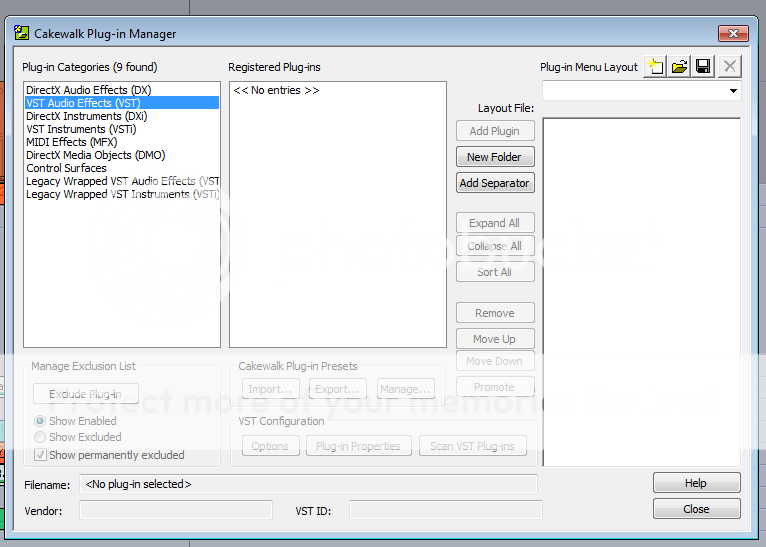 DXs are listed though. 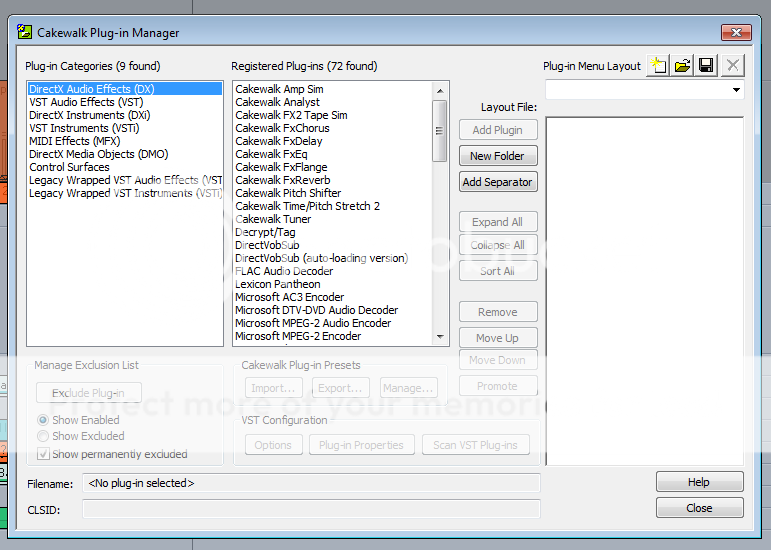 " /> I added the steinberg folder under global options but the scan VST folders button is not highlighted so I can't click on it either. 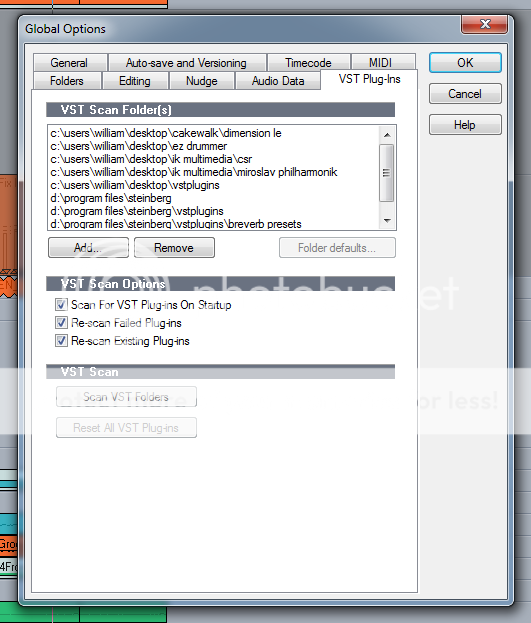
|
scook
Forum Host
- Total Posts : 24146
- Joined: 2005/07/27 13:43:57
- Location: TX
- Status: offline
Re: None of my projects will play anymore.
2013/10/11 01:19:58
(permalink)
Make sure to SONAR is "run as administrator" either by right-clicking on the app or icon and selecting the option or selecting the option in the compatibility tab in the program properties. Do not have more than one reference to "d:\program files\steinburg" in the scan path. The scanner recurses through the directories in paths specified. Also deselect the re-scan options.
|
One New
Max Output Level: -90 dBFS
- Total Posts : 8
- Joined: 2013/08/15 23:53:58
- Location: Atlanta
- Status: offline
Re: None of my projects will play anymore.
2013/10/11 17:53:57
(permalink)
Cactus Music
What you are experiencing is the move from 32 to 64 bit OS.
For what ever reason Sonar on the C drive (Windows 7 64-bit) is not seeing any VSTs. I moved the D:\program files\Steinberg folder over to the C drive (C:\program files\Steinberg) but I still can't scan them because the buttons are not highlighted. The Plug-in manager is seeing the DX stuff, the MIDI effects, and control surfaces but nothing with VST in the title. Maybe I need to install bit bridge? All my plug-ins are 32 bit. My Sonar 7 is 32 bit but the OS is 64 bit.
|
Divinit
Max Output Level: -89 dBFS

- Total Posts : 75
- Joined: 2003/11/14 16:27:17
- Location: Texas
- Status: offline
Re: None of my projects will play anymore.
2013/11/08 12:24:43
(permalink)
Having done just about every configuration/upgrade/crossgrade/reinstall/restore, etc. in every version of Cakewalk from 1997 til now and every version of Windows from 98 til 8.1, and taking it from one computer to another, the best way (IMHO) to do it to assure that it will work properly is to install ALL of your old plugins again. Go back to the oldest version of Cakewalk that you have that will install in some compatibility mode and just install the whole thing with all the bells and whistles. Since you likely have lots of disk space on the new one, just install the complete versions of all of them. To be absolutely sure, you might want to apply the appropriate patches to each of the programs. You don't even have to actually RUN each one of them, but you can, just to initialize them and make sure they come up right. Then shut them down and go to the next one until you are up to the current one. Definitely apply all the patches to the current version. Then, finally, do your VST scans after setting the paths to the defaults and the ones that others have already listed. Finally, run your project and see which, if any, of the installed VST's say they won't load. Those are the ones that are either in an incorrect path or need to be individually reinstalled. Yes, it's very time consuming, but one weekend day in order to get your system back up to running smoothly with all the wonderful bells and whistles that come from Cakewalk (and others) shouldn't be too much to ask....especially after all the work you've already done! My last "migration" was from my old computer to a new fancy schmantzy one running Win7x64. Typically, I install BOTH the 32 bit and 64 bit versions of Sonar AND all the plugins that allow it. I use the one that I need to for the 32 bit plugins and then use the other for the 64 bit plugins, but primarily for final mastering. There are a ton of ways to do it......good luck!
post edited by Divinit - 2013/11/08 12:25:58
When one is doing the process of self-analysis, One should make sure that the Self that is doing the analysis is, in fact, sane. Sonar X3 (always patched to current) Win7X64 8gb RAM Quad Core AMD 3.6mhz TASCAM USB interface EMU 1616m PCIe interface w/breakout Rapture, Dimension Pro, Studio Instruments, Zeta 2, tons more of Cakewalk's software Tons of IK, NI Camel Audio and other softsynths, plugins M-Audio Keystation Pro 88
|
New One 100
Max Output Level: -90 dBFS
- Total Posts : 2
- Joined: 2013/11/08 16:45:29
- Status: offline
Re: None of my projects will play anymore.
2013/11/08 17:09:13
(permalink)
Thanks for the reply Divinit, On another forum someone suggested that I hold down the shift key when I open Sonar. Don't know why but it worked. As soon as I clicked on the Sonar icon it scanned all my plugins. Unfortunately some of them still won't work. I'm getting this message for EZdrummer: EZdrummer cannot find the sound files! Reinstall EZdrummer or move the sounds to: The path to the sounds is not set. How do I set the path to the sounds and what do you mean when you say: "you might want to apply the appropriate patches to each of the programs"? Also, after hours of frustration I just found out that my Emulator X only works with Windows XP.  Most of my sounds come from the Emulator so now I'm trying to figure out if there is a way to load Windows XP alongside Windows 7 64 or am I going to have to rebuild this system again with Windows XP. I couldn't remember my password for this forum. I tried to reset it at least a dozen times but I kept getting the message that my account needed to be activated. When I tried to reactivate it it said it was already activated so I had to just open a new one. Any advice appreciated.
|
Cactus Music
Max Output Level: 0 dBFS
- Total Posts : 8424
- Joined: 2004/02/09 21:34:04
- Status: offline
Re: None of my projects will play anymore.
2013/11/08 20:54:50
(permalink)
did you ever try my method? just copy and paste them all to the C drive Cakewalk folder
|
New One 100
Max Output Level: -90 dBFS
- Total Posts : 2
- Joined: 2013/11/08 16:45:29
- Status: offline
Re: None of my projects will play anymore.
2013/11/11 17:09:10
(permalink)
Cactus I did copy and paste them into my new hard drive C drive> Program Files x86> Cakewalk> VstPlugins> VstPlugins folder but apparently it doesn't see them.
All of my VSTs on the original hard drive were in the D drive> Program files> Steinberg> Vst plugins folder.
I don't know where this Steinberg folder originally came from but there is another Vstplugin folder inside the Cakewalk folder on the original D drive, but the only plugins in it are the ones that are built-in to Sonar.
|
Dingleberry
Max Output Level: -90 dBFS
- Total Posts : 27
- Joined: 2013/03/08 11:41:00
- Status: offline
Re: None of my projects will play anymore.
2013/11/13 14:53:47
(permalink)
I read you had your computer in the car for a while?
could some hardware come loose inside? maybe re-seat them?
just a shot.
|
Cactus Music
Max Output Level: 0 dBFS
- Total Posts : 8424
- Joined: 2004/02/09 21:34:04
- Status: offline
Re: None of my projects will play anymore.
2013/11/13 18:53:07
(permalink)
You'll have a Steinberg VST folder if you had installed either Cubase or Wave Lab.
But for me, If I had Wave Lab or Cubase installed already, Then I install Sonar, The Steinberg VST plug ins automaticly show on the list , but in a sub list marked vst.
I've never had a problem, I often will download a free plug in from say KVR, it will go to my "Download" folder.
All I ever have do is copy and paste the .dll into Cakewalks shared plug in folder.
When I re build my computers all I do is copy and paste ( drag and drop in this case)
from the back up drive to the Cakewalk Shared Plug in folder on C.
Some Plug ins need to be installed as an application, those are obvious as they are exe. files
|