ramtin
Max Output Level: -89 dBFS

- Total Posts : 81
- Joined: 2013/10/19 02:41:41
- Location: Iran
- Status: offline

How to convert keyboard "Style" to" Sysex" file?
Dear Friends,
I had connected a “Technics SX KN 1000” Keyboard to My laptop supported by “windows 7 64 bit” via M-Audio UNO MIDI-USB cable, using Sonar x1.
I am working with very powerful style converter software which is called “Style works XT universal”. The software let you to make Style (Intro, Fill in, Passage, variations) from midi tracks corresponded to the Keyboard which you had already configured to work. In addition it let you to convert Style of a keyboard to another model or even other brands. For example you are able to convert “Korg PAX2” styles to “Technics SX KN 1000”. Any keyboard has its own formats for “user Style” (the style which is created by user) to apply in internal memory. As my keyboard is not equipped by any external memory device, at first, I have to convert the styles to Sysex file and then send it directly to the Keyboard from My laptop.
Does anybody know how it would be possible in Sonar or any other software?
|
ramtin
Max Output Level: -89 dBFS
- Total Posts : 81
- Joined: 2013/10/19 02:41:41
- Location: Iran
- Status: offline
Re: How to convert keyboard "Style" to" Sysex" file?
2013/11/09 04:31:02
(permalink)
Does anybody have any idea?
|
fb.seeker
Max Output Level: -88 dBFS

- Total Posts : 113
- Joined: 2006/02/24 18:59:14
- Location: 80 Miles north of Sacramento, CA
- Status: offline
Re: How to convert keyboard "Style" to" Sysex" file?
2013/11/09 11:01:52
(permalink)
Record the parts you want to use keyboard internally.
These should contain Technics sysex commands built into them.
Save this recording. Transfer midi to your PC.
Pages 71+ in your factory manual.
Load into your style maker.
When creating Yamaha Multipads I created short midi's(12-14 measure) using CM7 chord.
Then edited it within a different DAW, but it worked just fine.
|
LHong
Max Output Level: -90 dBFS

- Total Posts : 24
- Joined: 2005/11/23 01:41:12
- Location: California
- Status: offline
Re: How to convert keyboard "Style" to" Sysex" file?
2013/11/09 14:46:50
(permalink)
Have a look MIDIOX http://www.midiox.com/ May be it does what you need!P/S: for some reasons, I couldn't get the direct link here! Good luck!
|
jbraner
Max Output Level: -57 dBFS

- Total Posts : 1830
- Joined: 2003/11/06 14:38:35
- Location: Edinburgh, Scotland
- Status: offline
Re: How to convert keyboard "Style" to" Sysex" file?
2013/11/09 16:27:24
(permalink)
I don't really understand what you're trying to do (because your "style" looks like a MIDI sequence) but you can definitely record Sysex into SONAR - and also send it to any MIDI device.
Read the manual (I'm not being funny, but I don't know what level you're at, or where to start explaining) and check your MIDI settings in "Preferences" to make sure that send/receive Sysex is enabled.
basically, you just set SONAR to record, then press some button combination ( you need to check your keyboard's manual) to send a Sysex dump. Then the Sysex info is part of the SONAR file - so you can send it out to any other keyboard - when you hit "play".
BUT - I don't know if this is actually what you want to do...
|
Jeff Evans
Max Output Level: -24 dBFS

- Total Posts : 5139
- Joined: 2009/04/13 18:20:16
- Location: Ballarat, Australia
- Status: offline
Re: How to convert keyboard "Style" to" Sysex" file?
2013/11/09 17:48:37
(permalink)
Hi ramtin as usual an interesting problem! To those reading this thread I think the OP refers to being able to create a style of your own and somehow get it back into the Technics keyboard as some form of user style then.
I would start by trying to get the styles out of “Style works XT Universal” perhaps in the form of sysex dumps into your Technics. If it can generate a file that the Technics will recognise then sending styles across may be a possibility. Remember the keyboard can send certain parts of its memory to a sequencer or midi data program such as MidiOx, and get it back so that is one way to do it.
There may be another way in your Technics to somehow put it into record style mode and record the incoming midi data. You would have to sync the Technics clock wise to your sequencer. There is a mode when you are creating styles that is real time. The idea is you play in live your parts. However I bet any incoming midi data is also recorded. You might have to create the style in Style Worx or Sonar. Then use the sequencer to play back various parts of the styles one by one while those sections are put into real time record mode. Just some ideas. I will check the manual a bit further.
Specs i5-2500K 3.5 Ghz - 8 Gb RAM - Win 7 64 bit - ATI Radeon HD6900 Series - RME PCI HDSP9632 - Steinberg Midex 8 Midi interface - Faderport 8- Studio One V4 - iMac 2.5Ghz Core i5 - Sierra 10.12.6 - Focusrite Clarett thunderbolt interface Poor minds talk about people, average minds talk about events, great minds talk about ideas -Eleanor Roosevelt
|
ramtin
Max Output Level: -89 dBFS
- Total Posts : 81
- Joined: 2013/10/19 02:41:41
- Location: Iran
- Status: offline
Re: How to convert keyboard "Style" to" Sysex" file?
2013/11/10 01:20:39
(permalink)
fb.seeker
Record the parts you want to use keyboard internally.
These should contain Technics sysex commands built into them.
Save this recording. Transfer midi to your PC.
Pages 71+ in your factory manual.
Load into your style maker.
When creating Yamaha Multipads I created short midi's(12-14 measure) using CM7 chord.
Then edited it within a different DAW, but it worked just fine.
Dear Fb.seeker, Thanks a lot for your nice advice. It could be so helpful when I was going to send style from keyboard to PC. But I am exactly in opposite side,That means that I have already create my desire style in my PC using a very Powerful software called “ Style works XT universal”. It means that the style have been already created and saved in my PC by ".CMP" extension. Now I am going send the file to my “Technics SX KN 1000” Keyboard.If there was any chance to change the format to Sysex which be compatible with my keyboard, it was the best solution as, I had experienced sending/receiving style in Sysex format.Or any other way to send it through midi cable to the keyboard is appreciated . Regards
|
ramtin
Max Output Level: -89 dBFS
- Total Posts : 81
- Joined: 2013/10/19 02:41:41
- Location: Iran
- Status: offline
Re: How to convert keyboard "Style" to" Sysex" file?
2013/11/10 01:33:22
(permalink)
jbraner
I don't really understand what you're trying to do (because your "style" looks like a MIDI sequence) but you can definitely record Sysex into SONAR - and also send it to any MIDI device.
Read the manual (I'm not being funny, but I don't know what level you're at, or where to start explaining) and check your MIDI settings in "Preferences" to make sure that send/receive Sysex is enabled.
basically, you just set SONAR to record, then press some button combination ( you need to check your keyboard's manual) to send a Sysex dump. Then the Sysex info is part of the SONAR file - so you can send it out to any other keyboard - when you hit "play".
BUT - I don't know if this is actually what you want to do...
Dear jbraner, Thank you very much.I got that you are serious to help me on this problem.I am exactly going to transfer a style which has already created by " Style works Xt universal" to my keyboard "Tecknics SX KN 1000".
RegardsRamtin
|
ramtin
Max Output Level: -89 dBFS
- Total Posts : 81
- Joined: 2013/10/19 02:41:41
- Location: Iran
- Status: offline
Re: How to convert keyboard "Style" to" Sysex" file?
2013/11/10 01:39:37
(permalink)
LHong
Have a look MIDIOX
http://www.midiox.com/
May be it does what you need!
P/S: for some reasons, I couldn't get the direct link here!
Good luck!
Dear LHong, Thanks for your offer, I have already used the software.But had'nt seen any option for this particular case, in Midi-ox Tabs,If you Know any option there which can help me on the case please do the favor to me Regards Ramtin
|
ramtin
Max Output Level: -89 dBFS
- Total Posts : 81
- Joined: 2013/10/19 02:41:41
- Location: Iran
- Status: offline
Re: How to convert keyboard "Style" to" Sysex" file?
2013/11/10 02:16:29
(permalink)
Jeff Evans
Hi ramtin as usual an interesting problem! To those reading this thread I think the OP refers to being able to create a style of your own and somehow get it back into the Technics keyboard as some form of user style then.
Hi dear Jeff,Yes It is a new challenge,and I am serious to be overcome by using advice of wise friends like you. Jeff Evans
I would start by trying to get the styles out of “Style works XT Universal” perhaps in the form of sysex dumps into your Technics. If it can generate a file that the Technics will recognise then sending styles across may be a possibility. Remember the keyboard can send certain parts of its memory to a sequencer or midi data program such as MidiOx, and get it back so that is one way to do it.
Actually I had tried it Before,But it output was Style format with ".cpm" extension and Midi and GM file with ".mdi" extention.I really hope you can find an Syx output compatible with "Technics sx kn 1000" keyboard and if it happens the Problem will solve. Jeff Evans
There may be another way in your Technics to somehow put it into record style mode and record the incoming midi data. You would have to sync the Technics clock wise to your sequencer. There is a mode when you are creating styles that is real time. The idea is you play in live your parts. However I bet any incoming midi data is also recorded. You might have to create the style in Style Worx or Sonar. Then use the sequencer to play back various parts of the styles one by one while those sections are put into real time record mode. Just some ideas. I will check the manual a bit further.
It is so practical approach that I had experienced it before. In case that, I cannot find any other way I have to come back to it. On this method, I have to record 7 times, track by track, on real-time composer mode to fill "Drum" ,"Base", "acc1", "acc2","acc3","poly1","poly2".There are two restrictions. - It is so time consumable
- It is hard to match the measures on real-time mode.
Therefore, I have to find a better way to transfer the created style in the PC to my keyboard! Regards, Ramtin
|
Jeff Evans
Max Output Level: -24 dBFS
- Total Posts : 5139
- Joined: 2009/04/13 18:20:16
- Location: Ballarat, Australia
- Status: offline
Re: How to convert keyboard "Style" to" Sysex" file?
2013/11/10 04:23:54
(permalink)
Hi ramtin. I realise what I am suggesting is not ideal but an option. It is not difficult to synchronise the measures from your sequencer and the Technics keyboard.
You will have to get your DAW sequencer to send midi clock out the midi port that is feeding your Technics.
Normally the Technics is running on its own internal clock but it can be put into external sync mode and in this mode it will start and stop and sync with the sequencer. The Technicas will lock to the incoming external clock. It is in the manual. RealTime Setting (Midi 2: Page 1) Where it says 'clock' <int> Change this setting to <Midi>
When you powerup again it will be back onto <Int> automatically. However you will need to put it back to <Int> for normal operation again without powering OFF.
Most keyboards sync to sequencers very well.
Specs i5-2500K 3.5 Ghz - 8 Gb RAM - Win 7 64 bit - ATI Radeon HD6900 Series - RME PCI HDSP9632 - Steinberg Midex 8 Midi interface - Faderport 8- Studio One V4 - iMac 2.5Ghz Core i5 - Sierra 10.12.6 - Focusrite Clarett thunderbolt interface Poor minds talk about people, average minds talk about events, great minds talk about ideas -Eleanor Roosevelt
|
ramtin
Max Output Level: -89 dBFS
- Total Posts : 81
- Joined: 2013/10/19 02:41:41
- Location: Iran
- Status: offline
Re: How to convert keyboard "Style" to" Sysex" file?
2013/11/10 06:56:38
(permalink)
Dear Jeff,
I can set My keyboard clock.But can I ask you how can I set Sonar x1 to send midi clock out the midi port that is feeding My Technics and ultimately apply your method? I think that I have to open the style by midi format and set the ports of each track corresponded to my keyboard.My keyboard style is filling one by one for example 1-drums 2-base 3-acomp1,.....
Can you please explain more?
Thanks in advance
|
Jeff Evans
Max Output Level: -24 dBFS
- Total Posts : 5139
- Joined: 2009/04/13 18:20:16
- Location: Ballarat, Australia
- Status: offline
Re: How to convert keyboard "Style" to" Sysex" file?
2013/11/10 15:27:27
(permalink)
From the X1 Manual. I just looked up stuff on Midi Sync:
To use MIDI Sync with SONAR as the master
1. Configure your external MIDI devices to receive MIDI Sync.
2. Go to Edit > Preferences > Project - MIDI.
3. Check the Transmit MIDI Start/Continue/Stop/Clock box.
4. For most applications, check the Transmit MIDI Song Position Pointer box.
5. If you are using a drum machine to play patterns or loops, check the Use Start, Never Continu
option and disable the Transmit MIDI Song Position Pointer option.
6. In the MIDI Sync Output Ports field, check off the output ports that you want to send the sync
signal out of.
7. Click OK.
From now on, the transport controls in SONAR control playback on the external MIDI devices.
Specs i5-2500K 3.5 Ghz - 8 Gb RAM - Win 7 64 bit - ATI Radeon HD6900 Series - RME PCI HDSP9632 - Steinberg Midex 8 Midi interface - Faderport 8- Studio One V4 - iMac 2.5Ghz Core i5 - Sierra 10.12.6 - Focusrite Clarett thunderbolt interface Poor minds talk about people, average minds talk about events, great minds talk about ideas -Eleanor Roosevelt
|
LHong
Max Output Level: -90 dBFS
- Total Posts : 24
- Joined: 2005/11/23 01:41:12
- Location: California
- Status: offline
Re: How to convert keyboard "Style" to" Sysex" file?
2013/11/10 20:20:36
(permalink)
ramtin
LHong
Have a look MIDIOX
http://www.midiox.com/
May be it does what you need!
P/S: for some reasons, I couldn't get the direct link here!
Good luck!
Dear LHong,
Thanks for your offer,
I have already used the software.But had'nt seen any option for this particular case, in Midi-ox Tabs,If you Know any option there which can help me on the case please do the favor to me
Regards
Ramtin
Basically, the MIDIOX is an application that allows you to transfer from SysEx file (.syx) or from Text editor data to your MIDI keyboard as "SysEx Dump". In your case as Style files (.sty or .cpm), which is similar to (8-16 tracks) MIDI file format and contained the MIDI track's marker to determine what the parts in the keyboard style to work, such as Intro, main, fill or end, etc...you could simply import the styles to Sonar for MIDI editing as needed. What you will also need is an utility of MIDI to Sysex can be found as follows. It allows to convert the styles (or MIDI file) to SysEx (.syx). Then you can use MIDIOX -> load file -> send Sysex. http://www.bwalk.com.au/MidiUtil/SyxToMidi.zip Home page: http://www.bwalk.com.au/MidiUtil/FileConvert.html  An alternative MIDIOX is sendsx from Bome http://www.bome.com/products/sendsx 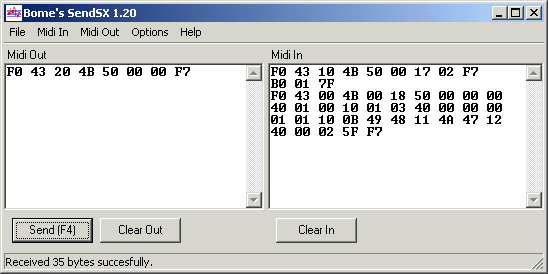 Hope this helps!
post edited by LHong - 2013/11/11 01:35:52
|
ramtin
Max Output Level: -89 dBFS
- Total Posts : 81
- Joined: 2013/10/19 02:41:41
- Location: Iran
- Status: offline
Re: How to convert keyboard "Style" to" Sysex" file?
2013/11/11 01:51:56
(permalink)
Dear LHong, Thanks for your explanation, As I have studied,Any instrument has its own ID in Sysex.For example for “Technics SX KN 1000” they are F0 : Exclusive status,50 : Technics ID21 : Individual data command01 : KN10 : Model 1000 (Should be)01 : data size (Should be)F7 : End of ExclusiveSecondly there are some other codes, which define the address which sysex file should be placed in the keyboard style user panels. Because the address for Style is different as song(sequence) or ..... When I convert the style to midi file and then change it to Sysex,as the output is an midi file, - How the converter software can find that it is a “Technics SX KN 1000” file and precise the correct ID in sysex file?
- As the converter is converting Midi to SYSEX how it can recognize that it is a "style" and specify the correct address in Sysex file in order to place in the keyboard style user panels?
Regards, Ramtin
|
LHong
Max Output Level: -90 dBFS
- Total Posts : 24
- Joined: 2005/11/23 01:41:12
- Location: California
- Status: offline
Re: How to convert keyboard "Style" to" Sysex" file?
2013/11/11 03:39:43
(permalink)
Good question!
I think the "MIDI to SYSEX" Utility just does trans-coding (whether style or not)!
It might be good idea to keep original style format instead of converting "style to midi".
How about try to convert directly from the style file by changing extension to .mid from .sty or .cpm.
|
ramtin
Max Output Level: -89 dBFS
- Total Posts : 81
- Joined: 2013/10/19 02:41:41
- Location: Iran
- Status: offline
Re: How to convert keyboard "Style" to" Sysex" file?
2013/11/11 04:54:53
(permalink)
Dear Lhong
your advice, changing extension to .mid from .sty or .cpm is not applicable,
regards
|
LHong
Max Output Level: -90 dBFS
- Total Posts : 24
- Joined: 2005/11/23 01:41:12
- Location: California
- Status: offline
Re: How to convert keyboard "Style" to" Sysex" file?
2013/11/11 11:40:03
(permalink)
Sorry to hear it! I don't have Technics Keyboard nor those utilities with me at the moment! Look likes you need more specific "Style to SysEx file conversion" for your Technics keyboard to work properly! Just wondering how other people do, in order to get the "SN1000 style file" to work? From Floppy Drive? your advice, changing extension to .mid from .sty or .cpm is not applicable, Edit: It seems be OK (created .syx output file), when I tried the Yamaha Tyros style (.STY) renamed to .mid and ran "MIDI to Sysex" utility! Not sure about the .CMP Style file since I don't own any! Have a look the example as follows: Input style file (original before rename to .mid): http://www.mediafire.com/?63e871sfna2idzp Output Sysex file: http://www.mediafire.com/?3a1wm2wh32jsw98 Any ideas?
post edited by LHong - 2013/11/11 15:13:40
|
ramtin
Max Output Level: -89 dBFS
- Total Posts : 81
- Joined: 2013/10/19 02:41:41
- Location: Iran
- Status: offline
Re: How to convert keyboard "Style" to" Sysex" file?
2013/11/12 01:52:19
(permalink)
☄ Helpfulby ramtin 2013/11/17 14:25:51
Jeff Evans
From the X1 Manual. I just looked up stuff on Midi Sync:
To use MIDI Sync with SONAR as the master
1. Configure your external MIDI devices to receive MIDI Sync.
2. Go to Edit > Preferences > Project - MIDI.
3. Check the Transmit MIDI Start/Continue/Stop/Clock box.
4. For most applications, check the Transmit MIDI Song Position Pointer box.
5. If you are using a drum machine to play patterns or loops, check the Use Start, Never Continu
option and disable the Transmit MIDI Song Position Pointer option.
6. In the MIDI Sync Output Ports field, check off the output ports that you want to send the sync
signal out of.
7. Click OK.
From now on, the transport controls in SONAR control playback on the external MIDI devices.
Dear Jeff,I apply the setting on Sonar and fortunately, I was able to fill the style in my "keyboard user style". But a small problem occur when I use the combination of sonar and midi file in order to fill the style. Actually there is happened some disorder specially on drums tracks when it is playing back through keyboard speakers. It may change the original octave on drum track and/or something else. Wherever, I had not the same problem when I had done the same, using " Style works XT universal" and the play back was performing very well through my keyboard speaker. As I have Many Tools in sonar such as loop, merge, copy delete etc. ...and above all, I can set my keyboard clock with sonar to playback in same time, I prefer to use sonar to handle this issue and hope that you have a solution to remove disorder and match the drum tracks with the keyboard. RegardsRamtin
|
ramtin
Max Output Level: -89 dBFS
- Total Posts : 81
- Joined: 2013/10/19 02:41:41
- Location: Iran
- Status: offline
Re: How to convert keyboard "Style" to" Sysex" file?
2013/11/12 02:08:14
(permalink)
LHong
Sorry to hear it! I don't have Technics Keyboard nor those utilities with me at the moment!
Look likes you need more specific "Style to SysEx file conversion" for your Technics keyboard to work properly! Just wondering how other people do, in order to get the "SN1000 style file" to work? From Floppy Drive?
your advice, changing extension to .mid from .sty or .cpm is not applicable,
Edit: It seems be OK (created .syx output file), when I tried the Yamaha Tyros style (.STY) renamed to .mid and ran "MIDI to Sysex" utility! Not sure about the .CMP Style file since I don't own any!
Have a look the example as follows:
Input style file (original before rename to .mid): http://www.mediafire.com/?63e871sfna2idzp
Output Sysex file: http://www.mediafire.com/?3a1wm2wh32jsw98
Any ideas?
Dear LHong, Thanks for your support,I was not able to check your solution because - Mediafire did not respond when I was going to download your result,and the following masage was appeared:
MediaFire will be right back! - The software which I had downloaded was not trial version and asked me for donate.
Regards Ramtin
|
LHong
Max Output Level: -90 dBFS
- Total Posts : 24
- Joined: 2005/11/23 01:41:12
- Location: California
- Status: offline
Re: How to convert keyboard "Style" to" Sysex" file?
2013/11/12 02:43:20
(permalink)
|
ramtin
Max Output Level: -89 dBFS
- Total Posts : 81
- Joined: 2013/10/19 02:41:41
- Location: Iran
- Status: offline
Re: How to convert keyboard "Style" to" Sysex" file?
2013/11/12 04:51:54
(permalink)
|
LHong
Max Output Level: -90 dBFS
- Total Posts : 24
- Joined: 2005/11/23 01:41:12
- Location: California
- Status: offline
Re: How to convert keyboard "Style" to" Sysex" file?
2013/11/12 13:16:09
(permalink)
I downloaded the Sysex files and opened it in Midi-ox. It seems that it is ok, but I am not insure. Did you try to transfer the Sysex to tyros, after you converted it from Style format?
If your Method works, it would be a great achievement for all workstation arranger user! No, I have not tried it! But as you said, It's good to know if this method works for other Workstations Arranger User as well! I'm looking forward to seeing that you could use the "SysEx Style" format through the MIDI connection for your Keyboard successfully! Can I ask you to put the free version of "midi to Sysex" in "Mediafire" To download? Then I would be able to myself test the matter. It is the direct link from the Website, where I got it: http://www.bwalk.com.au/MidiUtil/SyxToMidi.zip Try it again, if it still has same restriction, only thing I can help is to convert it for you from .CMP to SysEx for 1 or 2 files, just send me your style files. Then you could verify it by yourself. However, the best way is that you will need to contact to the developer directly, in order to get more supports or fix bugs in case needed. Keep in mind, since not many people are using this Method, don't expect it's "Bug Free" or it will work perfectly! And I would recommend to do so! Sorry, that's all I can help! Good luck!
post edited by LHong - 2013/11/12 14:38:27
|
ramtin
Max Output Level: -89 dBFS
- Total Posts : 81
- Joined: 2013/10/19 02:41:41
- Location: Iran
- Status: offline
Re: How to convert keyboard "Style" to" Sysex" file?
2013/11/12 14:55:38
(permalink)
Thanks, I will check and com back to you
|
ramtin
Max Output Level: -89 dBFS
- Total Posts : 81
- Joined: 2013/10/19 02:41:41
- Location: Iran
- Status: offline
Re: How to convert keyboard "Style" to" Sysex" file?
2013/11/13 06:22:48
(permalink)
When I play a Midi file in My Laptop using sonar and laptop sound card, the performance is good, but when I try to play it back from my keyboard (Technics KN 100), the performance will change and get disorder. by setting the channels and matching them between sonar and keyboard for other tracks except of drums, I can modify the performance in keyboard .It specially happens on drums track. I can not understand why it happens. Can anyone tell me what is the reason and solution?
|
ramtin
Max Output Level: -89 dBFS
- Total Posts : 81
- Joined: 2013/10/19 02:41:41
- Location: Iran
- Status: offline
Re: How to convert keyboard "Style" to" Sysex" file?
2013/11/13 08:29:51
(permalink)
LHong
Here you go - you should be able to get files as follows (Right click link -> save file as) - let me know!Style input (rename it to .mid before to convert) <a href="http://hotfile.com/dl/254627850/eb0778d/AllNightTyrosStyle.sty.html">http://hotfile.com/dl/254627850/eb0778d/AllNightTyrosStyle.sty.html </a></p>
<p> </p>
<p> Sysex output: <a href="http://hotfile.com/dl/254627762/a6bedae/AllNightTyrosStyle.SYX.html">http://hotfile.com/dl/254627762/a6bedae/AllNightTyrosStyle.SYX.html</a></p>
<p> </p>
<p> The software which I had downloaded was not trial version and asked me for donate. "MIDIOX" and "MIDI to SYSEX" are FREE! "Donation" is up to you, I think!
I download the file .l cannot use it before donation Regards Ramtin
|
ramtin
Max Output Level: -89 dBFS
- Total Posts : 81
- Joined: 2013/10/19 02:41:41
- Location: Iran
- Status: offline
Re: How to convert keyboard "Style" to" Sysex" file?
2013/11/16 01:30:01
(permalink)
Ramtin
Dear Jeff,
I apply the setting on Sonar and fortunately, I was able to fill the style in my "keyboard user style". But a small problem occur when I use the combination of sonar and midi file in order to fill the style. Actually there is happened some disorder specially on drums tracks when it is playing back through keyboard speakers. It may change the original octave on drum track and/or something else. Wherever, I had not the same problem when I had done the same, using "Style works XT universal" and the play back was performing very well through my keyboard speaker. As I have Many Tools in sonar such as loop, merge, copy delete etc. ...and above all, I can set my keyboard clock with sonar to playback in same time, I prefer to use sonar to handle this issue and hope that you have a solution to remove disorder and match the drum tracks with the keyboard.
Regards
Ramtin
Dear Jeff,After a lot of Studies and exercises, finally I got, why midi files do not correctly performed, when they are playing back in sonar and transmitting to my keyboard.As I understood Midi files are supported by General Midi Standards which are include of GM banks and GM Drum Banks. All the Midi instrument which support general midi use same banks.But Technics keyboard KN series except of KN7000 are not supported GM.Therefore when song/midi are playing back in the instruments the drum kits get disorder do not play correctly. For those midi files, which are compatible with my instrument, your solution is so helpful to fill the style, Thanks for your support, Ramyin
|
Jeff Evans
Max Output Level: -24 dBFS
- Total Posts : 5139
- Joined: 2009/04/13 18:20:16
- Location: Ballarat, Australia
- Status: offline
Re: How to convert keyboard "Style" to" Sysex" file?
2013/11/16 02:44:35
(permalink)
☼ Best Answerby ramtin 2013/11/17 14:25:22
Hi ramtin, yes you are very correct. I completely overlooked that and I am sorry for not mentioning it. The really stupid thing and I mean stupid about that Technics model is it's failure to conform to the GMidi standard. But it is a very cool instrument and I have heard more than once that people prefer it over quite a few others. I think later Technics models switched to GMidi though.
It's only the drums that are not going to work. All you have to do is create a drum map to switch everything around.
Specs i5-2500K 3.5 Ghz - 8 Gb RAM - Win 7 64 bit - ATI Radeon HD6900 Series - RME PCI HDSP9632 - Steinberg Midex 8 Midi interface - Faderport 8- Studio One V4 - iMac 2.5Ghz Core i5 - Sierra 10.12.6 - Focusrite Clarett thunderbolt interface Poor minds talk about people, average minds talk about events, great minds talk about ideas -Eleanor Roosevelt
|
ramtin
Max Output Level: -89 dBFS
- Total Posts : 81
- Joined: 2013/10/19 02:41:41
- Location: Iran
- Status: offline
Re: How to convert keyboard "Style" to" Sysex" file?
2013/11/16 04:40:19
(permalink)
Jeff Evans
Hi ramtin, yes you are very correct. I completely overlooked that and I am sorry for not mentioning it. The really stupid thing and I mean stupid about that Technics model is it's failure to conform to the GMidi standard. But it is a very cool instrument and I have heard more than once that people prefer it over quite a few others. I think later Technics models switched to GMidi though.
It's only the drums that are not going to work. All you have to do is create a drum map to switch everything around.
Dear Jeff, Please correct me if I am wrong. As I understood, it is possible to switch manually the drums into their right place using drum mapper .I had seen the option in " Sonar" as well as “ Style works XT universal”. But, I do not know how it works.However, I will check the Manual to find out how should I do it, But also your experience and knowledge can be more helpful for me. The main things that I am thinking about right now is that , Can I create Data Map drum once time and use it for any GM file to play back in My keyboard ? Or I have to create it separately for any GMidi file? Regards Ramtin
|
ramtin
Max Output Level: -89 dBFS
- Total Posts : 81
- Joined: 2013/10/19 02:41:41
- Location: Iran
- Status: offline
Re: How to convert keyboard "Style" to" Sysex" file?
2013/11/17 03:12:49
(permalink)
Hi, Jeff, I had read the manual regarding drum map and found it as a strong function that can help me to perform GM song through my keyboard (Technics SX KN 1000).I have already done the follows: 1) Go to Edit > Preferences > MIDI - Instruments. 2) Import Technics 1000 Bank and Technics 1000 Drum which already had downloaded from cakewalk website. And set the port of midi track to Technics 1000 bank 3) Set drum track in My keyboard to channel 10. 4) Go to Edit > Preferences > MIDI - Drum Map Manager5) Create a new Map6) Go to preset box to find Technics KN 1000 drum map (It Is not available. From Technics series just KN 2000 is existed) 7) Therefore, I choose Default from preset box. Now I have to change the Note Out (Technics KN 1000) to get compatible with Note In (General Midi) for each patch, I tried to match the Note In and Note out by ear. By Pressing Shift+Space I hear Note In patch from laptop speaker/headphone and try to find the compatible percussion note in Keyboard(Technics 1000) to fill the note number in Note Out cell. I have prepared a table to match GM percussion (Note IN) with Technics KN1000 Percussion (NoteOut) using similarity value and name of patchs.  http://www.4shared.com/do...131117-113424-f5d16833 http://www.4shared.com/do...131117-113424-f5d16833 The blank cells have been not assigned yet. I surprised when I saw that technics KN1000 was not available in drum Map preset box in drom map manager, Therefore, I decided to create my own one to apply to the keyboard, Please correct me, if I am in wrong way.Or if I have missed any option please advice me.
post edited by ramtin - 2013/11/17 06:35:23
|