devoid2
Max Output Level: -90 dBFS

- Total Posts : 28
- Joined: 2007/01/28 21:14:29
- Status: offline
Pro Channel clipping lights and gain stage management
Hello all;
I just today noticed the "clipping LEDs" in Pro Channel. I'm using the Pro Channel in this case on the master bus. I find that I can't get them to run "safely" in the green or yellow without running the various tracks at a very low volume, and then the level at the master bus' output is pretty low too, averaging below -12. I don't hear any problems when getting flashing red clip lights, but I really couldn't find any info on how to interpret these lights. Anyone know how I ought to consider them?
thanks
d'2
|
The Maillard Reaction
Max Output Level: 0 dBFS

- Total Posts : 31918
- Joined: 2004/07/09 20:02:20
- Status: offline

Re:Pro Channel clipping lights and gain stage management
2011/03/25 18:55:00
(permalink)
|
Qwerty69
Max Output Level: -62 dBFS

- Total Posts : 1435
- Joined: 2004/02/19 17:44:10
- Status: offline
Re:Pro Channel clipping lights and gain stage management
2011/03/26 05:34:11
(permalink)
mike_mccue
Consider them useless.
Why? Q.
|
John
Forum Host

- Total Posts : 30467
- Joined: 2003/11/06 11:53:17
- Status: offline
Re:Pro Channel clipping lights and gain stage management
2011/03/26 06:34:03
(permalink)
I don't think they are clipping lights. I think they are activity lights. If the meter on the channel isn't clipping why would PC clip?
|
dwcaldwell
Max Output Level: -86 dBFS

- Total Posts : 234
- Joined: 2009/02/05 22:58:35
- Location: Texas
- Status: offline
Re:Pro Channel clipping lights and gain stage management
2011/03/26 06:42:38
(permalink)
I didn't think so either, John, but that's what the help file calls them:
"Clipping LED. Shows if the input signal to the Compressor module is clipping. If there is any distortion in the ProChannel signal chain, the clipping LEDs let you identify where the clipping occurs."
|
John
Forum Host
- Total Posts : 30467
- Joined: 2003/11/06 11:53:17
- Status: offline
Re:Pro Channel clipping lights and gain stage management
2011/03/26 15:06:38
(permalink)
dwcaldwell
I didn't think so either, John, but that's what the help file calls them:
"Clipping LED. Shows if the input signal to the Compressor module is clipping. If there is any distortion in the ProChannel signal chain, the clipping LEDs let you identify where the clipping occurs."
Then it has a very low tolerance for clipping. Shouldn't it be red to be clipping?
post edited by John - 2011/03/26 15:12:42
|
The Maillard Reaction
Max Output Level: 0 dBFS
- Total Posts : 31918
- Joined: 2004/07/09 20:02:20
- Status: offline
Re:Pro Channel clipping lights and gain stage management
2011/03/26 15:23:08
(permalink)
Maybe Pro Channel users have a high propensity for not noticing the effect of clipping? The only actual meter I've seen on Pro Channel is a Gain Reduction meter... which is fairly useless even on my hardware compressors. The Pro Channel clipping LEDs are also about as useless as clipping LEDs on a hardware unit. They just don't provide enough information. What I would do is use: 1) the ProChannel on your track with only the EQ stage and set up a low cut and any fix-it EQ you may need before compression. 2) Send the track to a bus for another instance of ProChannel and use that for your compressor. 3) Send the bus to another bus and use that for the ProChannel EQ for musical tailoring. 4) Send that bus to a submix or master bus for the "mix" The good news is... the Saturation stage is so useless you don't need to set up a bus for it... just leave it turned off. The benefit of this method of patching is that you get a full set of meters... and you can even insert specialty meters in your FX bin in between the stages of ProChannel... plus you get to make great use of the EQ before the compressor so you don't compress and bring up stuff you don't want to make it to the mix and then you get to make use of ProChannel's compressor and then you get to have some EQ for actual mixing. There you go. < - post is posted - >
post edited by mike_mccue - 2011/03/26 15:26:23
|
TobyC
Max Output Level: -84 dBFS

- Total Posts : 337
- Joined: 2003/11/16 08:42:23
- Location: Haywards Heath, West Sussex, UK
- Status: offline
Re:Pro Channel clipping lights and gain stage management
2011/03/26 15:27:46
(permalink)
+1 to this question. I don't find the ProChannel LEDs' or the metering too helpful compared with Sonitus, for example or Ozone where the input and output levels and any clipping in either are crystal clear.
TobyC Album tracks & video: www.tobesmusic.com Key Hardware: Asus Z-170A + Intel Core i7 6700K 4.00GHz Socket 1151, Corsair Vengeance LPX 16GB (2x8GB) DDR4 DRAM 2666MHz, StarTech.com 2 Port 1394a PCI Express FireWire Card, RME Fireface-UFX Audio Interface + Behringer ADA8200 8 Channel extension Key Software: Win 7/64, Sonar Platinum, Sony Sound Forge Pro 11, Izotope (Ozone 7 Advanced, RX4, Nectar 2, Alloy 2), Voxengo (Elephant, LF Punch, Span Plus, Gliss EQ), Sony Movie Studio Platinum 13
|
snookerc
Max Output Level: -84 dBFS
- Total Posts : 312
- Joined: 2005/08/22 22:45:07
- Location: Iowa (USA)
- Status: offline
Re:Pro Channel clipping lights and gain stage management
2011/03/26 18:43:32
(permalink)
Chris Snook (Computer playing guitar programmer) _______________________________________ Sonar Platinum Windows 10 x64 AMD Phenom II X6 2.8GHz Saffire 40 Pro 8GB RAM Alesis QS8.1 controller kb
|
snookerc
Max Output Level: -84 dBFS
- Total Posts : 312
- Joined: 2005/08/22 22:45:07
- Location: Iowa (USA)
- Status: offline
Re:Pro Channel clipping lights and gain stage management
2011/03/26 18:45:08
(permalink)
The good news is... the Saturation stage is so useless you don't need to set up a bus for it... just leave it turned off. I agree, I haven't found it useful at all, sorry to say.
Chris Snook (Computer playing guitar programmer) _______________________________________ Sonar Platinum Windows 10 x64 AMD Phenom II X6 2.8GHz Saffire 40 Pro 8GB RAM Alesis QS8.1 controller kb
|
snookerc
Max Output Level: -84 dBFS
- Total Posts : 312
- Joined: 2005/08/22 22:45:07
- Location: Iowa (USA)
- Status: offline
Re:Pro Channel clipping lights and gain stage management
2011/03/26 18:48:11
(permalink)
Then it has a very low tolerance for clipping. Shouldn't it be red to be clipping? Yeah, I wasn't sure if they really mean red =0dB headroom? or....?
Chris Snook (Computer playing guitar programmer) _______________________________________ Sonar Platinum Windows 10 x64 AMD Phenom II X6 2.8GHz Saffire 40 Pro 8GB RAM Alesis QS8.1 controller kb
|
dwcaldwell
Max Output Level: -86 dBFS
- Total Posts : 234
- Joined: 2009/02/05 22:58:35
- Location: Texas
- Status: offline
Re:Pro Channel clipping lights and gain stage management
2011/03/26 21:26:07
(permalink)
John
dwcaldwell
I didn't think so either, John, but that's what the help file calls them:
"Clipping LED. Shows if the input signal to the Compressor module is clipping. If there is any distortion in the ProChannel signal chain, the clipping LEDs let you identify where the clipping occurs."
Then it has a very low tolerance for clipping. Shouldn't it be red to be clipping?
I concur.
|
Rasure
Max Output Level: -79 dBFS

- Total Posts : 584
- Joined: 2007/02/06 06:26:21
- Location: UK
- Status: offline
Re:Pro Channel clipping lights and gain stage management
2011/03/27 19:14:50
(permalink)
I noticed this since the X1b patch update, in fact when I froze my soft synths down the wave was clipped to distortion, even though the soft synth (omnisphere) volume was set at -8db.
Seems to be a similar bug to x1a where freezing synths including effects were not turning off pro channel after the freeze, but now its seems to be putting the volume up whenever it likes, something not right thats for sure, seems random, like the pro channel not working after inserting busses:-(
|
John
Forum Host
- Total Posts : 30467
- Joined: 2003/11/06 11:53:17
- Status: offline
Re:Pro Channel clipping lights and gain stage management
2011/03/27 19:31:38
(permalink)
One thing is I don't see how you can not notice a clipped track unless you have PC as post fader.
|
Rasure
Max Output Level: -79 dBFS
- Total Posts : 584
- Joined: 2007/02/06 06:26:21
- Location: UK
- Status: offline
Re:Pro Channel clipping lights and gain stage management
2011/03/27 20:08:53
(permalink)
I been back to recheck and I think that its an an issue with Omisphere 1.5 actually, with the "Human French Horns Pad" (that instance of omnsiphere is at -10db) Ive noticed in general of late that omnisphere volumes can be unpredictable at times. Still a bug though with Pro Channel not working on occasion, thats here http://forum.cakewalk.com/tm.aspx?m=2265073
|
2:43AM
Max Output Level: -68 dBFS

- Total Posts : 1147
- Joined: 2013/06/24 07:59:49
- Location: PHX
- Status: offline
Re:Pro Channel clipping lights and gain stage management
2013/08/31 18:40:34
(permalink)
☄ Helpfulby meh 2013/11/28 08:57:17
I am bringing this thread back from the dead as I, at this time, am questioning the "clipping indicator" (the official name in the Sonar help files). I agree that even in X2a, these indicators are a little useless as they were intended. Perhaps instead of calling them "clipping indicators," perhaps they should be be called or regarded as a signal strength indicator, i.e. 0dB is the "hottest" and gets the red and everything below that at logarithmic intervals is yellow and green. This seems like a more-appropriate name since they are likely to turn red early on when there is absolutely no chance for distortion/clipping. Just like any clipping LED on hardware, these lights inform when you're at the point where distortion can occur, i.e. you've reached the rails of an amplifier. However, on most hardware devices, the clipping light usually turns on and off quickly at the peaks, where said peaks "touch" the rails of the amplifier. This can be accomplished by means of a comparator circuit. Sonar, however, does not replicate this behavior accurately. But it does give you visual, color feedback of how well you're doing, quite similar to an LED VU meter. Below is a little test chart I put together. I used a 0dB, 1kHz test tone and observed the color/illumination changes on the ProChannel modules. ProChannel was made "post FX bin" and I used Sonitus:FX compressor to adjust its output volume. Points of measurement were taken when the color changed and the output volume of the compressor (i.e. the input volume to the ProChannel strip) was noted. The oddball color is orange, where it occurs at -6.9dB. A more appropriate value, following the logarithmic curve, should have been -6.3dB or an even -6.0dB. 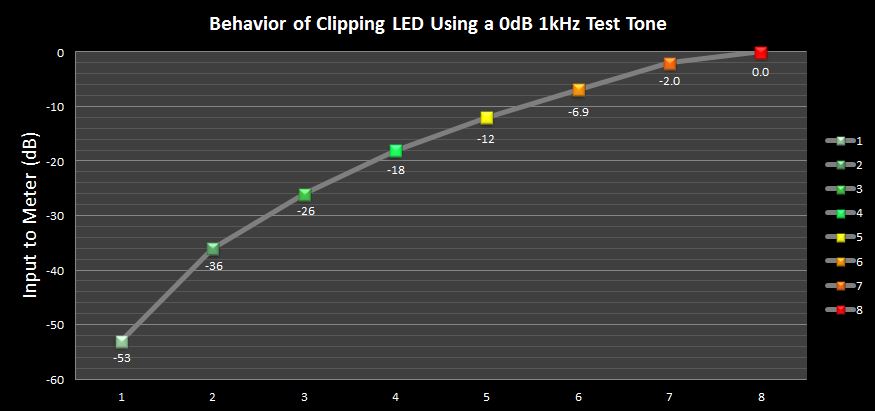
|
sharke
Max Output Level: 0 dBFS
- Total Posts : 13933
- Joined: 2012/08/03 00:13:00
- Location: NYC
- Status: offline
Re:Pro Channel clipping lights and gain stage management
2013/09/01 13:46:57
(permalink)
I just make sure nothing lights up red. It seems to be a rough but useful gain staging method.
One weird thing I've noticed sometimes is that the lights are slow to respond to changes made in your gain staging. For instance, I will sometimes have a couple of bars playing in a loop and I'm getting red lights. So I adjust the gain on that track, and it seems to take a couple of iterations of the loop before I see the change in the lights. It doesn't always happen like this, but I have noticed it a few times.
Also I wish they'd enable the light on the FX Chain module, seems pretty lame that this one doesn't work.
JamesWindows 10, Sonar SPlat (64-bit), Intel i7-4930K, 32GB RAM, RME Babyface, AKAI MPK Mini, Roland A-800 Pro, Focusrite VRM Box, Komplete 10 Ultimate, 2012 American Telecaster!
|
John
Forum Host
- Total Posts : 30467
- Joined: 2003/11/06 11:53:17
- Status: offline
Re:Pro Channel clipping lights and gain stage management
2013/09/01 14:11:26
(permalink)
This is the way I look at them as an indicator as to how hard you are driving the virtual circuit.
They are not digital clipping indicators (you have those on the meters) but more along the lines of an analog clipping meter. Keep in mind that Pro Channel's modules are modeling analog circuits. I do see them as useful when you look at them from this viewpoint.
I should have posted this sometime ago but I forgot this thread.
|
Keni
Max Output Level: -17.5 dBFS

- Total Posts : 5769
- Joined: 2003/11/04 10:42:15
- Location: Willits, CA USA
- Status: offline
Re:Pro Channel clipping lights and gain stage management
2013/11/27 19:54:04
(permalink)
mike_mccue
Maybe Pro Channel users have a high propensity for not noticing the effect of clipping?
The only actual meter I've seen on Pro Channel is a Gain Reduction meter... which is fairly useless even on my hardware compressors.
The Pro Channel clipping LEDs are also about as useless as clipping LEDs on a hardware unit.
They just don't provide enough information.
What I would do is use:
1) the ProChannel on your track with only the EQ stage and set up a low cut and any fix-it EQ you may need before compression.
2) Send the track to a bus for another instance of ProChannel and use that for your compressor.
3) Send the bus to another bus and use that for the ProChannel EQ for musical tailoring.
4) Send that bus to a submix or master bus for the "mix"
The good news is... the Saturation stage is so useless you don't need to set up a bus for it... just leave it turned off.
The benefit of this method of patching is that you get a full set of meters... and you can even insert specialty meters in your FX bin in between the stages of ProChannel... plus you get to make great use of the EQ before the compressor so you don't compress and bring up stuff you don't want to make it to the mix and then you get to make use of ProChannel's compressor and then you get to have some EQ for actual mixing.
There you go.
< - post is posted - >
Hi Mike... I'm guessing this post was pre X3? Or was it X2 that we got fx chains for the PC. We can easily add metering in between every stage we care to... But what a mess that makes for working with the PC....? I'd be fine with a 3 LED approach where 1 is activity, 2 is near max and 3 is a definite over.... There's plenty of room in the sme header the single LED currently lies... (Is that a pun?) Thanks... Keni
|
TS
Max Output Level: -88 dBFS

- Total Posts : 146
- Joined: 2012/01/02 16:30:09
- Location: Nice, France
- Status: offline
Re:Pro Channel clipping lights and gain stage management
2013/11/28 03:21:17
(permalink)
sharke
I just make sure nothing lights up red. It seems to be a rough but useful gain staging method. (...)
Also I wish they'd enable the light on the FX Chain module, seems pretty lame that this one doesn't work.
i do the same, and i wish the same  (for me these leds are very useful)
Laptop HP DV7 (i7 720 QM, Win 7/64, 4 Go Ram), UA-101 (2), Focal Solo6 Be, Sennh HD 600, set micros (MD441, M88, M160, MD431, Mk-012, K2, etc)
|
Jeff M.
Max Output Level: -80 dBFS

- Total Posts : 541
- Joined: 2012/09/22 03:02:04
- Location: RI, USA
- Status: offline
Re:Pro Channel clipping lights and gain stage management
2013/11/28 03:49:51
(permalink)
I also do the same - if a PC module is red, it needs attention ..actually the previous module(s) is/are the one(s) that needs attention.
I also think of them as what John mentioned
>>...but more along the lines of an analog clipping meter ...
Yaa, it's digital, but I "make the pretend" it's analog and adjust as if it were analog.
Platinum 64 RME UCX | Studio Cat Platinum: i7 2700k @ 4.5Ghz | 16Gb DDR3 | Win 7 64Komplete Kontrol S61 Gibson, Jackson, Parker, Suhr, Breedlove, Taylor, Lakland, Peavey, Marshall, Kemper
|
meh
Max Output Level: -82 dBFS

- Total Posts : 431
- Joined: 2005/06/11 13:01:57
- Location: Tempe, Az
- Status: offline
Re:Pro Channel clipping lights and gain stage management
2013/11/28 08:59:19
(permalink)
2:43AM
Blinded by science.....great thread.
SONAR Version 2017.09
HP Z-420 Workstation
Intel Xeon W3680 @3.50ghz
32g memory 2tb disk space
Win2008 Server R2 Standard 64-bit
TASCAM US-1641 interface
|