charles kasler
Max Output Level: -87 dBFS

- Total Posts : 192
- Joined: 2004/11/19 20:08:43
- Status: offline
how to show more than 3 fx in fx bin?
I can add more than 3 but I can't see all of them to adjust in X 1. thanks.
Paresh Dell Inspiron 5775, AMD Ryzen 5 2500U @2 GHz, Win 10, 16Gb ram,Sonar Platinum, 1 TB SSD
|
Beepster
Max Output Level: 0 dBFS

- Total Posts : 18001
- Joined: 2012/05/11 19:11:24
- Status: offline

Re: how to show more than 3 fx in fx bin?
2013/12/02 10:06:32
(permalink)
You have to use the little arrows just above the FX bin to scroll through them. Not sure if there is a way to display them all at once. I haven't seen one. Maybe in the Inspector somewhere.
|
charles kasler
Max Output Level: -87 dBFS
- Total Posts : 192
- Joined: 2004/11/19 20:08:43
- Status: offline
Re: how to show more than 3 fx in fx bin?
2013/12/02 10:10:57
(permalink)
awesome - I had thought that arrow was just for sends - thanks
Paresh Dell Inspiron 5775, AMD Ryzen 5 2500U @2 GHz, Win 10, 16Gb ram,Sonar Platinum, 1 TB SSD
|
Beepster
Max Output Level: 0 dBFS
- Total Posts : 18001
- Joined: 2012/05/11 19:11:24
- Status: offline
Re: how to show more than 3 fx in fx bin?
2013/12/02 10:15:59
(permalink)
Glad to help. It's still a bit of a pain but it saves screenspace compared to how other DAWs handle inserts. Cheers.
|
dlesaux
Max Output Level: -70 dBFS

- Total Posts : 1034
- Joined: 2009/09/13 09:25:18
- Status: offline
Re: how to show more than 3 fx in fx bin?
2013/12/02 10:26:11
(permalink)
☄ Helpfulby Brandon Ryan [Roland] 2013/12/03 08:14:55
If you insert an effects module in Pro Channel, you get much more room to see all of the effects. I no longer use the channel strip effects bin because of that.
Peace! Daniel Sonar Platinum - 2017.10 and PreSonus Studio One 3.5.5
Windows 10 64 bit
Studiocat Skylake Desktop PC with Intel i7 6700k processor @ 4.20 GHz / 16G RAM
Focusrite Scarlett 2i2 Audio Interface and Cakewalk UM-2G Midi Interface Check out my website
|
lawp
Max Output Level: -67 dBFS

- Total Posts : 1154
- Joined: 2012/06/28 13:27:41
- Status: offline
Re: how to show more than 3 fx in fx bin?
2013/12/02 11:23:30
(permalink)
Beepster
Glad to help. It's still a bit of a pain but it saves screenspace compared to how other DAWs handle inserts. Cheers.
what about the blank space at the top of the channel strip? could fit 3 or 4 more fx labels in there
|
Sanderxpander
Max Output Level: -36.5 dBFS

- Total Posts : 3873
- Joined: 2013/09/30 10:08:24
- Status: offline
Re: how to show more than 3 fx in fx bin?
2013/12/02 11:33:55
(permalink)
Maybe it's just in later versions but as far as I'm aware you can simply expand the track size? I'm pretty sure I've had at least five visible at the same time?
|
Phonic
Max Output Level: -85 dBFS

- Total Posts : 291
- Joined: 2011/04/04 13:13:38
- Status: offline
Re: how to show more than 3 fx in fx bin?
2013/12/02 11:36:44
(permalink)
It would be nice to be able to customize the console so that you could see all your FX without having to click the arrows - the current setup is a bit outdated in my opinion. This will probably be implemented in Sonar X5 or something 
i7 4770k @ 3.5 Ghz 24 GB DDR 3 Windows 7 64 bit Sonar Platinum Foxboro 64 bit MOTU 828 MK3 UAD-2 Quad
|
Beepster
Max Output Level: 0 dBFS
- Total Posts : 18001
- Joined: 2012/05/11 19:11:24
- Status: offline
Re: how to show more than 3 fx in fx bin?
2013/12/02 11:42:56
(permalink)
lawp
Beepster
Glad to help. It's still a bit of a pain but it saves screenspace compared to how other DAWs handle inserts. Cheers.
what about the blank space at the top of the channel strip? could fit 3 or 4 more fx labels in there
I thing maybe just being to drag down the bottom of the bin could be cool or maybe a Fit All FX Bin Contents option. Even better might be a flyout like the new Quad Curve. They already have the flyout code written. Hmm... then maybe even have it so if you click on an effect name in the flyout then the GUI pops open IN the flyout so you don't have to drag it around, dock it, hide it, etc. Yeah... that'd be REALLY cool. Of course the bubble would have to adjust to the different sizes of each GUI and/or have scroll bars for the larger ones. I've always kind of wanted the GUI pop up windows and the dock to have scroll bars for the larger GUIs.
|
Bristol_Jonesey
Max Output Level: 0 dBFS
- Total Posts : 16775
- Joined: 2007/10/08 15:41:17
- Location: Bristol, UK
- Status: offline
Re: how to show more than 3 fx in fx bin?
2013/12/02 14:55:23
(permalink)
dlesaux
If you insert an effects module in Pro Channel, you get much more room to see all of the effects. I no longer use the channel strip effects bin because of that. Whilst I agree that a totally revamped Fx bin would be not just nice, but useful as well, there is merit in using the Pro Channel to display all your active Fx plugins simultaneously. This applies to Track View and Console View, as long as you have the Track Inspector open and the Pro Channel the active tab. It also makes sense to minimise the height of each module/Fx Chain and just expand it when you want to use/view it. The only downside is that any Fx plugs in a chain will need to be clicked twice to access the GUI - once top expand the Fax chain and a second to open the GUI
CbB, Platinum, 64 bit throughoutCustom built i7 3930, 32Gb RAM, 2 x 1Tb Internal HDD, 1 x 1TB system SSD (Win 7), 1 x 500Gb system SSD (Win 10), 2 x 1Tb External HDD's, Dual boot Win 7 & Win 10 64 Bit, Saffire Pro 26, ISA One, Adam P11A,
|
Beepster
Max Output Level: 0 dBFS
- Total Posts : 18001
- Joined: 2012/05/11 19:11:24
- Status: offline
Re: how to show more than 3 fx in fx bin?
2013/12/02 15:26:38
(permalink)
@Jonesey... Hiya. I've actually decided that after I wipe and set my system back up again I'm going to spend an afternoon or so creating FX Chains of all the effects plugs I intend to use on a one plug per chain basis. That way I can avoid the FX Bin entirely and simply work within the PC as well as have more control over the signal chain. It'll be a bit of thinkin' and doin' but I think the little bit of time I spend doing that will save me oodles more later as well as make my mixing experience more fluid and pleasurable. I very much dislike having to screw around with GUI windows and trying to figure out Post/Pre bin settings or creating busses to skirt around the limitations of such set ups. I know chain modules are kind of a new thing but it really does solve a lot of routing problems considering I find I'm using the PC almost exclusively now that I know how all the doodads work. When I do actually need something else I'd like to be able to have it be in the Inspector with everything else instead of constrained to what the bin can do.
I just hope they work reliably but I haven't seen any complaints about this type of thing.
|
John
Forum Host

- Total Posts : 30467
- Joined: 2003/11/06 11:53:17
- Status: offline
Re: how to show more than 3 fx in fx bin?
2013/12/02 15:43:14
(permalink)
Is this what you would like to see? 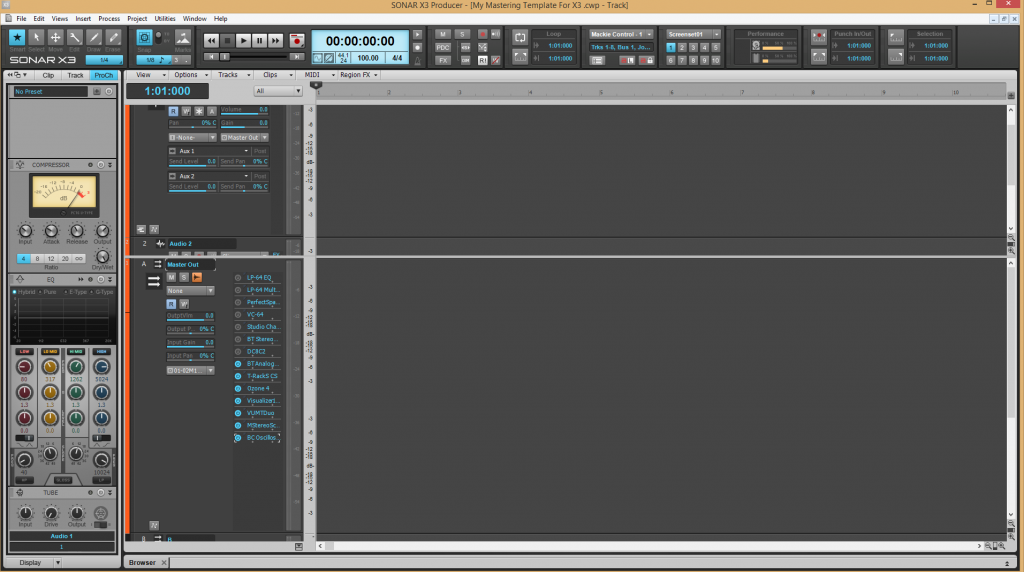
|
Sanderxpander
Max Output Level: -36.5 dBFS
- Total Posts : 3873
- Joined: 2013/09/30 10:08:24
- Status: offline
Re: how to show more than 3 fx in fx bin?
2013/12/02 16:05:55
(permalink)
I just realized the OP is talking about the console view. Yeah it is pretty dumb that you can have a huge bin in track view yet only see three fx simultaneously in console view. Not to mention you can only see two sends in there. Sonar is a little behind in console view customizability compared to other DAWs.
post edited by Sanderxpander - 2013/12/02 16:35:50
|
Bristol_Jonesey
Max Output Level: 0 dBFS
- Total Posts : 16775
- Joined: 2007/10/08 15:41:17
- Location: Bristol, UK
- Status: offline
Re: how to show more than 3 fx in fx bin?
2013/12/02 16:25:06
(permalink)
I think the Console view needs a major overhaul, but we probably won't see this until X4 at the earliest.
CbB, Platinum, 64 bit throughoutCustom built i7 3930, 32Gb RAM, 2 x 1Tb Internal HDD, 1 x 1TB system SSD (Win 7), 1 x 500Gb system SSD (Win 10), 2 x 1Tb External HDD's, Dual boot Win 7 & Win 10 64 Bit, Saffire Pro 26, ISA One, Adam P11A,
|
Beepster
Max Output Level: 0 dBFS
- Total Posts : 18001
- Joined: 2012/05/11 19:11:24
- Status: offline
Re: how to show more than 3 fx in fx bin?
2013/12/02 16:51:44
(permalink)
Well... I'm mostly okay with the CV but a couple things that would be nice is more per strip customization. Like allow it so you can show modules on certain tracks but not other and be able to rearrange them visually (without changing the routing) so you can get at stuff on the strips you need to. Also make it so you can narrow and hide strips on a per strip basis despite what your Track Manager settings are.
All that would help me a lot and is pretty much just visual stuff. I get around but it could indeed be easier. The Sends module section could use some work to but I don't really have any ideas for that. Maybe just make it so when you open that menu that allows you to choose Send 1 Send 2 it is a true checkmark system, make it so you can show more than 2 sends at a time and again make it customizable on a per strip basis.
Well look at that... I guess I did have some ideas. Probably better ways to do that though. Maybe a dedicated Sends pop up or something. Whatevs. My brain is fried. So much crazy freaking noise here today. Ugh.
|
Sanderxpander
Max Output Level: -36.5 dBFS
- Total Posts : 3873
- Joined: 2013/09/30 10:08:24
- Status: offline
Re: how to show more than 3 fx in fx bin?
2013/12/02 16:56:25
(permalink)
Beepster
Also make it so you can narrow and hide strips on a per strip basis despite what your Track Manager settings are.
Unless I'm misunderstanding what you want to do this is already possible...? Right click a channel in the console view and select narrow or hide? Doesn't seem to affect track view for me.
|
Beepster
Max Output Level: 0 dBFS
- Total Posts : 18001
- Joined: 2012/05/11 19:11:24
- Status: offline
Re: how to show more than 3 fx in fx bin?
2013/12/02 17:00:23
(permalink)
Sanderxpander
Beepster
Also make it so you can narrow and hide strips on a per strip basis despite what your Track Manager settings are.
Unless I'm misunderstanding what you want to do this is already possible...? Right click a channel in the console view and select narrow or hide? Doesn't seem to affect track view for me.
Huh... if that is the case then I will most definitely be making use of that. I'm quite sure I've obsessively poked at everything I could to make that happen without success but I will try again tomorrow. That would definitely help me. Perhaps it's new in X3? Anyway... thanks.
|
Bristol_Jonesey
Max Output Level: 0 dBFS
- Total Posts : 16775
- Joined: 2007/10/08 15:41:17
- Location: Bristol, UK
- Status: offline
Re: how to show more than 3 fx in fx bin?
2013/12/02 17:03:36
(permalink)
You can narrow/widen them individually, but it's always a bit of pain to have to access the somewhat buggy Track Manager, simply to hide a track.
I would love to simply right click a channel strip and select a 'hide' option.
For unhiding, then you would have to resort to Track Manager, but for unhiding sequential blocks of tracks, simply click & drag across 2 visible tracks and select 'unhide hidden range' or something like that.
Regarding sends, I think the way forward is to have all the controls relating to sends on a flyout, similar to the PC EQ, but a good deal smaller, and when this is not being displayed, the send is simply a one line text box with the flyout icon
This way you could easily fit 6 sends in the existing 1 space module
CbB, Platinum, 64 bit throughoutCustom built i7 3930, 32Gb RAM, 2 x 1Tb Internal HDD, 1 x 1TB system SSD (Win 7), 1 x 500Gb system SSD (Win 10), 2 x 1Tb External HDD's, Dual boot Win 7 & Win 10 64 Bit, Saffire Pro 26, ISA One, Adam P11A,
|
Bristol_Jonesey
Max Output Level: 0 dBFS
- Total Posts : 16775
- Joined: 2007/10/08 15:41:17
- Location: Bristol, UK
- Status: offline
Re: how to show more than 3 fx in fx bin?
2013/12/02 17:11:15
(permalink)
Here you go Beep: 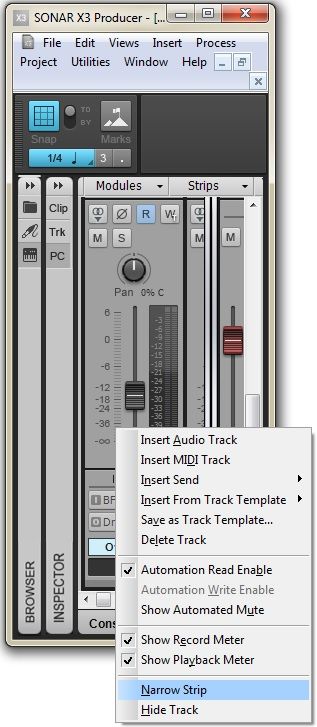 You get this popup when you right-click in any of the grey space surrounding the pan knob, and also by right-clicking the actual Scale readout to the left of the fader. It pays to investigate the different right-click menus in Console view, there are at least 3 or 4 different ones, depending on where you click the Console
CbB, Platinum, 64 bit throughoutCustom built i7 3930, 32Gb RAM, 2 x 1Tb Internal HDD, 1 x 1TB system SSD (Win 7), 1 x 500Gb system SSD (Win 10), 2 x 1Tb External HDD's, Dual boot Win 7 & Win 10 64 Bit, Saffire Pro 26, ISA One, Adam P11A,
|
Sanderxpander
Max Output Level: -36.5 dBFS
- Total Posts : 3873
- Joined: 2013/09/30 10:08:24
- Status: offline
Re: how to show more than 3 fx in fx bin?
2013/12/02 17:18:20
(permalink)
Bristol_Jonesey
You can narrow/widen them individually, but it's always a bit of pain to have to access the somewhat buggy Track Manager, simply to hide a track.I would love to simply right click a channel strip and select a 'hide' option.
As far as I'm aware this is exactly how it works?
|
Bristol_Jonesey
Max Output Level: 0 dBFS
- Total Posts : 16775
- Joined: 2007/10/08 15:41:17
- Location: Bristol, UK
- Status: offline
Re: how to show more than 3 fx in fx bin?
2013/12/02 17:32:29
(permalink)
Sanderxpander
Bristol_Jonesey
You can narrow/widen them individually, but it's always a bit of pain to have to access the somewhat buggy Track Manager, simply to hide a track.I would love to simply right click a channel strip and select a 'hide' option.
As far as I'm aware this is exactly how it works?
Hah! You got me there. I should take my own advice and examine the right click options more thoroughly  Thanks for pointing that out
CbB, Platinum, 64 bit throughoutCustom built i7 3930, 32Gb RAM, 2 x 1Tb Internal HDD, 1 x 1TB system SSD (Win 7), 1 x 500Gb system SSD (Win 10), 2 x 1Tb External HDD's, Dual boot Win 7 & Win 10 64 Bit, Saffire Pro 26, ISA One, Adam P11A,
|
Beepster
Max Output Level: 0 dBFS
- Total Posts : 18001
- Joined: 2012/05/11 19:11:24
- Status: offline
Re: how to show more than 3 fx in fx bin?
2013/12/02 17:37:14
(permalink)
I could have sworn when you selected the narrow option it did it to all of them... and the hide? How the heck did I miss that? Wow... I'm just... wow.
Thanks, Jonesey. I'll be looking at that tomorrow and slapping myself silly for somehow not seeing it.
wow
|
Sanderxpander
Max Output Level: -36.5 dBFS
- Total Posts : 3873
- Joined: 2013/09/30 10:08:24
- Status: offline
Re: how to show more than 3 fx in fx bin?
2013/12/02 18:00:24
(permalink)
I have never considered this to be even remotely useful for my workflow. But I'm glad you guys got your fix, haha :)
|
John
Forum Host
- Total Posts : 30467
- Joined: 2003/11/06 11:53:17
- Status: offline
Re: how to show more than 3 fx in fx bin?
2013/12/02 18:06:31
(permalink)
I believe it was introduced in X1 the ability to hide and narrow individual tracks or buses.
|
Brandon Ryan [Roland]
Max Output Level: -40.5 dBFS

- Total Posts : 3458
- Joined: 2003/11/06 03:29:12
- Location: Los Angeles, CA
- Status: offline
Re: how to show more than 3 fx in fx bin?
2013/12/03 08:15:38
(permalink)
dlesaux
If you insert an effects module in Pro Channel, you get much more room to see all of the effects. I no longer use the channel strip effects bin because of that.
Agreed. I do exactly the same.
"The sky above the port was the color of television, tuned to a dead channel." WG SONAR Platinum | VS-700 | A-800 PRO | PCAL i7 with SSD running Windows 8 x64 | Samsung 27" LCD @ 1920x1080 | Blue Sky monitors with BMC | All kinds of other stuff
|