martinv
Max Output Level: -88 dBFS

- Total Posts : 138
- Joined: 2012/07/28 02:25:07
- Status: offline
How to Un-strech accidental stretch of an audio clip and not lose quality?
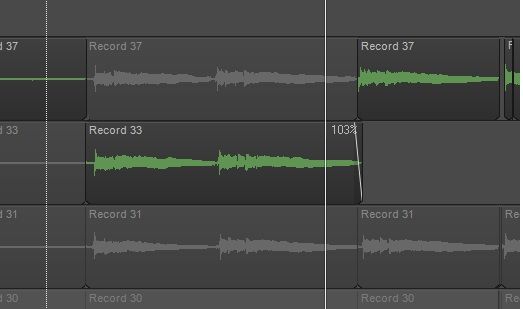 In SONAR X3, I have a guitar fill that somehow got stretched to 103%. No idea how but it also made it sound really warbley. Is it possible to unstrech to the original length and get back the original quality? I tried stretching it back to 100%, but it still sounded warbley.
SONAR Platinum 2016.03 (22.3.0.71), Windows 7 Professional (Service Pack 1) 64-bit, 6.1, build: 7601 (x64) CPU: GenuineIntel Intel(R) Core(TM)2 Quad CPU Q9300 @ 2.50GHz. RAM:6142 MB total. Focusrite Saffire PRO 40 Firewire, NVIDIA Geforce 210, 3-monitors via HDMI& DVI, 3rd monitor is via active splitter from main monitor.
|
Kev999
Max Output Level: -36 dBFS

- Total Posts : 3922
- Joined: 2007/05/01 14:22:54
- Location: Victoria, Australia
- Status: offline

Re: How to Un-strech accidental stretch of an audio clip and not lose quality?
2014/03/01 20:04:58
(permalink)
Try looking in the project's Audio folder. The original unaltered WAV file might still be present.
SonarPlatinum∞(22.11.0.111)|Mixbus32C(4.3.19)|DigitalPerformer(9.5.1)|Reaper(5.77)FractalDesign:DefineR5|i7-6850k@4.1GHz|16GB@2666MHz-DDR4|MSI:GamingProCarbonX99a|Matrox:M9148(x2)|UAD2solo(6.5.2)|W7Ult-x64-SP1
Audient:iD22+ASP800|KRK:VXT6|+various-outboard-gear|+guitars&basses, etc.
Having fun at work lately
|
martinv
Max Output Level: -88 dBFS
- Total Posts : 138
- Joined: 2012/07/28 02:25:07
- Status: offline
Re: How to Un-strech accidental stretch of an audio clip and not lose quality?
2014/03/01 20:48:26
(permalink)
Thanks for the reply. I did copy the file from the audio folder. In this case it worked because the fill started at time=0:00. How would I do the same if the audio file was in the middle of the song? Is there a way to a way to import while retaining the original time location of the file?
SONAR Platinum 2016.03 (22.3.0.71), Windows 7 Professional (Service Pack 1) 64-bit, 6.1, build: 7601 (x64) CPU: GenuineIntel Intel(R) Core(TM)2 Quad CPU Q9300 @ 2.50GHz. RAM:6142 MB total. Focusrite Saffire PRO 40 Firewire, NVIDIA Geforce 210, 3-monitors via HDMI& DVI, 3rd monitor is via active splitter from main monitor.
|
perfectprint
Max Output Level: -73 dBFS

- Total Posts : 862
- Joined: 2010/01/02 02:21:12
- Status: offline
Re: How to Un-strech accidental stretch of an audio clip and not lose quality?
2014/03/01 20:58:58
(permalink)
it hasnt been rendered down (hence the 103% still being visible). just ctl+drag the right side of clip to the left till it resorts back to 100%. nm, saw you tried that already. just bounce it down. realtime time stretching is pretty bad, but offline using the izotope algorithms should solve the problem.
post edited by perfectprint - 2014/03/02 20:19:11
|
Kev999
Max Output Level: -36 dBFS
- Total Posts : 3922
- Joined: 2007/05/01 14:22:54
- Location: Victoria, Australia
- Status: offline
Re: How to Un-strech accidental stretch of an audio clip and not lose quality?
2014/03/01 21:54:33
(permalink)
martinv
How would I do the same if the audio file was in the middle of the song? Is there a way to a way to import while retaining the original time location of the file?
Usually when you import audio using the menu, it places the clip at the current "Now time". Otherwise it is easy enough to just move it to the correct position. You can also import audio by dragging the file from Windows Explorer into the Sonar GUI and placing it exactly where you want it.
SonarPlatinum∞(22.11.0.111)|Mixbus32C(4.3.19)|DigitalPerformer(9.5.1)|Reaper(5.77)FractalDesign:DefineR5|i7-6850k@4.1GHz|16GB@2666MHz-DDR4|MSI:GamingProCarbonX99a|Matrox:M9148(x2)|UAD2solo(6.5.2)|W7Ult-x64-SP1
Audient:iD22+ASP800|KRK:VXT6|+various-outboard-gear|+guitars&basses, etc.
Having fun at work lately
|
brundlefly
Max Output Level: 0 dBFS

- Total Posts : 14250
- Joined: 2007/09/14 14:57:59
- Location: Manitou Spgs, Colorado
- Status: offline
Re: How to Un-strech accidental stretch of an audio clip and not lose quality?
2014/03/02 03:33:52
(permalink)
☄ Helpfulby mettelus 2014/03/02 04:40:41
As perfectprint said, the fact that it's still showing the stretch percentage indicates the stretching hasn't been rendered permanent by bouncing. The way to undo it then is to go to the Audiosnap section of Clip properties in the Inspector and either set the stretch percentage back to 100% which both resets the stretch and disables stretching or just uncheck the Enable Stretch box which will leave the 103% showing but grayed out and inactive. Either way, stretching will be completely disabled, and the clip will play normally.
SONAR Platinum x64, 2x MOTU 2408/PCIe-424 (24-bit, 48kHz) Win10, I7-6700K @ 4.0GHz, 24GB DDR4, 2TB HDD, 32GB SSD Cache, GeForce GTX 750Ti, 2x 24" 16:10 IPS Monitors
|
Guitarhacker
Max Output Level: 0 dBFS
- Total Posts : 24398
- Joined: 2007/12/07 12:51:18
- Location: NC
- Status: offline
Re: How to Un-strech accidental stretch of an audio clip and not lose quality?
2014/03/02 08:48:55
(permalink)
have you tried the EDIT>UNDO function?
as long as you have not saved it and closed the project the undo function should still be an option.
In my experience, in working in a project, every now and then I will inadvertently delete a clip or drag a clip a bit making it out of sync.... rather than trying to drag it back I simply use the EDIT>UNDO and waaa laaa, it's back to where it was supposed to be. This works fine up until you save and close the project. Then, apparently, Sonar wipes the undo for that project session from it's files.... at that point, next day for example, if you discover the mistake.... ouch.... the undo won't work. It's either try to fix it, or grab the mics and do a punch in recording session.
My website & music: www.herbhartley.com MC4/5/6/X1e.c, on a Custom DAW Focusrite Firewire Saffire Interface BMI/NSAI "Just as the blade chooses the warrior, so too, the song chooses the writer "
|
brundlefly
Max Output Level: 0 dBFS
- Total Posts : 14250
- Joined: 2007/09/14 14:57:59
- Location: Manitou Spgs, Colorado
- Status: offline
Re: How to Un-strech accidental stretch of an audio clip and not lose quality?
2014/03/02 12:56:30
(permalink)
I assumed he had saved and closed the project or had made so many edits since the stretch that it wasn't feasible to use undo. But I guess it never hurts to point out the obvious. 
SONAR Platinum x64, 2x MOTU 2408/PCIe-424 (24-bit, 48kHz) Win10, I7-6700K @ 4.0GHz, 24GB DDR4, 2TB HDD, 32GB SSD Cache, GeForce GTX 750Ti, 2x 24" 16:10 IPS Monitors
|