Shepiod
Max Output Level: -90 dBFS

- Total Posts : 33
- Joined: 2007/11/11 11:07:46
- Status: offline
Sonar X-1 Exported track problem
When I bounce tracks to a single stereo track for mastering and export, I am getting a darkened area at the end of the mixed down stereo track that is contained in the exported WAV file which I am unable to eliminate to get the exported WAV file to be the proper time configuration. I am selecting export in Tracks and not Entire mix. This is puzzling. Any suggestions would be greatly appreciated and this just came up as I am trying to get a new cd to the manufacturer so thanks too for replying asap with any info on this problem.
|
dcumpian
Max Output Level: -34 dBFS

- Total Posts : 4124
- Joined: 2005/11/03 15:50:51
- Status: offline

Re: Sonar X-1 Exported track problem
2015/02/12 08:18:31
(permalink)
Use the From/To settings to tell Sonar where to start and end your export. Sonar is exporting from the length of the entire project, unless you tell it otherwise.
Regards,
Dan
Mixing is all about control. My music: http://dancumpian.bandcamp.com/ or https://soundcloud.com/dcumpian Studiocat Advanced Studio DAW (Intel i5 3550 @ 3.7GHz, Z77 motherboard, 16GB Ram, lots of HDDs), Sonar Plat, Mackie 1604, PreSonus Audiobox 44VSL, ESI 4x4 Midi Interface, Ibanez Bass, Custom Fender Mexi-Strat, NI S88, Roland JV-2080 & MDB-1, Komplete, Omnisphere, Lots o' plugins.
|
Shepiod
Max Output Level: -90 dBFS
- Total Posts : 33
- Joined: 2007/11/11 11:07:46
- Status: offline
Re: Sonar X-1 Exported track problem
2015/02/12 08:22:39
(permalink)
Dan
Where is the from/to control located?
|
Shepiod
Max Output Level: -90 dBFS
- Total Posts : 33
- Joined: 2007/11/11 11:07:46
- Status: offline
Re: Sonar X-1 Exported track problem
2015/02/12 08:23:07
(permalink)
Thank you Dan for replying. I really appreciate it.
|
Bristol_Jonesey
Max Output Level: 0 dBFS

- Total Posts : 16775
- Joined: 2007/10/08 15:41:17
- Location: Bristol, UK
- Status: offline
Re: Sonar X-1 Exported track problem
2015/02/12 08:26:38
(permalink)
2 Steps
1 - Select ALL (or Select NONE)
2 - Sweep along the time ruler to highlight the area you want exporting
Export.
If it's a Stereo wav you want, use Main Outs.
CbB, Platinum, 64 bit throughoutCustom built i7 3930, 32Gb RAM, 2 x 1Tb Internal HDD, 1 x 1TB system SSD (Win 7), 1 x 500Gb system SSD (Win 10), 2 x 1Tb External HDD's, Dual boot Win 7 & Win 10 64 Bit, Saffire Pro 26, ISA One, Adam P11A,
|
Shepiod
Max Output Level: -90 dBFS
- Total Posts : 33
- Joined: 2007/11/11 11:07:46
- Status: offline
Re: Sonar X-1 Exported track problem
2015/02/12 09:03:15
(permalink)
bristol
When I darken the track I want to export does that not give me the track only in the time configuration?
I still have this darker shaded area after the track.
Also do I use Main outs on the master bus or the stereo track I am exporting itself?
I'm a little confused.
Thanks for the reply.
|
Bristol_Jonesey
Max Output Level: 0 dBFS
- Total Posts : 16775
- Joined: 2007/10/08 15:41:17
- Location: Bristol, UK
- Status: offline
Re: Sonar X-1 Exported track problem
2015/02/12 10:15:27
(permalink)
Right I see - you're trying to export a single track which is a previously bounced down track of all your other tracks correct?
In which case I would start by soloing this track, select it, swipe in the time ruler to highlight the range you want, then export it, again from Main Outs.
CbB, Platinum, 64 bit throughoutCustom built i7 3930, 32Gb RAM, 2 x 1Tb Internal HDD, 1 x 1TB system SSD (Win 7), 1 x 500Gb system SSD (Win 10), 2 x 1Tb External HDD's, Dual boot Win 7 & Win 10 64 Bit, Saffire Pro 26, ISA One, Adam P11A,
|
Cactus Music
Max Output Level: 0 dBFS
- Total Posts : 8424
- Joined: 2004/02/09 21:34:04
- Status: offline
Re: Sonar X-1 Exported track problem
2015/02/12 10:28:25
(permalink)
And just as another option, I do the final top and tails in a wave editor because it has the tools down pat. You can add fades and check your overall RMS levels too. I use Wave Lab but these work too Wavosaur free- http://www.wavosaur.com/ Gold Wave free to demo- http://www.goldwave.ca/release.php
|
Shepiod
Max Output Level: -90 dBFS
- Total Posts : 33
- Joined: 2007/11/11 11:07:46
- Status: offline
Re: Sonar X-1 Exported track problem
2015/02/12 12:00:35
(permalink)
i will try to swipe in the time ruler.
I'm not sure how to do that.
And I'm still not sure where the "from/to" control located that Dan spoke of.
Is this the time ruler?
Do I put the main outs from the bounced track or from the main?
Thank you I am starting to see how to solve this problem I think.
|
Bristol_Jonesey
Max Output Level: 0 dBFS
- Total Posts : 16775
- Joined: 2007/10/08 15:41:17
- Location: Bristol, UK
- Status: offline
Re: Sonar X-1 Exported track problem
2015/02/12 14:10:31
(permalink)
The time ruler is at the top of track view, numbered 1, 2, 3 etc as shown below Click & drag in here to "swipe" though the selection you want In my example I have between 5:02:000 and 6:02:000 highlighted 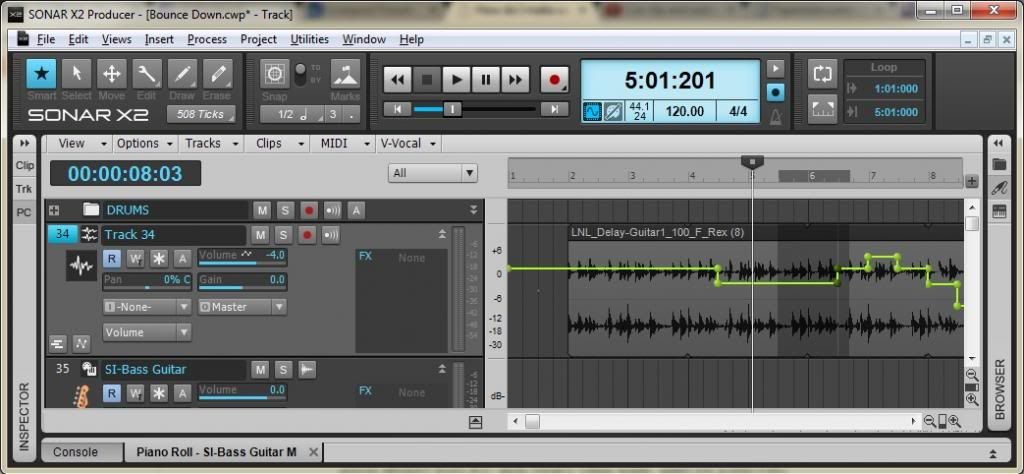
CbB, Platinum, 64 bit throughoutCustom built i7 3930, 32Gb RAM, 2 x 1Tb Internal HDD, 1 x 1TB system SSD (Win 7), 1 x 500Gb system SSD (Win 10), 2 x 1Tb External HDD's, Dual boot Win 7 & Win 10 64 Bit, Saffire Pro 26, ISA One, Adam P11A,
|