DaveG74
Max Output Level: -86 dBFS

- Total Posts : 220
- Joined: 2013/07/07 12:54:25
- Status: offline

[UPDATE] Audio Engine quirks
A few weeks back, I encountered an issue with no sound in my Sonar X3 template. This seems to have been relieved. Here's a summary of the progress involved, as discussed in this Forum thread. ------------------------------------------------------------------------------------------------------------------------------ EARLY MAY: ISSUESonar template created and saved with 12 tracks and no data. No sound heard from drum tracks. --- Later noticed no sound from all synth tracks (rather than just drum tracks). Sound would return upon insert of new track. 5/12: FOLLOW-UPA fellow Forum user tested the template; confirmed audio was heard. Believed the cause was no instruments set on some tracks, but still no audio heard. 5/15: OBSERVATION #1 & FURTHER ISSUEIdenitified that the Audio Engine button was disabled on startup. Through moderate experimentation, noticed Audio Engine disabling at "random" times. Upon reporting, was strongly recommended upgrade to an audio interface. 5/18: OBSERVATION #2 & FOLLOW-UPTested all of my current projects in progress; all played back fine. Created new template; issue still persists (no sound on any track). Via further experimentation, identified the Audio Engine doesn't enable without data to play. --- After draw of first note, Audio Engine enables and track plays back fine. SOURCES REVIEWEDCakewalk Documentation: The Audio Engine Button--- First paragraph: "When playback is in progress, Audio Engine starts automatically" Cakewalk Forum thread: "Audio Engine Won't Start"--- Post #2: "Audio engine won't start without data to play" ------------------------------------------------------------------------------------------------------------------------------SUMMARYIt was suggested that this issue wasn't worth researching without an audio interface, but I was compelled to continue in the meantime. I was relieved to notice that the Audio Engine truly won't trigger on without data to playback -- a complete oversight of logic and common sense. I'm in no way negating the need for an audio interface. I'm just merely noting that, hence the previous paragraph, I seem to have identified/resolved the problem -- at least part of it, or the blatantly obvious. :) REMAINING QUESTIONSHow is it that the Audio Engine button doesn't trigger until the track is played? Shouldn't I be able to insert a synth track and hear the notes outright when sampling them from the corresponding Mixer window? I swore I was able to do this in MC6 without having to play a track to enable the sound. AUDIO INTERFACEOver the past few days, I have researched different devices, two of which are available at my local Best Buy. They are by M-Audio and Focusrite, per this link. Can anyone offer any opinions on these? The reviews look pretty promising. In the meantime, I feel a renewed sense of confidence and I'm going to continue working as usual. Thanks to all who participated and I look forward to further suggestions on anything mentioned here. 
post edited by Grundberg - 2014/05/19 16:20:31
|
robert_e_bone
Moderator

- Total Posts : 8968
- Joined: 2007/12/26 22:09:28
- Location: Palatine, IL
- Status: offline
Re: [UPDATE] Audio Engine disabling / Audio interface options?
2014/05/18 19:53:33
(permalink)
OK - a couple of thoughts on the interfaces you are looking at: 1. IF you need midi ports on whatever interface you pick up, neither one of those 2 interfaces has them, so you would not be able to connect anything through a midi connection to your computer. This is normally only an issue if you have older external keyboards or rack-mounted gear, or perhaps a midi foot controller for guitar (Behringer FCB1010 comes to mind). 2. Of the 2 interfaces you are looking at, I believe the Focusrite will have the better sounding preamps, from reports I have seen. 3. They both seem to have Windows 8 drivers. Here is a link to a post I made earlier today for someone else who is looking at interfaces: http://forum.cakewalk.com/FindPost/3040835 Guitar Center has a really nice one with midi ports and Windows 8 support, and is a smaller version of the audio interface I happen to use. So, take a look at the above post - it's $119.99 new. Bob Bone
Wisdom is a giant accumulation of "DOH!" Sonar: Platinum (x64), X3 (x64) Audio Interfaces: AudioBox 1818VSL, Steinberg UR-22 Computers: 1) i7-2600 k, 32 GB RAM, Windows 8.1 Pro x64 & 2) AMD A-10 7850 32 GB RAM Windows 10 Pro x64 Soft Synths: NI Komplete 8 Ultimate, Arturia V Collection, many others MIDI Controllers: M-Audio Axiom Pro 61, Keystation 88es Settings: 24-Bit, Sample Rate 48k, ASIO Buffer Size 128, Total Round Trip Latency 9.7 ms
|
Cactus Music
Max Output Level: 0 dBFS

- Total Posts : 8424
- Joined: 2004/02/09 21:34:04
- Status: offline
Re: [UPDATE] Audio Engine disabling / Audio interface options?
2014/05/18 20:53:58
(permalink)
My shopping list: I needed a min of 6 inputs and 6 outputs.: 2 Combi front panel inputs for instruments or Mikes. 2 line level inputs for Analog mixer. SPDIF input for Digital Mixer ( = 2) MIDI input for Controller 4 analog outputs must be balanced for FOH patching. SPDIF output MIDI output for hardware synths. 2 Headphones with front panel control Front panel Monitor level control. Pre Amps must be regarded as good quality by reviews. Phantom Power Front panel Computer/Input Balance control Input Metering NOT MADE OF PLASTIC! Small and portable On /Off switch A/C powered http://www.gearslutz.com/board/reviews/906141-focusrite-scarlett-6i6.html
|
John
Forum Host

- Total Posts : 30467
- Joined: 2003/11/06 11:53:17
- Status: offline
Re: [UPDATE] Audio Engine disabling / Audio interface options?
2014/05/18 22:00:45
(permalink)
I wouldn't worry about the audio engine button. Once you have a solid audio interface it wont be an issue.
I just opened an empty project. No audio or MIDI in it. The button was grayed out showing that the audio engine was not running. This is to be expected. The way CW has programed Sonar is the button is there so we users when we run into trouble we can manually turn off audio to prevent unpleasant sounds from hurting our ears or speakers. Its a convenience not some diagnostic tool.
As one presenter pointed out many years ago at a Cubase demonstration outside of video processing multi track audio is the most demanding form of computing a user is likely to deal with. I don't know how true that statement was but no matter, it is a real burden on a computer's CPU. In order to have a well functioning system for multi track audio we need to enlist a quality audio interface to take some of the burden off the CPU. This is where it is fundamental to get a good interface. Its drivers will allow the software to access the DSP of the device in real time and with low CPU. This is not true for a multimedia audio chip on the motherboard.
Because we have CPUs of enormous power in comparison to the past it would seem that it shouldn't be a problem anymore for a low end chip to rely on the CPU for many of its processing needs. That is true in many cases. Except that multi track audio with a lot of native plugins engaged and virtual synths and samplers demanding the attention of the CPU and a further demand that the audio be instant with no latency it is no wonder that quality audio interfaces are used by the great majority of DAW users. They promise low latency and multiple audio streams with no unnecessary demands made on the CPU. Audio engines will run and processing will happen happily.
If you were to take a look at just what goes on internally with Sonar's audio engine when you press play you would be bewildered and bewitched and beguiled by all that is going on. It only stands for you to provide an environment that will help not hinder all the bits going hither and yon.
|
DaveG74
Max Output Level: -86 dBFS
- Total Posts : 220
- Joined: 2013/07/07 12:54:25
- Status: offline
Re: [UPDATE] Audio Engine disabling / Audio interface options?
2014/05/18 22:17:27
(permalink)
John
I wouldn't worry about the audio engine button. Once you have a solid audio interface it wont be an issue.
I just opened an empty project. No audio or MIDI in it. The button was grayed out showing that the audio engine was not running. This is to be expected. The way CW has programed Sonar is the button is there so we users when we run into trouble we can manually turn off audio to prevent unpleasant sounds from hurting our ears or speakers. Its a convenience not some diagnostic tool.
Thanks for the explanation; I'm beginning to understand this better. However -- can you answer me this: Why is it that, when I create an empty project and insert a synth track (i.e. Sound Center), I go into the library, select an instrument and 1) it does not sound, 2) but the sound returns (as well as audio engine comes on) when I insert another synth track? I swear I don't remember it working like this, at least, until not with Music Creator and not long after I installed Sonar. I'm just curious, as I used to be able to sample the instrument library outright without worrying whether the audio engine was on.
|
scook
Forum Host
- Total Posts : 24146
- Joined: 2005/07/27 13:43:57
- Location: TX
- Status: offline
Re: [UPDATE] Audio Engine disabling / Audio interface options?
2014/05/18 22:26:19
(permalink)
Creating an empty project should have the audio engine enabled, at least this is the case with my interface. Don't know why it is not consistently happening when using the internal sound chip. Maybe windows sounds or another app are interfering with it.
One thing about being a SONAR owner is you are entitled to free phone support. Tech support may be in a better position to offer an explanation.
|
John
Forum Host
- Total Posts : 30467
- Joined: 2003/11/06 11:53:17
- Status: offline
Re: [UPDATE] Audio Engine disabling / Audio interface options?
2014/05/18 22:33:45
(permalink)
Grundberg
John
I wouldn't worry about the audio engine button. Once you have a solid audio interface it wont be an issue.
I just opened an empty project. No audio or MIDI in it. The button was grayed out showing that the audio engine was not running. This is to be expected. The way CW has programed Sonar is the button is there so we users when we run into trouble we can manually turn off audio to prevent unpleasant sounds from hurting our ears or speakers. Its a convenience not some diagnostic tool.
Thanks for the explanation; I'm beginning to understand this better.
However -- can you answer me this: Why is it that, when I create an empty project and insert a synth track (i.e. Sound Center), I go into the library, select an instrument and 1) it does not sound, 2) but the sound returns (as well as audio engine comes on) when I insert another synth track?
I swear I don't remember it working like this, at least, until not with Music Creator and not long after I installed Sonar. I'm just curious, as I used to be able to sample the instrument library outright without worrying whether the audio engine was on.
I don't know except I avoid Sound Center. I used it once just to see how it works and if I could get any use out of it. Sadly my impression was its meant to highlight sound packs from CW for other synths. In other words its a promotional tool not a useful synth. I had glitches with also. What I use is Kontakt 5, Dimension Pro GPO, BFD3 and a whole lot of other synths. I do not use Sound Center.
|
John
Forum Host
- Total Posts : 30467
- Joined: 2003/11/06 11:53:17
- Status: offline
Re: [UPDATE] Audio Engine disabling / Audio interface options?
2014/05/18 22:42:47
(permalink)
scook
Creating an empty project should have the audio engine enabled, at least this is the case with my interface. Don't know why it is not consistently happening when using the internal sound chip. Maybe windows sounds or another app are interfering with it.
One thing about being a SONAR owner is you are entitled to free phone support. Tech support may be in a better position to offer an explanation.
I think you created it and this may be the reason. I opened one that has no audio or MIDI in it.
|
scook
Forum Host
- Total Posts : 24146
- Joined: 2005/07/27 13:43:57
- Location: TX
- Status: offline
Re: [UPDATE] Audio Engine disabling / Audio interface options?
2014/05/18 22:47:58
(permalink)
IDK, I have an empty project (I believe you do too). When I open my empty-x3.cwp, the audio engine is enabled. The only thing in empty-x3.cwp are the default Normal.cwt buses and a limiter in the master FX bin.
|
John
Forum Host
- Total Posts : 30467
- Joined: 2003/11/06 11:53:17
- Status: offline
Re: [UPDATE] Audio Engine disabling / Audio interface options?
2014/05/19 00:39:15
(permalink)
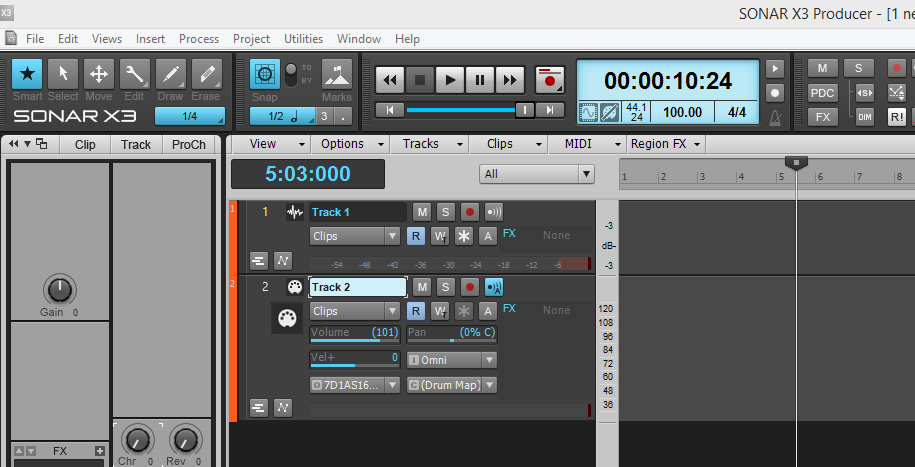 Here is the empty project. The audio engine is off.
|
scook
Forum Host
- Total Posts : 24146
- Joined: 2005/07/27 13:43:57
- Location: TX
- Status: offline
Re: [UPDATE] Audio Engine disabling / Audio interface options?
2014/05/19 01:13:48
(permalink)
I hope you will believe me when I tell you the audio engine is enabled when I open an empty project. Do I really need to create an account somewhere and post a picture? I do believe the picture you have posted represents a snapshot in time on your system. After inserting a synth in an empty project do you have to enable the audio engine to test a patch? Or does the engine turn on when it sees midi data from the controller? In my case, I add a synth to my empty project (n.b. the audio engine is already running) and can test the synth right away.
It may be system specific, IDK. I can only speak for my system and configuration.
|
John
Forum Host
- Total Posts : 30467
- Joined: 2003/11/06 11:53:17
- Status: offline
Re: [UPDATE] Audio Engine disabling / Audio interface options?
2014/05/19 01:34:57
(permalink)
scook
I hope you will believe me when I tell you the audio engine is enabled when I open an empty project. Do I really need to create an account somewhere an post a picture? I do believe the picture you have posted represents a snapshot in time on your system. After inserting a synth in an empty project do you really have to enable the audio engine to test a patch? Or does the engine turn on when it sees midi data from the controller? In my case, I add a synth to my empty project (n.b. the audio engine is already running) and can test the synth right away.
It may be system specific, IDK. I can only speak for my system and configuration.
No Scook. I don't know what is going on and no you do not need to prove anything. As soon as there is some sound to play either a synth or audio it does as it says in the manual and will automatically turn on. I never have to deal with the audio engine. Basically that was all I was trying to get across to the OP. Loading a MIDI file and playing it via a hardware synth there is no change to the audio engine button it appears off. I would expect this. The moment I inserted a synth the button came on. This was also expected. I did nothing to the button at all. If I turn the button off and then hit play it comes on again.
|
robert_e_bone
Moderator
- Total Posts : 8968
- Joined: 2007/12/26 22:09:28
- Location: Palatine, IL
- Status: offline
Re: [UPDATE] Audio Engine disabling / Audio interface options?
2014/05/19 11:50:21
(permalink)
In 20+ years, I have never once had to deal with the audio engine being off or on, period.
So, just so I can sleep tonight, please do the following and tell me if you get sound (please note there are lots of ways to do things in Sonar, and the following are but one way, HOWEVER, the following steps work, so let's follow them exactly):
1. Launch Sonar
2. Since I understand you have a modified template that opens, CLOSE it so no project is open.
3. Click File>New, and create a brand-new project - call it whatever - using the Cakewalk-supplied 16 Track Audio project template (NOT your modified Normal template). The 16 Track Audio project template is just their original Normal template, loaded with 16 audio tracks. Please note this will have extra tracks, but it is no big deal to remove those, and we will be then very close to the original Normal template.
4. Click on the 'X' at the bottom left corner of the Console Pane, to close it for now.
5. Click directly on the '2' on the far left side of the second track in the Track Pane, which will highlight it.
6. Now, hold Shift down and click on the '16' on the far left side of the 16th track in the Track Pane, which will highlight tracks 2-16.
7. Now, right click on any one of the highlighted track numbers, and click on 'Delete 15 Tracks', which will simply leave us with Track 1 - which is an audio track, and we will also have 3 buses (Master, Metronome, and Preview - though you won't see those buses since we closed the Console Pane).
OK, so now we already have an audio track to work with. We just need to add a midi track, load a soft synth, make the appropriate routing assignments, and play some sounds.
1. Right click in the Track Pane, under the existing Track 1, and insert a midi track.
2. In the Media Browser, click on the tab labelled Synth.
3. Now, click on the '+' to get the Insert Synth dialog started.
4. Expand the 'Insert Synth' then expand DirectX, and click on 'Cakewalk TTS-1 '.
5. This will open the 'Insert Soft Synth Options' dialog box. For purposes of this walk through, leave only the 'Synth Property Page', 'Recall Assignable Controls', and 'Ask This Every Time' boxes checked.
6. Sonar will complete the insertion of the TTS-1 synth, with no associated tracks or assignments.
7. Go ahead and close TTS-1 UI. It already has a Piano sound loaded into channel 1, and that's all I am looking for at the moment.
OK, so now we need to connect the dots, between the tracks and the synth.
1. Click on the '1' to highlight Track 1, the audio track.
2. Now, in the Inspector Pane, they have Sonar default to having the Pro Channel displayed. Click on the blue 'Pro Channel' button to click it off. That will leave the Track Inspector displayed (since you highlighted the audio track, you should see Track 1 and Master channel strips in the Inspector Pane).
3. Click on the audio track Input, and assign it to: Output 1: Stereo of TTS-1.
4. Click on the '2' for the midi track, to highlight it.
5. Click on the Output for Track 2. The Output should already be set by Sonar to the 1st loaded synth in the synth rack, which happens to be the one we want - TTS-1.
OK, so we have midi data being sent to TTS-1, and it will be default react to any input, so if you have a midi controller/keyboard set up, if you play notes on it, you should hear Piano sounds being produced by TTS-1.
If you do not have a midi keyboard/controller available, you can still hear sounds, by double-clicking on the TTS-1 in the synth rack, to open its UI, then press and hold the Preview button at the bottom left of channel 1. This will cycle TTS-1 through a short clip of piano midi data, which you should hear because by having the assignments correctly set, and having highlighted the midi track, Sonar will automatically by default turn on the midi echo on button for the midi track.
So, please do EXACTLY the above, and post back on whether or not you get sound.
Bob Bone
Wisdom is a giant accumulation of "DOH!" Sonar: Platinum (x64), X3 (x64) Audio Interfaces: AudioBox 1818VSL, Steinberg UR-22 Computers: 1) i7-2600 k, 32 GB RAM, Windows 8.1 Pro x64 & 2) AMD A-10 7850 32 GB RAM Windows 10 Pro x64 Soft Synths: NI Komplete 8 Ultimate, Arturia V Collection, many others MIDI Controllers: M-Audio Axiom Pro 61, Keystation 88es Settings: 24-Bit, Sample Rate 48k, ASIO Buffer Size 128, Total Round Trip Latency 9.7 ms
|
Cactus Music
Max Output Level: 0 dBFS
- Total Posts : 8424
- Joined: 2004/02/09 21:34:04
- Status: offline
Re: [UPDATE] Audio Engine disabling / Audio interface options?
2014/05/19 14:51:38
(permalink)
In X3e studio, If I create new blank "normal",,, the audio engine is on,
If I choose "Blank Project" it is off.
All other templates it is on.
If I close to the empty Sonar screen it goes off.
I then booted 8.5 on my laptop and did not connect an interface, I had to change the driver mode to MME. Now the audio engine does not come on with a Normal Template.
Boy does Sonar get mad!! I couldn't load a soft synth! any how, this is why I never would even bother using MME and an on board chip.
|
Cactus Music
Max Output Level: 0 dBFS
- Total Posts : 8424
- Joined: 2004/02/09 21:34:04
- Status: offline
Re: [UPDATE] Audio Engine disabling / Audio interface options?
2014/05/19 14:54:26
(permalink)
Bob -We have solved the issue, its a lack of proper drivers, end of story. John has explained it very well I thought. Just try it your self, grab and off the self computer and try and run Sonar without an ASIO or WDM drivers.. you'll go nuts if your used to the performance we get with them.
post edited by Cactus Music - 2014/05/19 16:10:13
|
DaveG74
Max Output Level: -86 dBFS
- Total Posts : 220
- Joined: 2013/07/07 12:54:25
- Status: offline
Re: [UPDATE] Audio Engine disabling / Audio interface options?
2014/05/19 16:22:52
(permalink)
robert_e_bone
So, just so I can sleep tonight, please do the following and tell me if you get sound (please note there are lots of ways to do things in Sonar, and the following are but one way, HOWEVER, the following steps work, so let's follow them exactly):
1. Launch Sonar
2. Since I understand you have a modified template that opens, CLOSE it so no project is open.
3. Click File>New, and create a brand-new project - call it whatever - using the Cakewalk-supplied 16 Track Audio project template (NOT your modified Normal template). The 16 Track Audio project template is just their original Normal template, loaded with 16 audio tracks. Please note this will have extra tracks, but it is no big deal to remove those, and we will be then very close to the original Normal template.
4. Click on the 'X' at the bottom left corner of the Console Pane, to close it for now.
5. Click directly on the '2' on the far left side of the second track in the Track Pane, which will highlight it.
6. Now, hold Shift down and click on the '16' on the far left side of the 16th track in the Track Pane, which will highlight tracks 2-16.
7. Now, right click on any one of the highlighted track numbers, and click on 'Delete 15 Tracks', which will simply leave us with Track 1 - which is an audio track, and we will also have 3 buses (Master, Metronome, and Preview - though you won't see those buses since we closed the Console Pane).
OK, so now we already have an audio track to work with. We just need to add a midi track, load a soft synth, make the appropriate routing assignments, and play some sounds.
1. Right click in the Track Pane, under the existing Track 1, and insert a midi track.
2. In the Media Browser, click on the tab labelled Synth.
3. Now, click on the '+' to get the Insert Synth dialog started.
4. Expand the 'Insert Synth' then expand DirectX, and click on 'Cakewalk TTS-1 '.
5. This will open the 'Insert Soft Synth Options' dialog box. For purposes of this walk through, leave only the 'Synth Property Page', 'Recall Assignable Controls', and 'Ask This Every Time' boxes checked.
6. Sonar will complete the insertion of the TTS-1 synth, with no associated tracks or assignments.
7. Go ahead and close TTS-1 UI. It already has a Piano sound loaded into channel 1, and that's all I am looking for at the moment.
OK, so now we need to connect the dots, between the tracks and the synth.
1. Click on the '1' to highlight Track 1, the audio track.
2. Now, in the Inspector Pane, they have Sonar default to having the Pro Channel displayed. Click on the blue 'Pro Channel' button to click it off. That will leave the Track Inspector displayed (since you highlighted the audio track, you should see Track 1 and Master channel strips in the Inspector Pane).
3. Click on the audio track Input, and assign it to: Output 1: Stereo of TTS-1.
4. Click on the '2' for the midi track, to highlight it.
5. Click on the Output for Track 2. The Output should already be set by Sonar to the 1st loaded synth in the synth rack, which happens to be the one we want - TTS-1.
OK, so we have midi data being sent to TTS-1, and it will be default react to any input, so if you have a midi controller/keyboard set up, if you play notes on it, you should hear Piano sounds being produced by TTS-1.
If you do not have a midi keyboard/controller available, you can still hear sounds, by double-clicking on the TTS-1 in the synth rack, to open its UI, then press and hold the Preview button at the bottom left of channel 1. This will cycle TTS-1 through a short clip of piano midi data, which you should hear because by having the assignments correctly set, and having highlighted the midi track, Sonar will automatically by default turn on the midi echo on button for the midi track.
So, please do EXACTLY the above, and post back on whether or not you get sound.
Bob Bone
I followed each step to the letter. I briefly got confused on step #2 involving closing Pro Channel (found out it was only in Producer). But after all is said and done, I have sound . Now that's great, but it's quiet again once I reload the file. This is where I'm confused. Is this supposed to happen? This is where I have to either insert at least one note or a synth to "wake up" the audio engine. Mind you, I'm just curious. I want to know how this works (I want you to be able to sleep at night, LOL :) ) As the Forum link in the first post says, sound will not play if there's no data to play, which is why I am confused as to why I recently can't insert a synth (in a new file) and test the instruments from the Properties outright. MC6 didn't behave this way...
|
robert_e_bone
Moderator
- Total Posts : 8968
- Joined: 2007/12/26 22:09:28
- Location: Palatine, IL
- Status: offline
Re: [UPDATE] Audio Engine disabling / Audio interface options?
2014/05/19 16:41:12
(permalink)
Thanks - I get it - I put that together for the OP.
Bob Bone
Wisdom is a giant accumulation of "DOH!" Sonar: Platinum (x64), X3 (x64) Audio Interfaces: AudioBox 1818VSL, Steinberg UR-22 Computers: 1) i7-2600 k, 32 GB RAM, Windows 8.1 Pro x64 & 2) AMD A-10 7850 32 GB RAM Windows 10 Pro x64 Soft Synths: NI Komplete 8 Ultimate, Arturia V Collection, many others MIDI Controllers: M-Audio Axiom Pro 61, Keystation 88es Settings: 24-Bit, Sample Rate 48k, ASIO Buffer Size 128, Total Round Trip Latency 9.7 ms
|
robert_e_bone
Moderator
- Total Posts : 8968
- Joined: 2007/12/26 22:09:28
- Location: Palatine, IL
- Status: offline
Re: [UPDATE] Audio Engine disabling / Audio interface options?
2014/05/19 17:31:33
(permalink)
What I explained works, and reloading a saved project that worked prior to the save works fine for me and others.
I continue to recommend you pick up an audio interface.
Bob Bone
Wisdom is a giant accumulation of "DOH!" Sonar: Platinum (x64), X3 (x64) Audio Interfaces: AudioBox 1818VSL, Steinberg UR-22 Computers: 1) i7-2600 k, 32 GB RAM, Windows 8.1 Pro x64 & 2) AMD A-10 7850 32 GB RAM Windows 10 Pro x64 Soft Synths: NI Komplete 8 Ultimate, Arturia V Collection, many others MIDI Controllers: M-Audio Axiom Pro 61, Keystation 88es Settings: 24-Bit, Sample Rate 48k, ASIO Buffer Size 128, Total Round Trip Latency 9.7 ms
|
gcolbert
Max Output Level: -67 dBFS

- Total Posts : 1176
- Joined: 2010/11/13 18:34:06
- Location: Windsor Mill, MD
- Status: offline
Re: [UPDATE] Audio Engine disabling / Audio interface options?
2014/05/19 19:00:06
(permalink)
Grundberg - I'm assuming that you are using ASIO4ALL?
I used it with the internal sound card for a couple of years before getting a dedicated audio interface. One of the issues that I had with it was that the internal sound card needed to be disabled for Windows sounds and the Windows settings for my internal sound card needed to be set to allow programs to take exclusive control of the sound card.
I then had to set up Sonar so that it would take exclusive control of the sound card.
If any windows sounds were made (playing YouTube or anything else) Sonar would not get proper control of the sound card and the audio engine in Sonar would not start properly. However, if after a fresh reboot, loaded Sonar immediately and then Started Sonar the audio engine still did not start dependably (although sometimes it would work intermittently as seems to be the experience you are having). If the first thing that I did in Sonar was to open the ASIO4ALL dialog within Sonar, then everything would work without a problem. Working with the Cakewalk Help Desk we determined that ASIO4ALL was not being initialized properly when loading from Sonar, but opening the ASIO dialog got things initialized.
All of this went by the wayside when I got a proper interface and deleted ASIO4ALL from my system.
Try turning off windows sounds, setting the exclusive mode of the device and in Sonar, rebooting before using Sonar, open the ASIO panel and then just close it then try using Sonar to see if it doesn't work better for you.
Platinum / VS-100 / 12 GB RAM / Win 10 Pro / AMD A8 / MP Touch MonitorsPlatinum / on-board audio / 4 GB RAM /Win 10 Pro / HP dm4 Laptop / stuffTHpfft!
|
DaveG74
Max Output Level: -86 dBFS
- Total Posts : 220
- Joined: 2013/07/07 12:54:25
- Status: offline
Re: [UPDATE] Audio Engine disabling / Audio interface options?
2014/05/19 19:19:49
(permalink)
gcolbert
Grundberg - I'm assuming that you are using ASIO4ALL?
Try turning off windows sounds, setting the exclusive mode of the device and in Sonar, rebooting before using Sonar, open the ASIO panel and then just close it then try using Sonar to see if it doesn't work better for you.
Nope. I'm using the "MME (32-bit)" entry in the Audio -> Playback & Recording options. I suppose a control freak such as myself could just insert a silent 1/32 "phantom note" at 1:00:000 in a track somewhere that doesn't play. Then the audio engine would always go on -- but it goes on when the song starts anyway. As stated in my first post, I will still be looking for audio interfaces (especially taking into account Robert's suggestion) to see what's out there.
|
robert_e_bone
Moderator
- Total Posts : 8968
- Joined: 2007/12/26 22:09:28
- Location: Palatine, IL
- Status: offline
Re: [UPDATE] Audio Engine disabling / Audio interface options?
2014/05/19 23:51:11
(permalink)
Thanks for hanging in there, Grundberg.
You will be SOOOO much happier once you get that last missing piece or an audio interface.
Really, I just came back from a grueling day, sat in the chair, launched Sonar, and in less than 2 minutes was jamming guitar leads. Once it is all set up, it just WORKS. :)
Complete bliss - doesn't address the wrong notes, but I'll take it. :)
Bob Bone
Wisdom is a giant accumulation of "DOH!" Sonar: Platinum (x64), X3 (x64) Audio Interfaces: AudioBox 1818VSL, Steinberg UR-22 Computers: 1) i7-2600 k, 32 GB RAM, Windows 8.1 Pro x64 & 2) AMD A-10 7850 32 GB RAM Windows 10 Pro x64 Soft Synths: NI Komplete 8 Ultimate, Arturia V Collection, many others MIDI Controllers: M-Audio Axiom Pro 61, Keystation 88es Settings: 24-Bit, Sample Rate 48k, ASIO Buffer Size 128, Total Round Trip Latency 9.7 ms
|
DaveG74
Max Output Level: -86 dBFS
- Total Posts : 220
- Joined: 2013/07/07 12:54:25
- Status: offline
Re: [UPDATE] Audio Engine disabling / Audio interface options?
2014/06/04 17:55:03
(permalink)
I just wanted to reopen this thread as a quick update. Please pardon the potential beating of a dead horse, but trust me -- as a semi-newbie, this is a need-to-know scenario. AUDIO ENGINE I called Cakewalk tech support today, asking why the Audio Engine light doesn't come on automatically until I insert a note/synth track to be played? He confirmed (as does the Cakewalk documentation) that the Engine won't activate until there is data to play. This was why I couldn't hear audio opening a blank template. That's the way Sonar (and MC6) works. I feel much better knowing this, and I'm convinced that I was merely making a fuss over the normal operation of the DAW. It's kind of like fussing over the Roman numeral IIII on a clock -- it's been that way all along, and it's supposed to be. He added that with a USB audio interface, the Engine does activate automatically. I promise I understand this now and the hypothetical horse is dead. AUDIO INTERFACE As far as the audio interface -- I've still been looking, but to this day, I have not had the necessity for one. I'm not denying that I may need one or denouncing those on the Forum who have said so. All the projects I have started over the past year have gone smoothly with my current internal hardware. But you can be sure that, if the need arises, I will go looking for an audio interface (hence some very promising recommendations made my users of the Forum). I'll admit, my projects are quite basic. A finished song is usually 7 to 10 tracks and I don't use a lot of effects or plug-ins. But I know that as I progress, my needs will become more elaborate as well. I shall keep you all posted! SUMMARY Right now, I have the tremendous goal of remastering all eighteen of my MIDI compositions from the 90's (per this software) and also finishing about a dozen more I've started over the past year. Given everything I've learned from all of you -- and the roadblocks I've overcome to get here -- I see a very rewarding experience as I progress through these projects! Thanks, everyone, for your guidance and education!
|