nealios
Max Output Level: -90 dBFS

- Total Posts : 5
- Joined: 2014/06/01 06:07:14
- Status: offline

Experienced user, still not having it with Cakewalk Sonar products..
I've been a cakewalk user for years, used it on decent laptops years ago with decent results.
I went with Sonar X3 Producer mainly for the plugins, and I was familiar with cakewalk already.
Now I have my own built PC, with the works. Used for photoshop, music, vid editing, etc..
Intel i7 3440
16gb ram
256gb ssd (OS drive)
128gb ssd (plugins drive)
1tb HHD (Data drive)
GTX 660 TI video card
Roland Quad capture interface
Korg 61key Midi controller
With this built beast I was sure I would be able to handle and play in realtime in my most demanding projects, which really are not
all that big, less than 10 tracks on average. 16/44, up to 24/96.
everythings up to date, drivers, etc..
And so far Sonar X3, 6, 7.5, have been the most frustrating programs that Ive used and owned!
I've used other DAWS. To me, Reaper was great!! probably the best daw i've used, keyboard shortcuts and
navigation is the best, wish Sonar had the same layouts. What reaper didn't have was the plugins. I would use the plugins from sonar 6, or 7.5, Reaper would handle them better, with no dropouts, hickups, anything, on my old laptop..
So my Cakewalk Sonar Preferences that I use are the defaults, seemed my computer could handle default settings,
I/O buffers, latency and such.
So do you really have to play/record with very big latencies, buffers and what not? I was sure that I would be able to play and record in realtime with my newly built beast PC, seems it could handle everything. Everything except Sonar. Z3ta+2 for example, with limiters on and everything perfect, I can't make a tone from scratch without a dropout.
Seems theres something wrong on my part, but its only with sonar..
I will give yal gurus a post of my settings later when I have time, Its just frustrating ya know!!
|
gswitz
Max Output Level: -18.5 dBFS

- Total Posts : 5694
- Joined: 2007/06/16 07:17:14
- Location: Richmond Virginia USA
- Status: offline
Re: Experienced user, still not having it with Cakewalk Sonar products..
2014/06/01 10:54:10
(permalink)
You need to run Latency Monitor to discover what on your system is causing your issue. http://www.resplendence.com/latencymonIt's a free tool. I'm presuming you aren't having a hard drive constraint. That can also cause dropouts if you are trying to write lots of large files. I'll bet a dollar your problem is with long deferred procedure calls from some driver.
StudioCat > I use Windows 10 and Sonar Platinum. I have a touch screen. I make some videos. This one shows how to do a physical loopback on the RME UCX to get many more equalizer nodes.
|
Anderton
Max Output Level: 0 dBFS

- Total Posts : 14070
- Joined: 2003/11/06 14:02:03
- Status: offline
Re: Experienced user, still not having it with Cakewalk Sonar products..
2014/06/01 11:02:12
(permalink)
☄ Helpfulby Shambler 2014/06/01 11:00:21
At 24/96kHz, for small projects I can run Sonar with a 1 millisecond buffer and no dropouts. For most 44.1kHz projects the buffer is 96 or 128 samples. Some of these projects run over 100 tracks with no dropouts. My computer is similar to yours. So, the problem is not with Sonar.
The nature of your tracks will influence latency. 10 tracks of U-He's Diva set to the highest possible resolution/CPU consumption will challenge any computer. Latency will also depend on which plug-ins you use. Plug-ins with look-ahead functions, like Waves' maximizers and others, add latency to the base latency. With those plug-ins you can have a very low latency setting in preferences, but experience significant latency due to the plug-in.
You should not be getting dropouts with a single instance of Z3TA+. There is something wrong.
|
scook
Forum Host

- Total Posts : 24146
- Joined: 2005/07/27 13:43:57
- Location: TX
- Status: offline
Re: Experienced user, still not having it with Cakewalk Sonar products..
2014/06/01 11:12:13
(permalink)
I would suggest narrowing down that range of sample rates to 44.1 or 48KHz @ 24bit and concentrate on getting the parameters correct that configuration, first. Please provide details about ASIO buffer settings. Default settings often require turning and the tuning is system specific. Running a diagnostic tool like latencymon is good idea. It is unclear whether the Z3TA+2 issues are audio dropouts or missing MIDI notes. How is the CPU load (esp. the first bar in the load monitor in SONAR)?
|
robert_e_bone
Moderator

- Total Posts : 8968
- Joined: 2007/12/26 22:09:28
- Location: Palatine, IL
- Status: offline
Re: Experienced user, still not having it with Cakewalk Sonar products..
2014/06/01 11:19:22
(permalink)
If you are using the defaults, are you possibly using WDM Driver Mode?
For recording purposes, I suggest the following settings:
Audio interface: Sample Rate of either 44.1 k or 48 k, ASIO Buffer Size of 128
Sonar: Driver Mode of ASIO, Sample Rate that matches interface's, Record Bit-Depth of 24 bits.
When recording, you want to try to get your Sonar-reported Total Roundtrip Latency to around 10 milliseconds or just under it. This gives a good balance, and you can get a BUNCH of tracks and synths to work within those settings for recording purposes.
When done with recording, and you move on to mixing, you will likely need to bump your ASIO Buffer Size up to as high as 1024, depending on what plugin effects you load in. This is because some effects, by design, add massive latency to do what they do. Such effects are NOT meant for use in recording, because of the latency they add (which is why you need to bump up the ASIO Buffer Size). Examples of these include: Perfect Space and Boost 11, and there are others from Cakewalk, as well as other vendors.
Sooooooo, give the above settings a try and post back. If you still have the dropouts and such, it may then be due to the loaded effects in a given project. To test that theory, you can hit the 'E' key on your computer keyboard, and that will toggle off/on all effects. If dropouts and crackles that are present go away after bypassing all effects, then one or more of the loaded effects in that project are likely meant for mixing/mastering, and not for recording.
I hope the above helps,
Bob Bone
Wisdom is a giant accumulation of "DOH!" Sonar: Platinum (x64), X3 (x64) Audio Interfaces: AudioBox 1818VSL, Steinberg UR-22 Computers: 1) i7-2600 k, 32 GB RAM, Windows 8.1 Pro x64 & 2) AMD A-10 7850 32 GB RAM Windows 10 Pro x64 Soft Synths: NI Komplete 8 Ultimate, Arturia V Collection, many others MIDI Controllers: M-Audio Axiom Pro 61, Keystation 88es Settings: 24-Bit, Sample Rate 48k, ASIO Buffer Size 128, Total Round Trip Latency 9.7 ms
|
nealios
Max Output Level: -90 dBFS
- Total Posts : 5
- Joined: 2014/06/01 06:07:14
- Status: offline
Re: Experienced user, still not having it with Cakewalk Sonar products..
2014/06/01 14:45:19
(permalink)
My Driver settings 96Khz 24bit, 512 sample buffer size on my interface,
Driver mode is ASIO, sample rates are the same for interface and project 96000.
under PREFERENCES / SYNC AND CACHING,
Playback and record I/O buffer size both at 256
I have not enabled any read or write caching,
reported latency from all adjustments is 1750 samples.
under PREFERENCES / PLAYBACK AND RECORDING
128 for midi buffering, playback preparing set at 256 millisecond buffers ( haven't touched yet)
everything else is pretty much straight out of the box, get up and go sorta deal.
I've selected my inputs, outputs, Devices, folder locations, correctly im sure.
Ive only been having problem with Sonar and using plugin/instruments it seems "Z3TA, Addictive Drums 2, and for some
reason, Pentagon plugin crashes sonar when loading up tones? never messed or used pentagon before, but im pretty sure it wasn't made to do that, i hope.
Anyways, i've found reaper again and installed it to try something out. Some plugins don't load up in Reaper becuase of
cakewalks restrictions, but some of the plugins i've bought do, Addictive drums, Z3ta 2. They perform sooooooooooooooooooooooo good in Reaper. I can't retain the excitement im sorry.
being able to cycle through Addictive drum kits, and Z3ta 2 presets, pressing a key pad without a dropout gets me thinking it has to do something with sonar, or settings within it, not my computer?? right? maybe a clean installation of Sonar..
|
S.L.I.P.
Max Output Level: -72 dBFS

- Total Posts : 949
- Joined: 2004/07/10 18:00:29
- Status: offline
Re: Experienced user, still not having it with Cakewalk Sonar products..
2014/06/01 16:05:02
(permalink)
nealios, I feel your pain. I have a monster computer, and I've experienced random dropouts. I've had projects with over 30 tracks, and a ton of effects, soft synths, and not had a single dropout, but I've had projects with 7 audio tracks, and no effects, and I will experience random dropouts. I've read, and tried everything I can find to eliminate this problem. I do see that you have the Roland quad capture, and that is what I have as well. I'm thinking about getting a different audio interface.
|
gswitz
Max Output Level: -18.5 dBFS
- Total Posts : 5694
- Joined: 2007/06/16 07:17:14
- Location: Richmond Virginia USA
- Status: offline
Re: Experienced user, still not having it with Cakewalk Sonar products..
2014/06/01 17:00:08
(permalink)
Please post the results from Latency Monitor so we can read what's up. I think we'll be able to help.
StudioCat > I use Windows 10 and Sonar Platinum. I have a touch screen. I make some videos. This one shows how to do a physical loopback on the RME UCX to get many more equalizer nodes.
|
Splat 
Max Output Level: 0 dBFS
- Total Posts : 8672
- Joined: 2010/12/29 15:28:29
- Location: Mars.
- Status: offline
Re: Experienced user, still not having it with Cakewalk Sonar products..
2014/06/01 17:18:11
(permalink)
Well... 1) First tweak it as others have suggested (latency etc). 2) See if you can nail it down to a particular plugin (maybe). 3) Update plugins, firmware, drivers, and windows update, Sonar to X3E etc. Also perform a VST reset. 4) Defrag. 5) Configure your virus scanner to ignore certain file path with real time scan. 6) All else fails backup and wipe the partition and reinstall the OS (very much a last resort). Do not install plugins you are not going to use, avoid 32 bit plugins. Keep it clean and don't install programs that a non DAW related (like skype for instance). If you need that sort of thing go for a dual boot environment. What is your operating system version? 64 bit? Cheers...
Sell by date at 9000 posts. Do not feed. @48/24 & 128 buffers latency is 367 with offset of 38. Sonar Platinum(64 bit),Win 8.1(64 bit),Saffire Pro 40(Firewire),Mix Control = 3.4,Firewire=VIA,Dell Studio XPS 8100(Intel Core i7 CPU 2.93 Ghz/16 Gb),4 x Seagate ST31500341AS (mirrored),GeForce GTX 460,Yamaha DGX-505 keyboard,Roland A-300PRO,Roland SPD-30 V2,FD-8,Triggera Krigg,Shure SM7B,Yamaha HS5.Maschine Studio+Komplete 9 Ultimate+Kontrol Z1.Addictive Keys,Izotope Nectar elements,Overloud Bundle,Geist.Acronis True Image 2014.
|
robert_e_bone
Moderator
- Total Posts : 8968
- Joined: 2007/12/26 22:09:28
- Location: Palatine, IL
- Status: offline
Re: Experienced user, still not having it with Cakewalk Sonar products..
2014/06/01 17:55:53
(permalink)
Just for a test, please drop your sample rate for both the audio interface and for Sonar from 96 k to 48 k, and also drop your ASIO Buffer Size to 128 - (try to get your Sonar-reported Total Roundtrip Latency to around 10 milliseconds or just a little under).
Then, test the above out recording in a new project, building up number of synths, midi tracks, audio tracks, and audio effects (careful not to use effects that add lots of latency), and post back on how all of that goes.
Thanks,
Bob Bone
Wisdom is a giant accumulation of "DOH!" Sonar: Platinum (x64), X3 (x64) Audio Interfaces: AudioBox 1818VSL, Steinberg UR-22 Computers: 1) i7-2600 k, 32 GB RAM, Windows 8.1 Pro x64 & 2) AMD A-10 7850 32 GB RAM Windows 10 Pro x64 Soft Synths: NI Komplete 8 Ultimate, Arturia V Collection, many others MIDI Controllers: M-Audio Axiom Pro 61, Keystation 88es Settings: 24-Bit, Sample Rate 48k, ASIO Buffer Size 128, Total Round Trip Latency 9.7 ms
|
nealios
Max Output Level: -90 dBFS
- Total Posts : 5
- Joined: 2014/06/01 06:07:14
- Status: offline
Re: Experienced user, still not having it with Cakewalk Sonar products..
2014/06/02 05:32:53
(permalink)
pure awesomeness everyone thank you. hope you guys can load the 3 images I posted, right click to view image.. I acquired an ran LatencyMon, seems I need to stop browsing the web with my WLAN, find my Speedstep, cpu throttling, and performance settings and fiddle around with that. I know where to look, BIOS, Control panel. Ill tinker around. only ran it for 6 minutes, seems it can run forever. 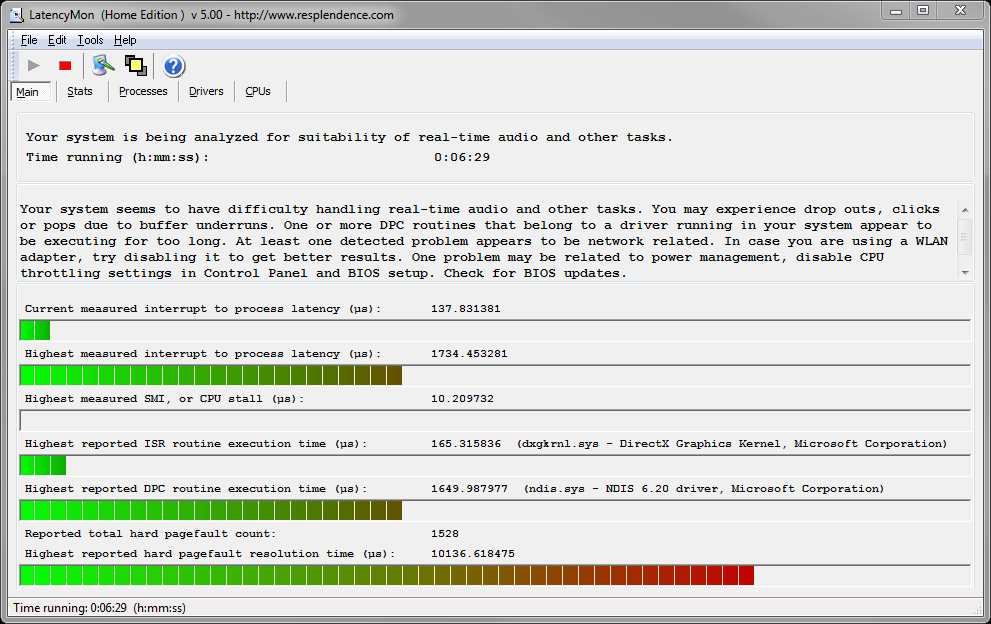 I use ASIO, I don't know much about the other driver modes, but they all are crap it seems.. right?!! I went on and messed with sonar with these settings on my Quad Capture interface.. 24/48, 128 buffer. ASIO reported latency, Input 177 samples, Output 360 samples, Roundtrip = 11.2 msec, 537 samples I just loaded up ADrums, z3ta 2, scrolled through presets, and recorded 4 audio tracks, my god, it works. No hiccups. 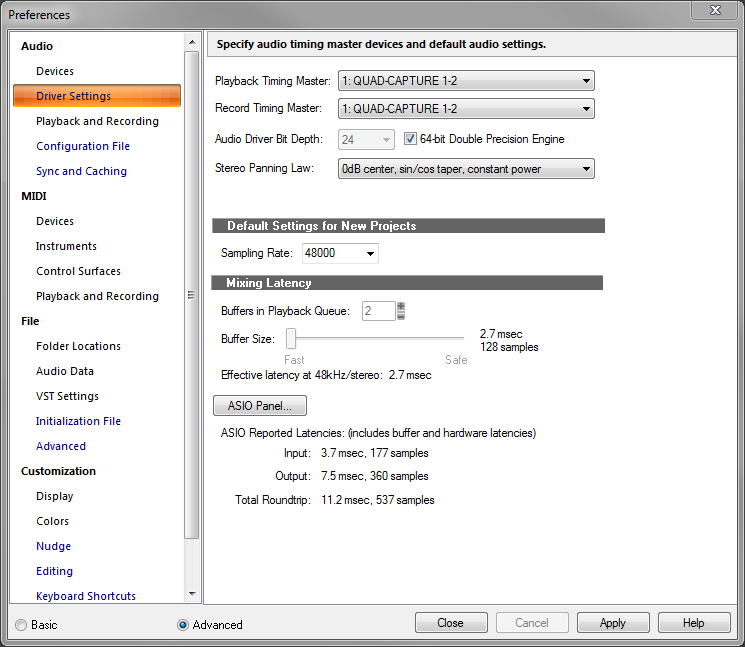 Went on to my usual settings. 24/96, 512 buffer ASIO reported latency, Input 567 samples, Output 1183 samples, Roundtrip 18.2 msec, 1750 samples I did the same as before, and my god morty, its working?!.. 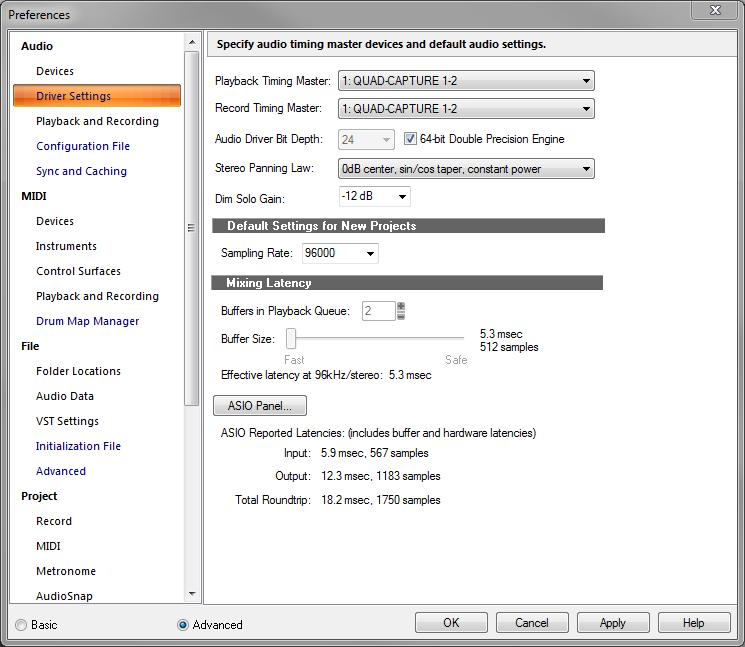 Only thing I didn't do is load a Boost 11 Limiter in my master bus, which I always do, Thanks for pointing that one out. I thought the dropouts were coming from the VST instruments making the audio clipping, so, put a limiter on it, especially with ADrums and Z3ta, some of Z3tas presets are LOUD and some don't have the internal limiter set on them, so I load up a limiter on the master to fix this when scrolling through Z3ta's presets, and I do like doing it fast. I never thought of Boost 11 or any other limiter being a possible culprit, I thought it was helping solve the problem. Well from my brief tests 24/48, 24/96, taking out Boost 11 has rid the dropout/performance issues. How do people keep your master bus from blaring out audio clipping volumes then? whats the method? cuz i thought I was doing it right to protect my monitors.. What other plugins do people have to worry about using? I recently bought Nomads Analog Mastering pack, came with AMT Amp Leveling, Max Warm, and Multi-Max limiter/compressors. Im beginning to love them, I think they sound amazing and would use them on many tracks im sure of. maybe I gotta plan my execution better. I dont need to load up all the when recording, but its nice to mess with while doing so.. I'll tryout some other settings. 24/96 with a smaller buffer, 256, 128, and more tracks, midis, plugins for performance testing, with and without Boost 11. Fix my computers performance also. back to the lab guys..
post edited by nealios - 2014/06/02 13:47:44
|
Splat
Max Output Level: 0 dBFS
- Total Posts : 8672
- Joined: 2010/12/29 15:28:29
- Location: Mars.
- Status: offline
Re: Experienced user, still not having it with Cakewalk Sonar products..
2014/06/02 11:18:47
(permalink)
Can't see the images sorry.
What version of Windows are you using 64 bit Windows and 64 bit Sonar?
Thanks...
Sell by date at 9000 posts. Do not feed. @48/24 & 128 buffers latency is 367 with offset of 38. Sonar Platinum(64 bit),Win 8.1(64 bit),Saffire Pro 40(Firewire),Mix Control = 3.4,Firewire=VIA,Dell Studio XPS 8100(Intel Core i7 CPU 2.93 Ghz/16 Gb),4 x Seagate ST31500341AS (mirrored),GeForce GTX 460,Yamaha DGX-505 keyboard,Roland A-300PRO,Roland SPD-30 V2,FD-8,Triggera Krigg,Shure SM7B,Yamaha HS5.Maschine Studio+Komplete 9 Ultimate+Kontrol Z1.Addictive Keys,Izotope Nectar elements,Overloud Bundle,Geist.Acronis True Image 2014.
|
nealios
Max Output Level: -90 dBFS
- Total Posts : 5
- Joined: 2014/06/01 06:07:14
- Status: offline
Re: Experienced user, still not having it with Cakewalk Sonar products..
2014/06/02 11:42:49
(permalink)
64 bit windows 7 home and 64 bit sonar X3 Producer E-Build. Dropbox won't allow public mode anymore..:( figured the Image problem out, went with Photobucket.. they should work now..
post edited by nealios - 2014/06/02 13:49:07
|
gswitz
Max Output Level: -18.5 dBFS
- Total Posts : 5694
- Joined: 2007/06/16 07:17:14
- Location: Richmond Virginia USA
- Status: offline
Re: Experienced user, still not having it with Cakewalk Sonar products..
2014/06/04 00:38:51
(permalink)
The drivers tab of latency monitor is pretty useful.
Concrete Limiter for the pro channel is a pretty nice low latency limiter.
If you raise your sample buffers as high as they go you may be able to use Boost11, but that plug doesn't get much love around here.
From your Lat Mon images, you can probably still do a lot to lower your deferred procedure call latency.
On my system, the highest measured interrupt to process latency (second bar) is 129.
On the drivers tab, sorted on highest execution ms is ClassPNP.SYS at 0.21 ms.
You are showing more than 10 times these numbers.
BTW, I recently had a latency problem caused by using a mouse for which I hadn't explicitly downloaded the driver. Going to Logitech and downloading the right driver helped me out. The mouse showed up in drivers tab as USBPORT.SYS. This same item is now 0.18 for me.
StudioCat > I use Windows 10 and Sonar Platinum. I have a touch screen. I make some videos. This one shows how to do a physical loopback on the RME UCX to get many more equalizer nodes.
|
Grumbleweed_
Max Output Level: -72 dBFS
- Total Posts : 915
- Joined: 2007/11/01 09:13:58
- Location: Southampton, England
- Status: offline
Re: Experienced user, still not having it with Cakewalk Sonar products..
2014/06/04 06:18:43
(permalink)
I've always had a Boost 11 on my Master Buss (at a neutral setting just to stop any clipping) until the Nomad stuff came with X3, and now I have the Concrete Limiter. I do not recall Boost 11 causing any problems (but I much prefer the Concrete Limiter!).
Grum.
|
Bristol_Jonesey
Max Output Level: 0 dBFS
- Total Posts : 16775
- Joined: 2007/10/08 15:41:17
- Location: Bristol, UK
- Status: offline
Re: Experienced user, still not having it with Cakewalk Sonar products..
2014/06/04 07:52:07
(permalink)
I used Boost 11 once.
Nothing more to say really.............
CbB, Platinum, 64 bit throughoutCustom built i7 3930, 32Gb RAM, 2 x 1Tb Internal HDD, 1 x 1TB system SSD (Win 7), 1 x 500Gb system SSD (Win 10), 2 x 1Tb External HDD's, Dual boot Win 7 & Win 10 64 Bit, Saffire Pro 26, ISA One, Adam P11A,
|
chuckebaby
Max Output Level: 0 dBFS
- Total Posts : 13146
- Joined: 2011/01/04 14:55:28
- Status: offline
Re: Experienced user, still not having it with Cakewalk Sonar products..
2014/06/04 08:47:05
(permalink)
Bristol_Jonesey
I used Boost 11 once.
Nothing more to say really.............
 me too, by accident.
Windows 8.1 X64 Sonar Platinum x64 Custom built: Asrock z97 1150 - Intel I7 4790k - 16GB corsair DDR3 1600 - PNY SSD 220GBFocusrite Saffire 18I8 - Mackie Control
|
musicroom
Max Output Level: -51 dBFS

- Total Posts : 2421
- Joined: 2004/04/26 22:31:02
- Status: offline
Re: Experienced user, still not having it with Cakewalk Sonar products..
2014/06/04 09:10:28
(permalink)
nealios
pure awesomeness everyone thank you.
hope you guys can load the 3 images I posted, right click to view image..
I acquired an ran LatencyMon, seems I need to stop browsing the web with my WLAN, find my Speedstep, cpu throttling, and performance settings and fiddle around with that. I know where to look, BIOS, Control panel. Ill tinker around.
only ran it for 6 minutes, seems it can run forever.
I use ASIO, I don't know much about the other driver modes, but they all are crap it seems.. right?!!
I went on and messed with sonar with these settings on my Quad Capture interface..
24/48, 128 buffer.
ASIO reported latency, Input 177 samples, Output 360 samples, Roundtrip = 11.2 msec, 537 samples
I just loaded up ADrums, z3ta 2, scrolled through presets, and recorded 4 audio tracks,
my god, it works. No hiccups.
Went on to my usual settings.
24/96, 512 buffer
ASIO reported latency, Input 567 samples, Output 1183 samples, Roundtrip 18.2 msec, 1750 samples
I did the same as before, and my god morty, its working?!..
Only thing I didn't do is load a Boost 11 Limiter in my master bus, which I always do, Thanks for pointing that one out. I thought the dropouts were coming from the VST instruments making the audio clipping, so, put a limiter on it, especially with ADrums and Z3ta, some of Z3tas presets are LOUD and some don't have the internal limiter set on them, so I load up a limiter on the master to fix this when scrolling through Z3ta's presets, and I do like doing it fast.
I never thought of Boost 11 or any other limiter being a possible culprit, I thought it was helping solve the problem. Well from my brief tests 24/48, 24/96, taking out Boost 11 has rid the dropout/performance issues.
How do people keep your master bus from blaring out audio clipping volumes then? whats the method? cuz i thought I was doing it right to protect my monitors..
What other plugins do people have to worry about using? I recently bought Nomads Analog Mastering pack, came with AMT Amp Leveling, Max Warm, and Multi-Max limiter/compressors. Im beginning to love them, I think they sound amazing and would use them on many tracks im sure of.
maybe I gotta plan my execution better. I dont need to load up all the when recording, but its nice to mess with while doing so..
I'll tryout some other settings. 24/96 with a smaller buffer, 256, 128, and more tracks, midis, plugins for performance testing, with and without Boost 11. Fix my computers performance also.
back to the lab guys..
I find for recording purposes that require low latency, I have to disable the master bus fx; especially if the project is starting to get hefty with either tracks or a combination of resource hungry plugins. To keep that step simple, I use the prochannel for the fx bin as well as the pc modules. That way it's one button to disengage on the pc master bus. Also, I sometimes need to engage the PDC botton on the toolbar to help compensate for fx latency. Latency is usually only a problem if I need to listen/monitor tracks being recorded and effected thru sonar (sims, drums, ets.). Otherwise, I can have as many plugs as I want and set the buffer high to record using the interface's zero latency monitoring. That's one reason I love having an interface with built-in dsp for adding monitoring effects. Makes a lot of difference performance wise for vocals and clean instrument recording while not worrying about buffer size and latency. Of course for vsti's heavy users, this approach wouldn't help much... As far as controlling peaking - that's usually in the mix and of course you can always turn down the master bus a bit and turn up the headphone volume when recording.
Dave Songs___________________________________ Desktop: Platinum / RME Multiface II / Purrfect Audio DAW I7-3770 / 16 GB RAM / Win 10 Pro / Remote Laptop i7 6500U / 12GB RAM / RME Babyface
|
rbowser
Max Output Level: -10 dBFS

- Total Posts : 6518
- Joined: 2005/07/31 14:32:34
- Status: offline
Re: Experienced user, still not having it with Cakewalk Sonar products..
2014/06/04 09:44:48
(permalink)
nealios...How do people keep your master bus from blaring out audio clipping volumes then? whats the method?... Quite a thread!-- Congrats on getting things to work better now, Nealios. I pulled out that quote because it's interesting. The reason you even have that question is because you're apparently accustomed to pushing everything to the max, and then relying on a plugin to stop the Master signal from peaking out -- not the best way to treat your music, no matter what the genre. The first thing to do while mixing to "keep your master bus from blaring" is to not have the track faders so danged high! Starting with faders generally around just 1/2 way up is a good start - aiming to keep the signal from rarely peaking at the Master. Then of course it's fine to use something on the Master to tame the peaks that are still in the mix, but your music would best be served if you'd focus on just getting a good mix, and not trying to produce a master at the same time. Do your mix, then maximize the volume, perfect the overall EQ etc of the 2-track master - either in a dedicated audio editor like Sound Forge, or by bringing the master recording into Sonar by itself and using plugins from the big bag of tools Cakewalk provides. Notice you got some snide reactions to using Boost 11. I'm seriously surprised anyone is still using that when Sonar has much better alternatives. Years ago, Cakewalk users tried and rejected Boost 11 because it makes for instant Destruction of your signal. Sure it's simple to use, and its results are crude and barely acceptable. The Concrete Limiter - That's the plugin you want to use for this kind of maxed out signal you're going for - It could even be used for more subtle, more musical results at lower settings. Try it! Randy B.
Sonar X3e Studio Roland A-800 MIDI keyboard controller Alesis i|O2 interface Gigabyte Technology-AMD Phenom II @ 3 GHz 8 Gb RAM 6 Core Windows 7 Home Premium x64 with dual monitors
|
robert_e_bone
Moderator
- Total Posts : 8968
- Joined: 2007/12/26 22:09:28
- Location: Palatine, IL
- Status: offline
Re: Experienced user, still not having it with Cakewalk Sonar products..
2014/06/04 10:02:04
(permalink)
I still think your Total Rountrip Latency of 18 milliseconds is too high for good recording without noticeable lag.
I believe the audible lag detection point is something like 14.5 milliseconds or thereabouts. It was some German guy that figured that out, if memory serves.
I always recommend keeping settings to where for recording purposes, the Total Roundtrip Latency reported by Sonar is around 10 milliseconds, or just under that.
IF you want to run at a Sample Rate of 96 k, try using an ASIO Buffer Size of 256, though this does tax your system a bit - it should keep the latency low enough to work with, as long as the system can keep up.
I run with a Sample Rate of 48 k, and an ASIO Buffer Size of 128, and get a Total Roundtrip Latency of just a bit under 10 milliseconds, and can load up all kinds of synths and tracks without bogging down or getting dropouts/crackles.
Bob Bone
Wisdom is a giant accumulation of "DOH!" Sonar: Platinum (x64), X3 (x64) Audio Interfaces: AudioBox 1818VSL, Steinberg UR-22 Computers: 1) i7-2600 k, 32 GB RAM, Windows 8.1 Pro x64 & 2) AMD A-10 7850 32 GB RAM Windows 10 Pro x64 Soft Synths: NI Komplete 8 Ultimate, Arturia V Collection, many others MIDI Controllers: M-Audio Axiom Pro 61, Keystation 88es Settings: 24-Bit, Sample Rate 48k, ASIO Buffer Size 128, Total Round Trip Latency 9.7 ms
|
nealios
Max Output Level: -90 dBFS
- Total Posts : 5
- Joined: 2014/06/01 06:07:14
- Status: offline
Re: Experienced user, still not having it with Cakewalk Sonar products..
2014/06/06 11:06:25
(permalink)
my mouse and keyboard drivers were detected and installed when I plugged them in. I now believe they are
just fallback drivers? ones Windows puts in place if no dedicated driver's detected? because I never went on the brands site and got any drivers for both mouse and keyboard.. everything works fine though,
They both are pretty basic peripherals, no fancy additional buttons, etc..
Ill look into those to see if any lag issues were present, and to get the actual drivers.
- Stop disable WLAN driver (my external Rosewill Wireless adapter) ill stick with my Mac Air for browsing.
- I mainly put Boost 11 on instead of Concrete because it was more accessible. Ill stick with concrete now.
rearrange and customize my vst layout, stick with my favs ;)
- Start my projects with the master volume -6db - 10db other than just 0db ( which I usually did ).
something I was wondering is if my Nvidia card GTX660 TI, my monitor setup two 22in ASUS LED HD screens, and or my Intel Graphics 4000 Driver was causing any issues. I don't use my Intel graphics for anything, but the drivers installed. I don't think Sonar utulizes the graphics card for anything though.. (Cuda Cores or Intels gpu)..
Also I write record my audio to a 7200rpm 1 TB HDD sata 2, but my Sonar and vst drives are 256, 128GB SSD Sata 3.....
|
Cactus Music
Max Output Level: 0 dBFS
- Total Posts : 8424
- Joined: 2004/02/09 21:34:04
- Status: offline
Re: Experienced user, still not having it with Cakewalk Sonar products..
2014/06/06 11:31:54
(permalink)
Bob your getting round trip latency mixed up. 18 is normal for a Roland interface.
RTL only matters if you are using real time monitoring of things like Guitar rig.
You will hear no latency at all with most modern USB interfaces because Sonar and the drivers compensate and adjust. But unless your using something like an RME or Lynx interface you use the direct monitoring to track.
It is common practice to By Pass all efxs while tracking. Your timing will be tighter.
Sonar cannot adjust for latency added by look ahead plug ins.
|
robert_e_bone
Moderator
- Total Posts : 8968
- Joined: 2007/12/26 22:09:28
- Location: Palatine, IL
- Status: offline
Re: Experienced user, still not having it with Cakewalk Sonar products..
2014/06/06 11:40:02
(permalink)
With regard to your wireless adapter - you can temporarily disable it just prior to firing up Sonar, and then simply enable it again after completing your Sonar session. Just right-click on it in Device Manager and click disable or enable.
Bob Bone
Wisdom is a giant accumulation of "DOH!" Sonar: Platinum (x64), X3 (x64) Audio Interfaces: AudioBox 1818VSL, Steinberg UR-22 Computers: 1) i7-2600 k, 32 GB RAM, Windows 8.1 Pro x64 & 2) AMD A-10 7850 32 GB RAM Windows 10 Pro x64 Soft Synths: NI Komplete 8 Ultimate, Arturia V Collection, many others MIDI Controllers: M-Audio Axiom Pro 61, Keystation 88es Settings: 24-Bit, Sample Rate 48k, ASIO Buffer Size 128, Total Round Trip Latency 9.7 ms
|
gswitz
Max Output Level: -18.5 dBFS
- Total Posts : 5694
- Joined: 2007/06/16 07:17:14
- Location: Richmond Virginia USA
- Status: offline
Re: Experienced user, still not having it with Cakewalk Sonar products..
2014/06/06 21:04:04
(permalink)
You can trouble shoot your mouse and keyboard drivers (keyboard usually isn't an issue) by starting up Latency Monitor and unplugging the mouse and keyboard.
Do things get better?
Watch the drivers tab with the highest latency sorted to the top.
If your #1 problem drops off, well then, hunting for a driver for your mouse might be a good idea.
I have a logitech mouse and it was a matter of going to the logitech website and downloading the right driver. Took 5 minutes.
StudioCat > I use Windows 10 and Sonar Platinum. I have a touch screen. I make some videos. This one shows how to do a physical loopback on the RME UCX to get many more equalizer nodes.
|
robert_e_bone
Moderator
- Total Posts : 8968
- Joined: 2007/12/26 22:09:28
- Location: Palatine, IL
- Status: offline
Re: Experienced user, still not having it with Cakewalk Sonar products..
2014/06/06 21:31:06
(permalink)
I just generically refer to Total Roundtrip Latency - but yes it is the one-way for most instances. I normally suggest shooting for a total roundtrip latency of around 10 milliseconds. I should adjust future comments to refer to the one-way.
Bottom line is to find an ASIO Buffer Size and Sample Rate combination that end up without lag or dropouts or crackles and such.
Bob Bone
Wisdom is a giant accumulation of "DOH!" Sonar: Platinum (x64), X3 (x64) Audio Interfaces: AudioBox 1818VSL, Steinberg UR-22 Computers: 1) i7-2600 k, 32 GB RAM, Windows 8.1 Pro x64 & 2) AMD A-10 7850 32 GB RAM Windows 10 Pro x64 Soft Synths: NI Komplete 8 Ultimate, Arturia V Collection, many others MIDI Controllers: M-Audio Axiom Pro 61, Keystation 88es Settings: 24-Bit, Sample Rate 48k, ASIO Buffer Size 128, Total Round Trip Latency 9.7 ms
|