Teal
Max Output Level: -90 dBFS

- Total Posts : 49
- Joined: 2013/12/06 21:13:13
- Status: offline
SONAR X3 Demo, where the HECK is the Track Menu that lets you define your output channel?
I am an experienced DAW user demoing X3. Documentation does not match what I see on screen, there is NOWHERE to define the ooutput device for a channel, thus no sound. I have defined audio devices in the preferences menu, they exist and are checked, I have set the master device, just no way to set it for a track.
Looks differnt from the cakewalk help page which shows a drop down. I have been looking for over an hour; very negative first view of this product.
I have left and right clicked on EVERYTHING, gone thru all the menus, nothing.
Forum does not allow me to attach Screenshot. Please show/tell me where the "output button" is.
|
Teal
Max Output Level: -90 dBFS
- Total Posts : 49
- Joined: 2013/12/06 21:13:13
- Status: offline

Re: SONAR X3 Demo, where the HECK is the Track Menu that lets you define your output chann
2014/06/18 22:14:05
(permalink)
This is from the help. THIS MENU DOES NOT EXIST ON MINE. http://www.cakewalk.com/Documentation?product=SONAR%20X3&language=3&help=Tutorial1.6.html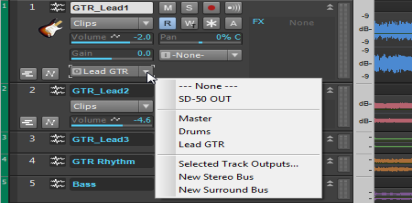
|
scook
Forum Host

- Total Posts : 24146
- Joined: 2005/07/27 13:43:57
- Location: TX
- Status: offline
Re: SONAR X3 Demo, where the HECK is the Track Menu that lets you define your output chann
2014/06/18 22:19:55
(permalink)
Above the track headers to the right of the time display is a drop down controlling the track header display. In the illustration below from http://www.cakewalk.com/D...amp;help=Views.02.html the drop down is set to Mix. Set it to All. Ignore the red box. 
|
RobertB
Max Output Level: 0 dBFS

- Total Posts : 11256
- Joined: 2005/11/19 23:40:50
- Location: Fort Worth, Texas
- Status: offline
Re: SONAR X3 Demo, where the HECK is the Track Menu that lets you define your output chann
2014/06/18 22:22:20
(permalink)
Near the top of your track view, you should see a button that reads "Custom". This is the default setting. Change that to "All". This will reveal the I/O options for the track.
Hang in there. Once you find your way around, it gets very easy to set up projects.
Edit: The "Custom" button I referred to is the same one scook shows as "Mix". Either way, change it to "All".
My Soundclick Page SONAR Professional, X3eStudio,W7 64bit, AMD Athlon IIx4 2.8Ghz, 4GB RAM, 64bit, AKAI EIE Pro, Nektar Impact LX61,Alesis DM6,Alesis ControlPad,Yamaha MG10/2,Alesis M1Mk2 monitors,Samson Servo300,assorted guitars,Lava Lamp Shimozu-Kushiari or Bob
|
Teal
Max Output Level: -90 dBFS
- Total Posts : 49
- Joined: 2013/12/06 21:13:13
- Status: offline
Re: SONAR X3 Demo, where the HECK is the Track Menu that lets you define your output chann
2014/06/18 22:24:36
(permalink)
Thanks so much for your fast response, but after an hour of frustration, I have to say it is a lame design, unintuitive, hiding an important option behind another option, and not even mentioning it in the setup guide.
|
robert_e_bone
Moderator

- Total Posts : 8968
- Joined: 2007/12/26 22:09:28
- Location: Palatine, IL
- Status: offline
Re: SONAR X3 Demo, where the HECK is the Track Menu that lets you define your output chann
2014/06/18 22:28:09
(permalink)
If you hit ALT+2, you should see the console view, and for each channel strip for your tracks, you should see a button for Input and another for Output. The normal routing assignment for Output of an audio track is either to the Master Bus, or to a sub-bus for eventual combining to the Master Bus.
You could also hit 'I' to bring up the Inspector Pane, which has three little buttons at the top (Clip, Track, and ProCh). If you make sure none of those 3 buttons are lit, you will see two channel strips displayed. The one on the left will be the channel strip for whichever track you have selected (brought into focus). If you have an audio track selected, then you will also see a channel strip to the right of the displayed audio track channel strip, and this strip will be for the Master Bus. For the audio track, you can set your routing assignments for Input and Output there as well.
Sometimes, trying to do everything in the Track Pane can be a bit small and hard to find things. using the Console View and the Inspector Pane may help you.
In addition, there are tutorials that you could likely cruise through, because of your prior DAW experience, and these should help you get up to speed on how Sonar does things.
There are also a ton of free videos to watch on all sorts of features and basics of Sonar X3, and there are books available that offer tremendous insight into using Sonar at a high level.
Hang in there,
Bob Bone
Wisdom is a giant accumulation of "DOH!" Sonar: Platinum (x64), X3 (x64) Audio Interfaces: AudioBox 1818VSL, Steinberg UR-22 Computers: 1) i7-2600 k, 32 GB RAM, Windows 8.1 Pro x64 & 2) AMD A-10 7850 32 GB RAM Windows 10 Pro x64 Soft Synths: NI Komplete 8 Ultimate, Arturia V Collection, many others MIDI Controllers: M-Audio Axiom Pro 61, Keystation 88es Settings: 24-Bit, Sample Rate 48k, ASIO Buffer Size 128, Total Round Trip Latency 9.7 ms
|
Splat 
Max Output Level: 0 dBFS
- Total Posts : 8672
- Joined: 2010/12/29 15:28:29
- Location: Mars.
- Status: offline
Re: SONAR X3 Demo, where the HECK is the Track Menu that lets you define your output chann
2014/06/18 22:31:05
(permalink)
☄ Helpfulby Steve_Karl 2014/06/21 02:59:50
Learn your DAW here: http://www.groove3.com/str/SONAR-X3-Explained.htmlThere is method, logic and intuition behind the madness. Train yourself to see the light, it won't be the same as your last DAW, and you certainly won't get there by accident.
post edited by CakeAlexS - 2014/06/18 22:52:20
Sell by date at 9000 posts. Do not feed. @48/24 & 128 buffers latency is 367 with offset of 38. Sonar Platinum(64 bit),Win 8.1(64 bit),Saffire Pro 40(Firewire),Mix Control = 3.4,Firewire=VIA,Dell Studio XPS 8100(Intel Core i7 CPU 2.93 Ghz/16 Gb),4 x Seagate ST31500341AS (mirrored),GeForce GTX 460,Yamaha DGX-505 keyboard,Roland A-300PRO,Roland SPD-30 V2,FD-8,Triggera Krigg,Shure SM7B,Yamaha HS5.Maschine Studio+Komplete 9 Ultimate+Kontrol Z1.Addictive Keys,Izotope Nectar elements,Overloud Bundle,Geist.Acronis True Image 2014.
|
robert_e_bone
Moderator
- Total Posts : 8968
- Joined: 2007/12/26 22:09:28
- Location: Palatine, IL
- Status: offline
Re: SONAR X3 Demo, where the HECK is the Track Menu that lets you define your output chann
2014/06/18 22:35:09
(permalink)
I think you are being a bit judgmental, considering you haven't really gone through either the documentation or the tutorials.
Different software will work differently. While Sonar has some things in progress, and has compromised on other things, this release in particular has received widespread praise for its ease of use and for its stability and features.
I am not trying to bust your chops - just suggesting you put a bit more into doing the tutorials and going through the videos and the documentation it before you start blasting it.
Welcome to the forum, and to Sonar. Give it some time, and you hopefully will find it to fit your needs. The forum folks are also really good at helping folks, so hang in there. :)
Bob Bone
Wisdom is a giant accumulation of "DOH!" Sonar: Platinum (x64), X3 (x64) Audio Interfaces: AudioBox 1818VSL, Steinberg UR-22 Computers: 1) i7-2600 k, 32 GB RAM, Windows 8.1 Pro x64 & 2) AMD A-10 7850 32 GB RAM Windows 10 Pro x64 Soft Synths: NI Komplete 8 Ultimate, Arturia V Collection, many others MIDI Controllers: M-Audio Axiom Pro 61, Keystation 88es Settings: 24-Bit, Sample Rate 48k, ASIO Buffer Size 128, Total Round Trip Latency 9.7 ms
|
Anderton
Max Output Level: 0 dBFS
- Total Posts : 14070
- Joined: 2003/11/06 14:02:03
- Status: offline
Re: SONAR X3 Demo, where the HECK is the Track Menu that lets you define your output chann
2014/06/19 00:16:04
(permalink)
Actually, while defaulting to the custom set of track widgets is great for regular users (one of Sonar's best features is that you can really customize your work environment), I agree it's not a good choice for those who are checking out the program for the first time.
Discussions in this forum have also exposed a couple other defaults, like the one involving MIDI buffers, that would benefit from being changed.
Although it's considerate that Sonar's defaults favor existing users, I suppose they could just as easily favor first-timers...the existing users would know how to change the defaults to their liking.
|
Vastman
Max Output Level: -50 dBFS

- Total Posts : 2508
- Joined: 2006/08/30 02:49:18
- Location: Oakland, CA
- Status: offline
Re: SONAR X3 Demo, where the HECK is the Track Menu that lets you define your output chann
2014/06/19 00:22:59
(permalink)
I've decided it boils down to "different strokes for different folks"... My dearest uber intelligent buddy bought into X3 at my suggestion but just couldn't grapple with it and ended up in Ableton. We're both pretty smart... and at this point, He's happy/I'm happy...what was "intuitive" to him isn't the same for me... but I can't imagine creating what I do on Live... After all his feedback/frustrations, I decided to try Ableton and Studio One2 just for the heck of it but ended up extremely frustrated after a couple weeks...so many things X3 allows/enables or which are just intuitive to me now....do not appear possible; I became frustrated very fast. I came away feeling S1/2 was more a toy than my ideal DAW... Now whether this is true or that I haven't "immersed" myself enough in the others to see their genius, I don't know...Studio one really seemed limited and Live just was so different...and lacked features I've fallen in love with, like "comping". Each may be really great but I don't really care! Comping, track templates alone are unique enough and the rest is heavenly gravy. Learning curves are not that steep but X3 is really deep...and little things like where you've gotten stuck can be frustrating at first... X3 can do a zillion things I don't even contemplate... whenever I reach a wtf moment... I google/search and always end up with an "ah ha!" I agree with others... watchin' the vids helps a lot. and on your point about "custom", "All", "mix"... I do think the default should be "all" for beginners... Not a problem once ur using templates/screensets... I have to admit, I've spent many hours going....????? especially in earlier versions... not so much anymore. You wanna write off X3 this quick you're gonna miss the bliss. Just watch the comping vids and spend an evening... you'll never go back... Although some people can be happy with the simpler stuff like mix-master... it definitely leaves lots less to learn...
post edited by Vastman - 2014/06/19 00:33:22
Dana We make the future... Climate Change MusicVastMaschine:SP4L/W10/i74930K/32GB/RME/CAD E100s; The Orchestra! NOVO!/Inspire/BohemianViolin&Cello, ARK1&2,/MinimalCapriccioMaximoSoto/OE1&2, Action&Emotive/Omni2/Tril/RMX/All OrangeTree/Falcon/APE Jugs/Alpha&Bravo/BFD3 & SD3Gravity/DM307/AEON/DM/Damage/Diva/HZebra/Hive/Diversion/VC4/Serum/Alchemy/blablablaSpitfire/8DIO/SL/KH/EW/NI; Shred1&2/AGF,G,M&T Torch&Res&Ren/GD-6; Ibanez SR1200&SR505NOVAX FanFret Tele&Strat
|
Anderton
Max Output Level: 0 dBFS
- Total Posts : 14070
- Joined: 2003/11/06 14:02:03
- Status: offline
Re: SONAR X3 Demo, where the HECK is the Track Menu that lets you define your output chann
2014/06/19 03:20:11
(permalink)
Vastman
I decided to try Ableton and Studio One2 just for the heck of it but ended up extremely frustrated after a couple weeks...so many things X3 allows/enables or which are just intuitive to me now....do not appear possible; I became frustrated very fast. I came away feeling S1/2 was more a toy than my ideal DAW... Now whether this is true or that I haven't "immersed" myself enough in the others to see their genius, I don't know...Studio one really seemed limited and Live just was so different...
Actually I think you've nailed the differences quite well. Of course this is all subjective, but I feel Studio One - despite being a capable and sleek program - is not as ambitious as Sonar in trying to suit a wide variety of applications. It does have the mastering page thing, which is really genius. Unfortunately, the rise of the single and decline of the album have rendered it not as relevant as it might have been. Live IS completely different. The way I describe the difference is that Sonar is a studio disguised as software, while Live is a musical instrument disguised as software (although now with the Push controller, Ableton is basically saying it is a musical instrument). I don't use Live as a DAW, and I don't play Sonar live as a musical instrument (although I do use it as a host for guitar amp sims). Then there's Traktor, which is my software of choice for "pure" DJ applications as opposed to the more "DJ-style" use of Live...right tool for the right job, and all that. All of them had learning curves, with Ableton being the most challenging for me. However, it is internally consistent so once you learn "the Ableton way," it becomes easier. Traktor is very straightforward, but deep. It's easy to get started, but difficult to master.
|
lawp
Max Output Level: -67 dBFS

- Total Posts : 1154
- Joined: 2012/06/28 13:27:41
- Status: offline
Re: SONAR X3 Demo, where the HECK is the Track Menu that lets you define your output chann
2014/06/19 10:17:33
(permalink)
Agree with Craig here, studio one does what it does very well, and doesn't try to be a "jack of all trades", and live also does the same (focuses on its strengths) it's a case of finding the app that does what you need, after all they are tools for jobs, don't use a hammer if you need a screwdriver ;-)
sstteerreeoo ffllllaanngge
|