cyberzip
Max Output Level: -78 dBFS

- Total Posts : 613
- Joined: 2003/11/12 13:09:45
- Location: Sweden
- Status: offline
RIP, dark user interfaces in audio software!
...at least that's what I wish – and apparently – also Paul White, Editor In Chief on Sound On Sound, who voices the same opinion in his June 2014 leader: "If you're clever enough to create the software in the first place, you should be clever enough to give the user enough control over things like backgrounds and text colours to keep everyone happy."
SOS June leader: A Dark Future http://www.soundonsound.com/sos/jun14/articles/leader-0614.htm Let's bring back the option of a light Sonar interface! :)
|
Splat 
Max Output Level: 0 dBFS

- Total Posts : 8672
- Joined: 2010/12/29 15:28:29
- Location: Mars.
- Status: offline

Re: RIP, dark user interfaces in audio software!
2014/06/21 07:54:44
(permalink)
Sell by date at 9000 posts. Do not feed. @48/24 & 128 buffers latency is 367 with offset of 38. Sonar Platinum(64 bit),Win 8.1(64 bit),Saffire Pro 40(Firewire),Mix Control = 3.4,Firewire=VIA,Dell Studio XPS 8100(Intel Core i7 CPU 2.93 Ghz/16 Gb),4 x Seagate ST31500341AS (mirrored),GeForce GTX 460,Yamaha DGX-505 keyboard,Roland A-300PRO,Roland SPD-30 V2,FD-8,Triggera Krigg,Shure SM7B,Yamaha HS5.Maschine Studio+Komplete 9 Ultimate+Kontrol Z1.Addictive Keys,Izotope Nectar elements,Overloud Bundle,Geist.Acronis True Image 2014.
|
Kalle Rantaaho
Max Output Level: -5 dBFS

- Total Posts : 7005
- Joined: 2006/01/09 13:07:59
- Location: Finland
- Status: offline
Re: RIP, dark user interfaces in audio software!
2014/06/21 09:12:29
(permalink)
That same applies to hardware, home stereos etc. Its incredible that so many (most?) of them have the buttons and knobs marked so poorly that one can't read them with the basic reading glasses on, and needs additional light.
Sacrificing usability on the altar of design is stupidity, in my books.
SONAR PE 8.5.3, Asus P5B, 2,4 Ghz Dual Core, 4 Gb RAM, GF 7300, EMU 1820, Bluetube Pre - Kontakt4, Ozone, Addictive Drums, PSP Mixpack2, Melda Creative Pack, Melodyne Plugin etc. The benefit of being a middle aged amateur is the low number of years of frustration ahead of you.
|
panup
Max Output Level: -50 dBFS

- Total Posts : 2538
- Joined: 2006/05/23 09:34:35
- Status: offline
Re: RIP, dark user interfaces in audio software!
2014/06/21 09:28:42
(permalink)
CakeAlexS
Here is what controls text colours and backgrounds. Customize to your requirements.
http://www.cakewalk.com/D...help=Dialogs2.074.html
Customizing Control Bar, FX bin, ProChannel or Browser colors is very limited or impossible if you don't use 3rd party utilities.
|
Splat
Max Output Level: 0 dBFS
- Total Posts : 8672
- Joined: 2010/12/29 15:28:29
- Location: Mars.
- Status: offline
Re: RIP, dark user interfaces in audio software!
2014/06/21 09:44:12
(permalink)
☄ Helpfulby Mystic38 2014/06/23 07:17:13
I'm sure there is room for improvement, but you do have control over brightness and contrast and color for all these attributes:
Window Background
Window text Text color
Rules in the Tempo view Vertical lines in the Tempo view used to mark time intervals
Major Rules Major lines used to mark larger intervals of time
Beat Rules Color of the Beat rule lines
Grid Rules Color of the Grid rule lines
Rules in the Track View Vertical lines in the Track view used to mark measure intervals
Values Color of selected events and tempo changes in the Tempo view
Drawing Colors used to show your drawing in the Piano Roll and Tempo views
Erasing Color used to show your erasing in the Tempo views
Lasso select Color of lasso select highlight
Markers Color of markers in time rulers
Pitch Markers Color of pitch markers in the Time Ruler
Loop Markers Color of loop point markers
Punch Record Markers Color of punch recording markers
Track View Time Ruler Digits Color of the Time Ruler markings
Time Ruler Tick Marks Color of the Time Ruler beat and measure lines
AudioSnap Pool Lines The color of the vertical lines in the Track view that show transient locations
Musical Snap Pool Lines The color of the vertical lines in the Track view that show Snap to Grid locations (when Add MBT to Pool is enabled)
Musical Snap Pool Markers The color of the markers in the Track view time ruler that show Snap to Grid locations (when Add MBT to Pool is enabled)
Clip Fades Color for the fade line and fade shading
Clip Zero Amplitude Lines Color for the line that marks a silent volume level for a clip
Snap Offset Markers Color of the Snap offset markers
Clip Gain Envelope Color of the Gain envelopes in clips
Clip Pan Envelope Color of the Pan envelopes in clips
Clip Velocity Envelope Color of velocity envelopes in clips
Selected Clip Color of clips that are currently selected
Muted MIDI Clip Data Color of the MIDI data in a muted area of a clip. Also used for the outline of event muted notes in the Piano Roll.
Folder Clip Background Color of an area of a folder clip where there is no data
Folder Clip Text Color of text label on a folder clip
Folder Line Color of the line on the left side of the Track pane connecting a track folder to the tracks that are contained in the folder
Record Preview Clip Background The background color in the Clips pane of an armed track
Recording Waveform Previews Color of the waveform in a clip during preview while recording
Bus Waveform Preview Color of the waveform that a bus’s or synth track’s output generates
Waveform Preview (>= 0dB) Color of the waveform in a clip during preview while recording if the amplitude is greater than or equal to 0dB
Input Quantize Record Preview Background The background color in the Clips pane of an armed MIDI track when Input Quantize is enabled
Frozen Track Background The background color of a frozen track in the Clips pane
Region FX Clip Background The background color of a Region FX clip.
Header The color of clip headers.
Header (selected) The color of selected clip headers.
Clip Background The background color of clips.
Clip Background (selected) The background color of selected clips.
Default Waveform Waveform color of audio clips.
Default Notes Note color of MIDI clips.
Audio Tracks 1, 11, 21...Foreground Foreground color of all audio tracks that end in the number “1” (1, 11, 21, etc.)
Audio Tracks 1, 11, 21...Background Background color of all audio tracks that end in the number “1” (1, 11, 21, etc.)
Audio Tracks 2, 12, 22...Foreground Foreground color of all audio tracks that end in the number “2” (2, 12, 22, etc.)
Audio Tracks 2, 12, 22...Background Background color of all audio tracks that end in the number “2” (2, 12, 22, etc.)
Audio Tracks 3, 13, 23...Foreground Foreground color of all audio tracks that end in the number “3” (3, 13, 23, etc.)
Audio Tracks 3, 13, 23...Background Background color of all audio tracks that end in the number “3” (3, 13, 23, etc.)
Audio Tracks 4, 14, 24...Foreground Foreground color of all audio tracks that end in the number “4” (4, 14, 24, etc.)
Audio Tracks 4, 14, 24...Background Background color of all audio tracks that end in the number “4” (4, 14, 24, etc.)
Audio Tracks 5, 15, 25...Foreground Foreground color of all audio tracks that end in the number “5” (5, 15, 25, etc.)
Audio Tracks 5, 15, 25...Background Background color of all audio tracks that end in the number “5” (5, 15, 25, etc.)
Audio Tracks 6, 16, 26...Foreground Foreground color of all audio tracks that end in the number “6” (6, 16, 26, etc.)
Audio Tracks 6, 16, 26...Background Background color of all audio tracks that end in the number “6” (6, 16, 26, etc.)
Audio Tracks 7, 17, 27...Foreground Foreground color of all audio tracks that end in the number “7” (7, 17, 27, etc.)
Audio Tracks 7, 17, 27...Background Background color of all audio tracks that end in the number “7” (7, 17, 27, etc.)
Audio Tracks 8, 18, 28...Foreground Foreground color of all audio tracks that end in the number “8” (8, 18, 28, etc.)
Audio Tracks 8, 18, 28...Background Background color of all audio tracks that end in the number “8” (8, 18, 28, etc.)
Audio Tracks 9, 19, 29...Foreground Foreground color of all audio tracks that end in the number “9” (9, 19, 29, etc.)
Audio Tracks 9, 19, 29...Background Background color of all audio tracks that end in the number “9” (9, 19, 29, etc.)
Audio Tracks 10, 20, 30...Foreground Foreground color of all audio tracks that end in the number “0” (10, 20, 30, etc.)
Audio Tracks 10, 20, 30...Background Background color of all audio tracks that end in the number “0” (10, 20, 30, etc.)
MIDI Tracks 1, 11, 21...Foreground Foreground color of all MIDI tracks that end in the number “1” (1, 11, 21, etc.)
MIDI Tracks 1, 11, 21...Background Background color of all MIDI tracks that end in the number “1” (1, 11, 21, etc.)
MIDI Tracks 2, 12, 22...Foreground Foreground color of all MIDI tracks that end in the number “2” (2, 12, 22, etc.)
MIDI Tracks 2, 12, 22...Background Background color of all MIDI tracks that end in the number “2” (2, 12, 22, etc.)
MIDI Tracks 3, 13, 23...Foreground Foreground color of all MIDI tracks that end in the number “3” (3, 13, 23, etc.)
MIDI Tracks 3, 13, 23...Background Background color of all MIDI tracks that end in the number “3” (3, 13, 23, etc.)
MIDI Tracks 4, 14, 24...Foreground Foreground color of all MIDI tracks that end in the number “4” (4, 14, 24, etc.)
MIDI Tracks 4, 14, 24...Background Background color of all MIDI tracks that end in the number “4” (4, 14, 24, etc.)
MIDI Tracks 5, 15, 25...Foreground Foreground color of all MIDI tracks that end in the number “5” (5, 15, 25, etc.)
MIDI Tracks 5, 15, 25...Background Background color of all MIDI tracks that end in the number “5” (5, 15, 25, etc.)
MIDI Tracks 6, 16, 26...Foreground. Foreground color of all MIDI tracks that end in the number “6” (6, 16, 26, etc.)
MIDI Tracks 6, 16, 26...Background Background color of all MIDI tracks that end in the number “6” (6, 16, 26, etc.)
MIDI Tracks 7, 17, 27...Foreground Foreground color of all MIDI tracks that end in the number “7” (7, 17, 27, etc.)
MIDI Tracks 7, 17, 27...Background Background color of all MIDI tracks that end in the number “7” (7, 17, 27, etc.)
MIDI Tracks 8, 18, 28...Foreground Foreground color of all MIDI tracks that end in the number “8” (8, 18, 28, etc.)
MIDI Tracks 8, 18, 28...Background Background color of all MIDI tracks that end in the number “8” (8, 18, 28, etc.)
MIDI Tracks 9, 19, 29...Foreground Foreground color of all MIDI tracks that end in the number “9” (9, 19, 29, etc.)
MIDI Tracks 9, 19, 29...Background Background color of all MIDI tracks that end in the number “9” (9, 19, 29, etc.)
MIDI Tracks 10, 20, 30...Foreground Foreground color of all MIDI tracks that end in the number “0” (10, 20, 30, etc.)
MIDI Tracks 10, 20, 30...Background Background color of all MIDI tracks that end in the number “0” (10, 20, 30, etc.)
Track View Active Outline Color of the border around the active pane in the Track view: if the Bus pane is active, it displays this color; if the Track pane is active, it displays this color.
Clips Pane Ellipse Color of dots which appear where there are no clips in the Clips pane
Selected Track Sets the color of any selected tracks
Track View Track Header Peak Text Color of the text on the right end of a track’s title bar that displays the peak level that the track’s audio meter measures
Track View Header Warning Text Color of the text described above when the track’s level is in danger of clipping
Peak Marker (< 0 dB) The color of the Peak Marker when amplitude peaks are less than 0dB
Peak Marker (>= 0 dB) The color of the Peak Marker when amplitude peaks are greater than or equal to 0dB
Peak Marker Text The color of the text on the Peak Marker
Vertical Measure Lines The color of vertical measure lines in the Clips pane
Vertical Beat Lines The color of vertical beat lines in the Clips pane
View Background (odd) The Clips pane background color for odd-numbered tracks/buses
View Background (even) The Clips pane background color for even-numbered tracks/buses
AudioSnap Marker Color of active AudioSnap transient markers
Disabled AudioSnap Marker Color of disabled AudioSnap transient markers
Selected AudioSnap Marker Color of selected AudioSnap transient markers
Maximum stretched AudioSnap Marker Color of maximum stretched AudioSnap transient markers
AudioSnap Pool Member Marker Color of AudioSnap transient markers that belong to the Pool
Aim Assist line Color of vertical line that follows the mouse pointer position when Aim Assist is enabled in the Track view
Track View Header Track Number Color of the track number in the track header
Track View Audio Track Name Background Color of background of audio track names in Track view
Track View Audio Track Name Text Color of text of audio track names in Track view
Track View MIDI Track Name Background Color of background of MIDI track names in Track view
Track View MIDI Track Name Text Color of text of MIDI track names in Track view
Track View Synth Track Name Background Color of background of Synth track names in Track view
Track View Synth Track Name Text Color of text of Synth track names in Track view
Track View Instrument Track Name Background Color of background of Instrument track names in Track view
Track View Instrument Track Name Text Color of text of Instrument track names in Track view
Track View Bus Name Background Color of background of Bus names in Track view
Track View Bus Name Text Color of text of Bus names in Track view
Track View Track Folder Name Background Color of the background for track folders in the folder name field
Track View Track Folder Name Text Color of the text for track folders in the folder name field
Track View Strip Background Background color outside the control fields in a track
Track View Control Background Background color inside the control fields in a track
Track View Control Text and Values Color of the text in Track view controls
Track View Disabled Control Text Color of disabled controls in a track
Track View Control Outline Color of the control outlines
Track View Control Borders Color of Track view control’s borders
Track View Current Control Outline Color of current Track view control outlines
Track View Strip Under Color of empty space in the Track pane
First controller/surface color choice Highlight color of any SONAR controls being controlled by the first control surface listed in Edit >Preferences > MIDI - Control Surfaces.
Second controller/surface color choice Highlight color of any SONAR controls being controlled by the second control surface listed in Edit >Preferences > MIDI - Control Surfaces.
Third controller/surface color choice Highlight color of any SONAR controls being controlled by the third control surface listed in Edit >Preferences > MIDI - Control Surfaces.
Fourth controller/surface color choice Highlight color of any SONAR controls being controlled by the fourth control surface listed in Edit >Preferences > MIDI - Control Surfaces.
Font for controller/surface channel number display Color of text in control surface channel display
Track View Trim Control Sets the color of the background in the trim control field
Track View Bus Input Pan Control Sets the color of this parameter’s automation envelope
Quick Group Sets the color that appears on controls that are part of a Quick Group
Track View Track Icons Background Color of space surrounding Track Icons in Track view
Track View Volume Control / Envelope Sets the color of this parameter’s automation envelope
Track View Pan Control / Envelope Sets the color of this parameter’s automation envelope
Track View MIDI Chorus Control / Envelope Sets the color of this parameter’s automation envelope
Track View MIDI Reverb Control / Envelope Sets the color of this parameter’s automation envelope
Track View Mute Envelope Sets the color of this parameter’s automation envelope
Surround Angle Envelope Color of automation envelope for surround angle
Surround Focus Envelope Color of automation envelope for surround focus
Surround LFE Send Control/Envelope Color of automation envelope for LFE send control
Surround Width Envelope Color of automation envelope for surround width
Front/Rear Balance Envelope Color of automation envelope for surround front/rear balance
Track View Bus Send Level 1, 9 Control / Envelope Sets the color of this parameter’s automation envelope
Track View Bus Send Level 2, 10 Control / Envelope Sets the color of this parameter’s automation envelope
Track View Bus Send Level 3, 11 Control / Envelope Sets the color of this parameter’s automation envelope
Track View Bus Send 4, 12 Level Control / Envelope Sets the color of this parameter’s automation envelope
Track View Bus Send Level 5, 13 Control / Envelope Sets the color of this parameter’s automation envelope
Track View Bus Send Level 6, 14 Control / Envelope Sets the color of this parameter’s automation envelope
Track View Bus Send Level 7, 15 Control / Envelope Sets the color of this parameter’s automation envelope
Track View Bus Send Level 8, 16 Control / Envelope Sets the color of this parameter’s automation envelope
Track View Bus Send Pan 1, 9 Control / Envelope Sets the color of this parameter’s automation envelope
Track View Bus Send Pan 2, 10 Control / Envelope Sets the color of this parameter’s automation envelope
Track View Bus Send Pan 3, 11 Control / Envelope Sets the color of this parameter’s automation envelope
Track View Bus Send Pan 4, 12 Control / Envelope Sets the color of this parameter’s automation envelope
Track View Bus Send Pan 5, 13 Control / Envelope Sets the color of this parameter’s automation envelope
Track View Bus Send Pan 6, 14 Control / Envelope Sets the color of this parameter’s automation envelope
Track View Bus Send Pan 7, 15 Control / Envelope Sets the color of this parameter’s automation envelope
Track View Bus Send Pan 8, 16 Control / Envelope Sets the color of this parameter’s automation envelope
Bus Send Angle 1, 9 Envelope Sets the color of this parameter’s automation envelope
Bus Send Angle 2, 10 Envelope Sets the color of this parameter’s automation envelope
Bus Send Angle 3, 11 Envelope Sets the color of this parameter’s automation envelope
Bus Send Angle 4, 12 Envelope Sets the color of this parameter’s automation envelope
Bus Send Angle 5, 13 Envelope Sets the color of this parameter’s automation envelope
Bus Send Angle 6, 14 Envelope Sets the color of this parameter’s automation envelope
Bus Send Angle 7, 15 Envelope Sets the color of this parameter’s automation envelope
Bus Send Angle 8, 16 Envelope Sets the color of this parameter’s automation envelope
Bus Send Focus1, 9 Envelope Sets the color of this parameter’s automation envelope
Bus Send Focus 2, 10 Envelope Sets the color of this parameter’s automation envelope
Bus Send Focus 3, 11 Envelope Sets the color of this parameter’s automation envelope
Bus Send Focus 4, 12 Envelope Sets the color of this parameter’s automation envelope
Bus Send Focus 5, 13 Envelope Sets the color of this parameter’s automation envelope
Bus Send Focus 6, 14 Envelope Sets the color of this parameter’s automation envelope
Bus Send Focus 7, 15 Envelope Sets the color of this parameter’s automation envelope
Bus Send Focus 8, 16 Envelope Sets the color of this parameter’s automation envelope
Bus Send LFE 1, 9 Envelope Sets the color of this parameter’s automation envelope
Bus Send LFE 2, 10 Envelope Sets the color of this parameter’s automation envelope
Bus Send LFE 3, 11 Envelope Sets the color of this parameter’s automation envelope
Bus Send LFE 4, 12 Envelope Sets the color of this parameter’s automation envelope
Bus Send LFE 5, 13 Envelope Sets the color of this parameter’s automation envelope
Bus Send LFE 6, 14 Envelope Sets the color of this parameter’s automation envelope
Bus Send LFE 7, 15 Envelope Sets the color of this parameter’s automation envelope
Bus Send LFE 8, 16 Envelope Sets the color of this parameter’s automation envelope
Bus Send Width 1, 9 Envelope Sets the color of this parameter’s automation envelope
Bus Send Width 2, 10 Envelope Sets the color of this parameter’s automation envelope
Bus Send Width 3, 11 Envelope Sets the color of this parameter’s automation envelope
Bus Send Width 4, 12 Envelope Sets the color of this parameter’s automation envelope
Bus Send Width 5, 13 Envelope Sets the color of this parameter’s automation envelope
Bus Send Width 6, 14 Envelope Sets the color of this parameter’s automation envelope
Bus Send Width 7, 15 Envelope Sets the color of this parameter’s automation envelope
Bus Send Width 8, 16 Envelope Sets the color of this parameter’s automation envelope
Bus Send Front/Rear Balance 1, 9 Envelope Sets the color of this parameter’s automation envelope
Bus Send Front/Rear Balance 2, 10 Envelope Sets the color of this parameter’s automation envelope
Bus Send Front/Rear Balance 3, 11 Envelope Sets the color of this parameter’s automation envelope
Bus Send Front/Rear Balance 4, 12 Envelope Sets the color of this parameter’s automation envelope
Bus Send Front/Rear Balance 5, 13 Envelope Sets the color of this parameter’s automation envelope
Bus Send Front/Rear Balance 6, 14 Envelope Sets the color of this parameter’s automation envelope
Bus Send Front/Rear Balance 7, 15 Envelope Sets the color of this parameter’s automation envelope
Bus Send Front/Rear Balance 8, 16 Envelope Sets the color of this parameter’s automation envelope
Event List Note Events Color of note events in the Event List view
Event List KeyAft Events Color of key aftertouch events in the Event List view
Event List Control Events Color of controller events in the Event List view
Event List Patch Events Color of patch events in the Event List view
Event List ChanAft Events Color of channel aftertouch events in the Event List view
Event List Wheel Events Color of pitch wheel events in the Event List view
Event List Sysx Events Color of System Exclusive events in the Event List view
Event List Special Events Color of other, special events in the Event List view
Note that is on Color of currently playing notes
Events Color of selected events in the Piano Roll view
Navigator Background Color of background in Navigator pane and view
Navigator Track Rectangle Color of the Navigator pane triangle that shows what the part of the Clips pane is currently displayed
PRV Drag Contents The color that a MIDI event becomes while you’re dragging the event
Snap to Scale Excluded Rows Color of pitch rows in Piano Roll view (or Inline PRV) that become unavailable when Snap to Scale is enabled.
Continuous Event 1 The color of the first type of continuous event entered into the Piano Roll or Inline Piano Roll view
Continuous Event 2 The color of the second type of continuous event entered into the Piano Roll or Inline Piano Roll view
Continuous Event 3 The color of the third type of continuous event entered into the Piano Roll or Inline Piano Roll view
Continuous Event 4 The color of the fourth type of continuous event entered into the Piano Roll or Inline Piano Roll view
Continuous Event 5 The color of the fifth type of continuous event entered into the Piano Roll or Inline Piano Roll view
Continuous Event 6 The color of the sixth type of continuous event entered into the Piano Roll or Inline Piano Roll view
Continuous Event 7 The color of the seventh type of continuous event entered into the Piano Roll or Inline Piano Roll view
Continuous Event 8 The color of the eighth type of continuous event entered into the Piano Roll or Inline Piano Roll view
VU Lo level Sets the color of the lower portion of a non-segmented meter.
VU Hi level Sets the color of the higher portion of a non-segmented meter.
VU Tick Marks Sets the color of the numbers and calibration lines of a non-segmented meter.
Console Segmented VU Tick Marks Color of tick marks in segmented meters in the Console view
Enable/Disable Toggles Sets the color of the enable/disable check box on effects and other objects that have an on/off switch
Console FX Bin Text Color of text in Console View’s FX bin
Console View Control Text and Values Color of text on Console View’s controls
Console View Slider Background Color of border area of Console view fields controlled by sliders
Console View Strip Background Color of empty space in Console view
Console Audio Track Name Text Color of text of audio track names in Console view
Console MIDI Track Name Text Color of text of MIDI track names in Console view
Console Synth Track Name Background Color of background of Synth track names in Console view
Console Synth Track Name Text Color of text of Synth track names in Console view
Console Instrument Track Name Text Color of text of Instrument track names in Console view
Console Bus Name Text Color of text of Bus names in Console view
Console Main Output Name Text Color of text of Main Output names in Console view
Console View Strip Label Text Color of meter peak values in the Console view
Console EQ Plot Grid Color of grid lines in per-channel EQ plot in Console view
Console EQ Plot Graph Color of EQ curve in Console view’s per-channel EQ plot
Synth Rack Text Color of text in the Synth Rack
Dialog Box Banner Text Color of the headings that separate different parts of a dialog box page
Dialog Box Banner Background Color of the background behind a dialog banner heading
Track View Header Time Display Color of time display above track strips in the Track view
Ghosted clip background Color of clips when editing automation envelopes.
Sell by date at 9000 posts. Do not feed. @48/24 & 128 buffers latency is 367 with offset of 38. Sonar Platinum(64 bit),Win 8.1(64 bit),Saffire Pro 40(Firewire),Mix Control = 3.4,Firewire=VIA,Dell Studio XPS 8100(Intel Core i7 CPU 2.93 Ghz/16 Gb),4 x Seagate ST31500341AS (mirrored),GeForce GTX 460,Yamaha DGX-505 keyboard,Roland A-300PRO,Roland SPD-30 V2,FD-8,Triggera Krigg,Shure SM7B,Yamaha HS5.Maschine Studio+Komplete 9 Ultimate+Kontrol Z1.Addictive Keys,Izotope Nectar elements,Overloud Bundle,Geist.Acronis True Image 2014.
|
bitflipper
01100010 01101001 01110100 01100110 01101100 01101

- Total Posts : 26036
- Joined: 2006/09/17 11:23:23
- Location: Everett, WA USA
- Status: offline
Re: RIP, dark user interfaces in audio software!
2014/06/21 10:26:42
(permalink)
My gripe is devices intended for live use that are designed to look cool rather than to be visible on a dimly-lit stage. Sure, black is the official color of rock 'n roll, but does everything have to be black?
 All else is in doubt, so this is the truth I cling to. My Stuff
|
VariousArtist
Max Output Level: -63 dBFS

- Total Posts : 1397
- Joined: 2003/11/07 15:03:09
- Location: London, UK & California, USA
- Status: offline
Re: RIP, dark user interfaces in audio software!
2014/06/21 11:04:16
(permalink)
bitflipper
My gripe is devices intended for live use that are designed to look cool rather than to be visible on a dimly-lit stage. Sure, black is the official color of rock 'n roll, but does everything have to be black?
'It's the wild colour scheme that freaks me out,' said Zaphod, whose love affair with the ship had lasted almost three minutes into the flight. 'Every time you try and operate these weird black controls that are labeled in black on a black background, a little black light lights up in black to let you know you've done it.' Zaphod Beeblebrox, The Restaurant At The End Of The Universe douglas adams
|
Splat
Max Output Level: 0 dBFS
- Total Posts : 8672
- Joined: 2010/12/29 15:28:29
- Location: Mars.
- Status: offline
Re: RIP, dark user interfaces in audio software!
2014/06/21 11:05:58
(permalink)
bitflipper
My gripe is devices intended for live use that are designed to look cool rather than to be visible on a dimly-lit stage. Sure, black is the official color of rock 'n roll, but does everything have to be black?
I have consulted Spinal Tap. Not all blacks are the same.
Sell by date at 9000 posts. Do not feed. @48/24 & 128 buffers latency is 367 with offset of 38. Sonar Platinum(64 bit),Win 8.1(64 bit),Saffire Pro 40(Firewire),Mix Control = 3.4,Firewire=VIA,Dell Studio XPS 8100(Intel Core i7 CPU 2.93 Ghz/16 Gb),4 x Seagate ST31500341AS (mirrored),GeForce GTX 460,Yamaha DGX-505 keyboard,Roland A-300PRO,Roland SPD-30 V2,FD-8,Triggera Krigg,Shure SM7B,Yamaha HS5.Maschine Studio+Komplete 9 Ultimate+Kontrol Z1.Addictive Keys,Izotope Nectar elements,Overloud Bundle,Geist.Acronis True Image 2014.
|
lawp
Max Output Level: -67 dBFS

- Total Posts : 1154
- Joined: 2012/06/28 13:27:41
- Status: offline
Re: RIP, dark user interfaces in audio software!
2014/06/21 11:14:49
(permalink)
form is easier to sell than function
sstteerreeoo ffllllaanngge
|
ivanSC
Max Output Level: -84 dBFS

- Total Posts : 325
- Joined: 2007/02/13 05:29:37
- Location: UK
- Status: offline
Re: RIP, dark user interfaces in audio software!
2014/06/21 17:43:32
(permalink)
☄ Helpfulby Skyline_UK 2014/06/22 13:38:16
I am a member of the Macular Degeneration generation.... When is white going to be the new black? 
|
The Maillard Reaction
Max Output Level: 0 dBFS
- Total Posts : 31918
- Joined: 2004/07/09 20:02:20
- Status: offline
Re: RIP, dark user interfaces in audio software!
2014/06/21 17:56:05
(permalink)
+1 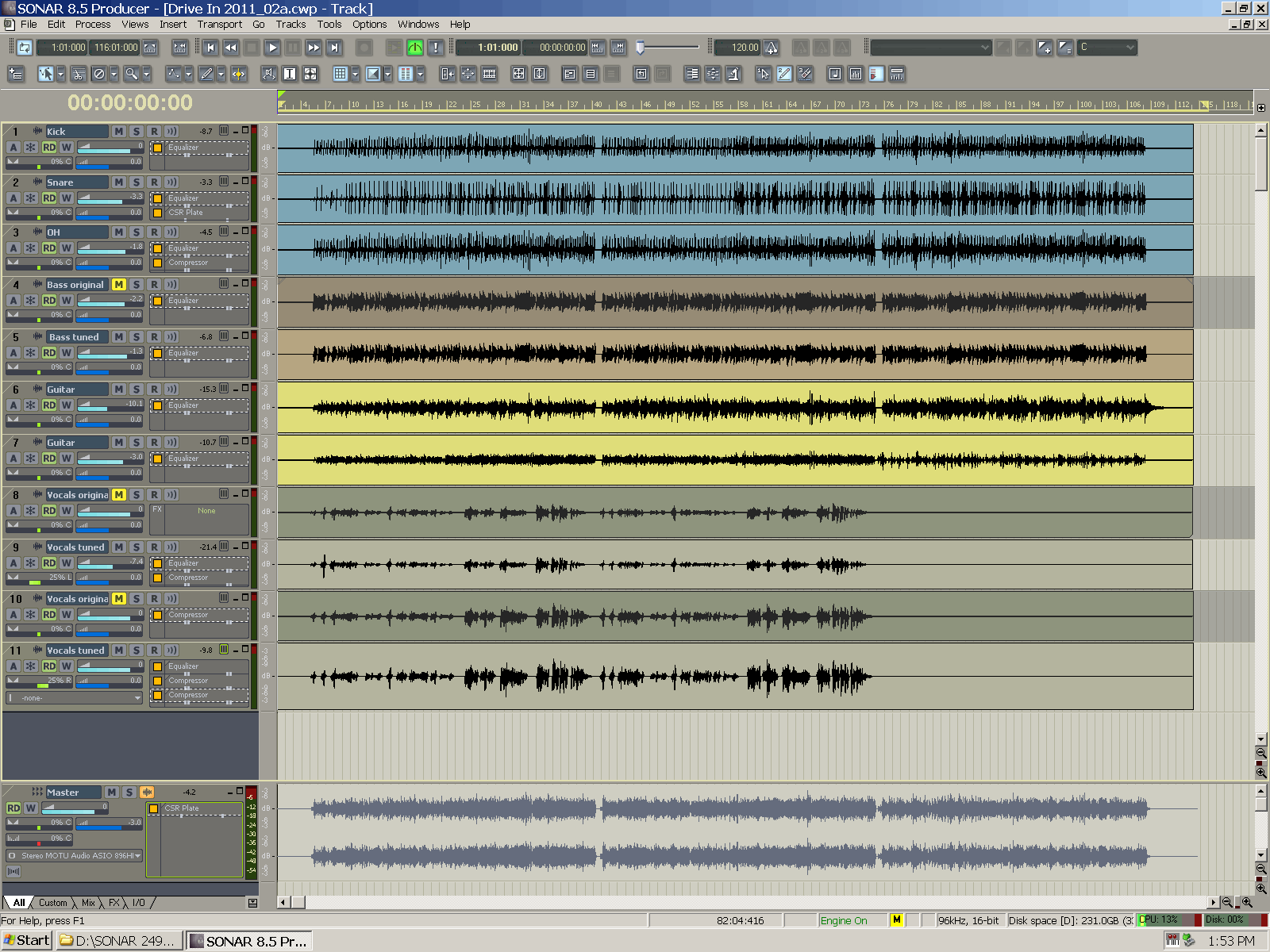
|
Cactus Music
Max Output Level: 0 dBFS
- Total Posts : 8424
- Joined: 2004/02/09 21:34:04
- Status: offline
Re: RIP, dark user interfaces in audio software!
2014/06/21 20:30:38
(permalink)
Friend of mine was in a blues band, They painted everything blue! Mike stands, sub bins anything that was black became blue. It was a cool stage set.
PS- They used a lot of blue gels too!
The other day I discovered the little pallet of colours at the very bottom of each track in the console view. I coloured each type of instrument, it was fun and a big waste of my time,,, but it was fun... it does look interesting,, big waste of my time,,, but it was fun..
|
Anderton
Max Output Level: 0 dBFS
- Total Posts : 14070
- Joined: 2003/11/06 14:02:03
- Status: offline
Re: RIP, dark user interfaces in audio software!
2014/06/22 01:17:44
(permalink)
Cactus Music
The other day I discovered the little pallet of colours at the very bottom of each track in the console view. I coloured each type of instrument, it was fun and a big waste of my time,,, but it was fun... it does look interesting,, big waste of my time,,, but it was fun..
I thought track icons were a waste of time too, but I've changed my mind 180 degrees. I did a workshop at AES and used Sonar to do a segment about UI called "find the drums." It was based on the console view. The first screen shot had no colors or track icons, and the drum tracks were tossed around in the 24 tracks or whatever it was. It took forever for people to locate the drum tracks. The next screen shot had track icons for the drums. People identified the drums much faster. The final screen shot had all the drum tracks set to the same color. People found all the drums instantly. I'm working on a song right now with 22 tracks, all of which have track icons and colorizations. Bearing in mind that you want to stay in the right brain mode when creating, the right brain is good at parsing colors and images. If you have to read text, you switch over to left brain mode which isn't as desirable. That to me is why discussions about color matter if you're using color to identify, because it helps the creative process.
|
Cactus Music
Max Output Level: 0 dBFS
- Total Posts : 8424
- Joined: 2004/02/09 21:34:04
- Status: offline
Re: RIP, dark user interfaces in audio software!
2014/06/22 01:30:28
(permalink)
I actually like the icons,,, it was the colours that I was talking about. and not being very serious ( twas a beer break) . They are certainly handy in console view if you use narrow strips and therefore cannot read the names. Kinda like virtual masking tape.
|
Anderton
Max Output Level: 0 dBFS
- Total Posts : 14070
- Joined: 2003/11/06 14:02:03
- Status: offline
Re: RIP, dark user interfaces in audio software!
2014/06/22 01:34:39
(permalink)
Cactus Music
I actually like the icons,,, it was the colours that I was talking about. and not being very serious ( twas a beer break) . They are certainly handy in console view if you use narrow strips and therefore cannot read the names. Kinda like virtual masking tape.
"Virtual Masking Tape" is almost a good name for a band. 
|
KPerry
Max Output Level: -44 dBFS

- Total Posts : 3120
- Joined: 2011/04/26 15:13:15
- Location: London, UK
- Status: offline
Re: RIP, dark user interfaces in audio software!
2014/06/22 03:01:17
(permalink)
The main problem with icons is screen real estate: there's been a tendency in SONAR over many versions to make the widgets and other items in left hand side of the track view larger (in both dimensions) at the expense of the right hand side (y'know, there the song actually is!). Icons exacerbate this problem, as do the Control Surface WAI strips (as I reminded myself yesterday when bringing my CS out of storage for the first time in quite a while) and the lane buttons. All very useful, but there's been no corresponding shrinkage in widget or font size - the reverse in fact - to balance them out.
|
paulo
Max Output Level: -13 dBFS

- Total Posts : 6218
- Joined: 2007/01/30 05:06:57
- Status: offline
Re: RIP, dark user interfaces in audio software!
2014/06/22 09:11:18
(permalink)
cyberzip
Let's bring back the option of a light Sonar interface! :)
Or even better, the option of a dark one. When I choose black, it's because I want black, not slightly darker grey.
|
Steve_Karl
Max Output Level: -50 dBFS
- Total Posts : 2534
- Joined: 2003/11/06 20:53:26
- Location: Pittsburgh, PA USA
- Status: offline
Re: RIP, dark user interfaces in audio software!
2014/06/22 12:18:43
(permalink)
There are problems even with the most basic and adverted as "special" color changes.
Example: Change the color of a track folder and try to be able to see the + - sign that opens and closes the folder.
Good luck wit dat.
|
RogerH
Max Output Level: -78 dBFS
- Total Posts : 608
- Joined: 2007/09/10 17:50:07
- Location: Norway
- Status: offline
Re: RIP, dark user interfaces in audio software!
2014/06/22 12:50:19
(permalink)
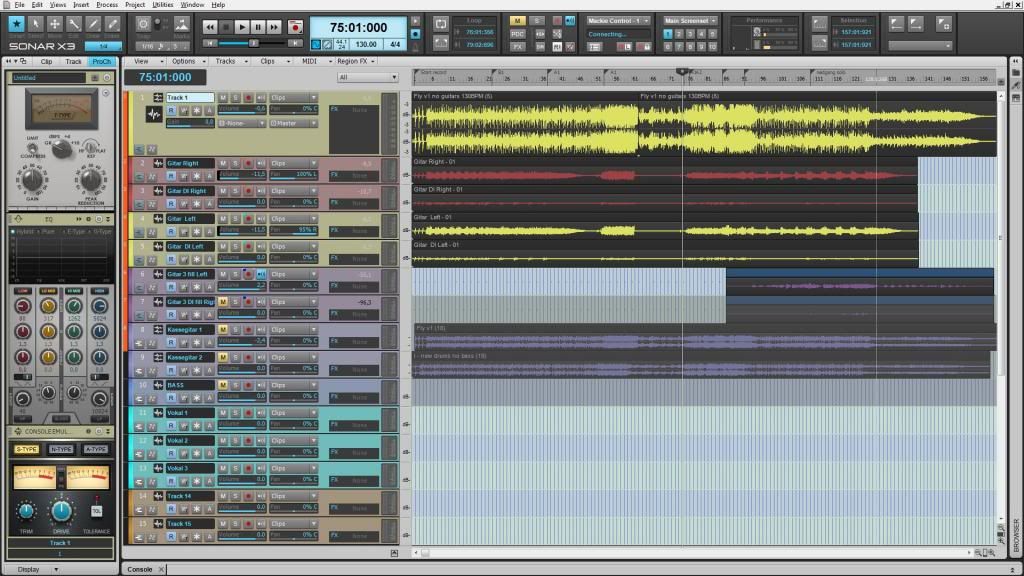 My current coloursetup
A song from my band: Terramater My soundcloud pageSonar Platinum Windows 7 Professional (SP1) 64Bit Intel Core i7 Quad Processor i7-2600K 3,4GHz MSI P67A-C45 (MOBO) Corsair Vengeance DDR3 1600MHz 8GB CL9 (2x4GB) Seagate Barracuda® 7200.12 1TB Seagate Barracuda® XT 2TB
[font="arial, sans-se
|
bapu
Max Output Level: 0 dBFS

- Total Posts : 86000
- Joined: 2006/11/25 21:23:28
- Location: Thousand Oaks, CA
- Status: offline
Re: RIP, dark user interfaces in audio software!
2014/06/22 13:09:32
(permalink)
mike_mccue
+1
That's as gaudy as it gets my friend. Well Done.
|
bapu
Max Output Level: 0 dBFS
- Total Posts : 86000
- Joined: 2006/11/25 21:23:28
- Location: Thousand Oaks, CA
- Status: offline
Re: RIP, dark user interfaces in audio software!
2014/06/22 13:10:15
(permalink)
CakeAlexS
I'm sure there is room for improvement, but you do have control over brightness and contrast and color for all these attributes:
Window Background
Window text Text color
Rules in the Tempo view Vertical lines in the Tempo view used to mark time intervals
Major Rules Major lines used to mark larger intervals of time
Beat Rules Color of the Beat rule lines
Grid Rules Color of the Grid rule lines
Rules in the Track View Vertical lines in the Track view used to mark measure intervals
Values Color of selected events and tempo changes in the Tempo view
Drawing Colors used to show your drawing in the Piano Roll and Tempo views
Erasing Color used to show your erasing in the Tempo views
Lasso select Color of lasso select highlight
Markers Color of markers in time rulers
Pitch Markers Color of pitch markers in the Time Ruler
Loop Markers Color of loop point markers
Punch Record Markers Color of punch recording markers
Track View Time Ruler Digits Color of the Time Ruler markings
Time Ruler Tick Marks Color of the Time Ruler beat and measure lines
AudioSnap Pool Lines The color of the vertical lines in the Track view that show transient locations
Musical Snap Pool Lines The color of the vertical lines in the Track view that show Snap to Grid locations (when Add MBT to Pool is enabled)
Musical Snap Pool Markers The color of the markers in the Track view time ruler that show Snap to Grid locations (when Add MBT to Pool is enabled)
Clip Fades Color for the fade line and fade shading
Clip Zero Amplitude Lines Color for the line that marks a silent volume level for a clip
Snap Offset Markers Color of the Snap offset markers
Clip Gain Envelope Color of the Gain envelopes in clips
Clip Pan Envelope Color of the Pan envelopes in clips
Clip Velocity Envelope Color of velocity envelopes in clips
Selected Clip Color of clips that are currently selected
Muted MIDI Clip Data Color of the MIDI data in a muted area of a clip. Also used for the outline of event muted notes in the Piano Roll.
Folder Clip Background Color of an area of a folder clip where there is no data
Folder Clip Text Color of text label on a folder clip
Folder Line Color of the line on the left side of the Track pane connecting a track folder to the tracks that are contained in the folder
Record Preview Clip Background The background color in the Clips pane of an armed track
Recording Waveform Previews Color of the waveform in a clip during preview while recording
Bus Waveform Preview Color of the waveform that a bus’s or synth track’s output generates
Waveform Preview (>= 0dB) Color of the waveform in a clip during preview while recording if the amplitude is greater than or equal to 0dB
Input Quantize Record Preview Background The background color in the Clips pane of an armed MIDI track when Input Quantize is enabled
Frozen Track Background The background color of a frozen track in the Clips pane
Region FX Clip Background The background color of a Region FX clip.
Header The color of clip headers.
Header (selected) The color of selected clip headers.
Clip Background The background color of clips.
Clip Background (selected) The background color of selected clips.
Default Waveform Waveform color of audio clips.
Default Notes Note color of MIDI clips.
Audio Tracks 1, 11, 21...Foreground Foreground color of all audio tracks that end in the number “1” (1, 11, 21, etc.)
Audio Tracks 1, 11, 21...Background Background color of all audio tracks that end in the number “1” (1, 11, 21, etc.)
Audio Tracks 2, 12, 22...Foreground Foreground color of all audio tracks that end in the number “2” (2, 12, 22, etc.)
Audio Tracks 2, 12, 22...Background Background color of all audio tracks that end in the number “2” (2, 12, 22, etc.)
Audio Tracks 3, 13, 23...Foreground Foreground color of all audio tracks that end in the number “3” (3, 13, 23, etc.)
Audio Tracks 3, 13, 23...Background Background color of all audio tracks that end in the number “3” (3, 13, 23, etc.)
Audio Tracks 4, 14, 24...Foreground Foreground color of all audio tracks that end in the number “4” (4, 14, 24, etc.)
Audio Tracks 4, 14, 24...Background Background color of all audio tracks that end in the number “4” (4, 14, 24, etc.)
Audio Tracks 5, 15, 25...Foreground Foreground color of all audio tracks that end in the number “5” (5, 15, 25, etc.)
Audio Tracks 5, 15, 25...Background Background color of all audio tracks that end in the number “5” (5, 15, 25, etc.)
Audio Tracks 6, 16, 26...Foreground Foreground color of all audio tracks that end in the number “6” (6, 16, 26, etc.)
Audio Tracks 6, 16, 26...Background Background color of all audio tracks that end in the number “6” (6, 16, 26, etc.)
Audio Tracks 7, 17, 27...Foreground Foreground color of all audio tracks that end in the number “7” (7, 17, 27, etc.)
Audio Tracks 7, 17, 27...Background Background color of all audio tracks that end in the number “7” (7, 17, 27, etc.)
Audio Tracks 8, 18, 28...Foreground Foreground color of all audio tracks that end in the number “8” (8, 18, 28, etc.)
Audio Tracks 8, 18, 28...Background Background color of all audio tracks that end in the number “8” (8, 18, 28, etc.)
Audio Tracks 9, 19, 29...Foreground Foreground color of all audio tracks that end in the number “9” (9, 19, 29, etc.)
Audio Tracks 9, 19, 29...Background Background color of all audio tracks that end in the number “9” (9, 19, 29, etc.)
Audio Tracks 10, 20, 30...Foreground Foreground color of all audio tracks that end in the number “0” (10, 20, 30, etc.)
Audio Tracks 10, 20, 30...Background Background color of all audio tracks that end in the number “0” (10, 20, 30, etc.)
MIDI Tracks 1, 11, 21...Foreground Foreground color of all MIDI tracks that end in the number “1” (1, 11, 21, etc.)
MIDI Tracks 1, 11, 21...Background Background color of all MIDI tracks that end in the number “1” (1, 11, 21, etc.)
MIDI Tracks 2, 12, 22...Foreground Foreground color of all MIDI tracks that end in the number “2” (2, 12, 22, etc.)
MIDI Tracks 2, 12, 22...Background Background color of all MIDI tracks that end in the number “2” (2, 12, 22, etc.)
MIDI Tracks 3, 13, 23...Foreground Foreground color of all MIDI tracks that end in the number “3” (3, 13, 23, etc.)
MIDI Tracks 3, 13, 23...Background Background color of all MIDI tracks that end in the number “3” (3, 13, 23, etc.)
MIDI Tracks 4, 14, 24...Foreground Foreground color of all MIDI tracks that end in the number “4” (4, 14, 24, etc.)
MIDI Tracks 4, 14, 24...Background Background color of all MIDI tracks that end in the number “4” (4, 14, 24, etc.)
MIDI Tracks 5, 15, 25...Foreground Foreground color of all MIDI tracks that end in the number “5” (5, 15, 25, etc.)
MIDI Tracks 5, 15, 25...Background Background color of all MIDI tracks that end in the number “5” (5, 15, 25, etc.)
MIDI Tracks 6, 16, 26...Foreground. Foreground color of all MIDI tracks that end in the number “6” (6, 16, 26, etc.)
MIDI Tracks 6, 16, 26...Background Background color of all MIDI tracks that end in the number “6” (6, 16, 26, etc.)
MIDI Tracks 7, 17, 27...Foreground Foreground color of all MIDI tracks that end in the number “7” (7, 17, 27, etc.)
MIDI Tracks 7, 17, 27...Background Background color of all MIDI tracks that end in the number “7” (7, 17, 27, etc.)
MIDI Tracks 8, 18, 28...Foreground Foreground color of all MIDI tracks that end in the number “8” (8, 18, 28, etc.)
MIDI Tracks 8, 18, 28...Background Background color of all MIDI tracks that end in the number “8” (8, 18, 28, etc.)
MIDI Tracks 9, 19, 29...Foreground Foreground color of all MIDI tracks that end in the number “9” (9, 19, 29, etc.)
MIDI Tracks 9, 19, 29...Background Background color of all MIDI tracks that end in the number “9” (9, 19, 29, etc.)
MIDI Tracks 10, 20, 30...Foreground Foreground color of all MIDI tracks that end in the number “0” (10, 20, 30, etc.)
MIDI Tracks 10, 20, 30...Background Background color of all MIDI tracks that end in the number “0” (10, 20, 30, etc.)
Track View Active Outline Color of the border around the active pane in the Track view: if the Bus pane is active, it displays this color; if the Track pane is active, it displays this color.
Clips Pane Ellipse Color of dots which appear where there are no clips in the Clips pane
Selected Track Sets the color of any selected tracks
Track View Track Header Peak Text Color of the text on the right end of a track’s title bar that displays the peak level that the track’s audio meter measures
Track View Header Warning Text Color of the text described above when the track’s level is in danger of clipping
Peak Marker (< 0 dB) The color of the Peak Marker when amplitude peaks are less than 0dB
Peak Marker (>= 0 dB) The color of the Peak Marker when amplitude peaks are greater than or equal to 0dB
Peak Marker Text The color of the text on the Peak Marker
Vertical Measure Lines The color of vertical measure lines in the Clips pane
Vertical Beat Lines The color of vertical beat lines in the Clips pane
View Background (odd) The Clips pane background color for odd-numbered tracks/buses
View Background (even) The Clips pane background color for even-numbered tracks/buses
AudioSnap Marker Color of active AudioSnap transient markers
Disabled AudioSnap Marker Color of disabled AudioSnap transient markers
Selected AudioSnap Marker Color of selected AudioSnap transient markers
Maximum stretched AudioSnap Marker Color of maximum stretched AudioSnap transient markers
AudioSnap Pool Member Marker Color of AudioSnap transient markers that belong to the Pool
Aim Assist line Color of vertical line that follows the mouse pointer position when Aim Assist is enabled in the Track view
Track View Header Track Number Color of the track number in the track header
Track View Audio Track Name Background Color of background of audio track names in Track view
Track View Audio Track Name Text Color of text of audio track names in Track view
Track View MIDI Track Name Background Color of background of MIDI track names in Track view
Track View MIDI Track Name Text Color of text of MIDI track names in Track view
Track View Synth Track Name Background Color of background of Synth track names in Track view
Track View Synth Track Name Text Color of text of Synth track names in Track view
Track View Instrument Track Name Background Color of background of Instrument track names in Track view
Track View Instrument Track Name Text Color of text of Instrument track names in Track view
Track View Bus Name Background Color of background of Bus names in Track view
Track View Bus Name Text Color of text of Bus names in Track view
Track View Track Folder Name Background Color of the background for track folders in the folder name field
Track View Track Folder Name Text Color of the text for track folders in the folder name field
Track View Strip Background Background color outside the control fields in a track
Track View Control Background Background color inside the control fields in a track
Track View Control Text and Values Color of the text in Track view controls
Track View Disabled Control Text Color of disabled controls in a track
Track View Control Outline Color of the control outlines
Track View Control Borders Color of Track view control’s borders
Track View Current Control Outline Color of current Track view control outlines
Track View Strip Under Color of empty space in the Track pane
First controller/surface color choice Highlight color of any SONAR controls being controlled by the first control surface listed in Edit >Preferences > MIDI - Control Surfaces.
Second controller/surface color choice Highlight color of any SONAR controls being controlled by the second control surface listed in Edit >Preferences > MIDI - Control Surfaces.
Third controller/surface color choice Highlight color of any SONAR controls being controlled by the third control surface listed in Edit >Preferences > MIDI - Control Surfaces.
Fourth controller/surface color choice Highlight color of any SONAR controls being controlled by the fourth control surface listed in Edit >Preferences > MIDI - Control Surfaces.
Font for controller/surface channel number display Color of text in control surface channel display
Track View Trim Control Sets the color of the background in the trim control field
Track View Bus Input Pan Control Sets the color of this parameter’s automation envelope
Quick Group Sets the color that appears on controls that are part of a Quick Group
Track View Track Icons Background Color of space surrounding Track Icons in Track view
Track View Volume Control / Envelope Sets the color of this parameter’s automation envelope
Track View Pan Control / Envelope Sets the color of this parameter’s automation envelope
Track View MIDI Chorus Control / Envelope Sets the color of this parameter’s automation envelope
Track View MIDI Reverb Control / Envelope Sets the color of this parameter’s automation envelope
Track View Mute Envelope Sets the color of this parameter’s automation envelope
Surround Angle Envelope Color of automation envelope for surround angle
Surround Focus Envelope Color of automation envelope for surround focus
Surround LFE Send Control/Envelope Color of automation envelope for LFE send control
Surround Width Envelope Color of automation envelope for surround width
Front/Rear Balance Envelope Color of automation envelope for surround front/rear balance
Track View Bus Send Level 1, 9 Control / Envelope Sets the color of this parameter’s automation envelope
Track View Bus Send Level 2, 10 Control / Envelope Sets the color of this parameter’s automation envelope
Track View Bus Send Level 3, 11 Control / Envelope Sets the color of this parameter’s automation envelope
Track View Bus Send 4, 12 Level Control / Envelope Sets the color of this parameter’s automation envelope
Track View Bus Send Level 5, 13 Control / Envelope Sets the color of this parameter’s automation envelope
Track View Bus Send Level 6, 14 Control / Envelope Sets the color of this parameter’s automation envelope
Track View Bus Send Level 7, 15 Control / Envelope Sets the color of this parameter’s automation envelope
Track View Bus Send Level 8, 16 Control / Envelope Sets the color of this parameter’s automation envelope
Track View Bus Send Pan 1, 9 Control / Envelope Sets the color of this parameter’s automation envelope
Track View Bus Send Pan 2, 10 Control / Envelope Sets the color of this parameter’s automation envelope
Track View Bus Send Pan 3, 11 Control / Envelope Sets the color of this parameter’s automation envelope
Track View Bus Send Pan 4, 12 Control / Envelope Sets the color of this parameter’s automation envelope
Track View Bus Send Pan 5, 13 Control / Envelope Sets the color of this parameter’s automation envelope
Track View Bus Send Pan 6, 14 Control / Envelope Sets the color of this parameter’s automation envelope
Track View Bus Send Pan 7, 15 Control / Envelope Sets the color of this parameter’s automation envelope
Track View Bus Send Pan 8, 16 Control / Envelope Sets the color of this parameter’s automation envelope
Bus Send Angle 1, 9 Envelope Sets the color of this parameter’s automation envelope
Bus Send Angle 2, 10 Envelope Sets the color of this parameter’s automation envelope
Bus Send Angle 3, 11 Envelope Sets the color of this parameter’s automation envelope
Bus Send Angle 4, 12 Envelope Sets the color of this parameter’s automation envelope
Bus Send Angle 5, 13 Envelope Sets the color of this parameter’s automation envelope
Bus Send Angle 6, 14 Envelope Sets the color of this parameter’s automation envelope
Bus Send Angle 7, 15 Envelope Sets the color of this parameter’s automation envelope
Bus Send Angle 8, 16 Envelope Sets the color of this parameter’s automation envelope
Bus Send Focus1, 9 Envelope Sets the color of this parameter’s automation envelope
Bus Send Focus 2, 10 Envelope Sets the color of this parameter’s automation envelope
Bus Send Focus 3, 11 Envelope Sets the color of this parameter’s automation envelope
Bus Send Focus 4, 12 Envelope Sets the color of this parameter’s automation envelope
Bus Send Focus 5, 13 Envelope Sets the color of this parameter’s automation envelope
Bus Send Focus 6, 14 Envelope Sets the color of this parameter’s automation envelope
Bus Send Focus 7, 15 Envelope Sets the color of this parameter’s automation envelope
Bus Send Focus 8, 16 Envelope Sets the color of this parameter’s automation envelope
Bus Send LFE 1, 9 Envelope Sets the color of this parameter’s automation envelope
Bus Send LFE 2, 10 Envelope Sets the color of this parameter’s automation envelope
Bus Send LFE 3, 11 Envelope Sets the color of this parameter’s automation envelope
Bus Send LFE 4, 12 Envelope Sets the color of this parameter’s automation envelope
Bus Send LFE 5, 13 Envelope Sets the color of this parameter’s automation envelope
Bus Send LFE 6, 14 Envelope Sets the color of this parameter’s automation envelope
Bus Send LFE 7, 15 Envelope Sets the color of this parameter’s automation envelope
Bus Send LFE 8, 16 Envelope Sets the color of this parameter’s automation envelope
Bus Send Width 1, 9 Envelope Sets the color of this parameter’s automation envelope
Bus Send Width 2, 10 Envelope Sets the color of this parameter’s automation envelope
Bus Send Width 3, 11 Envelope Sets the color of this parameter’s automation envelope
Bus Send Width 4, 12 Envelope Sets the color of this parameter’s automation envelope
Bus Send Width 5, 13 Envelope Sets the color of this parameter’s automation envelope
Bus Send Width 6, 14 Envelope Sets the color of this parameter’s automation envelope
Bus Send Width 7, 15 Envelope Sets the color of this parameter’s automation envelope
Bus Send Width 8, 16 Envelope Sets the color of this parameter’s automation envelope
Bus Send Front/Rear Balance 1, 9 Envelope Sets the color of this parameter’s automation envelope
Bus Send Front/Rear Balance 2, 10 Envelope Sets the color of this parameter’s automation envelope
Bus Send Front/Rear Balance 3, 11 Envelope Sets the color of this parameter’s automation envelope
Bus Send Front/Rear Balance 4, 12 Envelope Sets the color of this parameter’s automation envelope
Bus Send Front/Rear Balance 5, 13 Envelope Sets the color of this parameter’s automation envelope
Bus Send Front/Rear Balance 6, 14 Envelope Sets the color of this parameter’s automation envelope
Bus Send Front/Rear Balance 7, 15 Envelope Sets the color of this parameter’s automation envelope
Bus Send Front/Rear Balance 8, 16 Envelope Sets the color of this parameter’s automation envelope
Event List Note Events Color of note events in the Event List view
Event List KeyAft Events Color of key aftertouch events in the Event List view
Event List Control Events Color of controller events in the Event List view
Event List Patch Events Color of patch events in the Event List view
Event List ChanAft Events Color of channel aftertouch events in the Event List view
Event List Wheel Events Color of pitch wheel events in the Event List view
Event List Sysx Events Color of System Exclusive events in the Event List view
Event List Special Events Color of other, special events in the Event List view
Note that is on Color of currently playing notes
Events Color of selected events in the Piano Roll view
Navigator Background Color of background in Navigator pane and view
Navigator Track Rectangle Color of the Navigator pane triangle that shows what the part of the Clips pane is currently displayed
PRV Drag Contents The color that a MIDI event becomes while you’re dragging the event
Snap to Scale Excluded Rows Color of pitch rows in Piano Roll view (or Inline PRV) that become unavailable when Snap to Scale is enabled.
Continuous Event 1 The color of the first type of continuous event entered into the Piano Roll or Inline Piano Roll view
Continuous Event 2 The color of the second type of continuous event entered into the Piano Roll or Inline Piano Roll view
Continuous Event 3 The color of the third type of continuous event entered into the Piano Roll or Inline Piano Roll view
Continuous Event 4 The color of the fourth type of continuous event entered into the Piano Roll or Inline Piano Roll view
Continuous Event 5 The color of the fifth type of continuous event entered into the Piano Roll or Inline Piano Roll view
Continuous Event 6 The color of the sixth type of continuous event entered into the Piano Roll or Inline Piano Roll view
Continuous Event 7 The color of the seventh type of continuous event entered into the Piano Roll or Inline Piano Roll view
Continuous Event 8 The color of the eighth type of continuous event entered into the Piano Roll or Inline Piano Roll view
VU Lo level Sets the color of the lower portion of a non-segmented meter.
VU Hi level Sets the color of the higher portion of a non-segmented meter.
VU Tick Marks Sets the color of the numbers and calibration lines of a non-segmented meter.
Console Segmented VU Tick Marks Color of tick marks in segmented meters in the Console view
Enable/Disable Toggles Sets the color of the enable/disable check box on effects and other objects that have an on/off switch
Console FX Bin Text Color of text in Console View’s FX bin
Console View Control Text and Values Color of text on Console View’s controls
Console View Slider Background Color of border area of Console view fields controlled by sliders
Console View Strip Background Color of empty space in Console view
Console Audio Track Name Text Color of text of audio track names in Console view
Console MIDI Track Name Text Color of text of MIDI track names in Console view
Console Synth Track Name Background Color of background of Synth track names in Console view
Console Synth Track Name Text Color of text of Synth track names in Console view
Console Instrument Track Name Text Color of text of Instrument track names in Console view
Console Bus Name Text Color of text of Bus names in Console view
Console Main Output Name Text Color of text of Main Output names in Console view
Console View Strip Label Text Color of meter peak values in the Console view
Console EQ Plot Grid Color of grid lines in per-channel EQ plot in Console view
Console EQ Plot Graph Color of EQ curve in Console view’s per-channel EQ plot
Synth Rack Text Color of text in the Synth Rack
Dialog Box Banner Text Color of the headings that separate different parts of a dialog box page
Dialog Box Banner Background Color of the background behind a dialog banner heading
Track View Header Time Display Color of time display above track strips in the Track view
Ghosted clip background Color of clips when editing automation envelopes.
Your cut n paste skills are improving my friend. Well Done!
|
bapu
Max Output Level: 0 dBFS
- Total Posts : 86000
- Joined: 2006/11/25 21:23:28
- Location: Thousand Oaks, CA
- Status: offline
Re: RIP, dark user interfaces in audio software!
2014/06/22 13:12:24
(permalink)
Anderton
I'm working on a song right now with 22 tracks, all of which have track icons and colorizations. Bearing in mind that you want to stay in the right brain mode when creating, the right brain is good at parsing colors and images. If you have to read text, you switch over to left brain mode which isn't as desirable.
Craig assumes I have a brain. 
|
Dave Modisette
Max Output Level: 0 dBFS
- Total Posts : 11050
- Joined: 2003/11/13 22:12:55
- Location: Brandon, Florida
- Status: offline
Re: RIP, dark user interfaces in audio software!
2014/06/22 13:22:51
(permalink)
It's not the colors of the channel strips that is the problem. SONAR has that issue fixed at present. It's the text under the widgets. Medium gray text on a dark grey background or even worse, dark gray text on a black ground.
And these are AFAICT, hard coded into the graphics so you can't change the text color to white or light blue or anything else you can read.
|
bapu
Max Output Level: 0 dBFS
- Total Posts : 86000
- Joined: 2006/11/25 21:23:28
- Location: Thousand Oaks, CA
- Status: offline
Re: RIP, dark user interfaces in audio software!
2014/06/22 13:30:50
(permalink)
Mod Bod
It's not the colors of the channel strips that is the problem. SONAR has that issue fixed at present. It's the text under the widgets. Medium gray text on a dark grey background or even worse, dark gray text on a black ground.
And these are AFAICT, hard coded into the graphics so you can't change the text color to white or light blue or anything else you can read.
True, but that DOES NOT negate the list that CakeAlexS cut-n-pasted, roight? 
|
bvideo
Max Output Level: -58 dBFS

- Total Posts : 1707
- Joined: 2006/09/02 22:20:02
- Status: offline
Re: RIP, dark user interfaces in audio software!
2014/06/22 14:43:45
(permalink)
For fun, open the colors dialog and set all the colors to yellow. Then see which ones do and don't get changed.
|
Keni
Max Output Level: -17.5 dBFS

- Total Posts : 5769
- Joined: 2003/11/04 10:42:15
- Location: Willits, CA USA
- Status: offline
Re: RIP, dark user interfaces in audio software!
2014/06/22 15:06:58
(permalink)
Hi Gang... I have been disturbed by the changes to color control since the release of X1... I'm at a point right now where I'm actually reasonably comfortable with the available color set in general for the various windows. I realize that I no more buy a Neve board for it's visible color over a Mackie's color... ;-) Icons? Yeah... At first I thought it a waste of effort as I mostly keep my tracks in somewhat similar order and was so used to it... But the more I took the time to work with icons, the faster I locate the track I want... It seems that we mostly identify images much faster than we do words.... Unless you're using Evelyn Wood speed reading to read your labels... ;-) Track Colors? I love this... I find it makes track ID even faster... I regularly use the same colors for similar instrument types, and together with icons, the make speedy magic... I'm a devotee to them both now! Especially with a larger screen... I've been so trapped in the world of the small screen (well, medium resolution 22" wasn't typically terrible)... Not that I've got a 30" screen running at 2640x1600, Many viewing issues are different. Full exposure of the Console now fits in roughly 2/3 the window height so it's actually usefull to have both theTV and the Console open at the same time on a single screen! <sheesh>.... So though I knew I hated hearing it too, it seems that a bigger, higher res screen really is better as it makes the experience more what I believe The Bakers intended... If you can wangle one (or two?) it's worth it's weight for sure! Today I experience a forgotten joy... Screen res is so high, that when I remembered I could use the z-drag on this particular project as it does not yet have any hidden tracks or folders! What a rush! See and move with a speed approaching immediate! Keni [edit] The console takes closer to a half screen height than 2/3 [end edit]
post edited by Keni - 2014/06/22 15:17:30
|
Splat
Max Output Level: 0 dBFS
- Total Posts : 8672
- Joined: 2010/12/29 15:28:29
- Location: Mars.
- Status: offline
Re: RIP, dark user interfaces in audio software!
2014/06/22 20:17:20
(permalink)
Keni
I have been disturbed by the changes to color control since the release of X1...
So has he! :) 
Sell by date at 9000 posts. Do not feed. @48/24 & 128 buffers latency is 367 with offset of 38. Sonar Platinum(64 bit),Win 8.1(64 bit),Saffire Pro 40(Firewire),Mix Control = 3.4,Firewire=VIA,Dell Studio XPS 8100(Intel Core i7 CPU 2.93 Ghz/16 Gb),4 x Seagate ST31500341AS (mirrored),GeForce GTX 460,Yamaha DGX-505 keyboard,Roland A-300PRO,Roland SPD-30 V2,FD-8,Triggera Krigg,Shure SM7B,Yamaha HS5.Maschine Studio+Komplete 9 Ultimate+Kontrol Z1.Addictive Keys,Izotope Nectar elements,Overloud Bundle,Geist.Acronis True Image 2014.
|
cyberzip
Max Output Level: -78 dBFS
- Total Posts : 613
- Joined: 2003/11/12 13:09:45
- Location: Sweden
- Status: offline
Re: RIP, dark user interfaces in audio software!
2014/06/30 16:07:39
(permalink)
A few points: - I'm glad this generates a lot of discussion, let's hope Cakewalk notices.
- Also, I find it refreshing that well-known journalists and writers, such as Paul White on Sound On Sound, comments on the trend of dark interfaces.
- In an anecdotal comparison between the small, cramped and dark V-Vocal window and the resizable, airy and light Melodyne window – I know which one I prefer (just comparing looks). :)
- Here's hoping for the introduction of more choice, suiting everyone!
|