pinguinotuerto
Max Output Level: -71 dBFS

- Total Posts : 976
- Joined: 2009/12/01 18:46:41
- Status: offline

SOLVED!! Sample Rate/Clocking Issue.
I'm getting clicking sounds randomly in my audio regardless of buffer size because my Line 6 UX8 and Sonar X3e seem to not be "talking" to each other properly. I'm running at 48/24 in AD2 and Sonar, but have a discrepancy in the sample rate and bit depth reported by the control panel for my UX8 which says that when Sonar is running the sampling rate is being converted down to 44.1. Wondering if anyone has any ideas to correct this? Line 6 doesn't support the UX8 anymore and the drivers are crap, but I'm wondering if there's something that can be done within Sonar (ini file) or Windows. See examples below. If I open Addictive Drums 2 standalone, the UX8 control panel shows this: 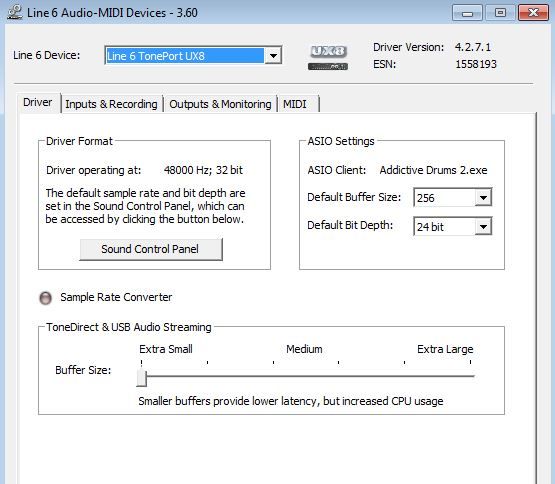 If I open Sonar, the control panel shows that the UX8 is in sample rate conversion mode, and although this time is showing Sonar as the Asio client, sometimes Asio client is blank. Also with both AD2 and Sonar the UX8 control panel shows 32 bit although both programs are running at 48 Khz 24 bit. 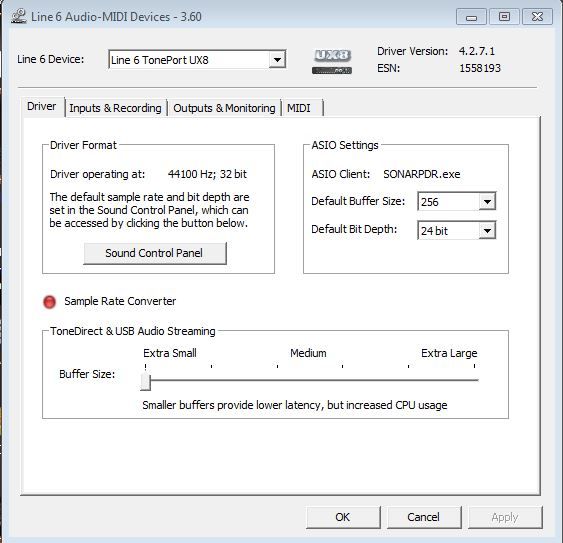
post edited by pinguinotuerto - 2014/09/08 20:21:04
HP DV7-3085 Laptop (Intel Core i7 720 1.6 GHZ, 6 GB RAM, 1333 MHZ FSB, 2 500GB 7200 RPM Internal HDs, 17" screen), HP 2009m Monitor, 2TB Ext Drive
Line 6 UX8 with PodFarm 2 Platinum 2 Joe Meek VC6Q British Channels
Sonar Platinum & X3e Producer (64 Bit) AD2 w Roland V-Drums (TD4KX2)
Windows 7 Home Premium (64 bit)KRK VXT 8 Monitors
Frontier Alphatrack, Razer Naga Mouse, nanoKontrol2
|
scook
Forum Host

- Total Posts : 24146
- Joined: 2005/07/27 13:43:57
- Location: TX
- Status: offline

Re: Sample Rate/Clocking Issue. Any suggestions BitFlipper, Noel, Craig, anyone?
2014/09/07 12:58:16
(permalink)
The images only show half the story. Both AD2 and SONAR have a configuration pages too. The sample rate and bit depth are set in AD2 and SONAR, it is the UX8 driver's job to use the sample rate and bit depth requested by AD2 and SONAR. The useful SONAR page is Preferences > Audio > Driver Settings. The settings on this page are either the default settings or, if a project is loaded, the project settings. The settings are stored per project.
|
pinguinotuerto
Max Output Level: -71 dBFS
- Total Posts : 976
- Joined: 2009/12/01 18:46:41
- Status: offline
Re: Sample Rate/Clocking Issue. Any suggestions BitFlipper, Noel, Craig, anyone?
2014/09/07 13:07:54
(permalink)
Correction: Scook, I had omitted the 48 khz part. My apologies.
post edited by pinguinotuerto - 2014/09/07 13:14:36
HP DV7-3085 Laptop (Intel Core i7 720 1.6 GHZ, 6 GB RAM, 1333 MHZ FSB, 2 500GB 7200 RPM Internal HDs, 17" screen), HP 2009m Monitor, 2TB Ext Drive
Line 6 UX8 with PodFarm 2 Platinum 2 Joe Meek VC6Q British Channels
Sonar Platinum & X3e Producer (64 Bit) AD2 w Roland V-Drums (TD4KX2)
Windows 7 Home Premium (64 bit)KRK VXT 8 Monitors
Frontier Alphatrack, Razer Naga Mouse, nanoKontrol2
|
scook
Forum Host
- Total Posts : 24146
- Joined: 2005/07/27 13:43:57
- Location: TX
- Status: offline
Re: Sample Rate/Clocking Issue. Any suggestions BitFlipper, Noel, Craig, anyone?
2014/09/07 13:12:29
(permalink)
I did not see any reference to the actual sample rates set by either AD2 or SONAR in the original post. What happens if the sound control panel is opened in the driver format area in the second image and the sample rate set to 48k?
|
pinguinotuerto
Max Output Level: -71 dBFS
- Total Posts : 976
- Joined: 2009/12/01 18:46:41
- Status: offline
Re: Sample Rate/Clocking Issue. Any suggestions BitFlipper, Noel, Craig, anyone?
2014/09/07 13:15:53
(permalink)
There's a discrepancy between what Sonar is set to and what the UX8's control panel reports. With AD2 running standalone, they both report 48, but with Sonar at 48 the UX8 reports 44.1 and the Sampling Rate conversion light turns red.
HP DV7-3085 Laptop (Intel Core i7 720 1.6 GHZ, 6 GB RAM, 1333 MHZ FSB, 2 500GB 7200 RPM Internal HDs, 17" screen), HP 2009m Monitor, 2TB Ext Drive
Line 6 UX8 with PodFarm 2 Platinum 2 Joe Meek VC6Q British Channels
Sonar Platinum & X3e Producer (64 Bit) AD2 w Roland V-Drums (TD4KX2)
Windows 7 Home Premium (64 bit)KRK VXT 8 Monitors
Frontier Alphatrack, Razer Naga Mouse, nanoKontrol2
|
pinguinotuerto
Max Output Level: -71 dBFS
- Total Posts : 976
- Joined: 2009/12/01 18:46:41
- Status: offline
Re: Sample Rate/Clocking Issue. Any suggestions BitFlipper, Noel, Craig, anyone?
2014/09/07 13:17:29
(permalink)
I'm beginning to wonder if this has something to do with the AD2 vst running within Sonar?
HP DV7-3085 Laptop (Intel Core i7 720 1.6 GHZ, 6 GB RAM, 1333 MHZ FSB, 2 500GB 7200 RPM Internal HDs, 17" screen), HP 2009m Monitor, 2TB Ext Drive
Line 6 UX8 with PodFarm 2 Platinum 2 Joe Meek VC6Q British Channels
Sonar Platinum & X3e Producer (64 Bit) AD2 w Roland V-Drums (TD4KX2)
Windows 7 Home Premium (64 bit)KRK VXT 8 Monitors
Frontier Alphatrack, Razer Naga Mouse, nanoKontrol2
|
scook
Forum Host
- Total Posts : 24146
- Joined: 2005/07/27 13:43:57
- Location: TX
- Status: offline
Re: Sample Rate/Clocking Issue. Any suggestions BitFlipper, Noel, Craig, anyone?
2014/09/07 13:19:41
(permalink)
I see that. I do not have the device so this is why I asked about the Driver Format section and the Sound Control Panel button to establish the default setting.
|
pinguinotuerto
Max Output Level: -71 dBFS
- Total Posts : 976
- Joined: 2009/12/01 18:46:41
- Status: offline
Re: Sample Rate/Clocking Issue. Any suggestions BitFlipper, Noel, Craig, anyone?
2014/09/07 13:20:52
(permalink)
Scook,
I reworded the post to state the problem more clearly. Thanks.
HP DV7-3085 Laptop (Intel Core i7 720 1.6 GHZ, 6 GB RAM, 1333 MHZ FSB, 2 500GB 7200 RPM Internal HDs, 17" screen), HP 2009m Monitor, 2TB Ext Drive
Line 6 UX8 with PodFarm 2 Platinum 2 Joe Meek VC6Q British Channels
Sonar Platinum & X3e Producer (64 Bit) AD2 w Roland V-Drums (TD4KX2)
Windows 7 Home Premium (64 bit)KRK VXT 8 Monitors
Frontier Alphatrack, Razer Naga Mouse, nanoKontrol2
|
scook
Forum Host
- Total Posts : 24146
- Joined: 2005/07/27 13:43:57
- Location: TX
- Status: offline
Re: Sample Rate/Clocking Issue. Any suggestions BitFlipper, Noel, Craig, anyone?
2014/09/07 13:23:33
(permalink)
pinguinotuerto
I'm beginning to wonder if this has something to do with the AD2 vst running within Sonar?
How so? To the device driver, SONAR and the standalone AD2 are peers. The plug-ins inside SONAR are unaware an audio driver exists and the audio driver has no idea what a DAW plug-in is.
|
pinguinotuerto
Max Output Level: -71 dBFS
- Total Posts : 976
- Joined: 2009/12/01 18:46:41
- Status: offline
Re: Sample Rate/Clocking Issue. Any suggestions BitFlipper, Noel, Craig, anyone?
2014/09/07 13:28:19
(permalink)
scook
pinguinotuerto
I'm beginning to wonder if this has something to do with the AD2 vst running within Sonar?
How so? To the device driver, SONAR and the standalone AD2 are peers. The plug-ins inside SONAR are unaware an audio driver exists.
Good to know. I wasn't aware of that. The reason I was wondering was because this just started happening and I have the AD2 plugin running in that song. Need to check to see if it happens with a song without AD2.
HP DV7-3085 Laptop (Intel Core i7 720 1.6 GHZ, 6 GB RAM, 1333 MHZ FSB, 2 500GB 7200 RPM Internal HDs, 17" screen), HP 2009m Monitor, 2TB Ext Drive
Line 6 UX8 with PodFarm 2 Platinum 2 Joe Meek VC6Q British Channels
Sonar Platinum & X3e Producer (64 Bit) AD2 w Roland V-Drums (TD4KX2)
Windows 7 Home Premium (64 bit)KRK VXT 8 Monitors
Frontier Alphatrack, Razer Naga Mouse, nanoKontrol2
|
pinguinotuerto
Max Output Level: -71 dBFS
- Total Posts : 976
- Joined: 2009/12/01 18:46:41
- Status: offline
Re: Sample Rate/Clocking Issue. Any suggestions BitFlipper, Noel, Craig, anyone?
2014/09/07 13:31:14
(permalink)
Scook,
Regarding AD2 and Sonar being seen as peers by the interface, if I run AD2 stand alone, it hogs the driver and Sonar says there's no device available. Does that happen to you?
HP DV7-3085 Laptop (Intel Core i7 720 1.6 GHZ, 6 GB RAM, 1333 MHZ FSB, 2 500GB 7200 RPM Internal HDs, 17" screen), HP 2009m Monitor, 2TB Ext Drive
Line 6 UX8 with PodFarm 2 Platinum 2 Joe Meek VC6Q British Channels
Sonar Platinum & X3e Producer (64 Bit) AD2 w Roland V-Drums (TD4KX2)
Windows 7 Home Premium (64 bit)KRK VXT 8 Monitors
Frontier Alphatrack, Razer Naga Mouse, nanoKontrol2
|
scook
Forum Host
- Total Posts : 24146
- Joined: 2005/07/27 13:43:57
- Location: TX
- Status: offline
Re: Sample Rate/Clocking Issue. Any suggestions BitFlipper, Noel, Craig, anyone?
2014/09/07 13:33:54
(permalink)
So setting the Driver Format to 48k using the "Sound Control Panel" button in the second images does nothing.
|
scook
Forum Host
- Total Posts : 24146
- Joined: 2005/07/27 13:43:57
- Location: TX
- Status: offline
Re: Sample Rate/Clocking Issue. Any suggestions BitFlipper, Noel, Craig, anyone?
2014/09/07 13:37:26
(permalink)
pinguinotuerto
Scook,
Regarding AD2 and Sonar being seen as peers by the interface, if I run AD2 stand alone, it hogs the driver and Sonar says there's no device available. Does that happen to you?
No, because I do not try to run more than one app at a time using ASIO drivers. If you want to share the ASIO driver you will need to enable driver sharing. There are sharing setting in both Windows and SONAR. While I use my DAW along with other audio apps, the other apps do not use ASIO.
|
pinguinotuerto
Max Output Level: -71 dBFS
- Total Posts : 976
- Joined: 2009/12/01 18:46:41
- Status: offline
Re: Sample Rate/Clocking Issue. Any suggestions BitFlipper, Noel, Craig, anyone?
2014/09/07 13:38:34
(permalink)
scook
So setting the Driver Format to 48k using the "Sound Control Panel" button in the second images does nothing.
Nope! Once a program is running the program is supposed to dictate the sampling rate and bit depth to the sound card. The user cannot select or change it. In other words, there's no way for me to manually override what the control panel is reporting.
HP DV7-3085 Laptop (Intel Core i7 720 1.6 GHZ, 6 GB RAM, 1333 MHZ FSB, 2 500GB 7200 RPM Internal HDs, 17" screen), HP 2009m Monitor, 2TB Ext Drive
Line 6 UX8 with PodFarm 2 Platinum 2 Joe Meek VC6Q British Channels
Sonar Platinum & X3e Producer (64 Bit) AD2 w Roland V-Drums (TD4KX2)
Windows 7 Home Premium (64 bit)KRK VXT 8 Monitors
Frontier Alphatrack, Razer Naga Mouse, nanoKontrol2
|
pinguinotuerto
Max Output Level: -71 dBFS
- Total Posts : 976
- Joined: 2009/12/01 18:46:41
- Status: offline
Re: Sample Rate/Clocking Issue. Any suggestions BitFlipper, Noel, Craig, anyone?
2014/09/07 13:41:19
(permalink)
scook
pinguinotuerto
Scook,
Regarding AD2 and Sonar being seen as peers by the interface, if I run AD2 stand alone, it hogs the driver and Sonar says there's no device available. Does that happen to you?
No, because I do not try to run more than one app at a time using the ASIO drivers. If you want to share the ASIO driver you will need to enable driver sharing. There are sharing setting in both Windows and SONAR.
I usually don't do it, it's only when I've been using AD2 by itself and forget to close it and launch Sonar. Anyway, that's not the issue, but I thought I'd mention it just in case my system was behaving differently from most people's.
HP DV7-3085 Laptop (Intel Core i7 720 1.6 GHZ, 6 GB RAM, 1333 MHZ FSB, 2 500GB 7200 RPM Internal HDs, 17" screen), HP 2009m Monitor, 2TB Ext Drive
Line 6 UX8 with PodFarm 2 Platinum 2 Joe Meek VC6Q British Channels
Sonar Platinum & X3e Producer (64 Bit) AD2 w Roland V-Drums (TD4KX2)
Windows 7 Home Premium (64 bit)KRK VXT 8 Monitors
Frontier Alphatrack, Razer Naga Mouse, nanoKontrol2
|
scook
Forum Host
- Total Posts : 24146
- Joined: 2005/07/27 13:43:57
- Location: TX
- Status: offline
Re: Sample Rate/Clocking Issue. Any suggestions BitFlipper, Noel, Craig, anyone?
2014/09/07 13:52:08
(permalink)
pinguinotuerto
scook
So setting the Driver Format to 48k using the "Sound Control Panel" button in the second images does nothing.
Nope! Once a program is running the program is supposed to dictate the sampling rate and bit depth to the sound card. The user cannot select or change it. In other words, there's no way for me to manually override what the control panel is reporting.
I believe SONAR is dictating the sample rate. That is why the Sample Rate Converter button is lit. SONAR has requested 48K but the default format (in this case) is set to 44.1K. I do not know how the device maintains the default format settings or what triggers a change to the default format. If the "Sound Control Panel" button does not do the job, this may be a case where resetting the UX8 to factory defaults or reinstalling the drivers may help.
|
pinguinotuerto
Max Output Level: -71 dBFS
- Total Posts : 976
- Joined: 2009/12/01 18:46:41
- Status: offline
Re: Sample Rate/Clocking Issue. Any suggestions BitFlipper, Noel, Craig, anyone?
2014/09/07 13:58:25
(permalink)
scook
I believe SONAR is dictating the sample rate. That is why the Sample Rate Converter button is lit. SONAR has requested 48K but the default format (in this case) is set to 44.1K. I do not know how the device maintains the default format settings or what triggers a change to the default format. This may be a case where resetting the UX8 to factory defaults or reinstalling the drivers may help.
Drivers don't help. Been through all of that. Actually, the card defaults to 48/32 when it isn't being used by a program. That's why it's so strange that it's going down to 44.1 when Sonar is using it. This doesn't happen with AD2 stand alone.
HP DV7-3085 Laptop (Intel Core i7 720 1.6 GHZ, 6 GB RAM, 1333 MHZ FSB, 2 500GB 7200 RPM Internal HDs, 17" screen), HP 2009m Monitor, 2TB Ext Drive
Line 6 UX8 with PodFarm 2 Platinum 2 Joe Meek VC6Q British Channels
Sonar Platinum & X3e Producer (64 Bit) AD2 w Roland V-Drums (TD4KX2)
Windows 7 Home Premium (64 bit)KRK VXT 8 Monitors
Frontier Alphatrack, Razer Naga Mouse, nanoKontrol2
|
pinguinotuerto
Max Output Level: -71 dBFS
- Total Posts : 976
- Joined: 2009/12/01 18:46:41
- Status: offline
Re: Sample Rate/Clocking Issue. Any suggestions BitFlipper, Noel, Craig, anyone?
2014/09/07 16:33:57
(permalink)
There has to be some tweak in the config file that can address this issue I'm having! Anyone?
HP DV7-3085 Laptop (Intel Core i7 720 1.6 GHZ, 6 GB RAM, 1333 MHZ FSB, 2 500GB 7200 RPM Internal HDs, 17" screen), HP 2009m Monitor, 2TB Ext Drive
Line 6 UX8 with PodFarm 2 Platinum 2 Joe Meek VC6Q British Channels
Sonar Platinum & X3e Producer (64 Bit) AD2 w Roland V-Drums (TD4KX2)
Windows 7 Home Premium (64 bit)KRK VXT 8 Monitors
Frontier Alphatrack, Razer Naga Mouse, nanoKontrol2
|
John
Forum Host
- Total Posts : 30467
- Joined: 2003/11/06 11:53:17
- Status: offline
Re: Sample Rate/Clocking Issue. Any suggestions BitFlipper, Noel, Craig, anyone?
2014/09/07 16:54:50
(permalink)
What is the sample rate in Sonar? The sample rate for your Sonar project as set in preferences/ audio devices and driver settings?
|
pinguinotuerto
Max Output Level: -71 dBFS
- Total Posts : 976
- Joined: 2009/12/01 18:46:41
- Status: offline
Re: Sample Rate/Clocking Issue. Any suggestions BitFlipper, Noel, Craig, anyone?
2014/09/07 16:57:50
(permalink)
Hi John,
It's 48 khz 24 bit.
HP DV7-3085 Laptop (Intel Core i7 720 1.6 GHZ, 6 GB RAM, 1333 MHZ FSB, 2 500GB 7200 RPM Internal HDs, 17" screen), HP 2009m Monitor, 2TB Ext Drive
Line 6 UX8 with PodFarm 2 Platinum 2 Joe Meek VC6Q British Channels
Sonar Platinum & X3e Producer (64 Bit) AD2 w Roland V-Drums (TD4KX2)
Windows 7 Home Premium (64 bit)KRK VXT 8 Monitors
Frontier Alphatrack, Razer Naga Mouse, nanoKontrol2
|
John
Forum Host
- Total Posts : 30467
- Joined: 2003/11/06 11:53:17
- Status: offline
Re: Sample Rate/Clocking Issue. Any suggestions BitFlipper, Noel, Craig, anyone?
2014/09/07 17:12:57
(permalink)
All you need do is set your audio interface to the same settings.
|
scook
Forum Host
- Total Posts : 24146
- Joined: 2005/07/27 13:43:57
- Location: TX
- Status: offline
Re: Sample Rate/Clocking Issue. Any suggestions BitFlipper, Noel, Craig, anyone?
2014/09/07 17:19:16
(permalink)
Why didn't I think of that
|
pinguinotuerto
Max Output Level: -71 dBFS
- Total Posts : 976
- Joined: 2009/12/01 18:46:41
- Status: offline
Re: Sample Rate/Clocking Issue. Any suggestions BitFlipper, Noel, Craig, anyone?
2014/09/07 17:30:11
(permalink)
scook
Why didn't I think of that
Lol!!!! John, I wish it were that simple. Perhaps you didn't read all the posts on this thread.
HP DV7-3085 Laptop (Intel Core i7 720 1.6 GHZ, 6 GB RAM, 1333 MHZ FSB, 2 500GB 7200 RPM Internal HDs, 17" screen), HP 2009m Monitor, 2TB Ext Drive
Line 6 UX8 with PodFarm 2 Platinum 2 Joe Meek VC6Q British Channels
Sonar Platinum & X3e Producer (64 Bit) AD2 w Roland V-Drums (TD4KX2)
Windows 7 Home Premium (64 bit)KRK VXT 8 Monitors
Frontier Alphatrack, Razer Naga Mouse, nanoKontrol2
|
John
Forum Host
- Total Posts : 30467
- Joined: 2003/11/06 11:53:17
- Status: offline
Re: Sample Rate/Clocking Issue. Any suggestions BitFlipper, Noel, Craig, anyone?
2014/09/07 18:15:14
(permalink)
This isn't rocket science. Sonar is the important thing here. You set it up and that is it, really. If you also need to set the audio interface separately then do that also. However, Sonar and the interface have to agree with one another. You may need to set the actual hardware of the audio device to the right sample rate. Why you are interjecting AD2 stand alone and comparing it with Sonar is irrelevant. It has nothing to do with anything here.
You may wish to use you a different audio device driver such as WDM or other.
|
pinguinotuerto
Max Output Level: -71 dBFS
- Total Posts : 976
- Joined: 2009/12/01 18:46:41
- Status: offline
Re: Sample Rate/Clocking Issue. Any suggestions BitFlipper, Noel, Craig, anyone?
2014/09/07 18:30:51
(permalink)
John
This isn't rocket science. Sonar is the important thing here. You set it up and that is it, really. If you also need to set the audio interface separately then do that also. However, Sonar and the interface have to agree with one another. You may need to set the actual hardware of the audio device to the right sample rate. Why you are interjecting AD2 stand alone and comparing it with Sonar is irrelevant. It has nothing to do with anything here.
You are right John, it isn't rocket science, it's computer science. If you don't have anything positive to contribute to solve the problem (besides snarky remarks), why post at all?
HP DV7-3085 Laptop (Intel Core i7 720 1.6 GHZ, 6 GB RAM, 1333 MHZ FSB, 2 500GB 7200 RPM Internal HDs, 17" screen), HP 2009m Monitor, 2TB Ext Drive
Line 6 UX8 with PodFarm 2 Platinum 2 Joe Meek VC6Q British Channels
Sonar Platinum & X3e Producer (64 Bit) AD2 w Roland V-Drums (TD4KX2)
Windows 7 Home Premium (64 bit)KRK VXT 8 Monitors
Frontier Alphatrack, Razer Naga Mouse, nanoKontrol2
|
sock monkey
Max Output Level: -80 dBFS

- Total Posts : 547
- Joined: 2011/11/06 12:12:08
- Location: Tree Top Studios
- Status: offline
Re: Sample Rate/Clocking Issue. Any suggestions BitFlipper, Noel, Craig, anyone?
2014/09/07 18:50:11
(permalink)
I'm glad I stay with 44.1. I used to have all these weird switching issues and tracks playing out of tune whenever I tried 48. Sonar would swap clock rates on me and revert back to 44.1 without warning etc.
Mostly I'm using 44.1 just so I don't have to think about down converting to go to a CD etc. My Yamaha 01v mixer also only supports 44.1 via spdif.
I use Share drivers with other programs.
I can run Sonar, Cubase, Wave Lab and Gold Wave at the same time and all are using the ASIO driver. There is no other driver anyways. I have disabled any traces of the on board sound. It is disabled in the BIOS.
I know 48 might improve my sound by 1 % but it's just easier to live without it.
Cakelab - Sonar X3e Studio Singer Songwriter, Solo Performer, Acoustic Duo and semi pro Sound Monkey.
|
John
Forum Host
- Total Posts : 30467
- Joined: 2003/11/06 11:53:17
- Status: offline
Re: Sample Rate/Clocking Issue. Any suggestions BitFlipper, Noel, Craig, anyone?
2014/09/07 19:24:20
(permalink)
pinguinotuerto
John
This isn't rocket science. Sonar is the important thing here. You set it up and that is it, really. If you also need to set the audio interface separately then do that also. However, Sonar and the interface have to agree with one another. You may need to set the actual hardware of the audio device to the right sample rate. Why you are interjecting AD2 stand alone and comparing it with Sonar is irrelevant. It has nothing to do with anything here.
You are right John, it isn't rocket science, it's computer science. If you don't have anything positive to contribute to solve the problem (besides snarky remarks), why post at all?
I do not engage in snarky remarks. I have simply described how I have set up my Sonar and posted that for you. Why this has turned into some sort of battle makes no sense to me.
|
pinguinotuerto
Max Output Level: -71 dBFS
- Total Posts : 976
- Joined: 2009/12/01 18:46:41
- Status: offline
Re: Sample Rate/Clocking Issue. Any suggestions BitFlipper, Noel, Craig, anyone?
2014/09/07 19:31:54
(permalink)
John
I do not engage in snarky remarks. I have simply described how I have set up my Sonar and posted that for you.
Why this has turned into some sort of battle makes no sense to me.
No battle at all John. Did it occur to you that I've had this set up for a while and know how to use my gear, and that I'm having an actual problem, instead of just not knowing how to properly set up my equipment? I think if you would have read all the posts carefully, you would have realized that, and understood why I mentioned not having the same issue with AD2 stand alone and my UX8 . Peace.
HP DV7-3085 Laptop (Intel Core i7 720 1.6 GHZ, 6 GB RAM, 1333 MHZ FSB, 2 500GB 7200 RPM Internal HDs, 17" screen), HP 2009m Monitor, 2TB Ext Drive
Line 6 UX8 with PodFarm 2 Platinum 2 Joe Meek VC6Q British Channels
Sonar Platinum & X3e Producer (64 Bit) AD2 w Roland V-Drums (TD4KX2)
Windows 7 Home Premium (64 bit)KRK VXT 8 Monitors
Frontier Alphatrack, Razer Naga Mouse, nanoKontrol2
|