jtl1697
Max Output Level: -90 dBFS

- Total Posts : 12
- Joined: 2014/12/30 18:49:23
- Status: offline
Screen Layout Question
Somehow, the bar at the top of Sonar X3 (Tool Panel, Snap Settings, Record, FF, Rewind, Stop, Play Pause Buttons, Time, Screensets, etc.) disappeared. What is this panel called and how can I get it back? THANKS!
|
mixmkr
Max Output Level: -43.5 dBFS

- Total Posts : 3169
- Joined: 2007/03/05 22:23:43
- Status: offline

Re: Screen Layout Question
2015/01/27 21:10:31
(permalink)
control bar...right click up there, and you should get your options how to view it...or keep it "disappeard"
edit...oops...at least in the new Sonar. In X3 you have a different set of options, but still right click to see what you want.
|
swamptooth
Max Output Level: -53 dBFS

- Total Posts : 2229
- Joined: 2012/04/16 15:44:21
- Status: offline
Re: Screen Layout Question
2015/01/27 21:13:06
(permalink)
Arvid H. PetersonSonar X3E Prod / X2A / X1PE | Cubase 9.5.1 | Reason 9.5 | Sibelius7 | Pure DataNative-Instruments Komplete 10 Ultimate and a smattering of other pluginsHome-brewed VSTs Toshiba Satellite S855-S5378 (16GB RAM, modified with 2x 750GB HDDs, Windows 8.1 x64) Samson Graphite 49, M-Audio Oxygen 49, Korg nanoPAD2, Webcam motion tracking programs M-Audio Fast Track UltraMember, ASCAP
|
jtl1697
Max Output Level: -90 dBFS
- Total Posts : 12
- Joined: 2014/12/30 18:49:23
- Status: offline
Re: Screen Layout Question
2015/01/27 21:13:41
(permalink)
Didn't seem to work, it must be different. Do you know what this panel might be called?
|
John
Forum Host

- Total Posts : 30467
- Joined: 2003/11/06 11:53:17
- Status: offline
Re: Screen Layout Question
2015/01/27 21:13:57
(permalink)
Right click on a blank area and a list of modules will show. Or you can remove a few until it shows up. If you upgrade to Platinum the Control Bar gets some nice useful features that make working with modules a lot simpler.
|
jtl1697
Max Output Level: -90 dBFS
- Total Posts : 12
- Joined: 2014/12/30 18:49:23
- Status: offline
Re: Screen Layout Question
2015/01/27 21:19:02
(permalink)
Wow that was easy, I feel kinda dumb now. Thanks swamptooth!
|
pianodano
Max Output Level: -67 dBFS

- Total Posts : 1160
- Joined: 2004/01/11 18:54:38
- Location: Va Beach Virginia
- Status: offline
Re: Screen Layout Question
2015/01/27 21:21:25
(permalink)
John
Right click on a blank area and a list of modules will show. Or you can remove a few until it shows up. If you upgrade to Platinum the Control Bar gets some nice useful features that make working with modules a lot simpler.
Can you fit all the modules on screen now ?
Best, Danny Core I7, win XP pro, 3 gig ram, 3 drives- Lynx Aurora firewire- Roll around 27 inch monitor, 42 inch console monitor- Motif xs controller - Networked P4's and FX Teleport for samples- Muse Receptor VIA Uniwire for samples and plugs- UAD QUAD Neve - UAD 1- Sonar X1 but favor 8.5 GUI - Toft ATB 32 - Vintage hardware - Tascam MS-16 synched via Timeline Microlynx -Toft ATB32 console
|
mixmkr
Max Output Level: -43.5 dBFS
- Total Posts : 3169
- Joined: 2007/03/05 22:23:43
- Status: offline
Re: Screen Layout Question
2015/01/27 21:24:16
(permalink)
yes in a minimized state, I believe....no in large format. The minimized state is new and is nice. more screen area now, and when you 'hover' over it...the module 'drops down'. it's nice.
|
pianodano
Max Output Level: -67 dBFS
- Total Posts : 1160
- Joined: 2004/01/11 18:54:38
- Location: Va Beach Virginia
- Status: offline
Re: Screen Layout Question
2015/01/27 21:49:10
(permalink)
Thanks. Is there a screen shot of that new control bar anywhere ?
Best, Danny Core I7, win XP pro, 3 gig ram, 3 drives- Lynx Aurora firewire- Roll around 27 inch monitor, 42 inch console monitor- Motif xs controller - Networked P4's and FX Teleport for samples- Muse Receptor VIA Uniwire for samples and plugs- UAD QUAD Neve - UAD 1- Sonar X1 but favor 8.5 GUI - Toft ATB 32 - Vintage hardware - Tascam MS-16 synched via Timeline Microlynx -Toft ATB32 console
|
swamptooth
Max Output Level: -53 dBFS
- Total Posts : 2229
- Joined: 2012/04/16 15:44:21
- Status: offline
Re: Screen Layout Question
2015/01/27 21:53:33
(permalink)
jtl1697
Wow that was easy, I feel kinda dumb now. Thanks swamptooth!
no prob joseph.
Arvid H. PetersonSonar X3E Prod / X2A / X1PE | Cubase 9.5.1 | Reason 9.5 | Sibelius7 | Pure DataNative-Instruments Komplete 10 Ultimate and a smattering of other pluginsHome-brewed VSTs Toshiba Satellite S855-S5378 (16GB RAM, modified with 2x 750GB HDDs, Windows 8.1 x64) Samson Graphite 49, M-Audio Oxygen 49, Korg nanoPAD2, Webcam motion tracking programs M-Audio Fast Track UltraMember, ASCAP
|
mixmkr
Max Output Level: -43.5 dBFS
- Total Posts : 3169
- Joined: 2007/03/05 22:23:43
- Status: offline
Re: Screen Layout Question
2015/01/27 21:56:39
(permalink)
pianodano
Thanks. Is there a screen shot of that new control bar anywhere ?
check the cake youtube channel. it shows it in one of the new vids. better than a pic
|
John
Forum Host
- Total Posts : 30467
- Joined: 2003/11/06 11:53:17
- Status: offline
Re: Screen Layout Question
2015/01/27 21:58:33
(permalink)
pianodano
John
Right click on a blank area and a list of modules will show. Or you can remove a few until it shows up. If you upgrade to Platinum the Control Bar gets some nice useful features that make working with modules a lot simpler.
Can you fit all the modules on screen now ?
It depends on the width of your display. I can't but I could is I floated it and stretched it across both displays. 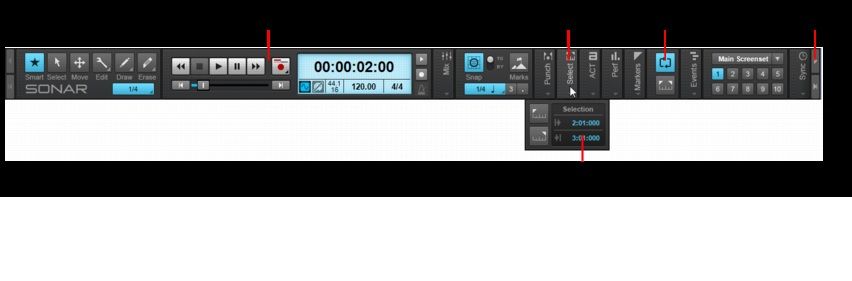 Above is a shot of the Sonar Platinum CB from the help file. Notice the arrows at the ends. It can scroll.
|
mixmkr
Max Output Level: -43.5 dBFS
- Total Posts : 3169
- Joined: 2007/03/05 22:23:43
- Status: offline
Re: Screen Layout Question
2015/01/27 21:58:52
(permalink)
|