Helpful ReplyNewbie question: Sonar Professional creates multiple tracks when I insert MIDI track

Author
Zahal
Max Output Level: -90 dBFS
  • Total Posts : 5
  • Joined: 2015/01/07 16:14:36
  • Status: offline
2015/03/08 10:56:44 (permalink)

Newbie question: Sonar Professional creates multiple tracks when I insert MIDI track

Good afternoon from a newbie in sunny Aberdeenshire.
 
I have installed Sonar Professional and am getting to know it, like a kid in a sweet shop (what does that shiny button do...?) but....
 
I am struggling to understand one behaviour in Sonar, which is probably due to user-malfunction. When I insert a softsynth (VST2) such as Addictive Drums or else my Yamaha Motif Rack XS, Sonar creates around a dozen tracks automatically.  Is this normal and does anyone know how to stop that happening? Maybe I have clicked one too many wrong buttons somewhere.
 
Many thanks in advance.
 
Regards
Zahal
#1
Fred Holmes
Max Output Level: -83 dBFS
  • Total Posts : 376
  • Joined: 2003/11/05 17:17:09
  • Status: offline
Re: Newbie question: Sonar Professional creates multiple tracks when I insert MIDI track 2015/03/08 11:12:56 (permalink)
I don't use AD or many other drum kits  but my assumption is that it initiates a track for each part of the kit(snare, tom Crash cymbal etc)
Try inserting a simple instrument such as Cakewallk Directx TTS and you should get just two tracks - a midi input and the synth audio output.
 
The other thing that influences how many tracks is the "Insert soft synths options" dialog where you can choose from 
First Synth out , all Synth out mono or stereo 
 
Fred
#2
brekdome
Max Output Level: -90 dBFS
  • Total Posts : 25
  • Joined: 2014/12/20 09:31:35
  • Status: offline
Re: Newbie question: Sonar Professional creates multiple tracks when I insert MIDI track 2015/03/08 11:31:38 (permalink)
In the Browser click on the Synth Tab . Click on the third button on next line - this is the Insert synth options . A new windows appears - there you can change Sonar behavior when inserting a new instruments
 
Don't forget to check Ask every time !
#3
Zahal
Max Output Level: -90 dBFS
  • Total Posts : 5
  • Joined: 2015/01/07 16:14:36
  • Status: offline
Re: Newbie question: Sonar Professional creates multiple tracks when I insert MIDI track 2015/03/08 11:54:19 (permalink)
Thanks Fred and Baldaur - think that more or less helps. 
Regards
Zahal
#4
bapu
Max Output Level: 0 dBFS
  • Total Posts : 86000
  • Joined: 2006/11/25 21:23:28
  • Location: Thousand Oaks, CA
  • Status: offline
Re: Newbie question: Sonar Professional creates multiple tracks when I insert MIDI track 2015/03/08 12:59:04 (permalink) ☄ Helpfulby mettelus 2015/03/10 15:05:58
Depending on how you choose to work in Addictive Drums you may or may not want to have what are called "multiple outs". This can be dictated by the popup dialog when you insert the synth (AD2).
 
Assume you insert the AD2 like this:
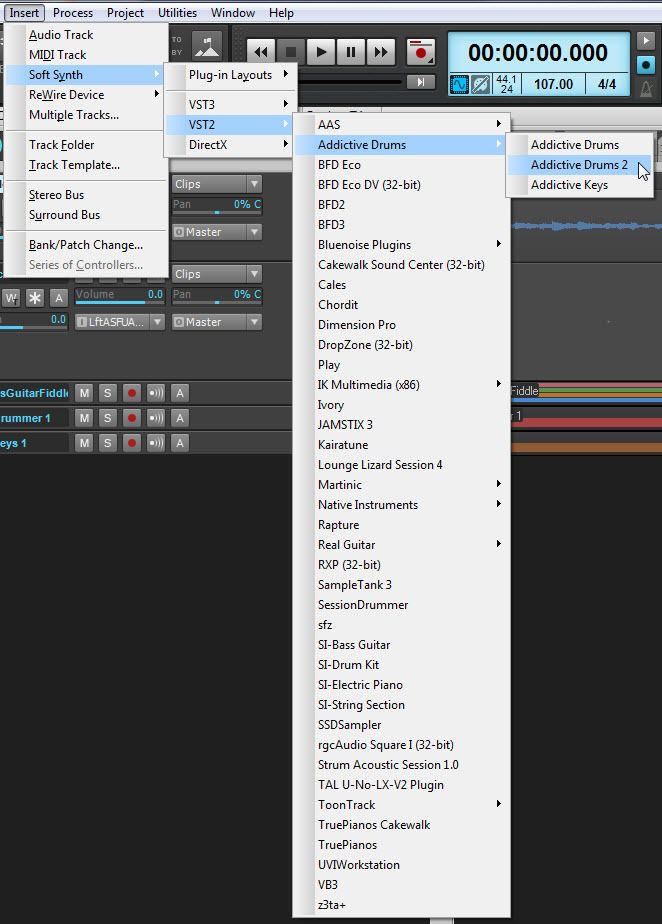
You will get a dialog like this:
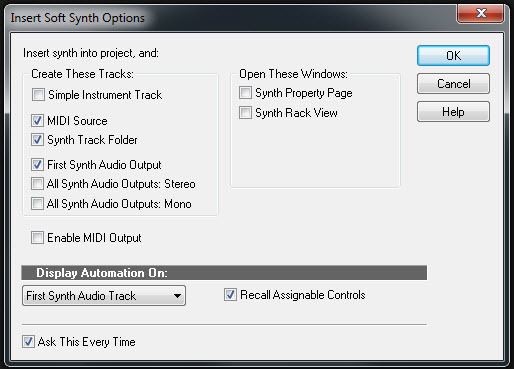
Notice the three options below the checked box for Synth Track Folder?
The option checked in the example will produce simply two tracks, one MIDI and one Audio.
If you chose that option most of your mixing of the drums would be done AD2's mixer. 
 
Now if you select All Synths Outputs: Stereo, you will get 9 audio tracks set to Stereo. Those audio tracks can be changed to represent what ever you want. But here is an example of the default for track 1 (of the AD2 folder).
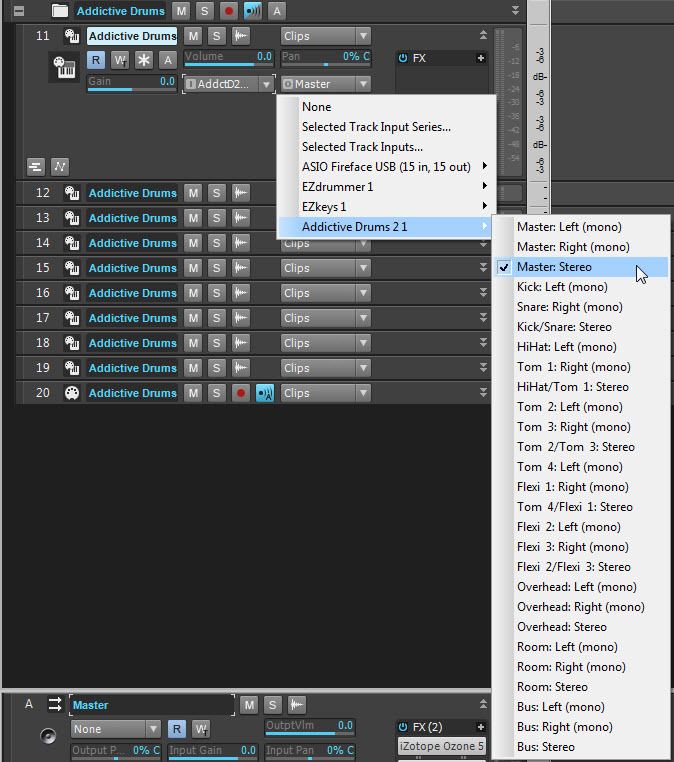
 

Tracks 2-9 (of the folder are set to the remaining stereo pairs).
 
Now, why would you want tack 12 to be the kick on the left and the snare on the right? You'd probably want the Kick and snare in the center (mono tracks). You can do that thus.
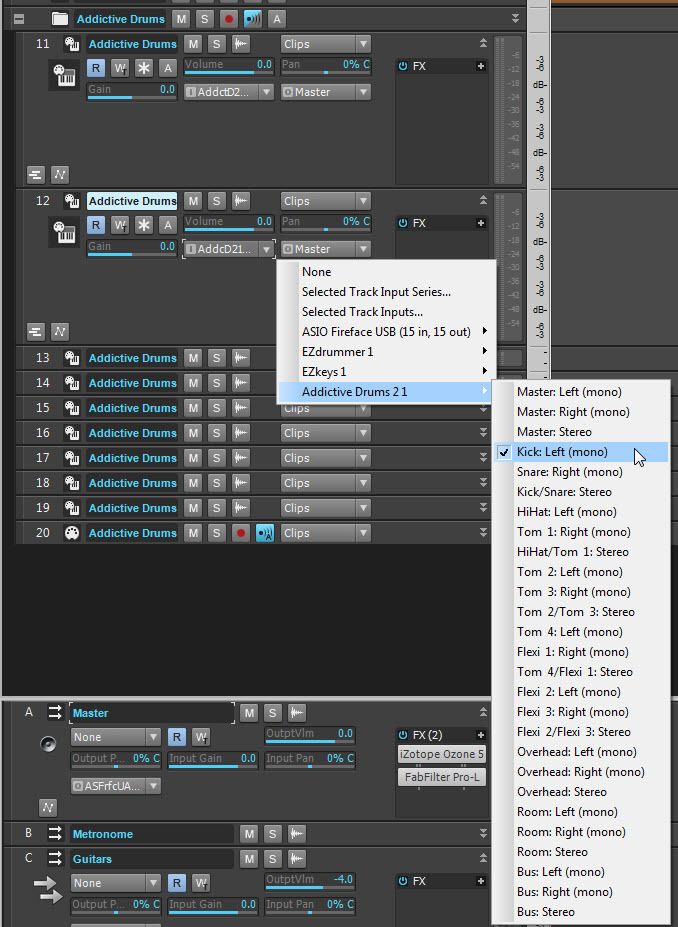
But... if you did that for tracks 12 and 13 (kick and snare) you will now have disrupted the stereo pair for the toms.
 
Maybe when you created your AD2 choice in SONAR you got 18 audio tracks, via All Synths Outputs: Mono. If so now you have all the kit pieces as mono but you also have your first two tracks as L and R of the Master outs in AD2. 
 
Assuming you to control the elements of your drum kits with multiple outs, its a little convoluted for the un-initaited. What you probably want is hybrid. Some stereo and some mono. With that in mid, read up on track templates and create your favorite way to work with AD2 and in each new project you can simply insert your track template.
 
Next to last caveat. With multiple outs you need to tell AD2 that you want the kit pieces to be sent to the multiple oust of SONAR. You do this by clicking the lowest button on each track/bus in AD2 (the red arrows).
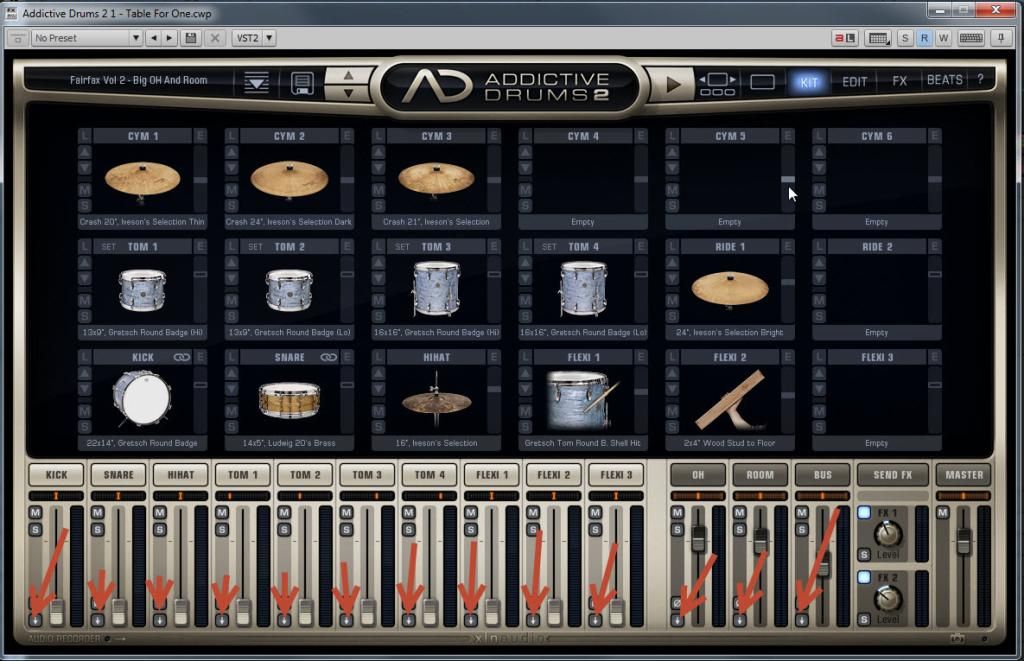
After clicking a dialog comes up with choices of where you want the routing to go. That is your choice. I happen to always choose separate outs. Once clicked the track/bus looks like this.
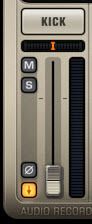
Now come the creative part....... you'll need to decide how you want those SONAR track to be your hybrid.
 
Hope this helps just a little more.
 
#5
Beepster
Max Output Level: 0 dBFS
  • Total Posts : 18001
  • Joined: 2012/05/11 19:11:24
  • Status: offline
Re: Newbie question: Sonar Professional creates multiple tracks when I insert MIDI track 2015/03/08 13:20:02 (permalink)
Bapu, rockin' it! Nicely done. Pictures and errythin'.
 
 
As a newcomer I highly recommend browsing all the free vids Cake has made available which can be found here...
 
http://www.cakewalk.com/CakeTV
 
In particular the Sonar University section has a lot of helpful tutorials. Some are a little dated and use older versions but many of the concepts still apply. You just may have to dig around in different areas of the program to access some features illistrated.
 
http://www.cakewalk.com/CakeTV/SONAR-University
 
In relation the topic of inserting and routing drum synths I learned the basics from the Drum Production I and II entries on this page...
 
http://www.cakewalk.com/CakeTV/SONAR-University/Master-Class
 
The vids are outdated because they show how to do this stuff in 8.5 and he is using Session Drummer3 but the general concepts are the same. At the bottom of the screen watch for text popups that will tell you how things are done in X1. Even though we are now quite a few years ahead of X1 most of the processes will be the same. The biggest thing at first is really just understanding the insertion and routing process for drum synths so you get the big picture. It pretty much applies to most multi out drum sequencers.
 
BTW... by default that third link I provided seems to show a snippet of the SWA X2/3 Complete tutorial bundle by Karl Rose which I highly recommend. It is in the Cake Store and goes on special from time to time. It's awesome. You need to scroll down a bit to get at the Drum Production vids.
 
Welcome to the forum.
#6
Zahal
Max Output Level: -90 dBFS
  • Total Posts : 5
  • Joined: 2015/01/07 16:14:36
  • Status: offline
Re: Newbie question: Sonar Professional creates multiple tracks when I insert MIDI track 2015/03/08 18:13:58 (permalink)
Bapu & Beepster
 
Your time & generosity are welcome. Ever thought of sorting out the Middle East....?!
I feel welcome; just trying to cover all bases by crazy researching of multiple forums (oops, fora?) so that questions I ask aren't too much in the Homer Simpson category (or have already been answered 15 million times). I shall go off into a deep dark cave and study your replies all of you.
 
Basic/Numpty midi in/out/input echo/channel out etc is my next Everest...
 
Regards
Zahal
#7
Beepster
Max Output Level: 0 dBFS
  • Total Posts : 18001
  • Joined: 2012/05/11 19:11:24
  • Status: offline
Re: Newbie question: Sonar Professional creates multiple tracks when I insert MIDI track 2015/03/08 18:21:22 (permalink)
I think you'll find many members here are more than willing to answer even basic questions if the asker is willing to learn.
 
Heck, I was a bumbling fool when I arrived here. Now I'm just a fool who occasionally bumbles. ;-)
 
I'm sure you'll be fine.
 
Cheers.
#8
Beepster
Max Output Level: 0 dBFS
  • Total Posts : 18001
  • Joined: 2012/05/11 19:11:24
  • Status: offline
Re: Newbie question: Sonar Professional creates multiple tracks when I insert MIDI track 2015/03/08 18:25:32 (permalink)
BTW... be sure to go through the Tutorial section at the start of the manual. It will guide you step by step through many of the basic functions and areas of the program you'll need to be familiar with. It doesn't necessarily take long (but you may find yourself trying out all sorts of stuff as you go which is good) and it is extremely helpful.
 
We'll be here if you have any problems.
 
#9
stevec
Max Output Level: 0 dBFS
  • Total Posts : 11546
  • Joined: 2003/11/04 15:05:54
  • Location: Parkesburg, PA
  • Status: offline
Re: Newbie question: Sonar Professional creates multiple tracks when I insert MIDI track 2015/03/09 15:22:48 (permalink)
Beepster
Heck, I was a bumbling fool when I arrived here. Now I'm just a fool who occasionally bumbles. ;-)


????


SteveC
https://soundcloud.com/steve-cocchi
http://www.soundclick.com/bands/pagemusic.cfm?bandID=39163
 
SONAR Platinum x64, Intel Q9300 (2.5Ghz), Asus P5N-D, Win7 x64 SP1, 8GB RAM, 1TB internal + ESATA + USB Backup HDDs, ATI Radeon HD5450 1GB RAM + dual ViewSonic VA2431wm Monitors;
Focusrite 18i6 (ASIO);
Komplete 9, Melodyne Studio 4, Ozone 7 Advanced, Rapture Pro, GPO5, Valhalla Plate, MJUC comp, MDynamic EQ, lots of other freebie VST plugins, synths and Kontakt libraries
 
#10
tlw
Max Output Level: -49.5 dBFS
  • Total Posts : 2567
  • Joined: 2008/10/11 22:06:32
  • Location: West Midlands, UK
  • Status: offline
Re: Newbie question: Sonar Professional creates multiple tracks when I insert MIDI track 2015/03/09 18:20:25 (permalink) ☄ Helpfulby mettelus 2015/03/10 15:06:55
And when you've sorted out the audio channels, routing and plugins that suit how you want to process/mix the kit, save them out as a track template. That way you can then reload exactly that setup every time you need it. Or incorporate it in a custom project template. No point in having to do the same job over and over again.

Sonar Platinum 64bit, Windows 8.1 Pro 64bit, I7 3770K Ivybridge, 16GB Ram, Gigabyte Z77-D3H m/board,
ATI 7750 graphics+ 1GB RAM, 2xIntel 520 series 220GB SSDs, 1 TB Samsung F3 + 1 TB WD HDDs, Seasonic fanless 460W psu, RME Fireface UFX, Focusrite Octopre.
Assorted real synths, guitars, mandolins, diatonic accordions, percussion, fx and other stuff.
#11
Zahal
Max Output Level: -90 dBFS
  • Total Posts : 5
  • Joined: 2015/01/07 16:14:36
  • Status: offline
Re: Newbie question: Sonar Professional creates multiple tracks when I insert MIDI track 2015/03/10 14:59:01 (permalink)
Thanks tlw - you guys are all v.helpful
Zahal
#12
Jump to:
© 2025 APG vNext Commercial Version 5.1