Channel output vs soft synth output

Author
plincoln
Max Output Level: -90 dBFS
  • Total Posts : 22
  • Joined: 2015/01/31 01:10:02
  • Status: offline
2015/03/22 23:51:24 (permalink)

Channel output vs soft synth output

Scott Garrigus in his Power book writes the following:
"7. Set the Input parameter to the MIDI port and channel that are being used to receive data from
your MIDI keyboard. Then click the Output parameter to display a list of available outputs. In
addition to your MIDI interface outputs, the list will also show any soft synths you previously set
up. Choose the soft synth you want to use.
8. Set the Channel, Bank, and Patch parameters for the MIDI track. The settings you choose for these
parameters will depend on the soft synth you are using. For the Channel parameter, choose the
same channel to which the soft synth is set. The Bank and Patch parameters automatically display
different settings, depending on the soft synth. The parameters will show the sound presets available
for the soft synth. Choose the bank and patch that correspond to the sound you want to use."
 
My question is given  "For the Channel parameter, choose the
same channel to which the soft synth is set.", why bother having a Channel parameter at all if  it is always going to be same as the channel that the soft synth is set to? Or are there circumstances where they would be different and if that is the case what are they?
#1

10 Replies Related Threads

    mudgel
    Max Output Level: 0 dBFS
    • Total Posts : 12010
    • Joined: 2004/08/13 00:56:05
    • Location: Linton Victoria (Near Ballarat)
    • Status: offline
    Re: Channel output vs soft synth output 2015/03/22 23:55:23 (permalink)
    If you soft synth was something like Kontakt then you will have 16 midi channels to output to potentially 16 stereo audio tracks

    Mike V. (MUDGEL)

    STUDIO: Win 10 Pro x64, SPlat & CbB x64,
    PC: ASUS Z370-A, INTEL i7 8700k, 32GIG DDR4 2400, OC 4.7Ghz.
    Storage: 7 TB SATA III, 750GiG SSD & Samsung 500 Gig 960 EVO NVMe M.2.
    Monitors: Adam A7X, JBL 10” Sub.
    Audio I/O & DSP Server: DIGIGRID IOS & IOX.
    Screen: Raven MTi + 43" HD 4K TV Monitor.
    Keyboard Controller: Native Instruments Komplete Kontrol S88.
    #2
    tlw
    Max Output Level: -49.5 dBFS
    • Total Posts : 2567
    • Joined: 2008/10/11 22:06:32
    • Location: West Midlands, UK
    • Status: offline
    Re: Channel output vs soft synth output 2015/03/23 02:12:44 (permalink)
    Not just software synths either. Multi-timbral hardware synths tend to use different MIDI channels to control each voice.

    Sonar Platinum 64bit, Windows 8.1 Pro 64bit, I7 3770K Ivybridge, 16GB Ram, Gigabyte Z77-D3H m/board,
    ATI 7750 graphics+ 1GB RAM, 2xIntel 520 series 220GB SSDs, 1 TB Samsung F3 + 1 TB WD HDDs, Seasonic fanless 460W psu, RME Fireface UFX, Focusrite Octopre.
    Assorted real synths, guitars, mandolins, diatonic accordions, percussion, fx and other stuff.
    #3
    mudgel
    Max Output Level: 0 dBFS
    • Total Posts : 12010
    • Joined: 2004/08/13 00:56:05
    • Location: Linton Victoria (Near Ballarat)
    • Status: offline
    Re: Channel output vs soft synth output 2015/03/23 02:51:24 (permalink)
    your hardware synth can be set to send on one of 16 MIDI channels as you lay it. If it is Multi Timbral you can set it up so that different sections of the keyboard can control different MIDI channels either internally or externally on another connected synth or within Sonar. Each channel can have a different sound/or patch assigned to it.
     
    MIDI channels 1-16 can be likened to addresses where you can send MIDI data. That data in turn will tell the synth to play whatever the MIDI commands instruct.
     
    Perhaps you need to google some basic MIDI information so you have a better grasp what you're playing with.

    Mike V. (MUDGEL)

    STUDIO: Win 10 Pro x64, SPlat & CbB x64,
    PC: ASUS Z370-A, INTEL i7 8700k, 32GIG DDR4 2400, OC 4.7Ghz.
    Storage: 7 TB SATA III, 750GiG SSD & Samsung 500 Gig 960 EVO NVMe M.2.
    Monitors: Adam A7X, JBL 10” Sub.
    Audio I/O & DSP Server: DIGIGRID IOS & IOX.
    Screen: Raven MTi + 43" HD 4K TV Monitor.
    Keyboard Controller: Native Instruments Komplete Kontrol S88.
    #4
    plincoln
    Max Output Level: -90 dBFS
    • Total Posts : 22
    • Joined: 2015/01/31 01:10:02
    • Status: offline
    Re: Channel output vs soft synth output 2015/03/23 05:10:09 (permalink)
    Thanks for the quick response.
     
    When I insert a synth I see five rows of info for MIDI.
     
    Top row - Input - (keyboard)
     
    2nd row - Output - I see the name of the synth here - no channel info - but it will be prefixed amd suffixed by a number e.g. 2 - EWGold - 1
     
    3rd row - channel - blank
     
    4th row - bank - blank
     
    5th row - instrument - blank
     
    If I then insert another instance of the synth I will see 5 rows of MIDI info again:
     
     
    Top row - Input - (keyboard)
     
    2nd row - Output - I see the name of the synth here - no channel info - but it will be prefixed by a number e.g. 3 - EWGold - 2
     
    3rd row - channel - blank
     
    4th row - bank - blank
     
    5th row - instrument - blank
     
    So the question is about the 2nd and 3rd rows. When I see something like 2 EWgold - 3, what does that mean? Are the 2 or 3 references to a channel? 
     
    And if they are why is row three the  channel blank for both instances -  do I have to put the channel in?
     
     
    So back to the question: 
     
    "For the Channel parameter, choose the
    same channel to which the soft synth is set."
     
    What would I choose in the above example for the channel for instance 1 and instance 2? It seems to work just fine without me choosing any channel. I click on the synth name and a GUI for  the synth pops up, I choose a sound in the visual synth and play it - nothing gets filled in for the channel, bank or instrument field by me choosing that. Then if do the same thing for the second instance of the synth again I can choose a completely different sound and it plays and again the channel, bank and instrument fields are blank. So I don't see the point of the channel/bank/instrument fields for  soft synths - are they in fact pointless for soft synths, somehow the soft synth does it all in the background, doesn't need me to do any filling in per my experience.  And if so then it seems that I might have to only fill in the channel/bank/instrument fields for some other type of synth - what might that be, a hardware synth that's attached? Some synth that doesn't have a GUI?
     
     
    #5
    williamcopper
    Max Output Level: -68 dBFS
    • Total Posts : 1120
    • Joined: 2014/11/03 09:22:03
    • Location: Virginia, USA
    • Status: offline
    Re: Channel output vs soft synth output 2015/03/23 05:31:51 (permalink)
    It's confusing.   Forgive me if the following is either too simple or too complicated, please.
     
     For one thing, take Kontakt: you can select an "8 output" or a "16 output" or a "32 output" version ... all those are audio, mono, channels.   For the input, when it is used as a VST instrument, there are 16 completely different "channels", and, in sonar, still, there is the completely different notion of "channel" as a distinct layer or something of midi events.    So: wrap your head around each in turn.   In reverse order, most people and software these days ignore "midi channel" as part of a data stream (correct me if wrong).   Then, you will want your midi data to go to one of Kontakt's input channels, 1-16.    (In standalone version, making the situation even more confusing, there are 4 groups of 16 channels, each a separate midi port).
     
    But leaving standalone aside, say you make 16 tracks in sonar, each intended to be "played" by a different instrument loaded into Kontakt:  you need to give each track a midi channel; you need to make sure Kontakt's 16 places in the multi are using the same channel (by default, they will, but it's possible to change this accidentally).
     
    Ok, so you have 16 "in" channels, from 16 sonar tracks, to 16 places in a Kontakt instance.  Now look at the Kontakt output:   depending on whether you've chosen the 8, 16, or 32 channel version, you potentially have that many outputs.    Each of those, from withing Kontakt, can be assigned to a sonar "bus" easiest to see in the "console" view.   The easiest way I've found to add more Kontakt output channels, in Sonar, is to use the "clone track" function on the one channel that Sonar creates by default.  There are probably other ways.   Naming the outputs helps to keep them organized.     See the image ... where it says "K5-1 Low Strings", that's one Kontakt instance, where I've set up three stereo outputs (6 channels). 
     
    Hope this is useful ... it's difficult to write words clearly. 
    #6
    plincoln
    Max Output Level: -90 dBFS
    • Total Posts : 22
    • Joined: 2015/01/31 01:10:02
    • Status: offline
    Re: Channel output vs soft synth output 2015/03/23 19:31:21 (permalink)
    I appreciate the effort and I am sure if I read it many times I will get what you are trying to say and it might be applicable to some later need of mine. However it doesn't really answer the specific example I detailed with the midi rows, etc. in the 'track view' when I insert a synth.  I need for my questions for that example answered because that's what I see now. Once I have those answered I can turn to situations that are more complex. My example is as simple as I believe you can get - insert a synth and midi rows pop up one of which I don't understand what the prefixes and suffixes mean - 2nd row - and the other three rows are blank and everything works without any further fiddling.  What are the prefixes and suffixes related to? Channels? Something else? Why does everything work without any use of the last three rows when the Scott Garrigus article relates the channel row (3rd row)  to the output row (row 2 ) when I can not see anything connecting them - the channel row is in fact blank and the Output row has prefixes and suffixes that don't seem to relate to anything. I can't seem to find anything in the manuals about where the prefix and suffixes come from yet there they are and there is a pattern. If I insert another it increments both prefix and suffix but I am not sure what the prefix or suffix relates to as as far as Midi or anything else.
    #7
    stevec
    Max Output Level: 0 dBFS
    • Total Posts : 11546
    • Joined: 2003/11/04 15:05:54
    • Location: Parkesburg, PA
    • Status: offline
    Re: Channel output vs soft synth output 2015/03/24 08:03:33 (permalink)
    I think part of the confusion may be that one can insert a new MIDI track and output that to an existing synth, which is (or at least can be) different than inserting the synth itself... assuming the synth's track(s) are added during the insert command.  
     
    Using Kontakt again as an example, I insert a single instance of Kontakt (Simple Instrument Track) and add MIDI data.  That track will by default output to Channel 1, using whichever instrument I've loaded.   I can then load a second instrument within Kontakt which will automatically be set to use MIDI channel 2.  However, I don't have a MIDI track to trigger that instrument... so, I insert a new MIDI track, set its output to that instance of Kontakt, and set the track's Channel to 2 (Bank and Patch as needed).   The MIDI track now triggers Kontakt's second instrument while the original still triggers the first instrument on channel 1.
     
    These pages from the online help include tables that list the widgets available for different track types.
    https://www.cakewalk.com/Documentation?product=SONAR%20X3&language=3&help=Views.31.html
    http://www.cakewalk.com/Documentation?product=SONAR%20X3&language=3&help=SoftSynths.05.html
     

    SteveC
    https://soundcloud.com/steve-cocchi
    http://www.soundclick.com/bands/pagemusic.cfm?bandID=39163
     
    SONAR Platinum x64, Intel Q9300 (2.5Ghz), Asus P5N-D, Win7 x64 SP1, 8GB RAM, 1TB internal + ESATA + USB Backup HDDs, ATI Radeon HD5450 1GB RAM + dual ViewSonic VA2431wm Monitors;
    Focusrite 18i6 (ASIO);
    Komplete 9, Melodyne Studio 4, Ozone 7 Advanced, Rapture Pro, GPO5, Valhalla Plate, MJUC comp, MDynamic EQ, lots of other freebie VST plugins, synths and Kontakt libraries
     
    #8
    RobertB
    Max Output Level: 0 dBFS
    • Total Posts : 11256
    • Joined: 2005/11/19 23:40:50
    • Location: Fort Worth, Texas
    • Status: offline
    Re: Channel output vs soft synth output 2015/03/25 12:43:49 (permalink)
    plincoln
    So I don't see the point of the channel/bank/instrument fields for  soft synths - are they in fact pointless for soft synths, somehow the soft synth does it all in the background, doesn't need me to do any filling in per my experience.  And if so then it seems that I might have to only fill in the channel/bank/instrument fields for some other type of synth - what might that be, a hardware synth that's attached? Some synth that doesn't have a GUI?
     

    You have several questions here, but this seems to be the core of your dilemma.
    Also some of the answers are swinging a bit wide because of the wording in your initial post. In particular, you are not looking at the Synth (audio) output.
    You are looking at the MIDI track output to the synth input. It's a very important distinction.
    I'm going to ignore the synth audio output for now and focus on the MIDI track, as this is where all of your questions are.
    The following screenshots illustrate two scenarios.
    In the first, channel, bank, and patch(instrument) settings are relevant.
    In the second, bank and patch have no bearing.
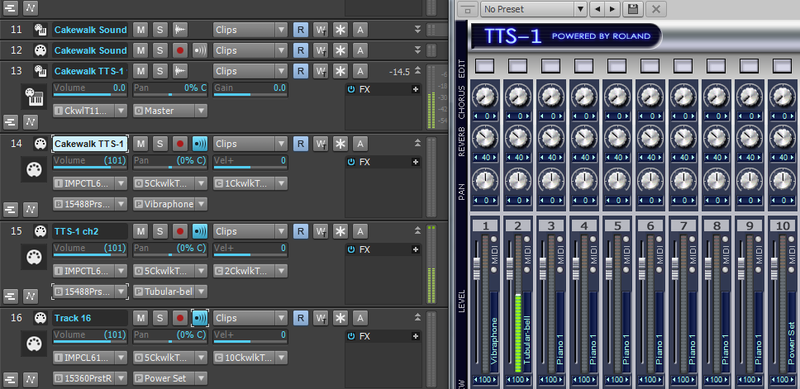
    Here we have TTS-1 inserted into the project. It is a GM2 softsynth, and as such, it does make use of the bank and patch settings. When TTS-1 is inserted, the bank and patch fields populate with drop down menus.
    It is also multi-timbral, and this is where the channels Scott refers to are important.
    Each of the 16 parts is preset to receive one of the available 16 MIDI channels.
    In this example, track 13 is the synth audio output from TTS-1(note the track input).
    Now, to the meat of your question.
    Tracks 14-16 are MIDI tracks, and each is set to a unique output channel. I have also used the bank and patch settings to specify which instrument will be played in each part.
    Track 14 settings:
    Output: 5Cakewalk TTS-1(I'll go into the prefix/suffix later).
    Channel: TTS-1 Channel 1
    Bank: 15488 Preset Normal (bank)0.
    Patch: Vibraphone
    Track 15 settings:
    Output: 5Cakewalk TTS-1
    Channel: TTS-1 Channel 2
    Bank: 15488 Preset Normal (bank)0.
    Patch: Tubular Bell
    Track 16 settings:
    Output: 5Cakewalk TTS-1
    Channel: TTS-1 Channel 10
    Bank: 15360 Preset Rhythm. This is the GM standard drum bank.
    Patch: Power Set
     
    Each MIDI track is sending data to the specified instrument part within TTS-1.
    So what happens if I do not select any channels?
    The controller will determine the channel that receives data (if the input is set to Omni). Most controllers default to channel 1, so only part 1(vibraphone) would play. However, If I set the controller to channel 10, I will get only drums.
    If I set the input to Omni, and select the appropriate output channels, all three parts will play when I hit a key.
    With me so far?
     
    From what I can see, the EW player is not multi-timbral. You would need a separate instance for each instrument.
    With everything left at default settings, you would get sound without selecting a channel, because the default is already channel 1.
    The bank and patch settings are not relevant to EW, so these fields are blank. Patch selection is made within the synth GUI. This is typical for the vast majority of soft synths.
    Among other things, the EW player is probably not your best choice for trying to understand your question.
     
    OK, on to the second scenario.
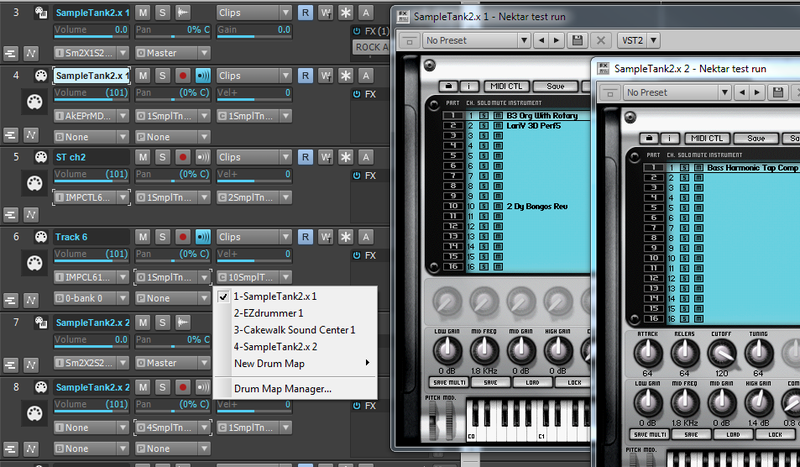
    Here, we have 2 instances of Sampletank 2 in the project.
    Let's look at those prefixes now.
    I have 4 soft synths in my synth rack.
    Synth 1 is the first instance of Sampletank, so it appears as 1-SampleTank2.x1.
    Synth 4 is the second instance, and it appears as 4-SampleTank 2.x2.
    The other two only appear once, so there is no iteration suffix.
     
    As in the other example, MIDI tracks 4,5,and 6 have their outputs set to channels 1,2,and 10, respectively.
    The channels correspond to the indivual parts in the synth GUI.
    Instruments are selected from menus in the synth GUI, so bank and patch are blank, since they are not relevant to this synth.
    Channels are important, because like TTS-1, each part is preset to receive on a given channel.
    This is really just basic MIDI routing, but it can be confusing at first.
    Take a minute to digest all of this.
    Hopefully it helps.
    post edited by RobertB - 2015/03/25 14:16:41

    My Soundclick Page
    SONAR Professional, X3eStudio,W7 64bit, AMD Athlon IIx4 2.8Ghz, 4GB RAM, 64bit, AKAI EIE Pro, Nektar Impact LX61,Alesis DM6,Alesis ControlPad,Yamaha MG10/2,Alesis M1Mk2 monitors,Samson Servo300,assorted guitars,Lava Lamp

    Shimozu-Kushiari or Bob
    #9
    plincoln
    Max Output Level: -90 dBFS
    • Total Posts : 22
    • Joined: 2015/01/31 01:10:02
    • Status: offline
    Re: Channel output vs soft synth output 2015/03/25 20:42:19 (permalink)
    Thanks so very much for the detail - you have gone way beyond the words 'response' or 'feedback' or 'reply'  here - none of those words do justice to the degree to which you have dug deeply to explain something that is not 'easy'.  I have done a speed read of what you wrote and I will do some deeper dives to follow as my quick scan gave me the feeling 'this is exactly what I was looking for, the answer is here'.  If I have any further questions once I have absorbed your detail I will get back. Thanks mucho again.
     
    #10
    RobertB
    Max Output Level: 0 dBFS
    • Total Posts : 11256
    • Joined: 2005/11/19 23:40:50
    • Location: Fort Worth, Texas
    • Status: offline
    Re: Channel output vs soft synth output 2015/03/25 21:24:15 (permalink)
    You're very welcome.
    The thing is, once you "get it", it really is easy, and you can focus on the more musical aspects of your projects.
    Good luck!

    My Soundclick Page
    SONAR Professional, X3eStudio,W7 64bit, AMD Athlon IIx4 2.8Ghz, 4GB RAM, 64bit, AKAI EIE Pro, Nektar Impact LX61,Alesis DM6,Alesis ControlPad,Yamaha MG10/2,Alesis M1Mk2 monitors,Samson Servo300,assorted guitars,Lava Lamp

    Shimozu-Kushiari or Bob
    #11
    Jump to:
    © 2025 APG vNext Commercial Version 5.1