oldsneakers
Max Output Level: -85 dBFS

- Total Posts : 293
- Joined: 2005/08/20 19:36:56
- Location: Connecticut USA
- Status: offline
PRV mini track menu on left mouse click
I inadvertently keep activating a little track list menu on left mouse click in the PRV. It looks useful but I don't know how I keep activating it and have trouble deactivating it. It's a list of the tracks I have picked to be seen in the PRV Track Pane. I couldn't find any information on it in the reference guide. Any guidance would be appreciated.
|
Bristol_Jonesey
Max Output Level: 0 dBFS

- Total Posts : 16775
- Joined: 2007/10/08 15:41:17
- Location: Bristol, UK
- Status: offline

Re: PRV mini track menu on left mouse click
2015/03/24 17:59:57
(permalink)
Do you mean this: 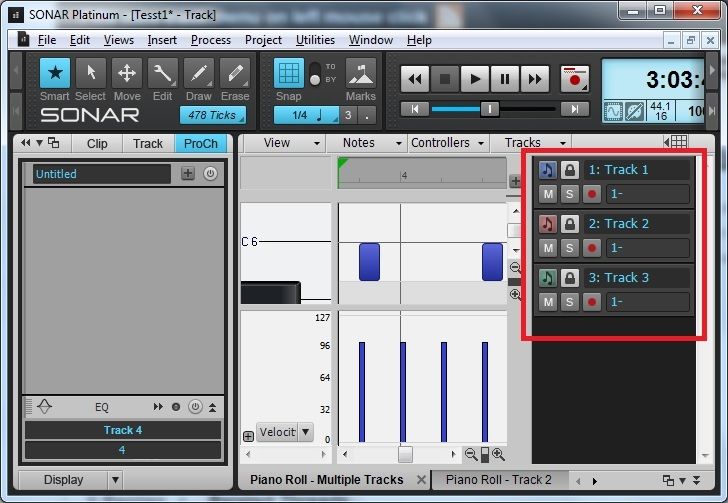 This is toggled in View > Show/Hide Track Pane in the prv. As far as I know, you cannot enable this with a single mouse click
CbB, Platinum, 64 bit throughoutCustom built i7 3930, 32Gb RAM, 2 x 1Tb Internal HDD, 1 x 1TB system SSD (Win 7), 1 x 500Gb system SSD (Win 10), 2 x 1Tb External HDD's, Dual boot Win 7 & Win 10 64 Bit, Saffire Pro 26, ISA One, Adam P11A,
|
brundlefly
Max Output Level: 0 dBFS
- Total Posts : 14250
- Joined: 2007/09/14 14:57:59
- Location: Manitou Spgs, Colorado
- Status: offline
Re: PRV mini track menu on left mouse click
2015/03/24 18:19:32
(permalink)
You can drag it open by the pane divider even when it's fully closed, but if it's popping open with a single click, I would suspect an issue with the persistence of the pane size in that particular project or version of SONAR. Is this happening in the current release of SONAR 2015?
SONAR Platinum x64, 2x MOTU 2408/PCIe-424 (24-bit, 48kHz) Win10, I7-6700K @ 4.0GHz, 24GB DDR4, 2TB HDD, 32GB SSD Cache, GeForce GTX 750Ti, 2x 24" 16:10 IPS Monitors
|
FidelityMusic
Max Output Level: -88 dBFS

- Total Posts : 138
- Joined: 2014/12/01 15:20:58
- Location: United States
- Status: offline
Re: PRV mini track menu on left mouse click
2015/03/24 18:27:00
(permalink)
I know you can Hide/Unhide it by pressing "H", but it shouldn't be doing that on a mouse click. I can't seem to make that happen myself.
Sonar Platinum, FL Studio 11 Signature Bundle, Windows 8.1 Pro M-Audio Firewire 410, KRK Rokit 5 G2 Akai MPK49, Maschine Mikro MK2, Korg NanoKontrol GA-990FXA-UD3, AMD FX-8320, 8GB 1886Mhz, 240GB SSD, 500GB HDD AMD 6750, Acer S2000HL x2
|
brundlefly
Max Output Level: 0 dBFS
- Total Posts : 14250
- Joined: 2007/09/14 14:57:59
- Location: Manitou Spgs, Colorado
- Status: offline
Re: PRV mini track menu on left mouse click
2015/03/24 18:31:17
(permalink)
I vaguely recall that an earlier version of SONAR would give you a mini track list when clicking with a certain tool or editing mode. Not sure how far back that was.
SONAR Platinum x64, 2x MOTU 2408/PCIe-424 (24-bit, 48kHz) Win10, I7-6700K @ 4.0GHz, 24GB DDR4, 2TB HDD, 32GB SSD Cache, GeForce GTX 750Ti, 2x 24" 16:10 IPS Monitors
|
oldsneakers
Max Output Level: -85 dBFS
- Total Posts : 293
- Joined: 2005/08/20 19:36:56
- Location: Connecticut USA
- Status: offline
Re: PRV mini track menu on left mouse click
2015/03/24 20:00:12
(permalink)
It is not the PRV Track Pane that pulls out from the right. It is this menu that appears when I left click on an open area of the PRV. Which normally would envoke using the Smart Tool. The items on the list are what I have visible in the Track Pane. I am using 2015 Platinum. Thanks for the help all. 
post edited by oldsneakers - 2015/03/24 20:17:48
|
icontakt
Max Output Level: -32.5 dBFS

- Total Posts : 4266
- Joined: 2012/03/04 08:18:02
- Location: Tokyo
- Status: offline
Re: PRV mini track menu on left mouse click
2015/03/24 20:32:25
(permalink)
☄ Helpfulby oldsneakers 2015/03/25 08:45:53
Yes, that's what I thought you were talking about. The pop-up is just asking you which track you want to edit.
Tak T. Primary Laptop: Core i7-4710MQ CPU, 16GB RAM, 7200RPM HDD, Windows 7 Home Premium OS (Japanese) x64 SP1Secondary Laptop: Core2 Duo CPU, 8GB RAM, 7200RPM HDD, Windows 7 Professional OS (Japanese) x64 SP1Audio Interface: iD14 (ASIO)Keyboard Controller/MIDI Interface: A-800PRODAW: SONAR Platinum x64 (latest update installed)
|
oldsneakers
Max Output Level: -85 dBFS
- Total Posts : 293
- Joined: 2005/08/20 19:36:56
- Location: Connecticut USA
- Status: offline
Re: PRV mini track menu on left mouse click
2015/03/24 20:36:39
(permalink)
Yeah, I know. But I can't figure out what I did to make this menu appear. Or go away. Thanks
|
icontakt
Max Output Level: -32.5 dBFS
- Total Posts : 4266
- Joined: 2012/03/04 08:18:02
- Location: Tokyo
- Status: offline
Re: PRV mini track menu on left mouse click
2015/03/24 20:42:37
(permalink)
☼ Best Answerby oldsneakers 2015/03/25 08:46:15
For example, if you picked four tracks (guitar, bass, piano, drums) to show in the PRV and let's you're editing the guitar track, then if you open the Pick Tracks menu and remove the guitar track and go back to the PRV, the view needs to know which of the three remaining tracks you want to edit. Makes sense?
Tak T. Primary Laptop: Core i7-4710MQ CPU, 16GB RAM, 7200RPM HDD, Windows 7 Home Premium OS (Japanese) x64 SP1Secondary Laptop: Core2 Duo CPU, 8GB RAM, 7200RPM HDD, Windows 7 Professional OS (Japanese) x64 SP1Audio Interface: iD14 (ASIO)Keyboard Controller/MIDI Interface: A-800PRODAW: SONAR Platinum x64 (latest update installed)
|
oldsneakers
Max Output Level: -85 dBFS
- Total Posts : 293
- Joined: 2005/08/20 19:36:56
- Location: Connecticut USA
- Status: offline
Re: PRV mini track menu on left mouse click
2015/03/24 20:53:47
(permalink)
Ah. I must have no track selected when this menu appears. That makes sense. So rather being frustrated at seeing this menu, just select one of the tracks from it. My PC is off but I will try this tomorrow. Thanks for the help.
|
oldsneakers
Max Output Level: -85 dBFS
- Total Posts : 293
- Joined: 2005/08/20 19:36:56
- Location: Connecticut USA
- Status: offline
Re: PRV mini track menu on left mouse click
2015/03/25 08:10:31
(permalink)
Ok, I got it now! If you hide the active track in the Track Pane, and left click in an open area of the PRV, this mini menu appears. It wants you to select the new active track. If you select the track you hid from that little menu, it unhides it. Thanks again icontakt and others who answered. That one has bugged me for a long time.
|
icontakt
Max Output Level: -32.5 dBFS
- Total Posts : 4266
- Joined: 2012/03/04 08:18:02
- Location: Tokyo
- Status: offline
Re: PRV mini track menu on left mouse click
2015/03/25 08:19:26
(permalink)
No problem. Glad I could help. 
Tak T. Primary Laptop: Core i7-4710MQ CPU, 16GB RAM, 7200RPM HDD, Windows 7 Home Premium OS (Japanese) x64 SP1Secondary Laptop: Core2 Duo CPU, 8GB RAM, 7200RPM HDD, Windows 7 Professional OS (Japanese) x64 SP1Audio Interface: iD14 (ASIO)Keyboard Controller/MIDI Interface: A-800PRODAW: SONAR Platinum x64 (latest update installed)
|
williamcopper
Max Output Level: -68 dBFS

- Total Posts : 1120
- Joined: 2014/11/03 09:22:03
- Location: Virginia, USA
- Status: offline
Re: PRV mini track menu on left mouse click
2015/03/25 10:34:53
(permalink)
That little chooser could be very useful ... just posted a feature request about it, that it allow multiple selection ... but maybe if it is geared to "active" track, multiples can't be used. It is such a simple and clear chooser, got the name and the color right there, it would be great to add the track number.
|