Radar Artist
Max Output Level: -90 dBFS

- Total Posts : 11
- Joined: 2015/06/20 18:07:03
- Status: offline
A Small Problem Selecting a curve from tracks on top of eachother
{Specs} *Windows 8.1 64-bit *Sonar Artist Product Hello,  I have a little problem trying to select the audio track's curve (Linear, Slow Curve, Fast Curve). The audio is over lapping each other (in purpose to create a smooth transition) when I try to select the track's curve that I want (in red) it highlights the other track. Is there anyway around this, for my method in separating the audio track just to add a curve and then re-aligning the track is tedious? Thanks.
|
Bristol_Jonesey
Max Output Level: 0 dBFS

- Total Posts : 16775
- Joined: 2007/10/08 15:41:17
- Location: Bristol, UK
- Status: offline

Re: A Small Problem Selecting a curve from tracks on top of eachother
2015/06/30 15:39:38
(permalink)
How many tracks are you talking about? It sounds like you have 2.
I would use volume automation curves on each track.
CbB, Platinum, 64 bit throughoutCustom built i7 3930, 32Gb RAM, 2 x 1Tb Internal HDD, 1 x 1TB system SSD (Win 7), 1 x 500Gb system SSD (Win 10), 2 x 1Tb External HDD's, Dual boot Win 7 & Win 10 64 Bit, Saffire Pro 26, ISA One, Adam P11A,
|
Bristol_Jonesey
Max Output Level: 0 dBFS
- Total Posts : 16775
- Joined: 2007/10/08 15:41:17
- Location: Bristol, UK
- Status: offline
Re: A Small Problem Selecting a curve from tracks on top of eachother
2015/06/30 15:42:25
(permalink)
Like this 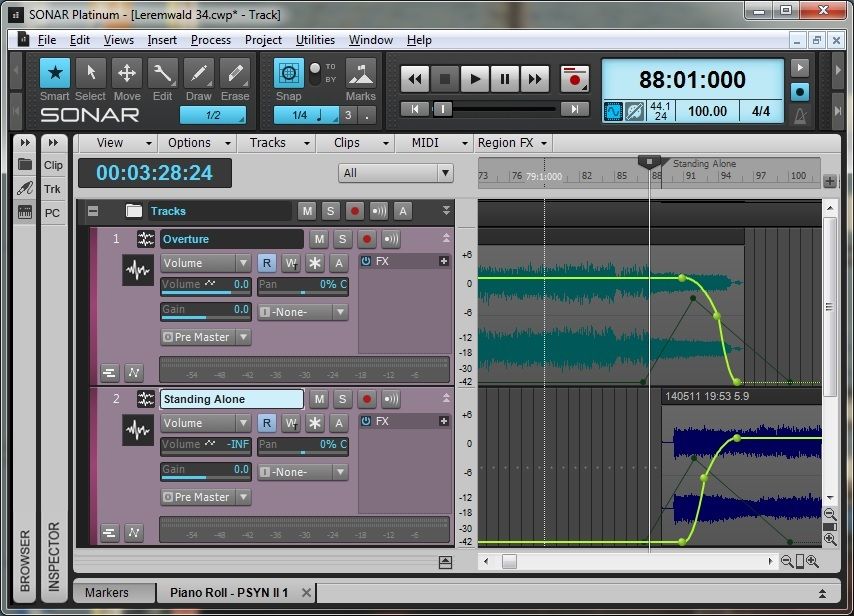
CbB, Platinum, 64 bit throughoutCustom built i7 3930, 32Gb RAM, 2 x 1Tb Internal HDD, 1 x 1TB system SSD (Win 7), 1 x 500Gb system SSD (Win 10), 2 x 1Tb External HDD's, Dual boot Win 7 & Win 10 64 Bit, Saffire Pro 26, ISA One, Adam P11A,
|
Zargg
Max Output Level: 0 dBFS
- Total Posts : 10666
- Joined: 2014/09/28 04:20:14
- Location: Norway
- Status: offline
Re: A Small Problem Selecting a curve from tracks on top of eachother
2015/06/30 16:31:09
(permalink)
Another option, could be to right click, when you see the fade sign / tool. You should then be able to adjust fade settings. Best of luck.
post edited by Zargg71 - 2015/06/30 16:37:41
Ken Nilsen ZarggBBZWin 10 Pro X64, Cakewalk by Bandlab, SPlat X64, AMD AM3+ fx-8320, 16Gb RAM, RME Ucx (+ ARC), Tascam FW 1884, M-Audio Keystation 61es, *AKAI MPK Pro 25, *Softube Console1, Alesis DM6 USB, Maschine MkII Laptop setup: Win 10 X64, i5 2.4ghz, 8gb RAM, 320gb 7200 RPM HD, Focusrite Solo, + *
|
Radar Artist
Max Output Level: -90 dBFS
- Total Posts : 11
- Joined: 2015/06/20 18:07:03
- Status: offline
Re: A Small Problem Selecting a curve from tracks on top of eachother
2015/07/07 19:20:27
(permalink)
Hello, thank you Bristol and Zargg for the help provided I only wish I knew how to upload pictures the make my questions more easier to understand. So it turns out on the edit dialog, I have to select what Zargg stated, the edit (Wrench Icon) not the Smart (Star Icon). And Yes Bristol just like the picture shown, but in one audio track together. My problem is solved. Many Thanks.
post edited by Radar Artist - 2015/07/07 19:28:06
|
Zargg
Max Output Level: 0 dBFS
- Total Posts : 10666
- Joined: 2014/09/28 04:20:14
- Location: Norway
- Status: offline
Re: A Small Problem Selecting a curve from tracks on top of eachother
2015/07/07 19:51:12
(permalink)
Glad you got it figured out  Ps. I still cannot insert images (this goes for imgur, onedrive+++) I just add / copy the link to my pictures here.
post edited by Zargg71 - 2015/07/07 19:57:37
Ken Nilsen ZarggBBZWin 10 Pro X64, Cakewalk by Bandlab, SPlat X64, AMD AM3+ fx-8320, 16Gb RAM, RME Ucx (+ ARC), Tascam FW 1884, M-Audio Keystation 61es, *AKAI MPK Pro 25, *Softube Console1, Alesis DM6 USB, Maschine MkII Laptop setup: Win 10 X64, i5 2.4ghz, 8gb RAM, 320gb 7200 RPM HD, Focusrite Solo, + *
|
Sixfinger
Max Output Level: -73 dBFS

- Total Posts : 890
- Joined: 2007/09/22 07:55:26
- Location: Branson MO
- Status: offline
Re: A Small Problem Selecting a curve from tracks on top of eachother
2015/07/07 20:14:07
(permalink)
you could create a new lane and then drag one of the clips to the new lane... just a thought
Sonar Platinum , ADK Computer -Intel - Penryn Quad Core Q9400 Processor, Windows 7 Home premium 64, RME Fireface UFX, Grace 101 Pre's, A-800 Pro, assorted mics, Strats ,Les Pauls, Mesa Boogies http://lionfeather.com
|
mudgel
Max Output Level: 0 dBFS
- Total Posts : 12010
- Joined: 2004/08/13 00:56:05
- Location: Linton Victoria (Near Ballarat)
- Status: offline
Re: A Small Problem Selecting a curve from tracks on top of eachother
2015/07/07 21:29:27
(permalink)
You can't add links or pics until a minimum of 25 posts. Designed to prevent spam.
Mike V. (MUDGEL) STUDIO: Win 10 Pro x64, SPlat & CbB x64, PC: ASUS Z370-A, INTEL i7 8700k, 32GIG DDR4 2400, OC 4.7Ghz. Storage: 7 TB SATA III, 750GiG SSD & Samsung 500 Gig 960 EVO NVMe M.2. Monitors: Adam A7X, JBL 10” Sub. Audio I/O & DSP Server: DIGIGRID IOS & IOX. Screen: Raven MTi + 43" HD 4K TV Monitor. Keyboard Controller: Native Instruments Komplete Kontrol S88.
|