mesayre
Max Output Level: -87 dBFS

- Total Posts : 195
- Joined: 2012/07/07 09:29:57
- Location: New York, NY
- Status: offline

Can someone set me straight on punch recording?
Hey all, I am pretty comfortable with punching in the analog tape definition, but I am a little confused by the way it works in Sonar, and I can't seem to get what I want. Here's the scenario: 1) I do a few full takes of a guitar part 2) I try to punch in to fix my flubs. But when I do this, Sonar changes the existing take, somehow muting only the part within the punch region and showing the outline of the previous take's waveform. This seems to happen in either comping or sound-on-sound mode. Now that would be fine if it were overwriting the data - then it would be like doing it on tape. But it's creating a new take in take lane, which I can then slip edit. But the data from the original take is still only an outline between the punch points, and there doesn't seem to be a way to get it to come back without un-doing my punch. If this were a bug I think others would've noticed. But I can't for the life of me figure out why it works this way. Can anybody help me out? Thanks, Mike EDIT: Splat Hopinkton, Windows 7x64
post edited by mesayre - 2015/09/17 15:28:30
Mike Sayre Composer, Horn Player Sonar Platinum, Win10x64 My new album, Music for Icebergs, is now on iTunes
|
morganfm71
Max Output Level: -89 dBFS

- Total Posts : 90
- Joined: 2015/08/11 06:41:24
- Location: New York
- Status: offline
Re: Can someone set me straight on punch recording?
2015/09/17 18:10:46
(permalink)
|
Keni
Max Output Level: -17.5 dBFS

- Total Posts : 5769
- Joined: 2003/11/04 10:42:15
- Location: Willits, CA USA
- Status: offline
Re: Can someone set me straight on punch recording?
2015/09/17 18:38:52
(permalink)
Not sure what's going on for you, but open the lanes view and when in sound on sound mode, other takes should be heard unless you have them muted...
Personally, I no longer punch in the traditional sense... I don't like to chance it while I'm trying to capture... So I prefer to edit the section I wish to replace (cut ends) and mute the section to be replaced.
Then I simply record the section and complete the editing.
It just seems easier and more accurate for me to do this so I can adjust any necessary cross fades...
Keni
|
Lynn
Max Output Level: -14 dBFS

- Total Posts : 6117
- Joined: 2003/11/12 18:36:16
- Location: Kansas City, MO
- Status: offline
Re: Can someone set me straight on punch recording?
2015/09/17 19:02:17
(permalink)
Right click on the record button in the control panel and you will have the option to use overwrite mode, as you seem to be wanting. This doesn't put every take in a new take lane unless you want it to. Or, go to preference>project>record and all your options will be available.
|
mesayre
Max Output Level: -87 dBFS
- Total Posts : 195
- Joined: 2012/07/07 09:29:57
- Location: New York, NY
- Status: offline
Re: Can someone set me straight on punch recording?
2015/09/17 22:22:43
(permalink)
Hi guys, Thanks for the response. I'm attaching a screenshot of what I'm seeing. I stopped transport partway through the pass to make it more visible. As you can see, the original take has been weirdly muted. Editing/deleting the punched region makes no difference. This is in comping mode. I get the same results in Sound-on-Sound mode. Is this intended behavior? This is with a brand new file with this track only. 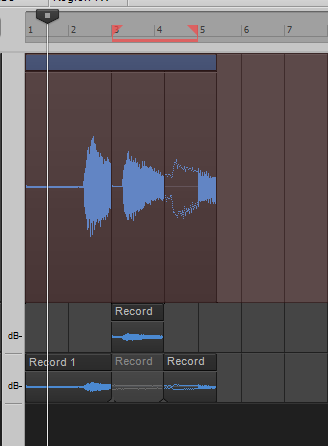 Overwrite mode actually does what I would expect comping mode to do - it crops the initial take and creates a new lane with the punched data, preserving the original for editing.
Mike Sayre Composer, Horn Player Sonar Platinum, Win10x64 My new album, Music for Icebergs, is now on iTunes
|
morganfm71
Max Output Level: -89 dBFS
- Total Posts : 90
- Joined: 2015/08/11 06:41:24
- Location: New York
- Status: offline
Re: Can someone set me straight on punch recording?
2015/09/18 00:12:20
(permalink)
That's the normal way it works.
|
brundlefly
Max Output Level: 0 dBFS

- Total Posts : 14250
- Joined: 2007/09/14 14:57:59
- Location: Manitou Spgs, Colorado
- Status: offline
Re: Can someone set me straight on punch recording?
2015/09/18 14:04:03
(permalink)
☼ Best Answerby mesayre 2015/09/19 11:15:20
Yes, that's all as expected. The region muting (dotted waveform outline) is due to having Mute Previous Takes option enabled for punch recording. The difference between Comping and Sound on Sound record mode is whether the existing take gets split at the boundaries of the new take or not. Your screenshot has the added twist that you apparently stopped recording before the end of the punch region, so the muting covers the entire range, but the comping splits only encompass the length of the second take.
Overwrite will cut out the punched range in the existing take(s), essentially making 'Mute Previous Takes' redundant.
Where things might get a little confusing is that Comping mode automatically mutes all previous takes but does it by invisibly suppressing playback rather than by muting clips. But enabling Autopunch overrides that playback suppression so you'll hear the previous takes(s) surrounding the punch region as well is inside the punch region if you don't have 'Mute Previous Takes' enabled.
In any case, you can undo the region muting after the fact by swiping in the top half of a muted clip with the Mute tool.
SONAR Platinum x64, 2x MOTU 2408/PCIe-424 (24-bit, 48kHz) Win10, I7-6700K @ 4.0GHz, 24GB DDR4, 2TB HDD, 32GB SSD Cache, GeForce GTX 750Ti, 2x 24" 16:10 IPS Monitors
|
slartabartfast
Max Output Level: -22.5 dBFS

- Total Posts : 5289
- Joined: 2005/10/30 01:38:34
- Status: offline
Re: Can someone set me straight on punch recording?
2015/09/18 16:43:45
(permalink)
Make sure you are using the right microphone: 
|
mesayre
Max Output Level: -87 dBFS
- Total Posts : 195
- Joined: 2012/07/07 09:29:57
- Location: New York, NY
- Status: offline
Re: Can someone set me straight on punch recording?
2015/09/19 11:10:08
(permalink)
brundlefly
Where things might get a little confusing is that Comping mode automatically mutes all previous takes but does it by invisibly suppressing playback rather than by muting clips. But enabling Autopunch overrides that playback suppression so you'll hear the previous takes(s) surrounding the punch region as well is inside the punch region if you don't have 'Mute Previous Takes' enabled.
In any case, you can undo the region muting after the fact by swiping in the top half of a muted clip with the Mute tool.
This is what I was missing. Seems a bit counterintuitive to me, but OK. Sometimes I have trouble figuring out some of Sonar's many option interact with each other, and I wasn't able to find great documentation on the Autopunch feature. Now that I know the mute tool can unmute that suppressed playback, I'm all set. Thanks for straightening me out, brundle.
Mike Sayre Composer, Horn Player Sonar Platinum, Win10x64 My new album, Music for Icebergs, is now on iTunes
|