jshep0102
Max Output Level: -71 dBFS

- Total Posts : 984
- Joined: 2006/02/21 22:44:35
- Status: offline
Inserting FX presets
I've made a few presets for tracks and busses. I'd like to be able to add or delete a preset to/from multiple tracks or busses. Is it possible? Thanks
post edited by jshep0102 - 2015/12/02 08:25:12
SHEP-ASRock Z97 Pro4 - i7 4790K 4.0ghz - 16 GB DDR3 - Windows 10 Home - Apollo Twin USB Duo - UAD2 Duo - Digimax FS - Focal CMS50 - Raven MTi2 - Slate VMS 1 - Bluebird - Yamaha MOXF8 - Axe Fx Ultra - SPLAT 2017.2
|
jbraner
Max Output Level: -57 dBFS

- Total Posts : 1830
- Joined: 2003/11/06 14:38:35
- Location: Edinburgh, Scotland
- Status: offline

Re: Inserting FX presets
2015/12/03 07:48:27
(permalink)
Do you mean loading a preset into a plugin? (on multiple tracks)
I have no idea if it will work, but your best bet is to try selecting the tracks and hold down "ctrl" while you add the preset. Otherwise, you could load the preset on one track, then ctrl drag the FX to the others (one at a time)
Sorry if this doesn't help - I'm just trying to think of things...
|
Kalle Rantaaho
Max Output Level: -5 dBFS

- Total Posts : 7005
- Joined: 2006/01/09 13:07:59
- Location: Finland
- Status: offline
Re: Inserting FX presets
2015/12/04 08:07:46
(permalink)
If I understand the question correctly (same way as jbraner), that is, you'd like to control the presets of several plugins or plugin instances simultaneously, I'd be very, very surprised to hear that there's a way to do it. It would be cool, even though I don't think I'd ever need the feature.
SONAR PE 8.5.3, Asus P5B, 2,4 Ghz Dual Core, 4 Gb RAM, GF 7300, EMU 1820, Bluetube Pre - Kontakt4, Ozone, Addictive Drums, PSP Mixpack2, Melda Creative Pack, Melodyne Plugin etc. The benefit of being a middle aged amateur is the low number of years of frustration ahead of you.
|
jshep0102
Max Output Level: -71 dBFS
- Total Posts : 984
- Joined: 2006/02/21 22:44:35
- Status: offline
Re: Inserting FX presets
2015/12/05 13:18:32
(permalink)
I'm talking about simply loading them into the bin. If I have 24 tracks I want to load with the same chain preset, it would be great to be able to do them all at once.
SHEP-ASRock Z97 Pro4 - i7 4790K 4.0ghz - 16 GB DDR3 - Windows 10 Home - Apollo Twin USB Duo - UAD2 Duo - Digimax FS - Focal CMS50 - Raven MTi2 - Slate VMS 1 - Bluebird - Yamaha MOXF8 - Axe Fx Ultra - SPLAT 2017.2
|
Zargg
Max Output Level: 0 dBFS

- Total Posts : 10666
- Joined: 2014/09/28 04:20:14
- Location: Norway
- Status: offline
Re: Inserting FX presets
2015/12/05 13:45:40
(permalink)
Hi. You can insert multiple Pro Channel presets while holding Ctrl when loading. Just save Pro Channel (with fx chain if needed), and insert on selected tracks. All the best.
post edited by Zargg71 - 2015/12/05 13:57:07
Ken Nilsen ZarggBBZWin 10 Pro X64, Cakewalk by Bandlab, SPlat X64, AMD AM3+ fx-8320, 16Gb RAM, RME Ucx (+ ARC), Tascam FW 1884, M-Audio Keystation 61es, *AKAI MPK Pro 25, *Softube Console1, Alesis DM6 USB, Maschine MkII Laptop setup: Win 10 X64, i5 2.4ghz, 8gb RAM, 320gb 7200 RPM HD, Focusrite Solo, + *
|
jshep0102
Max Output Level: -71 dBFS
- Total Posts : 984
- Joined: 2006/02/21 22:44:35
- Status: offline
Re: Inserting FX presets
2015/12/05 13:49:51
(permalink)
None involve Pro Channel. I will try to see if the ctrl move works for me - Thanks!
SHEP-ASRock Z97 Pro4 - i7 4790K 4.0ghz - 16 GB DDR3 - Windows 10 Home - Apollo Twin USB Duo - UAD2 Duo - Digimax FS - Focal CMS50 - Raven MTi2 - Slate VMS 1 - Bluebird - Yamaha MOXF8 - Axe Fx Ultra - SPLAT 2017.2
|
jshep0102
Max Output Level: -71 dBFS
- Total Posts : 984
- Joined: 2006/02/21 22:44:35
- Status: offline
Re: Inserting FX presets
2015/12/05 13:56:02
(permalink)
Sorry to say, but no. 4 tracks selected, only 1 instance loaded. It may be out of reach at this juncture.  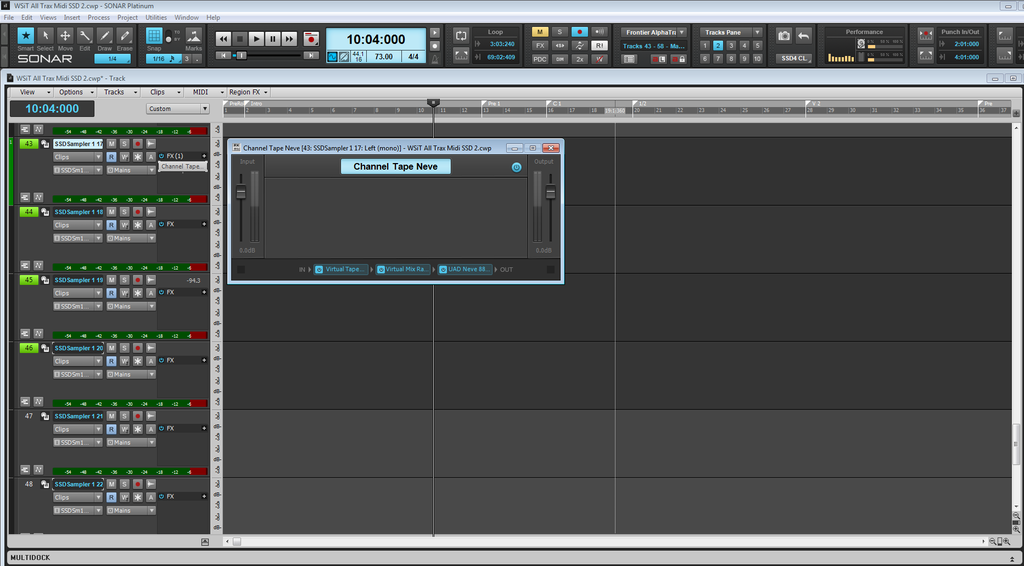 " />
SHEP-ASRock Z97 Pro4 - i7 4790K 4.0ghz - 16 GB DDR3 - Windows 10 Home - Apollo Twin USB Duo - UAD2 Duo - Digimax FS - Focal CMS50 - Raven MTi2 - Slate VMS 1 - Bluebird - Yamaha MOXF8 - Axe Fx Ultra - SPLAT 2017.2
|
Zargg
Max Output Level: 0 dBFS
- Total Posts : 10666
- Joined: 2014/09/28 04:20:14
- Location: Norway
- Status: offline
Re: Inserting FX presets
2015/12/05 14:45:03
(permalink)
But it is doable in the Pro Channel, by using presets. I cannot do it with Vst's.
All the best.
Ken Nilsen ZarggBBZWin 10 Pro X64, Cakewalk by Bandlab, SPlat X64, AMD AM3+ fx-8320, 16Gb RAM, RME Ucx (+ ARC), Tascam FW 1884, M-Audio Keystation 61es, *AKAI MPK Pro 25, *Softube Console1, Alesis DM6 USB, Maschine MkII Laptop setup: Win 10 X64, i5 2.4ghz, 8gb RAM, 320gb 7200 RPM HD, Focusrite Solo, + *
|
Zargg
Max Output Level: 0 dBFS
- Total Posts : 10666
- Joined: 2014/09/28 04:20:14
- Location: Norway
- Status: offline
Re: Inserting FX presets
2015/12/05 14:47:35
(permalink)
Save the fx you want to use in an fx chain in the Pro Channel. Save Pro Channel. Ctrl when opening preset (you saved) on multiple selected tracks.
Ken Nilsen ZarggBBZWin 10 Pro X64, Cakewalk by Bandlab, SPlat X64, AMD AM3+ fx-8320, 16Gb RAM, RME Ucx (+ ARC), Tascam FW 1884, M-Audio Keystation 61es, *AKAI MPK Pro 25, *Softube Console1, Alesis DM6 USB, Maschine MkII Laptop setup: Win 10 X64, i5 2.4ghz, 8gb RAM, 320gb 7200 RPM HD, Focusrite Solo, + *
|