Red4Con1
Max Output Level: -86 dBFS

- Total Posts : 214
- Joined: 2014/11/28 16:20:11
- Status: offline
Open View button?
In help the Open View button suggest that you can open not only the step sequencer yet the piano roll view, the staff view, and the event list. This does not work for me. It will open the step sequencer I can not get it to open any other pages.
OS Windows 10, x64, English, Sonar Platinum x64, English, 12 GB, Intel(R) Core(TM) i7-2600 @ 3.40 GHz, Realtek High Definition Audio, Internal High Definition Audio Bus, Edirol PSR 300, M-Audio Axiom AIR Mini 32
|
Bristol_Jonesey
Max Output Level: 0 dBFS

- Total Posts : 16775
- Joined: 2007/10/08 15:41:17
- Location: Bristol, UK
- Status: offline

Re: Open View button?
2015/12/09 04:38:50
(permalink)
What version of Sonar are you running?
Check to see if they are being opened in the Multidock
CbB, Platinum, 64 bit throughoutCustom built i7 3930, 32Gb RAM, 2 x 1Tb Internal HDD, 1 x 1TB system SSD (Win 7), 1 x 500Gb system SSD (Win 10), 2 x 1Tb External HDD's, Dual boot Win 7 & Win 10 64 Bit, Saffire Pro 26, ISA One, Adam P11A,
|
John
Forum Host

- Total Posts : 30467
- Joined: 2003/11/06 11:53:17
- Status: offline
Re: Open View button?
2015/12/09 05:09:50
(permalink)
☼ Best Answerby Red4Con1 2015/12/09 10:39:09
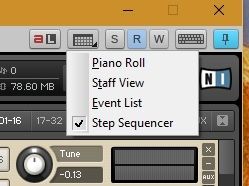 It must be set to which editor via the pull down menu using the little arrow at the bottom right on the buttom.
|
Bristol_Jonesey
Max Output Level: 0 dBFS
- Total Posts : 16775
- Joined: 2007/10/08 15:41:17
- Location: Bristol, UK
- Status: offline
Re: Open View button?
2015/12/09 07:13:04
(permalink)
Good one John. Never knew that existed
CbB, Platinum, 64 bit throughoutCustom built i7 3930, 32Gb RAM, 2 x 1Tb Internal HDD, 1 x 1TB system SSD (Win 7), 1 x 500Gb system SSD (Win 10), 2 x 1Tb External HDD's, Dual boot Win 7 & Win 10 64 Bit, Saffire Pro 26, ISA One, Adam P11A,
|
Paul P
Max Output Level: -48.5 dBFS

- Total Posts : 2685
- Joined: 2012/12/08 17:15:47
- Location: Montreal
- Status: offline
Re: Open View button?
2015/12/09 10:20:10
(permalink)
Bristol_Jonesey
Check to see if they are being opened in the Multidock
I just spent 15 minutes trying to open the step sequencer view after having breezed over this remark and trying to figure out what this thread was about. Turned out my console view was collapsed and all that was happening was the appearance of the step sequencer tab down at the bottom which I didn't even notice. As to the button with the arrow, just in case another newbie is looking everywhere for it, it's at the top right of the synth window. Thanks John and Colin. I just learned several things.
Sonar Platinum [2017.10], Win7U x64 sp1, Xeon E5-1620 3.6 GHz, Asus P9X79WS, 16 GB ECC, 128gb SSD, HD7950, Mackie Blackjack
|
Red4Con1
Max Output Level: -86 dBFS
- Total Posts : 214
- Joined: 2014/11/28 16:20:11
- Status: offline
Re: Open View button?
2015/12/09 10:30:51
(permalink)
Thanks John
Turn out that you have to hold the mouse button a little for the menu to show up.
OS Windows 10, x64, English, Sonar Platinum x64, English, 12 GB, Intel(R) Core(TM) i7-2600 @ 3.40 GHz, Realtek High Definition Audio, Internal High Definition Audio Bus, Edirol PSR 300, M-Audio Axiom AIR Mini 32
|
Paul P
Max Output Level: -48.5 dBFS
- Total Posts : 2685
- Joined: 2012/12/08 17:15:47
- Location: Montreal
- Status: offline
Re: Open View button?
2015/12/09 10:37:13
(permalink)
Red4Con1
Turn out that you have to hold the mouse button a little for the menu to show up.
Yeah, that too. It's not a move I've had to do anywhere else.
Sonar Platinum [2017.10], Win7U x64 sp1, Xeon E5-1620 3.6 GHz, Asus P9X79WS, 16 GB ECC, 128gb SSD, HD7950, Mackie Blackjack
|
mettelus
Max Output Level: -22 dBFS

- Total Posts : 5321
- Joined: 2005/08/05 03:19:25
- Location: Maryland, USA
- Status: offline
Re: Open View button?
2015/12/09 13:11:22
(permalink)
The "long press" does exist elsewhere, but it just occurred to me that the black triangle on the button is the indicator. The "panic" button in the Matrix View has the menu on long press as well. I never realized the Step Sequencer view could be assigned elsewhere either!
post edited by mettelus - 2015/12/09 13:25:10
ASUS ROG Maximus X Hero (Wi-Fi AC), i7-8700k, 16GB RAM, GTX-1070Ti, Win 10 Pro, Saffire PRO 24 DSP, A-300 PRO, plus numerous gadgets and gizmos that make or manipulate sound in some way.
|
Paul P
Max Output Level: -48.5 dBFS
- Total Posts : 2685
- Joined: 2012/12/08 17:15:47
- Location: Montreal
- Status: offline
Re: Open View button?
2015/12/09 22:07:12
(permalink)
mettelus
The "long press" does exist elsewhere, but it just occurred to me that the black triangle on the button is the indicator. And here I thought I had to hold on the triangle. Anywhere on the button works. The record button in the transport module has this behaviour as well.
Sonar Platinum [2017.10], Win7U x64 sp1, Xeon E5-1620 3.6 GHz, Asus P9X79WS, 16 GB ECC, 128gb SSD, HD7950, Mackie Blackjack
|