stratman70
Max Output Level: -45 dBFS

- Total Posts : 3044
- Joined: 2006/09/12 20:34:12
- Location: Earth
- Status: offline
View all Midi channels used at once?
I know I may be asking basic questions but I wouldn't if I didn't have to....Thanks Is this possible? Like open a project and see what midi channels are available for use? either by seeing all that are used or only those that are not used. I am all midi except for guitars (elec and acc) and vocals. Thanks folks Frank
post edited by stratman70 - 2015/12/13 22:10:43
|
John
Forum Host

- Total Posts : 30467
- Joined: 2003/11/06 11:53:17
- Status: offline

Re: View all Midi channels used at once?
2015/12/13 22:06:30
(permalink)
You could use the List view and filter out everything but channels. All you would need do is select all your MIDI tracks. Unfortunately there is no channel event. But you can see most via the patch event.
post edited by John - 2015/12/13 22:33:46
|
stratman70
Max Output Level: -45 dBFS
- Total Posts : 3044
- Joined: 2006/09/12 20:34:12
- Location: Earth
- Status: offline
Re: View all Midi channels used at once?
2015/12/13 23:37:57
(permalink)
OK- Thanks John................... Think that's kind of what I have been doing. Would be cool though to just pop up a window and midi channels are listed-wouldn't matter if they were showing which track either. But hey-no problem, just figured I would ask
post edited by stratman70 - 2015/12/13 23:54:00
|
williamcopper
Max Output Level: -68 dBFS

- Total Posts : 1120
- Joined: 2014/11/03 09:22:03
- Location: Virginia, USA
- Status: offline
Re: View all Midi channels used at once?
2015/12/14 01:26:29
(permalink)
I think all the criticism of sonar as a toy (from the midi point of view) boils down to this one simple design feature: so much of it assumes that "midi channel 1" is it, period, for all tracks and all uses. Maybe the decades old "midi channel 10" for drums.
|
John
Forum Host
- Total Posts : 30467
- Joined: 2003/11/06 11:53:17
- Status: offline
Re: View all Midi channels used at once?
2015/12/14 01:52:37
(permalink)
williamcopper
I think all the criticism of sonar as a toy (from the midi point of view) boils down to this one simple design feature: so much of it assumes that "midi channel 1" is it, period, for all tracks and all uses. Maybe the decades old "midi channel 10" for drums.
I'm not sure how you arrived at that conclusion. I can tell you its incorrect. With MIDI the port is the more important thing. All MIDI ports have 16 channels. Sonar is very easy to use for hardware and software synths because it is aware of ports. Not all DAWs are.
|
stratman70
Max Output Level: -45 dBFS
- Total Posts : 3044
- Joined: 2006/09/12 20:34:12
- Location: Earth
- Status: offline
Re: View all Midi channels used at once?
2015/12/14 11:18:14
(permalink)
williamcopper
I think all the criticism of sonar as a toy (from the midi point of view) boils down to this one simple design feature: so much of it assumes that "midi channel 1" is it, period, for all tracks and all uses. Maybe the decades old "midi channel 10" for drums.
I started this thread to ask a question about Sonar, not to criticize it. No way do I feel it is a toy. I was just hoping there was a way to do this. Not sure what your talking about because I have been using midi since the late 80's in Cakewalk Pro Audio to start. Midi I what brought me to Sonar and keeps me here- for over 20+ years. Midi functionality is great. I certainly will not lose sleep over the fact that I cannot just pop up a list of used or free midi channels. It was just a question and it was answered.
|
Beepster
Max Output Level: 0 dBFS

- Total Posts : 18001
- Joined: 2012/05/11 19:11:24
- Status: offline
Re: View all Midi channels used at once?
2015/12/14 12:29:03
(permalink)
williamcopper
I think all the criticism of sonar as a toy (from the midi point of view) boils down to this one simple design feature: so much of it assumes that "midi channel 1" is it, period, for all tracks and all uses. Maybe the decades old "midi channel 10" for drums.
WTH are you talking about? All channels are easily accessable on all tracks for all devices at all times. Do you not know how to choose MIDI channels in Sonar? Again... you are complaining about an issue that does not exist and doing so from the supposed perspective of someone who "knows" stuff at a professional level... but AGAIN you have shown that you have a severe lack of knowledge about the program you consistently complain about. Slow your roll, ask questions instead of making accusations, RTFM (and that is something I NEVER say in this manner) and you maybe... just MAYBE will be able to get what you want accomplished. That is of course if your stated goal of making music is what you want to accomplish. If you just want to troll, confuse newcomers, slag Sonar and waste everyone's time... mission accomplished. "Toy" indeed.
|
DRanck
Max Output Level: -78 dBFS

- Total Posts : 608
- Joined: 2013/05/31 18:35:32
- Location: Sarasota, FL USA
- Status: offline
Re: View all Midi channels used at once?
2015/12/14 15:13:19
(permalink)
To the OP, when you say "all midi", do you mean VSTs or are you driving outboard gear? I ask because I primarily use VSTs and have never seen the need see all channels in use. Maybe if I were using hardware then it would matter more.
Just wondering.
My Sound CloudWebsiteYoutube ChannelThe way that I've always gone about making music, the rule of thumb, has just been to make what I love. Amy Lee Sonar Pro 64 (Newburyport), Akai Pro MPK 88, i7-4770K, ASUS Z87-PRO V, 32GB SDRAM 1866, SAMSUNG 840 EVO 500GB SSD, 2 - WD BLACK 2TB, Samsung USB 3.0 SSD, Win 10 Pro 64, Radeon R9 270 Video 2GB, Dell P2314T 23" Touchscreen, Gateway 23" monitor, Presonus USB Audio Interface, Surface Pro 2 w/ Xotopad as a control surface
|
jatoth
Max Output Level: -83 dBFS

- Total Posts : 363
- Joined: 2009/08/12 06:31:35
- Status: offline
Re: View all Midi channels used at once?
2015/12/14 15:25:51
(permalink)
Frank,
Knowing what MIDI channels are in use would only apply if you are using a multi-timbrel synth such as Kontakt or a multi-timbrel external synth. If you are using multiple VSTis each one could be on the same channel with different MIDI tracks feeding each.
John X3e Producer, Sonar Platinum, Sweetwater CreationStation i5 3.1gHz, 12 GB RAM, 500GB SSD OS drive, 1TB SSD audio drive, 1TB archive/misc drive, dual 22" monitors, Windows 7x64, SaffirePro40 (firewire), MOTU MIDI Express XT, Behringer BCF2000, dbx 586, Samson Servo 120a, Yamaha HS80M, Auratone 5c Cubes, Sennheiser HD650, Sony MDR 7509HD, Sony MDR 7506, Kurzweil K2500XS, Roland XP-30, Proteus 2000.
|
stratman70
Max Output Level: -45 dBFS
- Total Posts : 3044
- Joined: 2006/09/12 20:34:12
- Location: Earth
- Status: offline
Re: View all Midi channels used at once?
2015/12/14 16:00:37
(permalink)
Guys-Sometimes I want to add, say a fender Rhodes thru Kontakt, I need to assign a midi channel and I want one that is not used. If I already have 10 midi tracks, I really don't remember the channel of each one. Maybe I don't work th normal way, but what can I say. Thanks
|
Bristol_Jonesey
Max Output Level: 0 dBFS
- Total Posts : 16775
- Joined: 2007/10/08 15:41:17
- Location: Bristol, UK
- Status: offline
Re: View all Midi channels used at once?
2015/12/14 16:01:43
(permalink)
The only time I've ever need to assign other than default Midi channels is when using Play with EWQLSO to route different instruments & articulation within a given instance of Play.
If you insert any number of soft synths via the "Insert Soft Synth" option you'll find they all use what is in effect "Channel 1"
CbB, Platinum, 64 bit throughoutCustom built i7 3930, 32Gb RAM, 2 x 1Tb Internal HDD, 1 x 1TB system SSD (Win 7), 1 x 500Gb system SSD (Win 10), 2 x 1Tb External HDD's, Dual boot Win 7 & Win 10 64 Bit, Saffire Pro 26, ISA One, Adam P11A,
|
stratman70
Max Output Level: -45 dBFS
- Total Posts : 3044
- Joined: 2006/09/12 20:34:12
- Location: Earth
- Status: offline
Re: View all Midi channels used at once?
2015/12/14 16:47:12
(permalink)
OK- No big deal- I like to have things on different midi channels so I can assign commands, be it pitch wheel, expression, whatever to each instrument as I please. I guess I really am unorthodox here-- but after using midi since the 80's, yes 80's.using a Kawai Q-80 and\or mastertracks before I bought Cakewalk Pro audio 6. So this is the way I do things. Why would you want to send the same midi messages to , say a bass guitar synth as you would an electric piano? Hmmm. I must really be weird I guess.
Anyway, I am happy with my methods. Thanks
|
Beepster
Max Output Level: 0 dBFS
- Total Posts : 18001
- Joined: 2012/05/11 19:11:24
- Status: offline
Re: View all Midi channels used at once?
2015/12/14 17:04:40
(permalink)
stratman70
OK- No big deal- I like to have things on different midi channels so I can assign commands, be it pitch wheel, expression, whatever to each instrument as I please. I guess I really am unorthodox here-- but after using midi since the 80's, yes 80's.using a Kawai Q-80 and\or mastertracks before I bought Cakewalk Pro audio 6. So this is the way I do things. Why would you want to send the same midi messages to , say a bass guitar synth as you would an electric piano? Hmmm. I must really be weird I guess.
Anyway, I am happy with my methods. Thanks
I don't think that's weird at all. Makes total sense and from what I understand that's kind of why MIDI channel's exist. It would make sense to want to see a full map of a project (and preferably an editable one). I've been wanting something like this but more for audio routing. I am not being helpful because a) I don't think such a thing exists and b) am not familiar enough with MIDI routing in Sonar to concoct a reasonable workaround for your needs. I just don't think it's weird. And sorry for the slight thread derailment back there... but willie was trying to glom on to your topic to engage in his usual ill informed whinging and it irked me. Hope you find a suitable answer/workflow. Maybe there is a third party MIDI routing plug that could link things up how you want. I've seen such things but don't know how well they would integrate in Sonar or if they even apply to your use case. Cheers.
|
stratman70
Max Output Level: -45 dBFS
- Total Posts : 3044
- Joined: 2006/09/12 20:34:12
- Location: Earth
- Status: offline
Re: View all Midi channels used at once?
2015/12/14 17:20:04
(permalink)
Hey Beepster-Thanks---I kind of thought it was fine also......I understand what Bristol, Jatoh, etc meant.....It really depends how you work. I usually always try to use the same midi channels and actually match the track. Just habit and also easy to remember. But sometimes I cannot do that. You didn't derail the thread-I understood perfectly. Thanks for chiming in Frank
post edited by stratman70 - 2015/12/14 17:32:02
|
John
Forum Host
- Total Posts : 30467
- Joined: 2003/11/06 11:53:17
- Status: offline
Re: View all Midi channels used at once?
2015/12/14 17:36:26
(permalink)
In the track Inspector for a MIDI track the channel is listed or made none. With Kontakt it will display the MIDI channel along with audio out in the Instrument Header for each instrument. One important point is it doesn't matter within Sonar which MIDI channels are used as long as they are assigned to a particular port. A port is either a physical one as in hardware or a VSTi or a DXi. Here is the Instrument Header for Kontakt  Output is the audio out and MIDI channel is the input channel. Here is the track Inspector from Sonar for MIDI 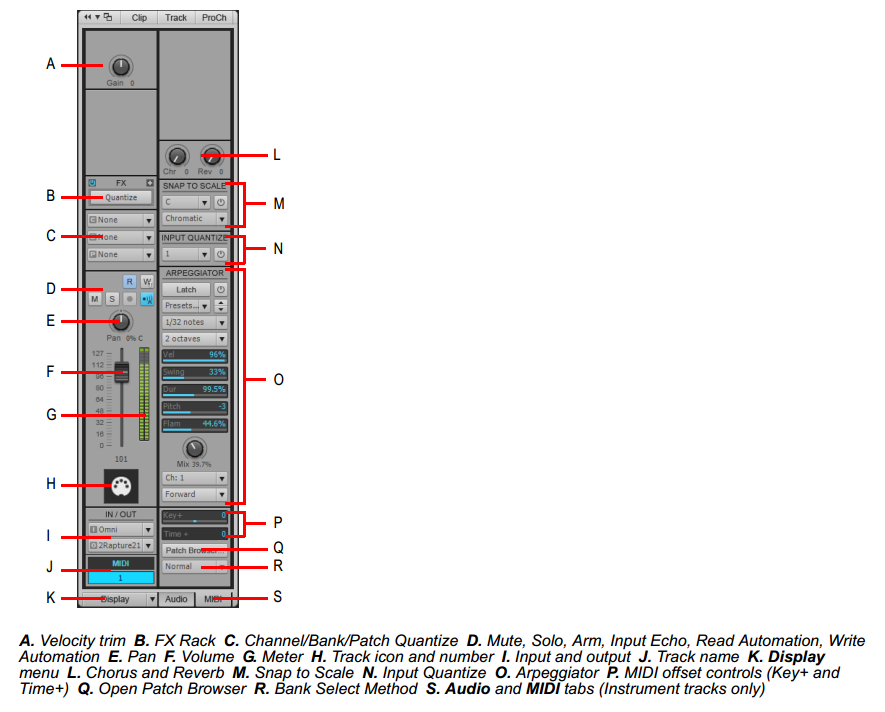 Notice that (I) above is the output meaning port. (C) is where one chooses the channel and the bank and the patch.
|
John
Forum Host
- Total Posts : 30467
- Joined: 2003/11/06 11:53:17
- Status: offline
Re: View all Midi channels used at once?
2015/12/14 17:41:45
(permalink)
stratman70
Hey Beepster-Thanks---I kind of thought it was fine also......I understand what Bristol, Jatoh, etc meant.....It really depends how you work. I usually always try to use the same midi channels and actually match the track. Just habit and also easy to remember. But sometimes I cannot do that.
You didn't derail the thread-I understood perfectly.
Thanks for chiming in
Frank
It works as is but your idea is interesting. I once made a Feature Request to have an overview of a project. One where all ins and outs were listed with routing. I can see a use for a display for all the MIDI ports and channels used in a project along with their patches in a single overview. So I would ask you to do a feature request on this and I will be happy to support it. I am sure others would like it too.
|
jatoth
Max Output Level: -83 dBFS
- Total Posts : 363
- Joined: 2009/08/12 06:31:35
- Status: offline
Re: View all Midi channels used at once?
2015/12/14 17:43:28
(permalink)
Not so much how you or I work.
What I was getting at was, separate channels are only necessary if you are sending all the MIDI to the same device or VSTi. When I use Kontakt with bass, strings, horns all in the same instance of Kontakt, I must use separate channels. If I'm using VB3, True Pianos, EZDrummer, then channels don't matter as much to me. That being said, if I'm controlling VB3, TP, EZD all from my Kurz, then I would need separate channels on the Kurz.
And I agree, it is a bit "clearer" to assign each instrument to a different MIDI channel, just not always necessary.
John X3e Producer, Sonar Platinum, Sweetwater CreationStation i5 3.1gHz, 12 GB RAM, 500GB SSD OS drive, 1TB SSD audio drive, 1TB archive/misc drive, dual 22" monitors, Windows 7x64, SaffirePro40 (firewire), MOTU MIDI Express XT, Behringer BCF2000, dbx 586, Samson Servo 120a, Yamaha HS80M, Auratone 5c Cubes, Sennheiser HD650, Sony MDR 7509HD, Sony MDR 7506, Kurzweil K2500XS, Roland XP-30, Proteus 2000.
|
stratman70
Max Output Level: -45 dBFS
- Total Posts : 3044
- Joined: 2006/09/12 20:34:12
- Location: Earth
- Status: offline
Re: View all Midi channels used at once?
2015/12/14 18:34:49
(permalink)
John
stratman70
Hey Beepster-Thanks---I kind of thought it was fine also......I understand what Bristol, Jatoh, etc meant.....It really depends how you work. I usually always try to use the same midi channels and actually match the track. Just habit and also easy to remember. But sometimes I cannot do that.
You didn't derail the thread-I understood perfectly.
Thanks for chiming in
Frank
It works as is but your idea is interesting. I once made a Feature Request to have an overview of a project. One where all ins and outs were listed with routing. I can see a use for a display for all the MIDI ports and channels used in a project along with their patches in a single overview.
So I would ask you to do a feature request on this and I will be happy to support it. I am sure others would like it too.
OK _john-I will do that tonight-Thanks very much-Frank
|
stratman70
Max Output Level: -45 dBFS
- Total Posts : 3044
- Joined: 2006/09/12 20:34:12
- Location: Earth
- Status: offline
Re: View all Midi channels used at once?
2015/12/14 18:37:11
(permalink)
Jatoth- Ok I understand...so there I are times I do "not" need to worry about the midi channel. That's good to know. Most of the time I will add the instrument to am instance of Kontakt that I already have. But not always...... Thanks Frank
post edited by stratman70 - 2015/12/14 18:49:51
|
Soundwise
Max Output Level: -62 dBFS

- Total Posts : 1419
- Joined: 2015/01/25 17:11:34
- Status: offline
Re: View all Midi channels used at once?
2015/12/14 20:20:36
(permalink)
stratman70
Guys-Sometimes I want to add, say a fender Rhodes thru Kontakt, I need to assign a midi channel and I want one that is not used. If I already have 10 midi tracks, I really don't remember the channel of each one. Maybe I don't work th normal way, but what can I say. Thanks
It's very easy to assign MIDI channells in Sonar (I'm sure you know this, but I'll post screenshots for those who don't) Method A:  Method B:  Then use F key for low track count or AutoZoom feature and mouse wheel scrolling for high track count to view all tracks' I/O assignment.  Well, it's not exactly what you were looking for. But once you have your project organized checking assigned MIDI channel isn't difficult. I like to use separate MIDI source tracks and soft synths in dedicated folders. Then you can use Console view to see routing of MIDI strips to soft synths and what MIDI channels are used. Not the simplest solution, yet it's rock-solid and bullet-proof. Hope that helps. 
|
stratman70
Max Output Level: -45 dBFS
- Total Posts : 3044
- Joined: 2006/09/12 20:34:12
- Location: Earth
- Status: offline
Re: View all Midi channels used at once?
2015/12/14 21:05:58
(permalink)
I appreciate the post-Yes I know all of this-30 years of midi....But all I posted was to see if there was a way to see a list of used\ or unused midi channels. Nothing less and nothing more. Point is I want to see them all at once. But I cannot. Thanks for everyone who replied. I am going ahead like John suggested and make the feature request-cannot hurt
Frank
|
John
Forum Host
- Total Posts : 30467
- Joined: 2003/11/06 11:53:17
- Status: offline
Re: View all Midi channels used at once?
2015/12/14 21:20:17
(permalink)
Frank one never knows where good questions will lead. I think some of the answers are not aimed at you but at others that have a limited understanding. I know I wasn't posting to you in all my responses. I know you have a thorough understanding of MIDI and Sonar.
Don't forget we have a lot of new users that don't have a lot of knowledge about MIDI in Sonar. Because of that its a good thing when members add information to the thread.
|
stratman70
Max Output Level: -45 dBFS
- Total Posts : 3044
- Joined: 2006/09/12 20:34:12
- Location: Earth
- Status: offline
Re: View all Midi channels used at once?
2015/12/14 21:25:34
(permalink)
Yes your right.....Just a bit touchy but for an unrelated reason- I appreciate so many folks trying to help and posting good info...
|
williamcopper
Max Output Level: -68 dBFS
- Total Posts : 1120
- Joined: 2014/11/03 09:22:03
- Location: Virginia, USA
- Status: offline
Re: View all Midi channels used at once?
2015/12/14 22:30:08
(permalink)
Here's a crude CAL script that will indirectly tell you which channels are used or not -- if there are 0 channel events, then that channel is unused. Which means -- no midi events. It's still possible there is some empty track assigned to a midi channel for input or output. You must select all midi tracks for this to work, or you could use it only for a group of selected tracks. Copy & paste into notepad or some text editor, save it under Cakewalk Content/Sonar Platinum/Cal Scripts" -- or whereever your cal scripts live. ;; show_channel.cal Count Midi Channels for selected events. ;; (do (include "need20.cal") ; Require version 2.0 or higher of CAL (int c1 0) ; counters (int c2 0) ; counters (int c3 0) ; counters (int c4 0) ; counters (int c5 0) ; counters (int c6 0) ; counters (int c7 0) ; counters (int c8 0) ; counters (int c9 0) ; counters (int c10 0) ; counters (int c11 0) ; counters (int c12 0) ; counters (int c13 0) ; counters (int c14 0) ; counters (int c15 0) ; counters (int c16 0) ; counters (forEachEvent (switch Event.Chan 0 (do (+= c1 1 ) ) 1 (do (+= c2 1 ) ) 2 (do (+= c3 1 ) ) 3 (do (+= c4 1 ) ) 4 (do (+= c5 1 ) ) 5 (do (+= c6 1 ) ) 6 (do (+= c7 1 ) ) 7 (do (+= c8 1 ) ) 8 (do (+= c9 1 ) ) 9 (do (+= c10 1 ) ) 10 (do (+= c11 1 ) ) 11 (do (+= c12 1 ) ) 12 (do (+= c13 1 ) ) 13 (do (+= c14 1 ) ) 14 (do (+= c15 1 ) ) 15 (do (+= c16 1 ) ) ) ) (pause " Ch 1: " c1 " Ch 2: " c2 " Ch 3: " c3 " Ch 4: " c4 " events" ) (pause " Ch 5: " c5 " Ch 6: " c6 " Ch 7: " c7 " Ch 8: " c8 " events" ) (pause " Ch 9: " c9 " Ch 10: " c10 " Ch 11: " c11 "Ch 12: " c12 " events" ) (pause " Ch 13: " c13 " Ch 14: " c14 " Ch 15: " c15 " Ch 16: " c16 " events" ) )
post edited by williamcopper - 2015/12/14 22:46:45
|
Anderton
Max Output Level: 0 dBFS
- Total Posts : 14070
- Joined: 2003/11/06 14:02:03
- Status: offline
Re: View all Midi channels used at once?
2015/12/14 22:40:10
(permalink)
A probably obsolete FYI, but back in the days when 32 bits ruled the land, Midi Ox had a monitor that showed channel activity as readout of 16 LEDs (one for each channel). Also, Midi Yoke (or more recently, LoopBe1) can provide a "virtual cable." In theory, you could do a temporary QuickGroup in SONAR to send all MIDI outs to Midi Yoke, and have Midi Ox's monitor read Midi Yoke as in input so you could see instantly which channels were producing MIDI data and which weren't. It worked very well back in the day, but unfortunately I tried all this with 64-bit Windows 7, and no joy. There's also a MIDI Monitor made by someone in France, but it too is 32-bit and for whatever reason, I can't get it to work.
In any event LoopBe1 still provides a virtual cable that works just fine with 64-bit systems. Now all we need is some kind of MIDI monitor to read the data. It's a pretty trivial coding exercise; maybe William Copper could build on what he just contributed (THANK YOU!) and knock one out for us.
|
williamcopper
Max Output Level: -68 dBFS
- Total Posts : 1120
- Joined: 2014/11/03 09:22:03
- Location: Virginia, USA
- Status: offline
Re: View all Midi channels used at once?
2015/12/14 22:53:31
(permalink)
Kontakt has a midi monitor, easy to use. Not sure about Kontakt player ... possibly not.
|
williamcopper
Max Output Level: -68 dBFS
- Total Posts : 1120
- Joined: 2014/11/03 09:22:03
- Location: Virginia, USA
- Status: offline
Re: View all Midi channels used at once?
2015/12/14 22:56:35
(permalink)
Also, 'midimon' which I believe is part of midi yoke, works fine on my 64 bit system -- but getting the plumbing right can be irritating and time consuming. The programs, again part of that (maybe?) called 'lsmidiins.exe' and 'lsmidiouts.exe' also work fine. So for that matter do the netmidic and netmidid ('client' and 'demon') programs.
post edited by williamcopper - 2015/12/14 23:10:27
|