(Solved) What are your MIDI track color settings?

Author
lawajava
Max Output Level: -55 dBFS
  • Total Posts : 2040
  • Joined: 2012/05/31 23:23:55
  • Location: Seattle
  • Status: offline
2015/12/15 23:10:34 (permalink)

(Solved) What are your MIDI track color settings?

Midi tracks were a joy to look at for me until X1 I think.  Then the color scheme changed from X1 forward.  I really dig the color settings for audio tracks and following the Bus track color etc that was introduced in I think Platinum, could have been X3, I forget. 
 
But for MIDI tracks I haven't put much thought into improving my user experience.
 
I noticed on the Cakewalk Home Page a cool screen of a user looking at his Platinum screen.  Not only do the audio tracks looks great, the MIDI tracks look great.  Mine don't.  They are really boring.
 
What I see in my songs:
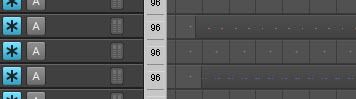

What the sample on Cakewalk's Home Page shows:
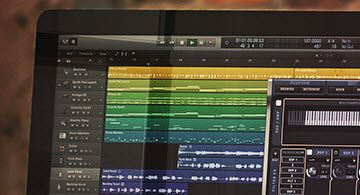

 
The dotted tracks are the MIDI tracks of course.  Looks like they went with white foreground perhaps for the dots and colors for the background.
 
What do some of you forum users do for your MIDI tracks?  I think I need to up my color selection strategy to look cool (and make it easier to see).
 
Some suggestions of color schemes for your MIDI tracks perhaps? Maybe a screen shot?  What are your settings, if you don't mind...
post edited by lawajava - 2015/12/16 02:12:40

Two internal 2TB SSDs laptop stuffed with Larry's deals and awesome tools. Studio One is the cat's meow as a DAW now that I've migrated off of Sonar. Using BandLab Cakewalk just to grab old files when migrating songs.
#1

7 Replies Related Threads

    John
    Forum Host
    • Total Posts : 30467
    • Joined: 2003/11/06 11:53:17
    • Status: offline
    Re: What are your MIDI track color settings? 2015/12/15 23:28:37 (permalink)
    I use the default colors. One is not forced to do so. In the track inspector (I) you can change the track color. You can also change the default colors in preferences.
     

    Best
    John
    #2
    lawajava
    Max Output Level: -55 dBFS
    • Total Posts : 2040
    • Joined: 2012/05/31 23:23:55
    • Location: Seattle
    • Status: offline
    Re: What are your MIDI track color settings? 2015/12/15 23:49:05 (permalink)
    Thanks John.  Actually I'm using the default choices for the Clip colors.  The track color selection is also set to default.  The result is what i have pictured in my top picture above.
     
    I'm suggesting I should go above and beyond default, which has been my passive, default approach.
     
    I like the stronger colors in the second picture for the MIDI tracks.  I'm wondering what other folks have chosen for their MIDI track colors.  If anyone has some preferences they think are slick.  I like what I see in that Cakewalk sample. It is inspiring me to take action and up my MIDI track color choices.

    Two internal 2TB SSDs laptop stuffed with Larry's deals and awesome tools. Studio One is the cat's meow as a DAW now that I've migrated off of Sonar. Using BandLab Cakewalk just to grab old files when migrating songs.
    #3
    John
    Forum Host
    • Total Posts : 30467
    • Joined: 2003/11/06 11:53:17
    • Status: offline
    Re: What are your MIDI track color settings? 2015/12/16 00:01:41 (permalink)
    I see. I'm sorta liking a bit more muted look as is the case with the defaults. This is not the first time this sort of thing has come up. Its been a major topic as far as being able to have more control over the color scheme. I'm not sure if it is about track color though. 
     
    One area I do like about Mixbus and Samplitude is their look and color choice.   
     
    The single most important quality in choosing colors is visibility. Sometimes Sonar fails in this. So I am sympathetic to all wishes for color changes as long as we have options.  

    Best
    John
    #4
    lawajava
    Max Output Level: -55 dBFS
    • Total Posts : 2040
    • Joined: 2012/05/31 23:23:55
    • Location: Seattle
    • Status: offline
    Re: What are your MIDI track color settings? 2015/12/16 00:10:22 (permalink)
    Well, I see on the sample that Cakewalk shows on the current Home Page that the MIDI tracks can actually look good.  Unfortunately not a default setting.  But it appears that MIDI tracks in Sonar Platinum can be set up to look sharp.
     
    I'm wondering if other forum members have done up their MIDI tracks like the sample on the Cakewalk Home Page, and if so, if they could share a couple samples of their color settings for their MIDI tracks so I could use that as a jumping off place to catch up.
    post edited by lawajava - 2015/12/16 00:22:26

    Two internal 2TB SSDs laptop stuffed with Larry's deals and awesome tools. Studio One is the cat's meow as a DAW now that I've migrated off of Sonar. Using BandLab Cakewalk just to grab old files when migrating songs.
    #5
    rebel007
    Max Output Level: -72 dBFS
    • Total Posts : 926
    • Joined: 2013/07/17 11:24:29
    • Location: Victoria, Australia
    • Status: offline
    Re: What are your MIDI track color settings? 2015/12/16 01:33:51 (permalink)
    I think the picture you are referring to on the home page is a totally different DAW. It's just advertising the synth. The giveaway is the Apple logo on the front of the screen. My guess is Logic, but that is just a guess.

    Home Built Desktop Computer: Intel Core i5 750: 4Mb RAM: NVidia 210 Silent: Windows 10 32bit: Sonar Platinum: Roland OctaCapture
    Presario CQ41 Laptop: Intel Core i5 760: 4Mb RAM: Windows 10 32bit: Sonar Platinum (Retired)
    CbB on HP Pavilion Laptop 64bit: GeForce Video Card: Intel 8550: 256GB SSD 1TB Data Drive: Windows10 64bit
    #6
    lawajava
    Max Output Level: -55 dBFS
    • Total Posts : 2040
    • Joined: 2012/05/31 23:23:55
    • Location: Seattle
    • Status: offline
    Re: What are your MIDI track color settings? 2015/12/16 01:59:38 (permalink)
    I think you're right! That's hilarious. I just didn't even imagine another DAW would be on the home page.

    The transport is clearly different. Wow, well that helps explain why the MIDI tracks look sharp in that image.

    In Sonar 8.5 days that was the norm.

    Oh well, never mind then I suppose.

    I'll call it solved I guess.
    post edited by lawajava - 2015/12/16 02:13:24

    Two internal 2TB SSDs laptop stuffed with Larry's deals and awesome tools. Studio One is the cat's meow as a DAW now that I've migrated off of Sonar. Using BandLab Cakewalk just to grab old files when migrating songs.
    #7
    John
    Forum Host
    • Total Posts : 30467
    • Joined: 2003/11/06 11:53:17
    • Status: offline
    Re: What are your MIDI track color settings? 2015/12/16 02:31:31 (permalink)
    No, I will support a feature request if you post one in the features forum. I don't see why one can't have the colors they want.

    Best
    John
    #8
    Jump to:
    © 2025 APG vNext Commercial Version 5.1