[SOLVED] Glitched GUI in Kontakt 5 instruments upon opening a project [See Attached Image]

Author
skitch_84
Max Output Level: -81 dBFS
  • Total Posts : 480
  • Joined: 2012/09/23 07:14:47
  • Location: Okayama, Japan
  • Status: offline
2015/12/30 02:03:28 (permalink)

[SOLVED] Glitched GUI in Kontakt 5 instruments upon opening a project [See Attached Image]

Okay, here's a new one that's super frustrating. 

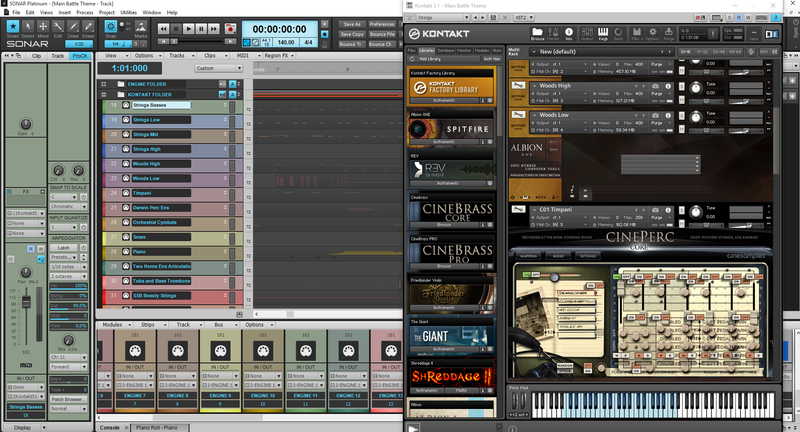
I finished up a project yesterday, and upon loading that project today, I find that the GUI for all of my instruments loaded in Kontakt 5 is all glitchy. I'm using Albion One, Cinebrass Core, and Cineperc Core. The GUI for all of these has become messed up and unusable. 

To see if it was just that one project that was messed up, I opened up another project from a few days earlier that had many of the same instruments, and I'm having the same issue. Messed up GUIs for all of the Spitfire and Cinesamples libraries.

If I load a new instance of Kontakt within one of these projects, and load the same instruments, those instruments' GUIs look fine and load correctly. 

If I open up those instruments in the standalone version of Kontakt, they load correctly.

I tried creating a brand new project as well. I loaded some of the same instruments (the GUIs looked fine upon loading), saved the project and exited. When I reloaded the project, strangely the GUIs are all fine. So, it appears that the GUIs in my past projects have all been corrupted somehow. 

I loaded yet another project with many different instruments and I found that I'm not having the GUI issue with many of the other sample libraries. For example, this project had a ton of 8Dio and Native Instrument libraries, and those GUIs are just fine. However, there was one Cinesamples library, and just like in the other projects, this one had a messed up GUI. So, it's definitely an issue with specific sample libraries and not Kontakt or Sonar as a whole. 

I really need some help troubleshooting this one because I have no idea what to do to fix it. I've attached a screenshot showing the GUI for one of the Albion One instruments and one of the Cinesample's instruments so you can see what I'm getting. 

Here's a link to a larger version of the image below (http://i75.photobucket.com/albums/i285/skitch_84/Kontakt%20GUI%20Glitch.png~original)

post edited by skitch_84 - 2015/12/30 02:36:22

Chris Porter
www.cportermusic.com
Listen to my original work on Soundcloud and YouTube
Get my original soundtracks on Bandcamp 
Sonar Platinum "2017.04", Windows 10 64-bit, ASUS Z170-A, i7 6700K (4.0GHz), 32GB DDR4 RAM, 250GB SSD 850 EVO (OS/Sonar/Plugins), 1TB SSD 850 EVO (Sample Libraries), 3TB WD Black HDD (projects/audio), Noctua NH-D14 Cooling Unit, PreSonus AudioBox USB Interface, M-AUDIO Oxygen49
#1

1 Reply Related Threads

    skitch_84
    Max Output Level: -81 dBFS
    • Total Posts : 480
    • Joined: 2012/09/23 07:14:47
    • Location: Okayama, Japan
    • Status: offline
    Re: [SOLVED] Glitched GUI in Kontakt 5 instruments upon opening a project [See Attached Im 2015/12/30 02:30:13 (permalink)
    [SOLVED]

    While I still don't know WHY this GUI glitch occurred, I know how to fix it. By the way, this issue never happened before and I've been working the way I'll describe below for a long time, so I don't know why this suddenly started happening. Anyway...

    I have all of my MIDI tracks in track folders called "Kontakt", "Engine", etc (depending on what they use). When I'm done composing and am ready to move on to mixing, I archive the whole folder with my MIDI tracks. 

    When I loaded these projects, they all had those track folder archived. However, the second I un-archive the track folders containing the MIDI tracks that are utilizing the Kontakt instruments in question, the GUI snaps back and looks the way it's supposed to. 

    Again, I've never experienced this before, so maybe it's a new bug introduced with the latest "Lexington" update, but I'm at least glad to know I didn't lose full functionality in all of my old projects. 

    Bakers take note of this one just in case. Thank you!
    post edited by skitch_84 - 2015/12/30 02:43:44

    Chris Porter
    www.cportermusic.com
    Listen to my original work on Soundcloud and YouTube
    Get my original soundtracks on Bandcamp 
    Sonar Platinum "2017.04", Windows 10 64-bit, ASUS Z170-A, i7 6700K (4.0GHz), 32GB DDR4 RAM, 250GB SSD 850 EVO (OS/Sonar/Plugins), 1TB SSD 850 EVO (Sample Libraries), 3TB WD Black HDD (projects/audio), Noctua NH-D14 Cooling Unit, PreSonus AudioBox USB Interface, M-AUDIO Oxygen49
    #2
    Jump to:
    © 2025 APG vNext Commercial Version 5.1