Seymour_Butz_Please123
Max Output Level: -90 dBFS

- Total Posts : 32
- Joined: 2014/10/09 21:49:28
- Status: offline
Solved: Tempo change for midi and audio
I have a project where after recording a few audio and midi tracks, I decided I want to increase the tempo from 84 to 88. Is there a way to change the tempo and have it speed up both the midi and audio tracks? I'm on version X2 build 306. I realize that there are different processes involved in simply changing the tempo of a midi track as opposed to the destructive nature of stretching the audio. I probably won't keep the existing audio tracks, but I'd love to be able to use them as a guide for re-recording, and I'd rather not have to stretch them in SoundForge. Thanks.
post edited by Seymour_Butz_Please123 - 2016/03/27 12:03:33
|
brundlefly
Max Output Level: 0 dBFS

- Total Posts : 14250
- Joined: 2007/09/14 14:57:59
- Location: Manitou Spgs, Colorado
- Status: offline

Re: Tempo change for midi and audio
2016/03/26 14:46:27
(permalink)
- Ctrl+A to Select All (MIDI doesn't need to be included, but it doesn't hurt to select everything).
- Open the Clip tab of the Track Inspector, and expand the Audiosnap section.
- Click to check the 'Enable' box, and give it a moment to finish processing.
- Ctrl+A again, and check the box for 'Follow Project Tempo'.
- Change the tempo.
Depending on what all is in the project, you will then want to open the Audiosnap palette, select individual clips/tracks and set an 'Offline' rendering algorithm appropriate to the material, and then Bounce to Clip to render the stretching permanent with the Offline algorithm. Or you can bounce all the audio to one track, and just enable stretching on that track if you're just going to use it as a reference to re-record; sometimes that gives better overall results than stretching tracks individually and then mixing down.
You can do all the earlier steps in the Audiosnap Palette, too; I mostly give the steps for using the Inspector because it's a little easier to describe.
SONAR Platinum x64, 2x MOTU 2408/PCIe-424 (24-bit, 48kHz) Win10, I7-6700K @ 4.0GHz, 24GB DDR4, 2TB HDD, 32GB SSD Cache, GeForce GTX 750Ti, 2x 24" 16:10 IPS Monitors
|
kevinwal
Max Output Level: -69 dBFS

- Total Posts : 1066
- Joined: 2007/07/27 19:07:43
- Location: Rogers, AR
- Status: offline
Re: Tempo change for midi and audio
2016/03/26 15:43:23
(permalink)
I've used brundlefly's exact steps with great results, so you can use them with confidence. A couple of notes:
a) I usually do a save-as of the original project first and do this operation on the new project after utterly destroying a project and then spastically hitting Ctrl-S with no project versioning enabled.
b) Depending on the length and number of tracks, this process can take a long time.
Kevin Walsh My latest tunes are at Reverbnation, please give a listen! EVGA X58 Classified III, 24GB Kingston RAM, i7/970 6 core256GB SSD, 2TB HDWindows 10 Build 10586, Sonar Platinum, 2016.03MOTU 8Pre Interface
|
Seymour_Butz_Please123
Max Output Level: -90 dBFS
- Total Posts : 32
- Joined: 2014/10/09 21:49:28
- Status: offline
Re: Tempo change for midi and audio
2016/03/27 12:03:43
(permalink)
|
lowerfreq
Max Output Level: -89 dBFS

- Total Posts : 57
- Joined: 2016/06/30 23:43:29
- Status: offline
Re: Tempo change for midi and audio
2017/01/05 19:35:52
(permalink)
Hello...
Question to add to this thread from earlier this year:
Using Fly's method, I followed the process step by step but there is no Follow Project tempo box for me to check that I can see...The only boxes available are Enable and Enable Stretch. Am I missing something in the view section??
I have 6 soft synth midi tracks at 120 bpm and 1 audio guitar track...
Any ideas?
Thanks,
Freq
Sonar Platinum, Intel i5 4670K, Asus Z-87-K, 24 GB RAM, Win 7 Pro
|
brundlefly
Max Output Level: 0 dBFS
- Total Posts : 14250
- Joined: 2007/09/14 14:57:59
- Location: Manitou Spgs, Colorado
- Status: offline
Re: Tempo change for midi and audio
2017/01/06 02:44:52
(permalink)
3rd row down in this screenshot: 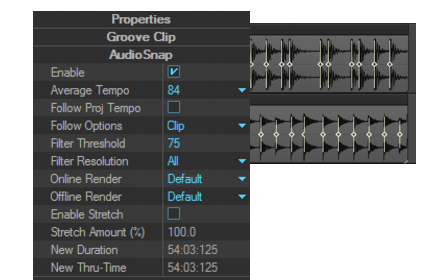
SONAR Platinum x64, 2x MOTU 2408/PCIe-424 (24-bit, 48kHz) Win10, I7-6700K @ 4.0GHz, 24GB DDR4, 2TB HDD, 32GB SSD Cache, GeForce GTX 750Ti, 2x 24" 16:10 IPS Monitors
|
marled
Max Output Level: -85 dBFS

- Total Posts : 251
- Joined: 2015/01/22 04:50:52
- Status: offline
Re: Tempo change for midi and audio
2017/01/06 08:27:58
(permalink)
If you have different tempos in the project, then the above method is okay (assumed that Sonar's tempo detection did a perfect job, with less rhythmic tracks it fails very often (e.g. pad synthesizers)).
But in the case when you use only one single constant tempo for the whole project the above method maybe a huge overkill and may cause unnecessary tempo faults, because of invalid tempo detections in some audio tracks. That's why I preferred to stretch the audio files in Audacity (free audio editor) in a linear way.
But I am no real Sonar expert (working with it only for 3 years). Perhaps someone knows how to do that in Sonar in an elegant way?
|
bokchoyboy
Max Output Level: -86 dBFS

- Total Posts : 238
- Joined: 2015/07/20 11:05:13
- Status: offline
Re: Tempo change for midi and audio
2017/01/06 10:03:57
(permalink)
Hmmmm... that option is still not available in my Audio Snap properties window... I see the follow proj tempo text, but there is no checkbox next to it...
Thanks Fly and Marled, I will keep trying.
Wonder if it has something to do with preferences???
|
brundlefly
Max Output Level: 0 dBFS
- Total Posts : 14250
- Joined: 2007/09/14 14:57:59
- Location: Manitou Spgs, Colorado
- Status: offline
Re: Tempo change for midi and audio
2017/01/06 13:03:39
(permalink)
It may not be available because some conflicting state is enabled on the clip, but I'm not sure offhand what that would be, unless maybe it's Locked?. If a clip already has Groove-clip/Rex looping or Melodyne applied, you wouldn't be able to enable Audiosnap in the first place.
SONAR Platinum x64, 2x MOTU 2408/PCIe-424 (24-bit, 48kHz) Win10, I7-6700K @ 4.0GHz, 24GB DDR4, 2TB HDD, 32GB SSD Cache, GeForce GTX 750Ti, 2x 24" 16:10 IPS Monitors
|
lowerfreq
Max Output Level: -89 dBFS
- Total Posts : 57
- Joined: 2016/06/30 23:43:29
- Status: offline
Re: Tempo change for midi and audio
2017/01/06 18:19:41
(permalink)
brundlefly
It may not be available because some conflicting state is enabled on the clip, but I'm not sure offhand what that would be, unless maybe it's Locked?. If a clip already has Groove-clip/Rex looping or Melodyne applied, you wouldn't be able to enable Audiosnap in the first place.
Ok... I'll dig a little deeper to see if that's the case... Thanks! Freq
Sonar Platinum, Intel i5 4670K, Asus Z-87-K, 24 GB RAM, Win 7 Pro
|