Johnbee58
Max Output Level: -72 dBFS

- Total Posts : 946
- Joined: 2014/06/21 10:45:53
- Location: Reading PA
- Status: offline
Effecting the Master Track?
Sonar X3 (Studio) user.
I don't know if it is a necessity to do it this way, but when I bounce down a mix to a stereo WAV file I highlight one (any) track, hit Control+A (for All), then go to the File menu and choose Export. I would like to apply some compression or EQ to the MASTER track to brighten up the entire mix but the MASTER track does not get included (highlighted/selected) in the process I use above. I tried once just highlighting the MASTER track (thinking it would include all the instrument and audio tracks), but I guess it doesn't work that way because I got an error saying nothing has been selected. So, how do I include any change I make on the MASTER track? Or will that just be included in the bounce process by default?
Thanks!
John B.
Lenovo Core i5 4460 Desktop PC (Windows 8 64 bit), Focusrite Scarlett 6i6, Nektar LX61 Keyboard MIDI Controller, Avantone Pro CV-12 tube condenser microphone, JBL LSR308 8" active monitor speakers. Cakewalk by Bandlab, Reason 7, NI Session Strings Pro, NI Strummed Acoustic Guitar, Miroslav Philharmonic, Auturia DX7 V, Garritan JABB 3, EZ Keys, EZ Drummer. "I will create music the way I want to whether a million people are listening or no one is listening." Dan Fogelberg, Singer/Songwriter-1951-2007
|
...wicked
Max Output Level: -1.5 dBFS

- Total Posts : 7360
- Joined: 2003/12/18 01:00:56
- Location: Seattle
- Status: offline

Re: Effecting the Master Track?
2016/05/04 12:48:14
(permalink)
SONAR doesn't have a "Master" track per se, though you could make one.
What it has is a flexible bussing system. So, in this case, you'd want to create a bus called MASTER (this is exactly how I do it with my own projects) and route all your relevant tracks to it. Then you can add effects to the MASTER bus just like any track/bus. You can have multiple buses that specialize in something, like say DRUMS, or a REVERB bus that acts more like an AUX track. But the first step is the create the bus structure you want.
=========== The Fog People =========== Intel i7-4790 16GB RAM ASUS Z97 Roland OctaCapture Win10/64 SONAR Platinum 64-bit billions VSTs, some of which work
|
John
Forum Host

- Total Posts : 30467
- Joined: 2003/11/06 11:53:17
- Status: offline
Re: Effecting the Master Track?
2016/05/04 12:56:26
(permalink)
Most do it that way Wicked. We have been promoting that way for a long time. Use a Master buss. If everything is routed to it you can use it as the export object.
|
Johnbee58
Max Output Level: -72 dBFS
- Total Posts : 946
- Joined: 2014/06/21 10:45:53
- Location: Reading PA
- Status: offline
Re: Effecting the Master Track?
2016/05/04 15:07:41
(permalink)
☄ Helpfulby tlw 2016/05/05 14:37:14
...wicked
SONAR doesn't have a "Master" track per se, though you could make one. I must be seeing things then, because I'm sure in every project I've done there is a channel called MASTER. It has a blue fader and if you move that fader up or down the volume of the entire project goes up or down. It also has an EQ and a drop down arrow marked FX. It comes alongside of a channel called Metronome and another called Preview. Is that just there as a decoration?
Lenovo Core i5 4460 Desktop PC (Windows 8 64 bit), Focusrite Scarlett 6i6, Nektar LX61 Keyboard MIDI Controller, Avantone Pro CV-12 tube condenser microphone, JBL LSR308 8" active monitor speakers. Cakewalk by Bandlab, Reason 7, NI Session Strings Pro, NI Strummed Acoustic Guitar, Miroslav Philharmonic, Auturia DX7 V, Garritan JABB 3, EZ Keys, EZ Drummer. "I will create music the way I want to whether a million people are listening or no one is listening." Dan Fogelberg, Singer/Songwriter-1951-2007
|
Sanderxpander
Max Output Level: -36.5 dBFS

- Total Posts : 3873
- Joined: 2013/09/30 10:08:24
- Status: offline
Re: Effecting the Master Track?
2016/05/04 15:28:17
(permalink)
That's a bus. It can be part of your default project but isn't necessarily so. In Sonar you can route any track directly to your soundcard outputs if you want. In most projects, tracks are sent to a master bus before hitting the main outputs. If you then export audio any audio that goes to the main outs will first have passed through the master bus so any and all effects on it will be applied. If you want to export audio from a specific bus (including but not exclusively the master bus) you can choose "buses" as source category during export.
post edited by Sanderxpander - 2016/05/04 16:18:40
|
Johnbee58
Max Output Level: -72 dBFS
- Total Posts : 946
- Joined: 2014/06/21 10:45:53
- Location: Reading PA
- Status: offline
Re: Effecting the Master Track?
2016/05/04 15:50:34
(permalink)
Sanderxpander
That's a bus. It can be part of your default project but isn't necessarily so. In Sonar you can route any track directly to your soundcard outputs if you want. In most projects, tracks are sent to a master bus before hitting the main outputs. If you then export audio any audio that goes to the main outs will first have passed through the master bus so any and all effects on it will be applied. If you want to export audio from a specific bus (including but not excluding the master bus) you can choose "buses" as source category during export.
That makes a bit more sense. Thanks for clearing it up. JB
Lenovo Core i5 4460 Desktop PC (Windows 8 64 bit), Focusrite Scarlett 6i6, Nektar LX61 Keyboard MIDI Controller, Avantone Pro CV-12 tube condenser microphone, JBL LSR308 8" active monitor speakers. Cakewalk by Bandlab, Reason 7, NI Session Strings Pro, NI Strummed Acoustic Guitar, Miroslav Philharmonic, Auturia DX7 V, Garritan JABB 3, EZ Keys, EZ Drummer. "I will create music the way I want to whether a million people are listening or no one is listening." Dan Fogelberg, Singer/Songwriter-1951-2007
|
John
Forum Host
- Total Posts : 30467
- Joined: 2003/11/06 11:53:17
- Status: offline
Re: Effecting the Master Track?
2016/05/04 16:09:05
(permalink)
Johnbee58
...wicked
SONAR doesn't have a "Master" track per se, though you could make one.
I must be seeing things then, because I'm sure in every project I've done there is a channel called MASTER. It has a blue fader and if you move that fader up or down the volume of the entire project goes up or down. It also has an EQ and a drop down arrow marked FX. It comes alongside of a channel called Metronome and another called Preview. Is that just there as a decoration?
This is important for you to fully understand. Its what makes Sonar a very powerful DAW. In the Track View you have the track pane and a buss pane. 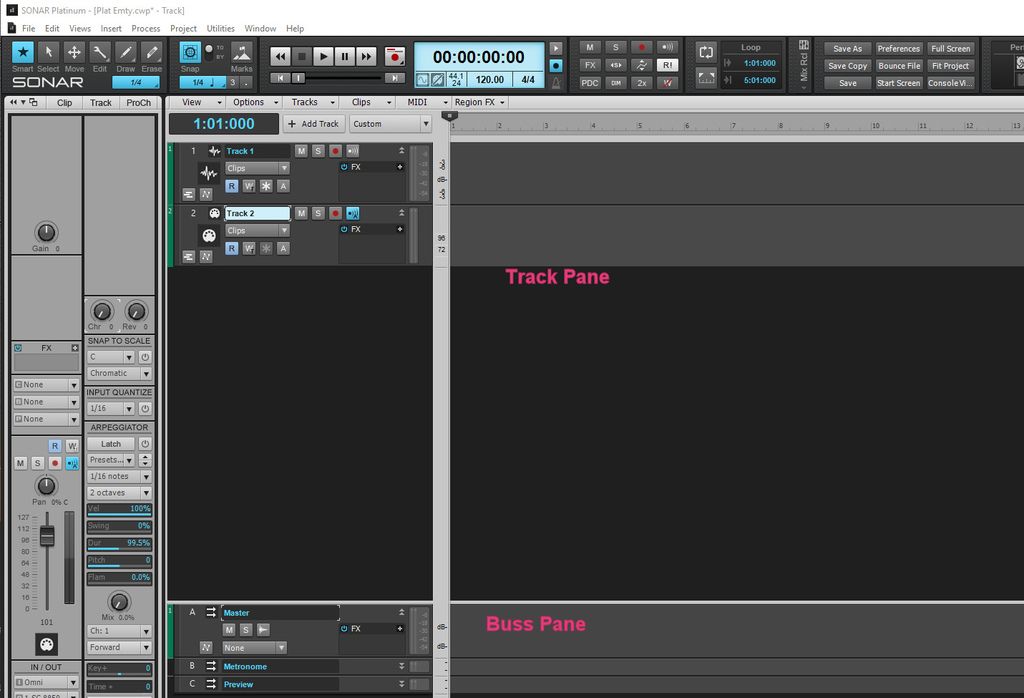 As you see in this picture the track view is divided into two sections and are labeled in the picture. The buss pane can have any number of buses plus auxiliaries which are just buses used with sends. The reason those buses are there is its the default setup. The metronome buss is for the output for the guess what, the metronome. The preview buss is for previewing loops and other audio files from the browser. In a full project with audio and MIDI I often have a buss for drums and instruments and aux 1 for reverb and so on. I have been known to have a master sub buss that feeds the master buss. One has total control over what buses and how many are used in any project. With Sonar 2016 Platinum you also have aux tracks which can record the output of a track. I suggest you read up on this in the manual or help file. Its fundamental.
|
Johnbee58
Max Output Level: -72 dBFS
- Total Posts : 946
- Joined: 2014/06/21 10:45:53
- Location: Reading PA
- Status: offline
Re: Effecting the Master Track?
2016/05/04 22:10:12
(permalink)
Is there any video that explains this? On second thought, never mind. I think i understand it.
post edited by Johnbee58 - 2016/05/04 22:32:17
Lenovo Core i5 4460 Desktop PC (Windows 8 64 bit), Focusrite Scarlett 6i6, Nektar LX61 Keyboard MIDI Controller, Avantone Pro CV-12 tube condenser microphone, JBL LSR308 8" active monitor speakers. Cakewalk by Bandlab, Reason 7, NI Session Strings Pro, NI Strummed Acoustic Guitar, Miroslav Philharmonic, Auturia DX7 V, Garritan JABB 3, EZ Keys, EZ Drummer. "I will create music the way I want to whether a million people are listening or no one is listening." Dan Fogelberg, Singer/Songwriter-1951-2007
|
Bristol_Jonesey
Max Output Level: 0 dBFS

- Total Posts : 16775
- Joined: 2007/10/08 15:41:17
- Location: Bristol, UK
- Status: offline
Re: Effecting the Master Track?
2016/05/05 04:33:25
(permalink)
John, it might make more sense if you look at in in Console View, rather than Track View.
Your tracks will be to the left of the screen, busses in their own section to the right and your interface outputs at the far right.
This closely follows signal flow: Tracks > Busses > Master Buss > Mains
You have to create your own busses including the Master (unless you start a project from a template with them already created)
CbB, Platinum, 64 bit throughoutCustom built i7 3930, 32Gb RAM, 2 x 1Tb Internal HDD, 1 x 1TB system SSD (Win 7), 1 x 500Gb system SSD (Win 10), 2 x 1Tb External HDD's, Dual boot Win 7 & Win 10 64 Bit, Saffire Pro 26, ISA One, Adam P11A,
|
Johnbee58
Max Output Level: -72 dBFS
- Total Posts : 946
- Joined: 2014/06/21 10:45:53
- Location: Reading PA
- Status: offline
Re: Effecting the Master Track?
2016/05/05 06:50:50
(permalink)
Thanks. Maybe I should've just tried this myself first, because I haven't really yet. I haven't really established that if I apply, say, an EQ to the Master buss (as seen) it won't do what I want it to. All I know is that this bus effects where the master volume of the whole project is (ie, if I want more volume on the whole project I can accomplish that with this bus). I never really tried to do anything else with it. I appreciate all your help. This just might have been a case where I was making assumptions and should've tried something on my own first. Also, it might have seemed that I had an attitude there and I want to apologize for that. I didn't mean to make anybody feel bad.
Thanks again.
John B
Lenovo Core i5 4460 Desktop PC (Windows 8 64 bit), Focusrite Scarlett 6i6, Nektar LX61 Keyboard MIDI Controller, Avantone Pro CV-12 tube condenser microphone, JBL LSR308 8" active monitor speakers. Cakewalk by Bandlab, Reason 7, NI Session Strings Pro, NI Strummed Acoustic Guitar, Miroslav Philharmonic, Auturia DX7 V, Garritan JABB 3, EZ Keys, EZ Drummer. "I will create music the way I want to whether a million people are listening or no one is listening." Dan Fogelberg, Singer/Songwriter-1951-2007
|
Johnbee58
Max Output Level: -72 dBFS
- Total Posts : 946
- Joined: 2014/06/21 10:45:53
- Location: Reading PA
- Status: offline
Re: Effecting the Master Track?
2016/05/05 12:08:30
(permalink)
OK. To verify, I just tried applying EQ and compression to the Master track and it did exactly what I wanted it to do. Again, so sorry to have bothered you guys on this. I just should've tried it myself. What made me question it was because when I selected all of the tracks to bounce to a WAV, I noticed that all the channels turned blue, but the Master didn't. That's why I asked, but, again, I should've just tried it.
Thanks all who responded.
JB
Lenovo Core i5 4460 Desktop PC (Windows 8 64 bit), Focusrite Scarlett 6i6, Nektar LX61 Keyboard MIDI Controller, Avantone Pro CV-12 tube condenser microphone, JBL LSR308 8" active monitor speakers. Cakewalk by Bandlab, Reason 7, NI Session Strings Pro, NI Strummed Acoustic Guitar, Miroslav Philharmonic, Auturia DX7 V, Garritan JABB 3, EZ Keys, EZ Drummer. "I will create music the way I want to whether a million people are listening or no one is listening." Dan Fogelberg, Singer/Songwriter-1951-2007
|
John
Forum Host
- Total Posts : 30467
- Joined: 2003/11/06 11:53:17
- Status: offline
Re: Effecting the Master Track?
2016/05/05 13:52:04
(permalink)
If you select tracks and your EQ is on a buss than when you export those tracks as a mix down the EQ will not be included.
Again there is no such thing as a Master track.
|
John
Forum Host
- Total Posts : 30467
- Joined: 2003/11/06 11:53:17
- Status: offline
Re: Effecting the Master Track?
2016/05/05 13:52:04
(permalink)
If you select tracks and your EQ is on a buss than when you export those tracks as a mix down the EQ will not be included.
Again there is no such thing as a Master track.
|
Sanderxpander
Max Output Level: -36.5 dBFS
- Total Posts : 3873
- Joined: 2013/09/30 10:08:24
- Status: offline
Re: Effecting the Master Track?
2016/05/05 14:44:03
(permalink)
But if you select all tracks/clips and export the master bus or main out, the master bus fx will be included.
|
John
Forum Host
- Total Posts : 30467
- Joined: 2003/11/06 11:53:17
- Status: offline
Re: Effecting the Master Track?
2016/05/05 14:47:46
(permalink)
Sanderxpander
But if you select all tracks/clips and export the master bus or main out, the master bus fx will be included.
Sanderxpander
But if you select all tracks/clips and export the master bus or main out, the master bus fx will be included.
True but there is no need to select tracks when using the master buss as the export object as long as all outs end up going through it. I do this all the time.
|
Johnbee58
Max Output Level: -72 dBFS
- Total Posts : 946
- Joined: 2014/06/21 10:45:53
- Location: Reading PA
- Status: offline
Re: Effecting the Master Track?
2016/05/05 16:16:05
(permalink)
John
Sanderxpander
But if you select all tracks/clips and export the master bus or main out, the master bus fx will be included.
Sanderxpander
But if you select all tracks/clips and export the master bus or main out, the master bus fx will be included.
True but there is no need to select tracks when using the master buss as the export object as long as all outs end up going through it. I do this all the time.
So, are you saying that I would not have to select all of the objects to export? I'd only have to select the Master bus to export? I seem to remember trying that once not long ago and I got an error saying I need to select something to export. It really doesn't matter. I don't wish to be argumentative with anybody. We're obviously talking about two different functions here. As I said before, I've accomplished what I wanted to accomplish. Cheers! JB EDIT-Could it be that the terms Master BUS and Master TRACK are what is causing the conflict? If that's the case than I apologize for using the wrong term. Guess I don't know my busses from my tracks.
post edited by Johnbee58 - 2016/05/05 16:39:23
Lenovo Core i5 4460 Desktop PC (Windows 8 64 bit), Focusrite Scarlett 6i6, Nektar LX61 Keyboard MIDI Controller, Avantone Pro CV-12 tube condenser microphone, JBL LSR308 8" active monitor speakers. Cakewalk by Bandlab, Reason 7, NI Session Strings Pro, NI Strummed Acoustic Guitar, Miroslav Philharmonic, Auturia DX7 V, Garritan JABB 3, EZ Keys, EZ Drummer. "I will create music the way I want to whether a million people are listening or no one is listening." Dan Fogelberg, Singer/Songwriter-1951-2007
|
John
Forum Host
- Total Posts : 30467
- Joined: 2003/11/06 11:53:17
- Status: offline
Re: Effecting the Master Track?
2016/05/05 16:33:28
(permalink)
"EDIT-Could it be that the terms Master BUS and Master TRACK are what is causing the conflict?"
To a degree yes. Sonar has no such thing as a master track. Some DAWs do have what they call a master track. Usually its for tempo changes.
I don't know how long you have been using Sonar but I assure you that selecting the master buss is a good way to export a full mix. You do this in the export dialog. The one proviso is you need to be sure all audio is going through the master buss. Check my date being on this forum. It was shortly after this forum came to be. Before that I was on the newsgroup. I have used this way of exporting for many years.
|
Sanderxpander
Max Output Level: -36.5 dBFS
- Total Posts : 3873
- Joined: 2013/09/30 10:08:24
- Status: offline
Re: Effecting the Master Track?
2016/05/05 16:47:28
(permalink)
You can either select everything or select nothing to export your mix. If you happen to have a single clip or track selected, Sonar will only export that. That's why I always do a CTRL+A in the track area to make sure I grab everything before an export. You could as well do the opposite and make sure you have nothing selected. Personally I find that a little less clear sometimes.
|
Bristol_Jonesey
Max Output Level: 0 dBFS
- Total Posts : 16775
- Joined: 2007/10/08 15:41:17
- Location: Bristol, UK
- Status: offline
Re: Effecting the Master Track?
2016/05/05 17:44:42
(permalink)
I always select nothing before exporting.
I have the File > Export > Audio bound to Alt +e, so the routine is ctrl + shift + a, alt & e.
Name the file, choose the destination and select desired preset. Done.
CbB, Platinum, 64 bit throughoutCustom built i7 3930, 32Gb RAM, 2 x 1Tb Internal HDD, 1 x 1TB system SSD (Win 7), 1 x 500Gb system SSD (Win 10), 2 x 1Tb External HDD's, Dual boot Win 7 & Win 10 64 Bit, Saffire Pro 26, ISA One, Adam P11A,
|
Johnbee58
Max Output Level: -72 dBFS
- Total Posts : 946
- Joined: 2014/06/21 10:45:53
- Location: Reading PA
- Status: offline
Re: Effecting the Master Track?
2016/05/05 17:49:43
(permalink)
@John (and all)-Thank you for the tip. I only tried exporting using the master bus once and maybe I wasn't doing something right. That does seem to be an easier way to export and now that you've pointed this out I will use that way from hence. I've been using Sonar since June 2014, almost two years and still have so much to learn, but I've been learning it as I go. If I really have an issue or really want to learn something and can't find it on line or the Reference guide I come here and most of the time I find the answers. Previously, I used Samplitude. That had a master TRACK, but it was much harder to create and access. What I really could use is a book called "Sonar X3 For Dummies" (as well as "Reason 7 For Dummies"). I don't think they exist though.  JB
Lenovo Core i5 4460 Desktop PC (Windows 8 64 bit), Focusrite Scarlett 6i6, Nektar LX61 Keyboard MIDI Controller, Avantone Pro CV-12 tube condenser microphone, JBL LSR308 8" active monitor speakers. Cakewalk by Bandlab, Reason 7, NI Session Strings Pro, NI Strummed Acoustic Guitar, Miroslav Philharmonic, Auturia DX7 V, Garritan JABB 3, EZ Keys, EZ Drummer. "I will create music the way I want to whether a million people are listening or no one is listening." Dan Fogelberg, Singer/Songwriter-1951-2007
|
Sanderxpander
Max Output Level: -36.5 dBFS
- Total Posts : 3873
- Joined: 2013/09/30 10:08:24
- Status: offline
Re: Effecting the Master Track?
2016/05/05 18:24:06
(permalink)
There is Sonar X3 Power by Scott Garrigus I think.
|
John
Forum Host
- Total Posts : 30467
- Joined: 2003/11/06 11:53:17
- Status: offline
|
Johnbee58
Max Output Level: -72 dBFS
- Total Posts : 946
- Joined: 2014/06/21 10:45:53
- Location: Reading PA
- Status: offline
Re: Effecting the Master Track?
2016/05/06 12:29:52
(permalink)
Sanderxpander
There is Sonar X3 Power by Scott Garrigus I think.
Just put an order in for this. Garrigus seems to know Sonar pretty well. Thanks again for the tip!
Lenovo Core i5 4460 Desktop PC (Windows 8 64 bit), Focusrite Scarlett 6i6, Nektar LX61 Keyboard MIDI Controller, Avantone Pro CV-12 tube condenser microphone, JBL LSR308 8" active monitor speakers. Cakewalk by Bandlab, Reason 7, NI Session Strings Pro, NI Strummed Acoustic Guitar, Miroslav Philharmonic, Auturia DX7 V, Garritan JABB 3, EZ Keys, EZ Drummer. "I will create music the way I want to whether a million people are listening or no one is listening." Dan Fogelberg, Singer/Songwriter-1951-2007
|