guitz
Max Output Level: -86 dBFS

- Total Posts : 232
- Joined: 2004/12/26 18:29:42
- Status: offline
Easy way to draw in portamento?
I tried following Cakewalks online directions for portamento, but either I'm doing something wrong or it's not working as the minimal online instructions say....all I'm wanting to do, is make about an 8 bar synth solo (that I'm still tweaking in z3ta+2 to get sounding right) to set what I think is called portamento, to where it sort of slides into each note...I don't have a MIDI controller, but figured it would be a straightforward thing to draw or set something somewhere the settings and play around with them until I heard what I wanted but I don't know how or where to do this in the piano roll view...is it even possible? x3ta+2 is mind numbingly confusing
|
jfcomposer
Max Output Level: -90 dBFS

- Total Posts : 29
- Joined: 2015/01/27 15:55:04
- Location: Nashville
- Status: offline

Re: Easy way to draw in portamento?
2016/06/04 19:30:16
(permalink)
I've never used a plugin to do this, so I'm ignorant when it comes to any of that. But the brute-force way to do this would be to create an RPN envelope (fine-tune pitch bend) on the track, and use that to bend the end of each note up or down to the next, then snap the envelope back to the middle at the beginning of each note. The results would probably be a little weird and require some tweaking, and the notes would need to be within (I think) a major second of each other for this to work.
Not ideal but it's all I've got. :)
|
jones082
Max Output Level: -89 dBFS

- Total Posts : 66
- Joined: 2014/12/21 10:13:08
- Status: offline
Re: Easy way to draw in portamento?
2016/06/04 21:39:46
(permalink)
I may be wrong, but I think what you want has to exist in the patch.
There are mono sounds that will only trigger one note at a time which are programmed to slide up into the next note, like the old Moogs.
The only other way I think is, again, if portamento is programmed into, say, a string patch, then you could trigger it via controller numbers.
Studio One 3, Sonar Platinum (64 bit). Dell Inspiron, Intel Core i5-4460, 3.20 GHz, 12 GB Ram, Windows 10, Focusrite Scarlett 6i6, Oxygen 49 keyboard controller
|
promidi
Max Output Level: -66 dBFS

- Total Posts : 1220
- Joined: 2014/11/21 18:46:39
- Location: South Australia
- Status: offline
Re: Easy way to draw in portamento?
2016/06/04 22:02:13
(permalink)
☄ Helpfulby mettelus 2016/06/04 22:49:05
In the standard MIDI spec, Controller 5 adjusts the portamento time and controller 65 controls whether it's on or off. Some synths use controller 84 to control the start note of a given slide (an example being Yamaha XG synths).
With Z3ta+2 , portamento parameters are set within the patch itself. Of course, you could use MIDI Learn map CC5 to the portamento time or you could even automate the portamento time value.
To get a note to slide to the next note without re-triggering the sound's envelope(s), set the polyphony of that patch to 1 and set the portamento mode to fing and make sure the notes overlap.
You can set the portamento mode to norm or fing. Norm applies portamento for every note, regardless of when it's triggered.
If you set polyphony to 1, and set the portamento mode to "Fing", the portamento is applied only if the "note on" event of one note occurs BEFORE the "note off" even of the previous note. Essentially, portamento is applied if the note starts before the previous note has ended.
I guess the best way to do this it to pull up Z3ta+2, load (or make) a basic sawtooth patch and test it out.
I hope this makes some sense.
Windows 10 64bit fully patched, 16 gig ram . PCR-800 Controller. (Working in Win 10 1809 64bit)CPU: i5 4670. Video: Nvidia GTX560ti (latest drivers). Audio IF: Focusrite 2i2 2nd Gen
Internet always on.
Software: Cakewalk by Bandlab (2018.09 B29)
ASIO mode. 24bit 48khz 256 samples Rapture Pro, AAS GS2, VS-3, EP-4, VA-2, Chromophone 2, Z3TA+ 2, Addictive drums 2, Addictive Keys, Mpowersynth (latest), Iris 2, GPO5, Sampletank 3,
|
guitz
Max Output Level: -86 dBFS
- Total Posts : 232
- Joined: 2004/12/26 18:29:42
- Status: offline
Re: Easy way to draw in portamento?
2016/06/04 22:17:09
(permalink)
promidi
In the standard MIDI spec, Controller 5 adjusts the portamento time and controller 65 controls whether it's on or off. Some synths use controller 84 to control the start note of a given slide (an example being Yamaha XG synths).
With Z3ta+2 , portamento parameters are set within the patch itself. Of course, you could use MIDI Learn map CC5 to the portamento time or you could even automate the portamento time value.
To get a note to slide to the next note without re-triggering the sound's envelope(s), set the polyphony of that patch to 1 and set the portamento mode to fing and make sure the notes overlap.
You can set the portamento mode to norm or fing. Norm applies portamento for every note, regardless of when it's triggered.
If you set polyphony to 1, and set the portamento mode to "Fing", the portamento is applied only if the "note on" event of one note occurs BEFORE the "note off" even of the previous note. Essentially, portamento is applied if the note starts before the previous note has ended.
I guess the best way to do this it to pull up Z3ta+2, load (or make) a basic sawtooth patch and test it out.
I hope this makes some sense.
but where Z3ta+2 is the portamento stuff set??
|
promidi
Max Output Level: -66 dBFS
- Total Posts : 1220
- Joined: 2014/11/21 18:46:39
- Location: South Australia
- Status: offline
Re: Easy way to draw in portamento?
2016/06/04 22:48:48
(permalink)
guitz
but where Z3ta+2 is the portamento stuff set??
If you look near the top left of the Z3ta+2 screen, where you set the waveform, there is a "perform" button. If you click this, there you can set various pitch shifting parameters. The one you're interested in is "PORTAMENTO MODE". There are 4 options there. You can also set the PORTAMENTO TIME here (if portamento is set to fix) More information about these modes can be found in the user guide on page 24 Off: No portamento. Norm, Fix: Normal mode, with a fixed time (set by the P. Time parameter) for the new note to reach its pitch. In legato mode (See “Master section” on page 14), portamento is in effect even when the first note has been released. Norm, Var: Normal mode, with portamento time depending also on the interval between the notes. Fing, Fix: Fingered mode with fixed time. In legato mode, the first note must be held in order for the portamento glide to take place. Fing, Var: Fingered mode, with portamento time depending also on the interval between the notes.
Windows 10 64bit fully patched, 16 gig ram . PCR-800 Controller. (Working in Win 10 1809 64bit)CPU: i5 4670. Video: Nvidia GTX560ti (latest drivers). Audio IF: Focusrite 2i2 2nd Gen
Internet always on.
Software: Cakewalk by Bandlab (2018.09 B29)
ASIO mode. 24bit 48khz 256 samples Rapture Pro, AAS GS2, VS-3, EP-4, VA-2, Chromophone 2, Z3TA+ 2, Addictive drums 2, Addictive Keys, Mpowersynth (latest), Iris 2, GPO5, Sampletank 3,
|
guitz
Max Output Level: -86 dBFS
- Total Posts : 232
- Joined: 2004/12/26 18:29:42
- Status: offline
Re: Easy way to draw in portamento?
2016/06/05 10:14:42
(permalink)
promidi
guitz
but where Z3ta+2 is the portamento stuff set??
If you look near the top left of the Z3ta+2 screen, where you set the waveform, there is a "perform" button. If you click this, there you can set various pitch shifting parameters. The one you're interested in is "PORTAMENTO MODE". There are 4 options there. You can also set the PORTAMENTO TIME here (if portamento is set to fix)
More information about these modes can be found in the user guide on page 24
Off: No portamento.
Norm, Fix: Normal mode, with a fixed time (set by the P. Time parameter) for the new note to reach its
pitch. In legato mode (See “Master section” on page 14), portamento is in effect even when the first
note has been released.
Norm, Var: Normal mode, with portamento time depending also on the interval between the notes.
Fing, Fix: Fingered mode with fixed time. In legato mode, the first note must be held in order for the
portamento glide to take place.
Fing, Var: Fingered mode, with portamento time depending also on the interval between the notes.
I'm not seeing a 'perform' button in the top left?  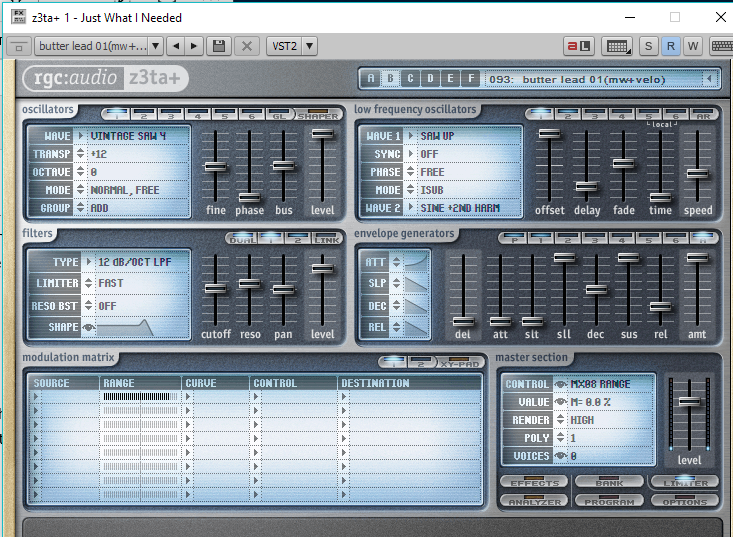 " />'
|
John T
Max Output Level: -7.5 dBFS

- Total Posts : 6783
- Joined: 2006/06/12 10:24:39
- Status: offline
Re: Easy way to draw in portamento?
2016/06/05 10:25:18
(permalink)
Ah, you've been typing Z3ta+2 but that's Z3ta+1. They're different synths entirely.
http://johntatlockaudio.com/Self-build PC // 16GB RAM // i7 3770k @ 3.5 Ghz // Nofan 0dB cooler // ASUS P8-Z77 V Pro motherboard // Intel x-25m SSD System Drive // Seagate RAID Array Audio Drive // Windows 10 64 bit // Sonar Platinum (64 bit) // Sonar VS-700 // M-Audio Keystation Pro 88 // KRK RP-6 Monitors // and a bunch of other stuff
|
Beepster
Max Output Level: 0 dBFS

- Total Posts : 18001
- Joined: 2012/05/11 19:11:24
- Status: offline
Re: Easy way to draw in portamento?
2016/06/05 10:26:24
(permalink)
That's the old version of Zeta. It should have Porta as well but you might want to use the newer version.
Also I asked this same question about a year ago and got a lot of good answers. I'll see if I can find the thread.
BRB...
|
promidi
Max Output Level: -66 dBFS
- Total Posts : 1220
- Joined: 2014/11/21 18:46:39
- Location: South Australia
- Status: offline
Re: Easy way to draw in portamento?
2016/06/05 10:26:46
(permalink)
guitz
I'm not seeing a 'perform' button in the top left?
Ah, your original post stated z3ta+2 , the above image is from z3ta+1
Windows 10 64bit fully patched, 16 gig ram . PCR-800 Controller. (Working in Win 10 1809 64bit)CPU: i5 4670. Video: Nvidia GTX560ti (latest drivers). Audio IF: Focusrite 2i2 2nd Gen
Internet always on.
Software: Cakewalk by Bandlab (2018.09 B29)
ASIO mode. 24bit 48khz 256 samples Rapture Pro, AAS GS2, VS-3, EP-4, VA-2, Chromophone 2, Z3TA+ 2, Addictive drums 2, Addictive Keys, Mpowersynth (latest), Iris 2, GPO5, Sampletank 3,
|
Beepster
Max Output Level: 0 dBFS
- Total Posts : 18001
- Joined: 2012/05/11 19:11:24
- Status: offline
Re: Easy way to draw in portamento?
2016/06/05 10:28:01
(permalink)
|
scook
Forum Host

- Total Posts : 24146
- Joined: 2005/07/27 13:43:57
- Location: TX
- Status: offline
Re: Easy way to draw in portamento?
2016/06/05 10:36:49
(permalink)
Beepster
That's the old version of Zeta. It should have Porta as well but you might want to use the newer version.
FYI, z3ta+2 is not bundled with SONAR. I believe you picked it up with a special bundle which included SONAR X1 and a couple of other products including z3ta+2.
|
Beepster
Max Output Level: 0 dBFS
- Total Posts : 18001
- Joined: 2012/05/11 19:11:24
- Status: offline
Re: Easy way to draw in portamento?
2016/06/05 10:40:37
(permalink)
scook
Beepster
That's the old version of Zeta. It should have Porta as well but you might want to use the newer version.
FYI, z3ta+2 is not bundled with SONAR. I believe you picked it up with a special bundle which included SONAR X1 and a couple of other products including z3ta+2.
Yup (X1 Production Suite). I thought there was a some kind of light version of Zeta2 included though but I guess not. That's a shame because Z3ta+2 is quite useful. Good catch. Edit: I guess that would make the Zeta instructions posted by Loptec in that thread not as useful but maybe the concept can be translated to Zeta1. There's still lots of other good cenceptual info in there though. Hope you've been well.
|
guitz
Max Output Level: -86 dBFS
- Total Posts : 232
- Joined: 2004/12/26 18:29:42
- Status: offline
Re: Easy way to draw in portamento?
2016/06/05 10:42:22
(permalink)
|
scook
Forum Host
- Total Posts : 24146
- Joined: 2005/07/27 13:43:57
- Location: TX
- Status: offline
Re: Easy way to draw in portamento?
2016/06/05 10:43:52
(permalink)
The bundled version is the original z3ta+ v1.5 renamed z3ta+ classic.
no changes to report.
|
Beepster
Max Output Level: 0 dBFS
- Total Posts : 18001
- Joined: 2012/05/11 19:11:24
- Status: offline
Re: Easy way to draw in portamento?
2016/06/05 10:44:39
(permalink)
guitz
sorry about that...yea , I've had it in my list of 'products' for a couple years but never downloaded because I'm a guitar guy, but needed some synth sounds...
Oh ya... if you have access to it you should totally install it. It's (IMO) quite a bit better than the Classic version and comes with a bunch more patches. Also you can then follow Loptec's instructions to the letter. /also a guitar guy... :-)
|
John T
Max Output Level: -7.5 dBFS
- Total Posts : 6783
- Joined: 2006/06/12 10:24:39
- Status: offline
Re: Easy way to draw in portamento?
2016/06/05 11:29:44
(permalink)
It's much better yeah, and it also includes a lot (perhaps all?) of the z3ta+1 patches, so if you've got a specific sound you're using, youy should be able to replicate it fairly easily.
http://johntatlockaudio.com/Self-build PC // 16GB RAM // i7 3770k @ 3.5 Ghz // Nofan 0dB cooler // ASUS P8-Z77 V Pro motherboard // Intel x-25m SSD System Drive // Seagate RAID Array Audio Drive // Windows 10 64 bit // Sonar Platinum (64 bit) // Sonar VS-700 // M-Audio Keystation Pro 88 // KRK RP-6 Monitors // and a bunch of other stuff
|
jimkleban
Max Output Level: -64 dBFS

- Total Posts : 1319
- Joined: 2008/11/09 09:42:45
- Status: offline
Re: Easy way to draw in portamento?
2016/06/05 16:10:43
(permalink)
OK, so PORTAMENTO as you describe for synths usually has to be part of the engine of the VST to work. When it is part of the engine, you use midi cc data to set portamento ON and another midi cc to set the time it takes to slide to the note.
This gets even trickier if you try and use a SAMPLE engine with samples and not a synth engine with portamento built in.
The VTSi synths from GFORCE (Oddity 2, Mini Monsta, etc) and the suite of synths VSTi from Arturia all have Portamento (or glide) built into their engines like on the original synths.
Now, some of the sample player VSTs have tried to implement a form of portamento so you can apply this to any sound and not just a synth. After all these years, the winning implementation of this effect remains to be Kontakt, which implements this thru a user script that you can add to a program definition within Kontakt. Other software titles also try this but the NI version works the best IMHO.
Some companies try to do this with "internal timed pitch bends" that give you the glide but no control over which note's attack transient is used and sounds sometimes awful (Sampletank for instance).
Hope this helps.
Jim
The Lamb Laid Down on MIDI www.lldom.com Studio Cat Custom i7 with Thunderbolt (wonderful system built and configured by our own Jim R) Apollo Duo (via TB) UAD Quad UAD Duo WIN 8.1 x64 with 32 GB Ram 4 SSD for programs and sample libraries Splat (latest version)
|
guitz
Max Output Level: -86 dBFS
- Total Posts : 232
- Joined: 2004/12/26 18:29:42
- Status: offline
Re: Easy way to draw in portamento?
2016/06/05 19:18:26
(permalink)
OMG, I figured this out!!....Using the older z3ta1, I stumbled upon what works....it's as simple as overlapping the blips of notes in the piano roll view JUST A HAIR, it triggers the portamento effect! Brilliant! ...I'm not sure how much you can tweak by moving the overlap...I'll play with it some, but I can already tell, it's sliding into and out of notes just enough to make me a happy camper...:)
post edited by guitz - 2016/06/05 19:42:26
|