Does anyone here have the Arturia Prophet V3?
I'm confused...
I upgraded seven Arturia synth in all last week. I'm loving the nice big GUI and the sounds are as good as ever.
As always, when I get a bunch of stuff like this, I set up a test project and create a simple ditty using step sequencer and that allows me to audition presets on the fly.
The VST3 version of Prophet V3, however, kept crashing SPlat during switching presets and I have created a ticket with Arturia.
Okay, now to the confusing bit:-
I'm not all that well up on VST3. Most of my soft synths are VST2 and are DLL files. I notice now that the VST3 instruments I have have the .vst3 file extension.
With VST3 being the latest incarnation of the Steinberg system that I generally use that, if I have a choice.
So, seeing as Arturia provide us with a VST2 and VST3 I decided that, for Prophet, I would see if the VST2 version also crashed SPlat.
It didn't. Which was good news.
Okay... Now I am really getting to the confusing bit (for me)
When I insert an instance of Prophet V3 and open the synth properties window it says VST3 in the little drop down box at top left.
I could have sworn that I had just added the VST2 version of this synth to my Plug-in Menu Layout.
Have a look at this:-
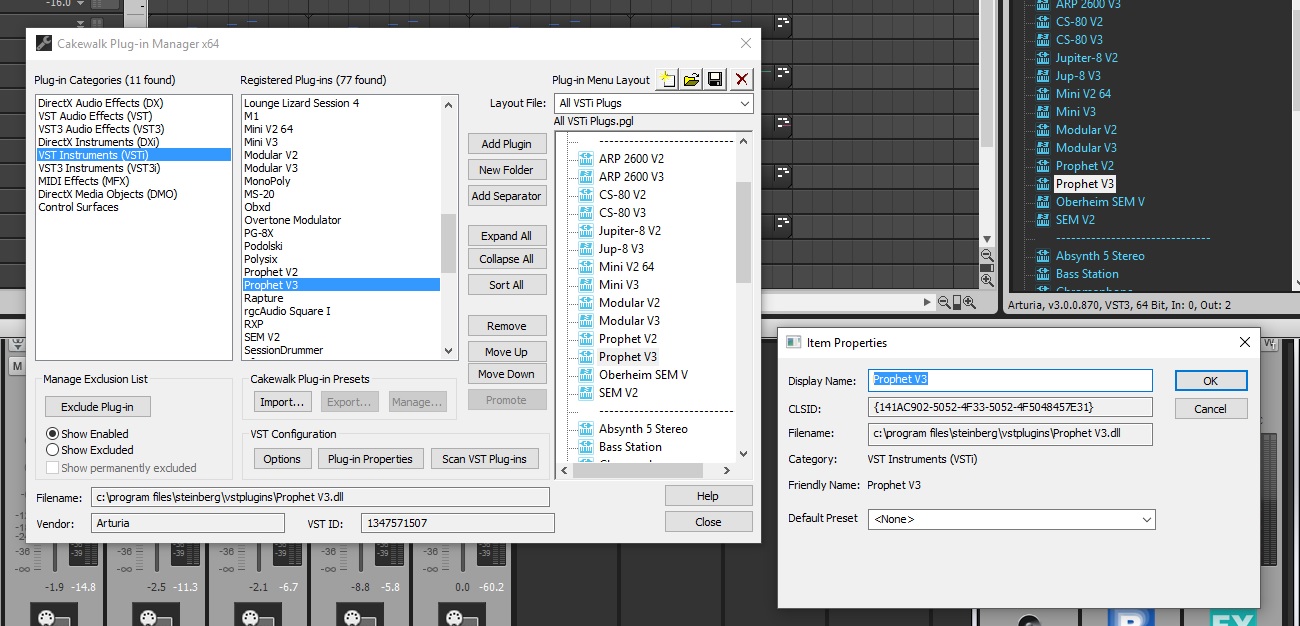
or this to get it full size
http://synkrotron.co.uk/Sonar/VST_Weirdness.jpg In the Plug-in Manager, you can see that I have selected VST Instruments (VSTi) and the synth I have selected is Prophet V3. The Filename is listed as being C:\Program Files\Steinberg\VstPlugins\Prophet V3.dll
In the Plug-in Menu Layout you can see that the Prophet V3 item is grey and that's because I have right clicked it to bring up the Item Properties window. The file name in that window matches the filename of the VSTi in the Registered Plug-ins pane.
So all looks to be right there and the synth I should be inserting when double clicking on Prophet V3 in my menu should be the DLL version.
But, if you look at the bottom of the browser window, with the Prophet V3 item selected, is says "Arturia, V3.0.0.870, VST3, 64 Bit, In: 0, Out: 2"
This picture show the synth property window:-
 http://synkrotron.co.uk/Sonar/VST_Weirdness2.jpg
 Now the Plig-in Properties window gives the full path as "c:\program files\common files\vst3\Prophet V3.vst3"
How did that happen? As far as I am concerned I was loading the DLL for Prophet V3, not the vst3 file.
Bottom line is, from the brief tests I have just run, I can no longer get SPlat to crash, so I guess it doesn't matter... I'm just kind of curious as to the why really.
Thanks for reading

andy