anorak
Max Output Level: -89 dBFS

- Total Posts : 52
- Joined: 2013/09/22 02:19:27
- Status: offline
Quantize in Sonar X3
I have play an piano-part. It has different Notes in his length. My problem is often, that the played notes are a little off the beat. Most of the notes are a little early. When I Quantizied the Notes, the turns left and right to the next step. But some are get earlier as the was, and someone right. Often some notes play at the same time, they where play successively. Just like this:  I tried to use the Quantizied 16 or 32 Beats, but nothing works really.. So, is there something I can do, that Sonar "knows" like I play and just quantizies the notes only a little bit afterwards to the next beat? And not back and foreward like he want? Sorry about my bad translation.. :)
|
Zargg
Max Output Level: 0 dBFS

- Total Posts : 10666
- Joined: 2014/09/28 04:20:14
- Location: Norway
- Status: offline

Re: Quantize in Sonar X3
2016/07/17 12:06:26
(permalink)
Hi. I cannot see your picture, but have you tried Groove Quantize (opens in Piano Roll View)?  It gives you more options. Hope it helps. All the best.
Ken Nilsen ZarggBBZWin 10 Pro X64, Cakewalk by Bandlab, SPlat X64, AMD AM3+ fx-8320, 16Gb RAM, RME Ucx (+ ARC), Tascam FW 1884, M-Audio Keystation 61es, *AKAI MPK Pro 25, *Softube Console1, Alesis DM6 USB, Maschine MkII Laptop setup: Win 10 X64, i5 2.4ghz, 8gb RAM, 320gb 7200 RPM HD, Focusrite Solo, + *
|
chuckebaby
Max Output Level: 0 dBFS
- Total Posts : 13146
- Joined: 2011/01/04 14:55:28
- Status: offline
Re: Quantize in Sonar X3
2016/07/17 22:50:14
(permalink)
you can also use input quantize.
this is done by setting it in the midi track settings.
this way when you play it live, it will find the correct notes. some adjustments might need to be made before hand by running a loop a few times to get the correct quantize setting.
Windows 8.1 X64 Sonar Platinum x64 Custom built: Asrock z97 1150 - Intel I7 4790k - 16GB corsair DDR3 1600 - PNY SSD 220GBFocusrite Saffire 18I8 - Mackie Control
|
Cactus Music
Max Output Level: 0 dBFS
- Total Posts : 8424
- Joined: 2004/02/09 21:34:04
- Status: offline
Re: Quantize in Sonar X3
2016/07/18 00:11:55
(permalink)
Sometimes its a matter of knowing what the smallest note value is, and most important is if it's a triplet value which you often find in blues or country music.
Record your track and open it in piano roll view.
Highlight all the notes and choose the quantize function.
Try 1/16 notes which for me works 90% of the time.
If it "sounds" wrong it might have been a 1/16 triplet so try that next.
Watch how far the notes jump.
If you played well they should hardly move.
If you played pourly you either try again or move a lot of notes around. Your chioce.
|
anorak
Max Output Level: -89 dBFS
- Total Posts : 52
- Joined: 2013/09/22 02:19:27
- Status: offline
Re: Quantize in Sonar X3
2016/07/18 04:27:18
(permalink)
Thanks for Help.
One of the problem is, that my english isnt that good (you may expect this). And my Sonar X3 on Steam is only in English. So I sometimes don't know what the function is (but I think it wouldn't be better when it's on german :D ).
@Cactus Music: That was the normal way I do it. And often it works. But when i use a very fast way to play maybe if i play an accord, but not all notes at once, but fast after another, then the quantize function brings them often all to one part, so I play it like a normal accord.
I try then 32th, but didn't work.
I will try the input quantize, maybe it works..
|
jb101
Max Output Level: -46 dBFS

- Total Posts : 2946
- Joined: 2011/12/04 05:26:10
- Status: offline
Re: Quantize in Sonar X3
2016/07/18 05:05:58
(permalink)
Input quantise won't work any better, and will be irreversible.
Trying to quantise swing or shuffle is the hardest, I find. Playing around with groove quantise may help.
As for the fast "arpeggio" that you mention - it may be worth quantising that separately, and using a low percentage value. I often find that you have to edit things like that manually in the PRV, and quantise the rest.
Or play it again - it's often quicker and less hassle..
|
anorak
Max Output Level: -89 dBFS
- Total Posts : 52
- Joined: 2013/09/22 02:19:27
- Status: offline
Re: Quantize in Sonar X3
2016/07/18 06:31:04
(permalink)
Yes, I often play it again. But I have often the problem, that I play very well and sounds OK, but when I playback that, I see every note is a little bevor the beat. Sometimes it's important to do that, because some sounds need "a while" to come up, just like Strings or something like this. But it ist hard to loop that pattern, if the sounds are not exactly on the beat. And often: When you move one note, you hear that and have to move all Notes :D
I didn't figure out, how to create a grid, where I can fix the notes on my own. I know, that you can add an grid and you can change it into 1/4, 1/8 ... 1/32.. But sometimes the notes didn't "snap" on the grid line.. I don't know if its a bug or a feature :D
So I have to doubleclick on a note and change the value for the starttime. Is okay if that where one or two notes, but not for a whole pattern :)
|
chuckebaby
Max Output Level: 0 dBFS
- Total Posts : 13146
- Joined: 2011/01/04 14:55:28
- Status: offline
Re: Quantize in Sonar X3
2016/07/18 06:57:47
(permalink)
jb101
Input quantise won't work any better, and will be irreversible.
Trying to quantise swing or shuffle is the hardest
Aren't we talking about midi here ? how irreversible is that  though im not sure that's going to work either. However, I think you are on to something with the swing and shuffle. Swing, Offset, Strength . 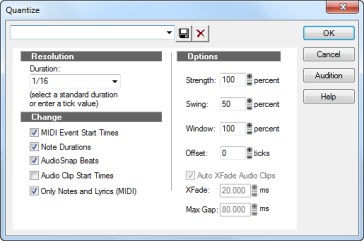
post edited by chuckebaby - 2016/07/18 07:24:43
Windows 8.1 X64 Sonar Platinum x64 Custom built: Asrock z97 1150 - Intel I7 4790k - 16GB corsair DDR3 1600 - PNY SSD 220GBFocusrite Saffire 18I8 - Mackie Control
|
jb101
Max Output Level: -46 dBFS
- Total Posts : 2946
- Joined: 2011/12/04 05:26:10
- Status: offline
Re: Quantize in Sonar X3
2016/07/18 07:19:00
(permalink)
chuckebaby
jb101
Input quantise won't work any better, and will be irreversible.
Trying to quantise swing or shuffle is the hardest
Aren't we talking about midi here ?
It is irreversible because the timing of the original performance is lost forever when using input quantise, so cannot be reverted to if the input quantise settings did not work. Hence irreversible. Quantising after the event means that you can return to the original performance if the settings did not work, and try again with different settings, or perhaps quantise some notes separately, such as triplets etc. HTH
|
chuckebaby
Max Output Level: 0 dBFS
- Total Posts : 13146
- Joined: 2011/01/04 14:55:28
- Status: offline
Re: Quantize in Sonar X3
2016/07/18 10:45:11
(permalink)
jb101
chuckebaby
jb101
Input quantise won't work any better, and will be irreversible.
Trying to quantise swing or shuffle is the hardest
Aren't we talking about midi here ?
It is irreversible because the timing of the original performance is lost forever when using input quantise, so cannot be reverted to if the input quantise settings did not work.
Hence irreversible.
Quantising after the event means that you can return to the original performance if the settings did not work, and try again with different settings, or perhaps quantise some notes separately, such as triplets etc.
HTH
I know what you mean now. your correct.
Windows 8.1 X64 Sonar Platinum x64 Custom built: Asrock z97 1150 - Intel I7 4790k - 16GB corsair DDR3 1600 - PNY SSD 220GBFocusrite Saffire 18I8 - Mackie Control
|