rogeriodec
Max Output Level: -75 dBFS

- Total Posts : 753
- Joined: 2004/04/09 13:55:04
- Location: Brazil
- Status: offline
Old MIDI sounds
I wonder if someone recommends a VST that emulates those old MIDI sounds of the old sound cards? I want to make a track in the old style video games, but I like those poor sounds of trumpet, strings, etc. In time, it has to be worse than the sounds of the TTS-1 
post edited by rogeriodec - 2016/07/28 22:09:13
rogeriodec.com.br* Cakewalk By Bandlabs (always lastest versions), Window 10 x64* Focusrite Scarlett Solo Audio Interface* Intel i7-4790K CPU @ 4.00 GHz / ASROCK EXTREME 4 Z97 Mobo* 2 SSD Samsung Evo 250 Gb (RAID-0) + 1 Western Digital 2 Tb + 1 Seagate 1 Tb* Onboard video / 16 Gb RAM HyperX Fury 1600 Mhz* 3 LCD Monitors* Axiom 61 MIDI Controller, Tapco S5 Active Studio Monitors
|
Canopus
Max Output Level: -85 dBFS

- Total Posts : 261
- Joined: 2014/12/20 14:02:38
- Status: offline

Re: Old MIDI sounds
2016/07/29 04:43:51
(permalink)
Maybe not exactly what you asked for, but one option might be to actually use TTS-1 and then also insert an effect such as Cakewalk AliasFactor. Perhaps some of the presets such as "Cheap Toy" or "Cheaper Toy" might make the TTS-1 sound poor enough for you? The result sounds at least pretty poor to me!
|
Bristol_Jonesey
Max Output Level: 0 dBFS

- Total Posts : 16775
- Joined: 2007/10/08 15:41:17
- Location: Bristol, UK
- Status: offline
Re: Old MIDI sounds
2016/07/29 06:16:48
(permalink)
Check out some of the presets in Z3TA
I'm 99% sure there's a bank of patches in there that do this.
CbB, Platinum, 64 bit throughoutCustom built i7 3930, 32Gb RAM, 2 x 1Tb Internal HDD, 1 x 1TB system SSD (Win 7), 1 x 500Gb system SSD (Win 10), 2 x 1Tb External HDD's, Dual boot Win 7 & Win 10 64 Bit, Saffire Pro 26, ISA One, Adam P11A,
|
AntManB
Max Output Level: -88 dBFS

- Total Posts : 144
- Joined: 2016/06/01 10:58:19
- Status: offline
Re: Old MIDI sounds
2016/07/29 07:50:04
(permalink)
You could use an SF2 player (e.g. sforzando) and download a nice low quality GM soundfont (something about 1 or 2MBs should be suitably bad).
AMB
|
Michael A.D.
Max Output Level: -89 dBFS

- Total Posts : 82
- Joined: 2016/03/24 16:02:28
- Status: offline
Re: Old MIDI sounds
2016/07/29 09:48:47
(permalink)
Check out Plogue - they make some interesting (and VERY FUN) stuff with old chip sounds that emulate early vocal and video game sounds.
|
Cactus Music
Max Output Level: 0 dBFS
- Total Posts : 8424
- Joined: 2004/02/09 21:34:04
- Status: offline
Re: Old MIDI sounds
2016/07/29 10:30:45
(permalink)
I think what it was called was 8 bit.
Not sure about newer windows but it was called the MS wavetable in XP and Sonar can only use it in MME mode.
|
rogeriodec
Max Output Level: -75 dBFS
- Total Posts : 753
- Joined: 2004/04/09 13:55:04
- Location: Brazil
- Status: offline
Re: Old MIDI sounds
2016/07/29 13:38:34
(permalink)
AntManB
You could use an SF2 player (e.g. sforzando) and download a nice low quality GM soundfont (something about 1 or 2MBs should be suitably bad).
AMB
I tried to use the native Sonar SFZ vst but it's not loading SF2 files... and this topic is telling this...  But reading some posts I discovered that Kontakt can read SF2 files. 
post edited by rogeriodec - 2016/07/29 14:15:30
rogeriodec.com.br* Cakewalk By Bandlabs (always lastest versions), Window 10 x64* Focusrite Scarlett Solo Audio Interface* Intel i7-4790K CPU @ 4.00 GHz / ASROCK EXTREME 4 Z97 Mobo* 2 SSD Samsung Evo 250 Gb (RAID-0) + 1 Western Digital 2 Tb + 1 Seagate 1 Tb* Onboard video / 16 Gb RAM HyperX Fury 1600 Mhz* 3 LCD Monitors* Axiom 61 MIDI Controller, Tapco S5 Active Studio Monitors
|
rogeriodec
Max Output Level: -75 dBFS
- Total Posts : 753
- Joined: 2004/04/09 13:55:04
- Location: Brazil
- Status: offline
Re: Old MIDI sounds
2016/07/29 13:43:45
(permalink)
Canopus
Maybe not exactly what you asked for, but one option might be to actually use TTS-1 and then also insert an effect such as Cakewalk AliasFactor. Perhaps some of the presets such as "Cheap Toy" or "Cheaper Toy" might make the TTS-1 sound poor enough for you? The result sounds at least pretty poor to me!
I tried to use AliasFactor (Insert FX Chain Present, right?), but for some reason, the only button that is responding is Volume. The other buttons (mode, cut, bit, etc.) do not change anything in the sound ...
rogeriodec.com.br* Cakewalk By Bandlabs (always lastest versions), Window 10 x64* Focusrite Scarlett Solo Audio Interface* Intel i7-4790K CPU @ 4.00 GHz / ASROCK EXTREME 4 Z97 Mobo* 2 SSD Samsung Evo 250 Gb (RAID-0) + 1 Western Digital 2 Tb + 1 Seagate 1 Tb* Onboard video / 16 Gb RAM HyperX Fury 1600 Mhz* 3 LCD Monitors* Axiom 61 MIDI Controller, Tapco S5 Active Studio Monitors
|
Canopus
Max Output Level: -85 dBFS
- Total Posts : 261
- Joined: 2014/12/20 14:02:38
- Status: offline
Re: Old MIDI sounds
2016/07/29 14:57:37
(permalink)
rogeriodec
Canopus
Maybe not exactly what you asked for, but one option might be to actually use TTS-1 and then also insert an effect such as Cakewalk AliasFactor. Perhaps some of the presets such as "Cheap Toy" or "Cheaper Toy" might make the TTS-1 sound poor enough for you? The result sounds at least pretty poor to me!
I tried to use AliasFactor (Insert FX Chain Present, right?), but for some reason, the only button that is responding is Volume. The other buttons (mode, cut, bit, etc.) do not change anything in the sound ...
Hm, did you insert AliasFactor into the FX bin and then select one of "Cheap Toy" or "Cheaper Toy" from the list of presets? Otherwise, right click in the FX bin and from the menu select "Insert Audio FX" > "LoFi" > "Alias Factor". Finally select your preset from the drop-down list. 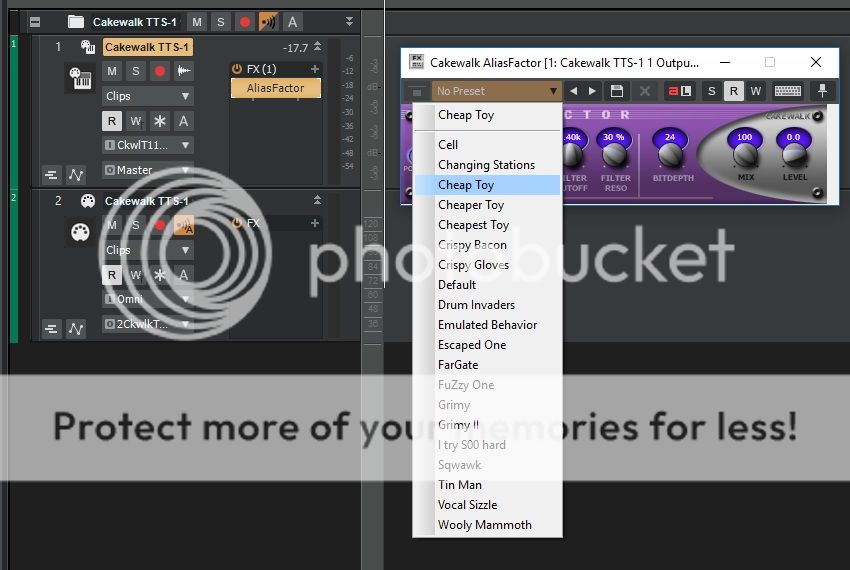
post edited by Canopus - 2016/07/29 15:19:14
|
rogeriodec
Max Output Level: -75 dBFS
- Total Posts : 753
- Joined: 2004/04/09 13:55:04
- Location: Brazil
- Status: offline
Re: Old MIDI sounds
2016/07/29 19:23:20
(permalink)
I'm using Platinum, I've never used this plugin, but watching your image, I can conclude that my plugin is corrupted, is this? 
rogeriodec.com.br* Cakewalk By Bandlabs (always lastest versions), Window 10 x64* Focusrite Scarlett Solo Audio Interface* Intel i7-4790K CPU @ 4.00 GHz / ASROCK EXTREME 4 Z97 Mobo* 2 SSD Samsung Evo 250 Gb (RAID-0) + 1 Western Digital 2 Tb + 1 Seagate 1 Tb* Onboard video / 16 Gb RAM HyperX Fury 1600 Mhz* 3 LCD Monitors* Axiom 61 MIDI Controller, Tapco S5 Active Studio Monitors
|
Canopus
Max Output Level: -85 dBFS
- Total Posts : 261
- Joined: 2014/12/20 14:02:38
- Status: offline
Re: Old MIDI sounds
2016/07/30 04:01:34
(permalink)
The difference seems to be that you have inserted the FX Chain Preset "AliasFactor", where as I have inserted the plugin "AliasFactor" directly. As the FX Chain Preset has no LoFi presets directly available, I think the easiest way is to simply remove that one and insert the plugin by following the instructions in my last post.
Right click in the FX bin and from the menu select "Insert Audio FX" > "LoFi" > "Alias Factor". Then finally select one of the presets (such as "Cheap Toy" or "Cheaper Toy") from the drop-down list.
|
rogeriodec
Max Output Level: -75 dBFS
- Total Posts : 753
- Joined: 2004/04/09 13:55:04
- Location: Brazil
- Status: offline
Re: Old MIDI sounds
2016/07/30 10:49:43
(permalink)
Canopus
The difference seems to be that you have inserted the FX Chain Preset "AliasFactor", where as I have inserted the plugin "AliasFactor" directly. As the FX Chain Preset has no LoFi presets directly available, I think the easiest way is to simply remove that one and insert the plugin by following the instructions in my last post.
Right click in the FX bin and from the menu select "Insert Audio FX" > "LoFi" > "Alias Factor". Then finally select one of the presets (such as "Cheap Toy" or "Cheaper Toy") from the drop-down list.
My Sonar Platinum does not show this option "LoFi" in the "Audio FX" menu, so I tried the "FX Chain Preset" because it was the only place I found. It may be a bug in my installation or may be one of those many things that no longer exist within the Platinum. Anyway I appreciate your attention.
rogeriodec.com.br* Cakewalk By Bandlabs (always lastest versions), Window 10 x64* Focusrite Scarlett Solo Audio Interface* Intel i7-4790K CPU @ 4.00 GHz / ASROCK EXTREME 4 Z97 Mobo* 2 SSD Samsung Evo 250 Gb (RAID-0) + 1 Western Digital 2 Tb + 1 Seagate 1 Tb* Onboard video / 16 Gb RAM HyperX Fury 1600 Mhz* 3 LCD Monitors* Axiom 61 MIDI Controller, Tapco S5 Active Studio Monitors
|
scook
Forum Host

- Total Posts : 24146
- Joined: 2005/07/27 13:43:57
- Location: TX
- Status: offline
Re: Old MIDI sounds
2016/07/30 10:57:15
(permalink)
What Canopus failed to tell you is the path provided to the AliasFactor plug-in is based on the Platinum Effects layout. The Default All Plugins path is DirectX > Cakewalk > AliasFactor
|
mrpippy2
Max Output Level: -86 dBFS

- Total Posts : 222
- Joined: 2008/10/03 20:54:06
- Status: offline
Re: Old MIDI sounds
2016/07/30 11:47:37
(permalink)
Check out a $20 VST from Audiothing called MiniBit. The DVD that comes with Computer Music magazine has a more limited version of it, but I bet it has what you're looking for.
Sweetwater Creation Station 250, QuadCore, i5 3.4 Ghz, 2x1TB HD, 16GB RAM, Windows 10 64 bit, Sonar Platinum 64 bit, Focusrite 2i2
|
rogeriodec
Max Output Level: -75 dBFS
- Total Posts : 753
- Joined: 2004/04/09 13:55:04
- Location: Brazil
- Status: offline
Re: Old MIDI sounds
2016/07/30 13:15:54
(permalink)
scook
What Canopus failed to tell you is the path provided to the AliasFactor plug-in is based on the Platinum Effects layout. The Default All Plugins path is DirectX > Cakewalk > AliasFactor
Definitely has something wrong with my installation and I wonder if you can help me. Enabling "Platinum Effects", I do not see the DirectX option (the options that appear are only for the "Sonitus fx"), as you can see in the image below:  However the DirectX option for audio appears in the plugin manager:  What could be done?
rogeriodec.com.br* Cakewalk By Bandlabs (always lastest versions), Window 10 x64* Focusrite Scarlett Solo Audio Interface* Intel i7-4790K CPU @ 4.00 GHz / ASROCK EXTREME 4 Z97 Mobo* 2 SSD Samsung Evo 250 Gb (RAID-0) + 1 Western Digital 2 Tb + 1 Seagate 1 Tb* Onboard video / 16 Gb RAM HyperX Fury 1600 Mhz* 3 LCD Monitors* Axiom 61 MIDI Controller, Tapco S5 Active Studio Monitors
|
scook
Forum Host
- Total Posts : 24146
- Joined: 2005/07/27 13:43:57
- Location: TX
- Status: offline
Re: Old MIDI sounds
2016/07/30 13:20:34
(permalink)
To see the DirectX folder select the "Default All Plugins" layout immediately above "Platinum Effects"  Default All Plugins layout is built on the fly from all available plug-ins and the plug-ins are first sorted by format: VST3, VST2 and DirectX. Notice the "Platinum Effects" layout has the LoFi folder mentioned above. 
post edited by scook - 2016/07/30 13:44:54
|
rogeriodec
Max Output Level: -75 dBFS
- Total Posts : 753
- Joined: 2004/04/09 13:55:04
- Location: Brazil
- Status: offline
Re: Old MIDI sounds
2016/07/30 13:38:25
(permalink)
With "Default All Plugins" I get only this:  Where in Plugin Manager is like:  So apparently there must be something corrupted in my install. But as in the previous post, "LoFi" appears, but only in the plugin manager. Could you tell me if there is how to fix this?
rogeriodec.com.br* Cakewalk By Bandlabs (always lastest versions), Window 10 x64* Focusrite Scarlett Solo Audio Interface* Intel i7-4790K CPU @ 4.00 GHz / ASROCK EXTREME 4 Z97 Mobo* 2 SSD Samsung Evo 250 Gb (RAID-0) + 1 Western Digital 2 Tb + 1 Seagate 1 Tb* Onboard video / 16 Gb RAM HyperX Fury 1600 Mhz* 3 LCD Monitors* Axiom 61 MIDI Controller, Tapco S5 Active Studio Monitors
|
scook
Forum Host
- Total Posts : 24146
- Joined: 2005/07/27 13:43:57
- Location: TX
- Status: offline
Re: Old MIDI sounds
2016/07/30 14:04:02
(permalink)
I should have noticed the plug-ins are not listed in the Plug-in Manager. There should be a Cakewalk folder under DirectX. It looks like the Classic Creative FX Suite is either not installed or the plug-ins failed to register during installation. If you are using the Command Center reinstall the Classic Creative FX Suite or download it from your account and manually install it.
|
jpetersen
Max Output Level: -61 dBFS

- Total Posts : 1499
- Joined: 2015/07/11 20:22:53
- Status: offline
Re: Old MIDI sounds
2016/07/30 20:18:36
(permalink)
|