timidi
Max Output Level: -21 dBFS

- Total Posts : 5449
- Joined: 2006/04/11 12:55:15
- Location: SE Florida
- Status: offline
colors
how do you make the track and clip colors and background lighter in platinum? Such as this: 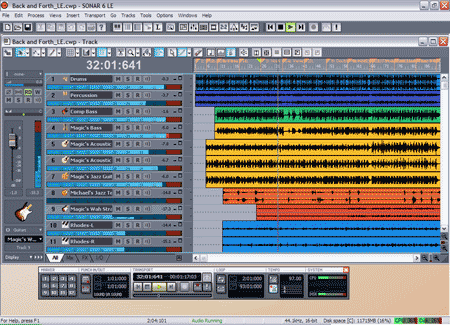
|
brundlefly
Max Output Level: 0 dBFS

- Total Posts : 14250
- Joined: 2007/09/14 14:57:59
- Location: Manitou Spgs, Colorado
- Status: offline
The last version of SONAR that allowed changing clip background colors in Preferences was X2. If you still have it installed, you can export/import colors from X2 and Platinum will honor the imported background colors.
But they'll only determine the default colors for newly recorded/pasted clips assigned according to the original track number (i.e. tracks 1, 11, 21, etc. all get the same one of 10 colors). These color assignments won't affect the default color combinations offered in the track color picker in Platinum, so you won't be able to, for example, change all your drum tracks to display clip colors as black foreground (waveform) on a bright yellow background.
SONAR Platinum x64, 2x MOTU 2408/PCIe-424 (24-bit, 48kHz) Win10, I7-6700K @ 4.0GHz, 24GB DDR4, 2TB HDD, 32GB SSD Cache, GeForce GTX 750Ti, 2x 24" 16:10 IPS Monitors
|
daveny5
Max Output Level: 0 dBFS
- Total Posts : 16934
- Joined: 2003/11/06 09:54:36
- Location: North Carolina
- Status: offline
Get the new Sonar Theme Editor! Just released in the latest version.
Dave Computer: Intel i7, ASROCK H170M, 16GB/5TB+, Windows 10 Pro 64-bit, Sonar Platinum, TASCAM US-16x08, Cakewalk UM-3G MIDI I/F Instruments: SL-880 Keyboard controller, Korg 05R/W, Korg N1R, KORG Wavestation EX Axes: Fender Stratocaster, Line6 Variax 300, Ovation Acoustic, Takamine Nylon Acoustic, Behringer GX212 amp, Shure SM-58 mic, Rode NT1 condenser mic. Outboard: Mackie 1402-VLZ mixer, TC Helicon VoiceLive 2, Digitech Vocalist WS EX, PODXTLive, various stompboxes and stuff. Controllers: Korg nanoKONTROL, Wacom Bamboo Touchpad
|
timidi
Max Output Level: -21 dBFS
- Total Posts : 5449
- Joined: 2006/04/11 12:55:15
- Location: SE Florida
- Status: offline
So, Theme editor will let me do this?
|
brundlefly
Max Output Level: 0 dBFS
- Total Posts : 14250
- Joined: 2007/09/14 14:57:59
- Location: Manitou Spgs, Colorado
- Status: offline
Yes, it will. The clip colors are under Track View > Clips Pane > Clips. I set new default clip colors to match some of the 24 default options in the track color picker so I don't have the issue issue mentioned above that you can't match the default colors when choosing colors for other tracks.
I could be missing something but I'm not seeing that it's possible to set the colors available in the track color picker, so that problem will still apply if you create your own foreground/background colors, especially if you use the reverse scheme where the backgrounds are bright and the waveforms are all black as in the S6 screenshot.
SONAR Platinum x64, 2x MOTU 2408/PCIe-424 (24-bit, 48kHz) Win10, I7-6700K @ 4.0GHz, 24GB DDR4, 2TB HDD, 32GB SSD Cache, GeForce GTX 750Ti, 2x 24" 16:10 IPS Monitors
|
icontakt
Max Output Level: -32.5 dBFS

- Total Posts : 4266
- Joined: 2012/03/04 08:18:02
- Location: Tokyo
- Status: offline
FWIW, it's also possible to achieve what you want without exporting/importing colors or using the Theme Editor.
To change the clip background color:
Select the clip, hit SHIFT+I (this will open Clip Properties Inspector), then edit the "Background" color.
However, any new clip you record will still have the default black background.
To change Clips pane background colors (this only seems to be applicable to Mercury theme):
Go to Edit -> Preferences -> Customization -> Colors, then select "Clips Pane" from the drop-down and edit the colors for "View Background (even)" and "View Background (odd)".
Tak T. Primary Laptop: Core i7-4710MQ CPU, 16GB RAM, 7200RPM HDD, Windows 7 Home Premium OS (Japanese) x64 SP1Secondary Laptop: Core2 Duo CPU, 8GB RAM, 7200RPM HDD, Windows 7 Professional OS (Japanese) x64 SP1Audio Interface: iD14 (ASIO)Keyboard Controller/MIDI Interface: A-800PRODAW: SONAR Platinum x64 (latest update installed)
|