Billy, hi ya doin...
See this:
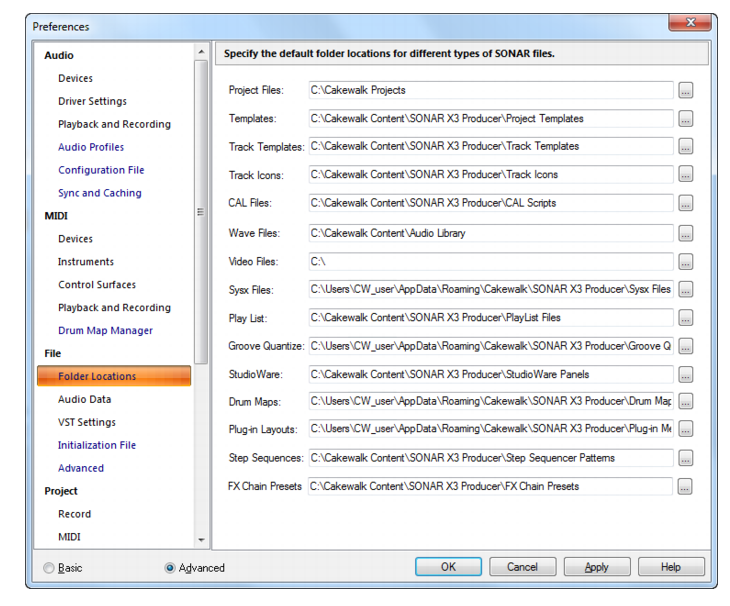
This is where you set up all your project folders and their locations.
in preferences/folder locations.
if you need more info:
https://www.cakewalk.com/Documentation?product=SONAR%20X3&language=3&help=Dialogs2.062.html or explain in a little bit more detail what you mean.
Sorry man, all im hearing is " I don't want to mess this up"

1- create the new folder on your D:\ drive.
2-Open sonar and go to preferences/folder locations
3-click on Project files
( *See above photo/its the first option )
4-point that towards your new D:\drive folder location.
its a piece of cake buddy

However your Cakewalk content is another story, that's like 8 different files that need to be placed on the D:\drive.
you can see them above in photo.
you would have been better off setting that up in Cakewalk Command Center during install.
but can still do it now by moving the Cakewalk Content folder to your D:\drive.
but you'll have to change the paths for all the above: templates, icons, CAL scrips, exc...
Its only about 5-7 GB (Cakewalk content) you might better off leaving that and just putting your projects on D.
those are the real Gigabyte killers (projects).
Good luck.
post edited by chuckebaby - 2016/08/01 22:49:13