Francis Steeno
Max Output Level: -90 dBFS

- Total Posts : 19
- Joined: 2014/12/23 23:16:49
- Location: Grafton, WI
- Status: offline
Routing a mix to 2 MAIN TRACKS for Mastering
I am feeling a certain level of confidence with MIDI/VST recording. I am a seasoned musician, but a relative beginner to FINAL MIX down, and Mastering techniques. I am not even sure how to get a 50 track piece mixed down to a simple Left / Right dual track. I want to do a master, and really am lost when it comes to this aspect.
What would be the most logical set of events to get my song ready for a mastering? Any help would be appreciated. It appears after talking to a knowledgeable recording pro, that I am not doing this right.
When exporting what should I do?
|
konradh
Max Output Level: -42 dBFS

- Total Posts : 3325
- Joined: 2006/01/16 16:07:06
- Status: offline

Re: Routing a mix to 2 MAIN TRACKS for Mastering
2016/08/08 20:35:20
(permalink)
1. The Master bus is already set up for a L-R mix. All of your tracks should be routed there.
2. Click File | Export |Audio to create an audio file of what you hear in the mix.
3. You will need to have the tracks and time range you want to export selected. I usually do SELECT ALL and then select by time to make sure my selection starts when the music starts and ends when the music ends to there are no blank measures. QUIRK OF SONAR: Sometimes you need to click one track before choosing SELECT ALL or nothing gets selected.
4. If any of your MIDI comes from external synths, you should click "Live Input" to ensure you record the audio coming in from the synths. Another option is to go ahead and record all those tracks first.
Good luck. I am sure others here will have lots more to add. Once you try it and tell us what happened, we will know more how to help (or else we will find out you are good!).
Konrad Current album and more: http://www.themightykonrad.com/ Sonar X1d Producer. V-Studio 700. PC: Intel i7 CPU 3.07GHz, 12 GB RAM. Win 7 64-bit. RealGuitar, RealStrat, RealLPC, Ivory II, Vienna Symphonic, Hollywood Strings, Electr6ity, Acoustic Legends, FabFour, Scarbee Rick/J-Bass/P-Bass, Kontakt 5. NI Session Guitar. Boldersounds, Noisefirm. EZ Drummer 2. EZ Mix. Melodyne Assist. Guitar Rig 4. Tyros 2, JV-1080, Kurzweil PC2R, TC Helicon VoiceWorks+. Rode NT2a, EV RE20. Presonus Eureka. Rokit 6s.
|
Francis Steeno
Max Output Level: -90 dBFS
- Total Posts : 19
- Joined: 2014/12/23 23:16:49
- Location: Grafton, WI
- Status: offline
Re: Routing a mix to 2 MAIN TRACKS for Mastering
2016/08/08 20:52:41
(permalink)
Thanks for the feed back. I hear what you're saying. I was told that all tracks needed to be routed and sent to a file name, and then imported back to do a final mix down.
I have been inserting my OZONE 7 into the master and letting that suffice as a master mix. Is that considered incorrect?
|
chuckebaby
Max Output Level: 0 dBFS

- Total Posts : 13146
- Joined: 2011/01/04 14:55:28
- Status: offline
Re: Routing a mix to 2 MAIN TRACKS for Mastering
2016/08/08 21:00:53
(permalink)
without getting too technical...
if when ever freezable, send your instruments to their own buses (bus groups)
all vocal tracks go to a vocal bus, all guitars go to a guitar bus, exc..
then route all those buses to your master bus.
this gives more control over the signal feeding the master bus.
when doing your mix, if your going to master it... don't push it.
mix levels should be between -7 to -3dB (everyone is different) I often mix a little hot.
let the mastering give you over all gain, not the mix. if you mix too loud, your sucking up all the dynamics and they have no where to go from there but distort.
don't use a limiter on the master bus when mixing, compression is fine just don't over do it.
(some times compression is needed on buses during mixes to control levels/just not, I repeat not a limiter or too much compression)
save the limiter for the master after mix is done.
Windows 8.1 X64 Sonar Platinum x64 Custom built: Asrock z97 1150 - Intel I7 4790k - 16GB corsair DDR3 1600 - PNY SSD 220GBFocusrite Saffire 18I8 - Mackie Control
|
Francis Steeno
Max Output Level: -90 dBFS
- Total Posts : 19
- Joined: 2014/12/23 23:16:49
- Location: Grafton, WI
- Status: offline
Re: Routing a mix to 2 MAIN TRACKS for Mastering
2016/08/08 22:27:32
(permalink)
Thanks Chuck.
I am still not getting things sorted out. I am EXPORTING an entire mix of multy tracks into a single L/R stereo track. At this point I am trying to Master that track by importing the single L/R track into a NEW FILE, and I am hearing the differences with my OZONE 7 Mastering inserted. When I try to export the new Mastered sound, it is not present in the (2nd) export. ???
This is where I am falling short. How do I get the inserted OZONE 7 enhancement to send with the export of the L/R track?
I am using SONAR PLATINUM.
|
Francis Steeno
Max Output Level: -90 dBFS
- Total Posts : 19
- Joined: 2014/12/23 23:16:49
- Location: Grafton, WI
- Status: offline
Re: Routing a mix to 2 MAIN TRACKS for Mastering
2016/08/08 22:30:27
(permalink)
Do I send as a:
1. Entire mix
2. Hardware outs
3. Bus
Do I have highlight more than one channel? I'm frustrated, but I know I am getting close to making this happen.
Fran
|
Bristol_Jonesey
Max Output Level: 0 dBFS
- Total Posts : 16775
- Joined: 2007/10/08 15:41:17
- Location: Bristol, UK
- Status: offline
Re: Routing a mix to 2 MAIN TRACKS for Mastering
2016/08/09 05:48:06
(permalink)
If you are happy with your mix and also with what Ozone is doing on your Master Buss then just do a File > Export, selecting Main Outs as your source.
Name the file and select a destination and that is your fully mastered song.
CbB, Platinum, 64 bit throughoutCustom built i7 3930, 32Gb RAM, 2 x 1Tb Internal HDD, 1 x 1TB system SSD (Win 7), 1 x 500Gb system SSD (Win 10), 2 x 1Tb External HDD's, Dual boot Win 7 & Win 10 64 Bit, Saffire Pro 26, ISA One, Adam P11A,
|
tenfoot
Max Output Level: -53.5 dBFS

- Total Posts : 2186
- Joined: 2015/01/22 18:12:07
- Location: Qld, Australia
- Status: offline
Re: Routing a mix to 2 MAIN TRACKS for Mastering
2016/08/09 06:03:42
(permalink)
Francis Steeno
Thanks for the feed back. I hear what you're saying. I was told that all tracks needed to be routed and sent to a file name, and then imported back to do a final mix down.
I have been inserting my OZONE 7 into the master and letting that suffice as a master mix. Is that considered incorrect?
Hey Francis. There is nothing wrong with what you are doing. If your DAW has the processor power to handle running your entire mix as well as Ozone inserted on the master bus, as Bristol-Jonesey said if you are happy with the mix just export that file as your master. Arguably, there are even advantages in doing it this way rather than mastering from a stereo mix down, but I really don't want to start that debate:)
Bruce. Sonar Platinum 2017-09, Studio One 3.5.3, Win 10 x64, Quad core i7, RME Fireface, Behringer X32 Producer, Behringer X32 Rack, Presonus Faderport, Lemure Software Controller (Android), Enttec DMXIS VST lighting controller, Xtempo POK.
|
chuckebaby
Max Output Level: 0 dBFS
- Total Posts : 13146
- Joined: 2011/01/04 14:55:28
- Status: offline
Re: Routing a mix to 2 MAIN TRACKS for Mastering
2016/08/09 06:59:29
(permalink)
its possible I misunderstood your question. lets go through the whole process. 1- first you need to select all the tracks you want to be in the mix. 2- you need to select your in and out points. (place the cursor = that thing with the line that follows the music :-) at point A=beginning / select EDIT/ From here then place the cursor to the end of your project at point B=The end / select EDIT/ From thru here. That selects the boundry's of your song. we good so far ? 3- As BJ said; go to: File > Export, selecting Main Outs as your source. 4- go through those settings, choose " What you hear" from the "Presets" drop down menu. tick the appropriate boxes if needed. which is basically all of them. 5- if you recorded in 24 bit and are exporting to 16 bit use dithering (start another thread if needed) Click EXPORT. PHOTO BELOW OF EXPORT SETTINGS: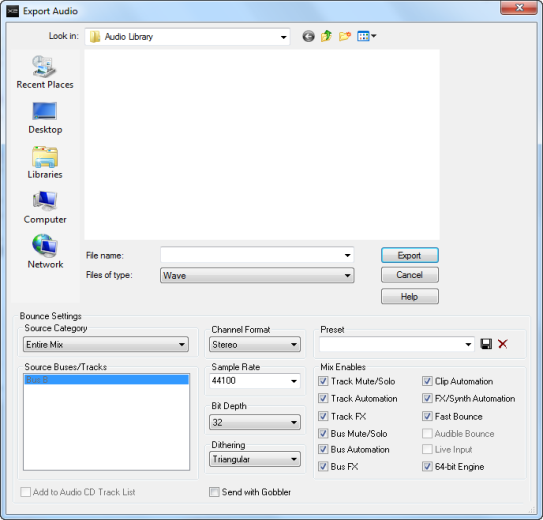 Also the video below will give you an idea of the basic functionality of the export process
post edited by chuckebaby - 2016/08/09 07:24:25
Windows 8.1 X64 Sonar Platinum x64 Custom built: Asrock z97 1150 - Intel I7 4790k - 16GB corsair DDR3 1600 - PNY SSD 220GBFocusrite Saffire 18I8 - Mackie Control
|
John
Forum Host

- Total Posts : 30467
- Joined: 2003/11/06 11:53:17
- Status: offline
Re: Routing a mix to 2 MAIN TRACKS for Mastering
2016/08/09 07:49:12
(permalink)
☄ Helpfulby chuckebaby 2016/08/09 13:20:38
Mixdown is simple to do in Sonar. Simply select the master buss as source and export it. Mastering is a lot more complicated. Because you are familiar with Ozone I recommend getting the Izotope guide on mastering and read it. Its free and on their web site. Mixing is also an art. Mixdown is a function. It seems practical to use Ozone on the master buss and just mixdown that. I think its easier and puts one into a different frame of mind if you don't put Ozone on the master buss. Instead, bring the exported stereo file back into a blank project for mastering. For now I would leave this as a beginning. (trying to keep it simple for now) Later you can add other effects for various purposes. But before you do any mastering understand what you want to improve about the mixdown you exported then follow the mastering guide in figuring out how to best approach this to get the results you want. Do things step by step in a logical order and that will help in cutting down on what I will call jumping around trying this that and the other and never really improving anything. Trust your ears too. Compare your master with a good quality commercial song. See how it maybe different. This is such a big category that a forum thread by itself is not going to scratch the surface. Listen to the members here on this thread and try to understand the reasoning behind what they say. It is really good advice.
post edited by John - 2016/08/09 08:10:31
|
brundlefly
Max Output Level: 0 dBFS
- Total Posts : 14250
- Joined: 2007/09/14 14:57:59
- Location: Manitou Spgs, Colorado
- Status: offline
Re: Routing a mix to 2 MAIN TRACKS for Mastering
2016/08/09 11:57:22
(permalink)
☄ Helpfulby chuckebaby 2016/08/09 13:20:42
Another option... keep your final Master (and alternates) in the project, and be able to A/B or null test it against the live mix:
- Create a track called Master Bounce.
- Set its output directly to Main Outs on your interface (i.e. parallel with the Master Bus), and invert the phase.
- Select nothing (Ctrl+Shift+A), and Bounce to Tracks with source = Buses and only the Master bus selected, and your Master Bounce track as the target.
With the inverted Master Bounce track playing in parallel with the Master bus, you can check for nulling of the two signals (may not null to silence, depending on FX and instrument plugins used, but should be close).
Or you can mute the Master Bounce track, and group it's mute button in opposition with the Master bus mute so you can A/B the two tracks (with or without disabling the phase invert on the Master Bounce track - doesn't much matter)
As an aside, I also like to create a "Pre-Master" bus that has no mastering FX on it, with peaks kept below -6dB, and a "To Main Outs" bus after the Master that I can use as a target for the Master Bounce track, and the Metronome bus to get control of the summed output level to A/D converters.
You can bounce additional, alternate Master mixes to new lanes in the Master Bounce track, and use exclusive lane soloing to isolate and A/B them.
When you've got what you want, Export just the Master Bounce track with Source = Tracks.
Or you can export the un-mastered "Pre-Master' bus to send on to a mastering engineer.
SONAR Platinum x64, 2x MOTU 2408/PCIe-424 (24-bit, 48kHz) Win10, I7-6700K @ 4.0GHz, 24GB DDR4, 2TB HDD, 32GB SSD Cache, GeForce GTX 750Ti, 2x 24" 16:10 IPS Monitors
|
chuckebaby
Max Output Level: 0 dBFS
- Total Posts : 13146
- Joined: 2011/01/04 14:55:28
- Status: offline
Re: Routing a mix to 2 MAIN TRACKS for Mastering
2016/08/09 13:00:17
(permalink)
that's the thing I really love about this place. I learn something different almost every day here. the above post (Dave) has helped me a lot in my obstacles, trial and error. cant stress enough how much he has helped me in this department (levels, routing, master bus, exc). and the other users here. your in good hands 
Windows 8.1 X64 Sonar Platinum x64 Custom built: Asrock z97 1150 - Intel I7 4790k - 16GB corsair DDR3 1600 - PNY SSD 220GBFocusrite Saffire 18I8 - Mackie Control
|
thedukewestern
Max Output Level: -83 dBFS

- Total Posts : 387
- Joined: 2008/04/14 12:06:59
- Location: NY
- Status: offline
Re: Routing a mix to 2 MAIN TRACKS for Mastering
2016/08/09 19:54:12
(permalink)
Be the first one who thinks that you can Sonar Platinum, Windows 7 64 bit - clean install January 2016, Focusrite Pro 40, Outboard Pres, Native Instruments Komplete, Izotope, PSP, Melodyne, Vegetarian
|
chuckebaby
Max Output Level: 0 dBFS
- Total Posts : 13146
- Joined: 2011/01/04 14:55:28
- Status: offline
Re: Routing a mix to 2 MAIN TRACKS for Mastering
2016/08/09 21:33:06
(permalink)
Windows 8.1 X64 Sonar Platinum x64 Custom built: Asrock z97 1150 - Intel I7 4790k - 16GB corsair DDR3 1600 - PNY SSD 220GBFocusrite Saffire 18I8 - Mackie Control
|
Francis Steeno
Max Output Level: -90 dBFS
- Total Posts : 19
- Joined: 2014/12/23 23:16:49
- Location: Grafton, WI
- Status: offline
Re: Routing a mix to 2 MAIN TRACKS for Mastering
2016/08/09 23:04:09
(permalink)
The list of options and tips is overwhelming! Thank you all. I have a whole lot to chew on at one time, and I agree with what John stated, " Mixing is also an art. Mixdown is a function." I am at the early stages and I am learning many fascinating new concepts, thanks to the brilliance of SONAR Platinum. I am very pleased with the job OZONE 7 is doing on my final mixes.
Can't say thanks enough. Back to the recording room.
Fran the Piano Man
|
thedukewestern
Max Output Level: -83 dBFS
- Total Posts : 387
- Joined: 2008/04/14 12:06:59
- Location: NY
- Status: offline
Re: Routing a mix to 2 MAIN TRACKS for Mastering
2016/08/10 00:00:36
(permalink)
chuckebaby
thedukewestern
https://www.youtube.com/watch?v=iMR26-CjF9s&feature=youtu.be Heres a video I made recently regarding mixdowns in sonar!
great job Dave.
I was watching you export and saying to myself (he didn't select any tracks)
but then you stopped and said oh ya, you got to select your tracks. 
Thanks - and HAHA Yeah - I dont edit my flubs out of the videos intentionally!
Be the first one who thinks that you can Sonar Platinum, Windows 7 64 bit - clean install January 2016, Focusrite Pro 40, Outboard Pres, Native Instruments Komplete, Izotope, PSP, Melodyne, Vegetarian
|