Resort Records
Max Output Level: -86 dBFS

- Total Posts : 234
- Joined: 2003/12/22 02:07:16
- Location: Incline Village, NV
- Status: offline
Cannot Export Surround
When exporting a surround project, I always receive this error: An unknown error occurred during processing, possibly caused by an invalid parameter.
I've tried various sample rates, bit depths, and dithering algorithms for both WAV and FLAC, but haven't found any combination that works. For the record, the bus I'm exporting (selected in the screen capture) is a 5.1 surround bus, routed to Sonar's automatic "Surround Main" output. 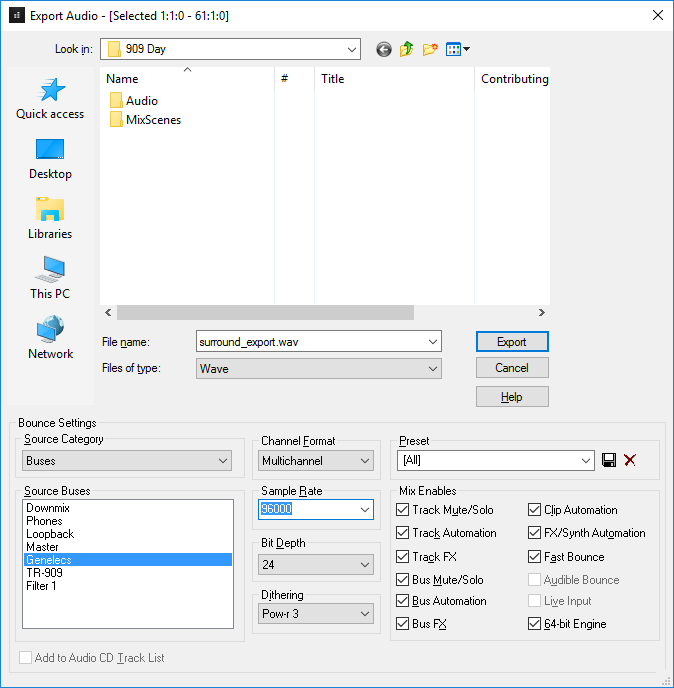 Any ideas?
|
Resort Records
Max Output Level: -86 dBFS
- Total Posts : 234
- Joined: 2003/12/22 02:07:16
- Location: Incline Village, NV
- Status: offline

Re: Cannot Export Surround
2016/09/07 14:34:29
(permalink)
For the record, I've followed the instructions, Exporting Surround Mixes in the Sonar Reference Guide, to the letter. No luck. And older versions of this documentation are archived on cakewalk.com, each with slightly different instructions. I've tried those too. Still no luck. And, to leave no stones unturned, I've now tried every file type that offers a multichannel Channel Format export option, from AIFF to YouTube Publish. All produce the same error. What am I doing wrong?! Any advice is greatly appreciated.
post edited by Resort Records - 2016/09/07 15:08:19
|
Base 57
Max Output Level: -86 dBFS
- Total Posts : 249
- Joined: 2014/12/26 16:30:14
- Status: offline
Re: Cannot Export Surround
2016/09/07 14:56:48
(permalink)
☄ Helpfulby Resort Records 2016/09/07 16:40:16
Just shooting from the hip here. I've never exported a surround mix. But... Have you tried using "entire mix" as your source category? Or maybe bounce to tracks and then export the resulting clips?
|
Resort Records
Max Output Level: -86 dBFS
- Total Posts : 234
- Joined: 2003/12/22 02:07:16
- Location: Incline Village, NV
- Status: offline
Re: Cannot Export Surround
2016/09/07 16:12:50
(permalink)
☄ Helpfulby jacksop 2017/10/03 15:04:05
Base 57
Just shooting from the hip here.... Have you tried using "entire mix" as your source category?
Damn, you're a good shot! That worked, but I must confess I'm not comfortable with the Entire Mix source category, because I don't fully understand its operation. The best description I've read calls it a mix of 'everything you hear,' but I have some hardware outputs that don't belong in the mix. For example, in addition to my six (5.1) main outs, I have spare outputs driving a headphone distribution amp, a loopback, etc. How do I know Sonar isn't folding those hardware outputs into the mix? This looks like a viable workaround, but according to Cakewalk's documentation, the Buses source category should also work. I submitted an email support request to Cakewalk, referencing this forum post, and hope to get to the bottom of it. But until then, you rescued my project - just in time for 909 Day! Thank you!!!
|
Base 57
Max Output Level: -86 dBFS
- Total Posts : 249
- Joined: 2014/12/26 16:30:14
- Status: offline
Re: Cannot Export Surround
2016/09/07 16:28:21
(permalink)
Glad I could help. And yeah, it should work from the busses. (???)
I believe that "entire mix" would be more accurately described as "what is sent to the interface output".
So FWIW mute those extra outputs just to be sure.
Cheers!
|
Resort Records
Max Output Level: -86 dBFS
- Total Posts : 234
- Joined: 2003/12/22 02:07:16
- Location: Incline Village, NV
- Status: offline
Re: Cannot Export Surround
2016/09/07 16:58:36
(permalink)
Yeah, so I just did some tests and verified that Sonar's Entire Mix source category folds all hardware outputs - not just those defined in Preferences > Surround - into the export. Muting my headphone and loopback buses seems to do the trick (for now). Now, I've got 16 hardware outputs. Yeah, the unused outs should be reading digital zero, but any unnecessary risk of noise makes me nervous. Maybe Cakewalk can offer some low-level technical assurances, but until then, I'd feel more comfortable exporting from a specified bus. Still, it's a good workaround. Thanks again!
post edited by Resort Records - 2016/09/07 17:20:59
|
Base 57
Max Output Level: -86 dBFS
- Total Posts : 249
- Joined: 2014/12/26 16:30:14
- Status: offline
Re: Cannot Export Surround
2016/09/07 17:59:21
(permalink)
Workarounds usually range from almost amusing to tedious and then to extremely annoying. My next suggestion is likely to be in that latter category.
After muting the headphone, loopback, and any other unwanted tracks, go into Preferences and unselect all of the outputs except for the six used by your surround bus. Then export your mix. You may need to restart SONAR, I'm not sure.
Yeah, I know...
|
Noel Borthwick [Cakewalk]
Cakewalk Staff

- Total Posts : 6475
- Joined: 2003/11/03 17:22:50
- Location: Boston, MA, USA
- Status: offline
Re: Cannot Export Surround
2016/09/07 18:02:08
(permalink)
Can you create a small sample project which throws this error and log a case (with the project bundle attached) and post the case number here?
|
Resort Records
Max Output Level: -86 dBFS
- Total Posts : 234
- Joined: 2003/12/22 02:07:16
- Location: Incline Village, NV
- Status: offline
Re: Cannot Export Surround
2016/09/08 02:09:43
(permalink)
Noel Borthwick [Cakewalk]
Can you create a small sample project which throws this error and log a case (with the project bundle attached) and post the case number here?
You bet. Here it is: CWBRN-54422 It doesn't get much simpler. I launched a new project, chose my surround template, added an audio track, recorded a few seconds of silence, and went straight for the export. No plugins or anything. And my surround template is pretty simple - it's just five buses pre-wired for common studio uses: Master, Genelecs (5.1), Downmix (stereo), Phones (stereo), and Loopback (stereo). Please let me know if there's anything else I can do to help. Thank you!
|
Noel Borthwick [Cakewalk]
Cakewalk Staff
- Total Posts : 6475
- Joined: 2003/11/03 17:22:50
- Location: Boston, MA, USA
- Status: offline
Re: Cannot Export Surround
2016/09/08 07:33:12
(permalink)
☄ Helpfulby Resort Records 2016/09/08 14:10:32
Thanks for submitting it. We'll investigate it.
|
Markus Horstmann
Max Output Level: -90 dBFS

- Total Posts : 1
- Joined: 2016/10/22 01:41:14
- Status: offline
Re: Cannot Export Surround
2016/12/19 01:26:26
(permalink)
Any news on this?
[Edit: Never mind, the workaround does work, I didn't have a Surround Master output selected...]
I'm getting the same error, but the Entire Mix workaround doesn't work for me: I don't get a selection for Multichannel with "Entire Mix", only when I chose a surround bus.
Happy to provide a sample project if it helps.
|