jonnewyork
Max Output Level: -85 dBFS

- Total Posts : 263
- Joined: 2007/02/07 19:38:38
- Status: offline
Issues using Melodyne Essential
I can't seem to separate pitches. If there are 2 flat notes in a row, for example, I raise the first pitch. Then I raise the next pitch and it pulls the note I just put in the proper pitch back down again. This is with the pitch grid set to "no snap".
I've looked at tuturials but the tutorials always seem to use a toolbox that I can't access.
The tool bar has only 3 tools, the main tool, scroll tool and zoom tool.
If I right click in the edit area, which is supposed to open a toolbox, all I get is: select all, delete, paste, copy, cut.
Any ideas?
Cheers, Jon Win 7 Pro Intel Core i7-3770 @ 3.40 GHz, 3.40 GHz 16 GB RAM 64 bit op sys Lynx Aurora 16 ADC w/ AES16e card
|
Paul G
Max Output Level: -52 dBFS

- Total Posts : 2334
- Joined: 2004/03/17 21:38:03
- Location: Florida
- Status: offline

Re: Issues using Melodyne Essential
2016/08/31 16:48:34
(permalink)
Are you hitting the Alt key when you drag the note?
|
stevec
Max Output Level: 0 dBFS

- Total Posts : 11546
- Joined: 2003/11/04 15:05:54
- Location: Parkesburg, PA
- Status: offline
Re: Issues using Melodyne Essential
2016/09/01 11:22:19
(permalink)
Can you post a screen capture of what you're seeing in Melodyne? I don't have Essentials, but what you're describing should be the same in all versions.
SteveC https://soundcloud.com/steve-cocchi http://www.soundclick.com/bands/pagemusic.cfm?bandID=39163 SONAR Platinum x64, Intel Q9300 (2.5Ghz), Asus P5N-D, Win7 x64 SP1, 8GB RAM, 1TB internal + ESATA + USB Backup HDDs, ATI Radeon HD5450 1GB RAM + dual ViewSonic VA2431wm Monitors; Focusrite 18i6 (ASIO); Komplete 9, Melodyne Studio 4, Ozone 7 Advanced, Rapture Pro, GPO5, Valhalla Plate, MJUC comp, MDynamic EQ, lots of other freebie VST plugins, synths and Kontakt libraries
|
jonnewyork
Max Output Level: -85 dBFS
- Total Posts : 263
- Joined: 2007/02/07 19:38:38
- Status: offline
Re: Issues using Melodyne Essential
2016/09/01 22:55:27
(permalink)
Cheers, Jon Win 7 Pro Intel Core i7-3770 @ 3.40 GHz, 3.40 GHz 16 GB RAM 64 bit op sys Lynx Aurora 16 ADC w/ AES16e card
|
jonnewyork
Max Output Level: -85 dBFS
- Total Posts : 263
- Joined: 2007/02/07 19:38:38
- Status: offline
Re: Issues using Melodyne Essential
2016/09/01 23:02:16
(permalink)
Paul G
Are you hitting the Alt key when you drag the note?
Yes. It doesn't seem to make any difference.
Cheers, Jon Win 7 Pro Intel Core i7-3770 @ 3.40 GHz, 3.40 GHz 16 GB RAM 64 bit op sys Lynx Aurora 16 ADC w/ AES16e card
|
jonnewyork
Max Output Level: -85 dBFS
- Total Posts : 263
- Joined: 2007/02/07 19:38:38
- Status: offline
Re: Issues using Melodyne Essential
2016/09/01 23:13:20
(permalink)
Cheers, Jon Win 7 Pro Intel Core i7-3770 @ 3.40 GHz, 3.40 GHz 16 GB RAM 64 bit op sys Lynx Aurora 16 ADC w/ AES16e card
|
stevec
Max Output Level: 0 dBFS
- Total Posts : 11546
- Joined: 2003/11/04 15:05:54
- Location: Parkesburg, PA
- Status: offline
Re: Issues using Melodyne Essential
2016/09/02 14:05:11
(permalink)
I've never used that tool before, but it looks like it simply bypasses all pitch correction so you can do an AB comparison between the original and edited versions. It sure sounds useful... Thanks for posting that!
Going back to the OP... in the first image you have some active blobs. If you click and drag that first Eb blob (fourth from the end) up or down, are you saying that the F blob next to it also shifts?
SteveC https://soundcloud.com/steve-cocchi http://www.soundclick.com/bands/pagemusic.cfm?bandID=39163 SONAR Platinum x64, Intel Q9300 (2.5Ghz), Asus P5N-D, Win7 x64 SP1, 8GB RAM, 1TB internal + ESATA + USB Backup HDDs, ATI Radeon HD5450 1GB RAM + dual ViewSonic VA2431wm Monitors; Focusrite 18i6 (ASIO); Komplete 9, Melodyne Studio 4, Ozone 7 Advanced, Rapture Pro, GPO5, Valhalla Plate, MJUC comp, MDynamic EQ, lots of other freebie VST plugins, synths and Kontakt libraries
|
jonnewyork
Max Output Level: -85 dBFS
- Total Posts : 263
- Joined: 2007/02/07 19:38:38
- Status: offline
Re: Issues using Melodyne Essential
2016/09/03 11:07:32
(permalink)
Part one of the mystery is solved. Even though the Celemony link above says "essential2" on the URL (because I specifically used 'essential' in the search terms), what they show is not the Essential version, which only has the basic tools, as seen below. Part two of the mystery is how to separate pitches so that I can move 2 pitches in a row higher without having the first one automatically lowered when I raise the second one or vice versa. 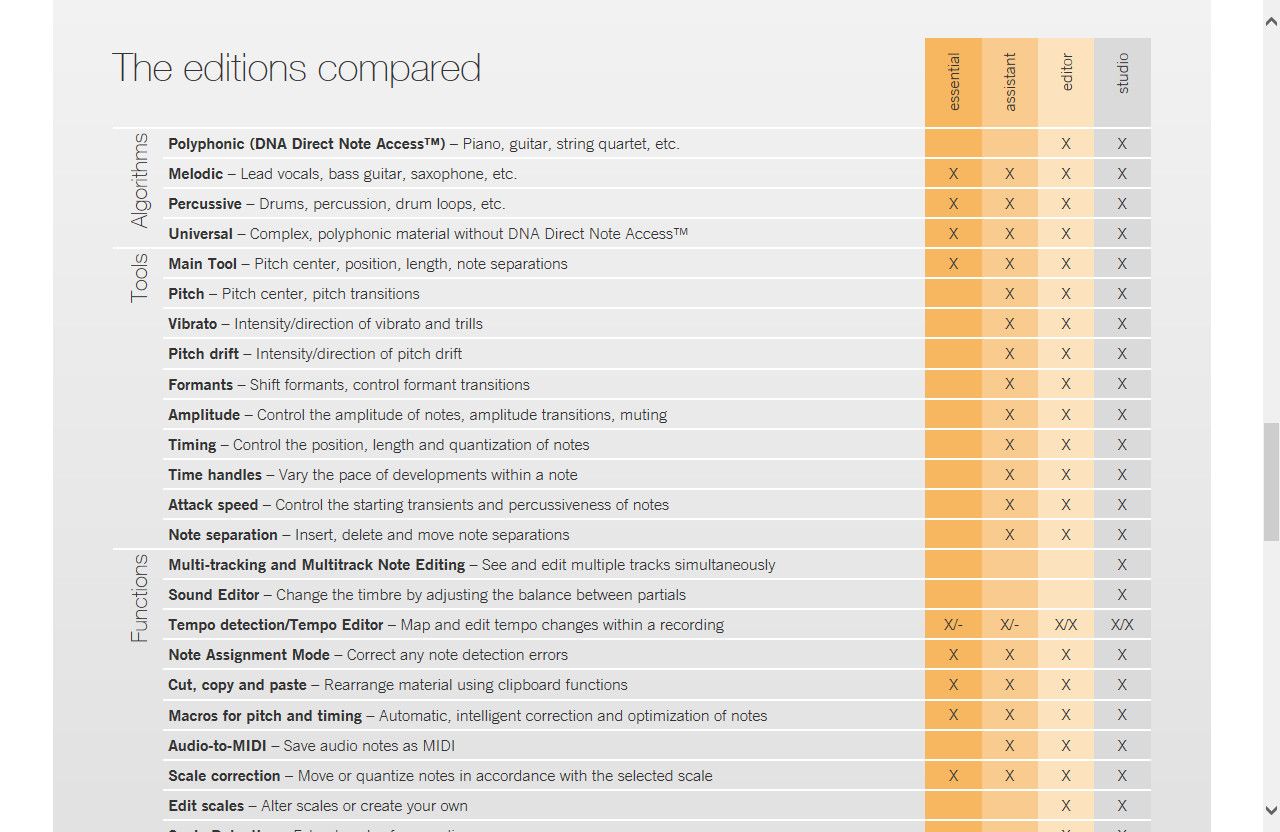
Cheers, Jon Win 7 Pro Intel Core i7-3770 @ 3.40 GHz, 3.40 GHz 16 GB RAM 64 bit op sys Lynx Aurora 16 ADC w/ AES16e card
|
jonnewyork
Max Output Level: -85 dBFS
- Total Posts : 263
- Joined: 2007/02/07 19:38:38
- Status: offline
Re: Issues using Melodyne Essential
2016/09/03 11:18:58
(permalink)
stevec
I've never used that tool before, but it looks like it simply bypasses all pitch correction so you can do an AB comparison between the original and edited versions. It sure sounds useful... Thanks for posting that!
Going back to the OP... in the first image you have some active blobs. If you click and drag that first Eb blob (fourth from the end) up or down, are you saying that the F blob next to it also shifts?
Yes, in the opposite direction. So if I raise the pitch in the 1st blob (love that term) and then raise the pitch of the 2nd blob, raising the pitch of the second blob to where I want it automatically lowers the pitch of the 1st blob to where I don't want it. I'll do some more research. The frustrating thing is that most of the tutorials use the full tool kit. I hate spending hours using all kinds of creative search terms trying to get a plugin to do its most basic function. I was hoping someone here had more experience with Melodyne Essential, but I guess I'm on my own on this one.
post edited by jonnewyork - 2016/09/03 11:40:23
Cheers, Jon Win 7 Pro Intel Core i7-3770 @ 3.40 GHz, 3.40 GHz 16 GB RAM 64 bit op sys Lynx Aurora 16 ADC w/ AES16e card
|
MArwood
Max Output Level: -57 dBFS

- Total Posts : 1816
- Joined: 2003/11/06 20:04:42
- Status: offline
Re: Issues using Melodyne Essential
2016/09/03 11:27:21
(permalink)
The 1st blob could still be selected. Try to click an open area then click the second blob to move it. Tell us if that works?
"Edited spelling" New Tag line so I won't have to keep typing this. I may or may not have edited this yet, but I probably need to. < Message edited by MArwood -- 3/02/2525 3:45:05 AM >
|
jonnewyork
Max Output Level: -85 dBFS
- Total Posts : 263
- Joined: 2007/02/07 19:38:38
- Status: offline
Re: Issues using Melodyne Essential
2016/09/03 21:57:37
(permalink)
Cheers, Jon Win 7 Pro Intel Core i7-3770 @ 3.40 GHz, 3.40 GHz 16 GB RAM 64 bit op sys Lynx Aurora 16 ADC w/ AES16e card
|
stevec
Max Output Level: 0 dBFS
- Total Posts : 11546
- Joined: 2003/11/04 15:05:54
- Location: Parkesburg, PA
- Status: offline
Re: Issues using Melodyne Essential
2016/09/04 18:07:07
(permalink)
Glad to see you were able to work it out! 
SteveC https://soundcloud.com/steve-cocchi http://www.soundclick.com/bands/pagemusic.cfm?bandID=39163 SONAR Platinum x64, Intel Q9300 (2.5Ghz), Asus P5N-D, Win7 x64 SP1, 8GB RAM, 1TB internal + ESATA + USB Backup HDDs, ATI Radeon HD5450 1GB RAM + dual ViewSonic VA2431wm Monitors; Focusrite 18i6 (ASIO); Komplete 9, Melodyne Studio 4, Ozone 7 Advanced, Rapture Pro, GPO5, Valhalla Plate, MJUC comp, MDynamic EQ, lots of other freebie VST plugins, synths and Kontakt libraries
|