bapu
Max Output Level: 0 dBFS

- Total Posts : 86000
- Joined: 2006/11/25 21:23:28
- Location: Thousand Oaks, CA
- Status: offline
In-Law's computer. HD, PSU or Vid problem?
The computer runs fine for a while.
The all of a sudden the screen just goes blank. Monitor light is still on. PSU fan is still blowing. Fans are still blowing on the MB.
It's an integrated vid card.
The whole system is 8 years old. They turn it off every night but they run it all day long (retired couple). Games, email, ebay. Nothing taxing.
I took the hard drive home and I'm attempting to clone it. Actually, backing it up first (Acronis 2015) and then I'll restore it to a new hard drive.
I have a new PSU just in case and I do have a spare vid card if necessary.
The OS is Vista business (as I said, it's 8 years old).
Thoughts on the black out?
|
Beagle
Max Output Level: 0 dBFS

- Total Posts : 50621
- Joined: 2006/03/29 11:03:12
- Location: Fort Worth, TX
- Status: offline

Re: In-Law's computer. HD, PSU or Vid problem?
2016/10/03 21:14:28
(permalink)
easy. CPU is overheating. can happen even if it appears fan is working correctly. download speedfan if you want to check the CPU temp before doing anything about it. http://www.almico.com/speedfan.php
|
bapu
Max Output Level: 0 dBFS
- Total Posts : 86000
- Joined: 2006/11/25 21:23:28
- Location: Thousand Oaks, CA
- Status: offline
Re: In-Law's computer. HD, PSU or Vid problem?
2016/10/03 21:23:23
(permalink)
FYI... nothing about their room temp has changed.
So is it possible that the CPU fan (which was running when the black out occurred) is no longer powerful enough or has become "unseated" (i.e. CPU thermal grease dried out and needs to be replaced)?
|
Jim Roseberry
Max Output Level: 0 dBFS
- Total Posts : 9871
- Joined: 2004/03/23 11:34:51
- Location: Ohio
- Status: offline
Re: In-Law's computer. HD, PSU or Vid problem?
2016/10/03 21:25:26
(permalink)
If the CPU is overheating, the machine would likely not just "black out".
It would likely BSOD and reboot. (I doubt less tech savvy users would disable the Automatic Restart.)
Most likely not the PS.
Does the system boot/run and display fine in Safe Mode?
Boot into Safe Mode... and let it stay in Safe Mode for an extended period.
If all is fine, it's most likely a config issue.
When the screen goes black, what happens if you tap the power button (not holding it in for four seconds).
If the machine gracefully shuts down, that tells you it was still within Windows... and had not crashed.
The display (alone) had blacked out.
That would put the issue on the onboard video or config/drivers.
If onboard video is the only defective culprit, the dedicated video card should resolve the problem.
|
bapu
Max Output Level: 0 dBFS
- Total Posts : 86000
- Joined: 2006/11/25 21:23:28
- Location: Thousand Oaks, CA
- Status: offline
Re: In-Law's computer. HD, PSU or Vid problem?
2016/10/03 22:03:23
(permalink)
Thanks Jim (and Beagle).
I'll investigate a little further tomorrow when I go back there.
|
Mooch4056
Max Output Level: -0.5 dBFS

- Total Posts : 7494
- Joined: 2005/02/19 17:40:35
- Location: Chicago
- Status: offline
Re: In-Law's computer. HD, PSU or Vid problem?
2016/10/03 22:10:33
(permalink)
How long does the screen work for. Whatever that time is ... that is how much time they get to email something or buy something for amazon. I could see this kind of game becoming an Olympic sport. If you can't fix it buy them a new one for Christmas $279 right here http://www.bestbuy.com/si...165000.p?skuId=5165000
From Now On Call Me Conquistador!
Donate to the cure Bapu Foundation Email: mooch4056@gmail.com for more info
|
Mooch4056
Max Output Level: -0.5 dBFS
- Total Posts : 7494
- Joined: 2005/02/19 17:40:35
- Location: Chicago
- Status: offline
Re: In-Law's computer. HD, PSU or Vid problem?
2016/10/03 22:10:52
(permalink)
☄ Helpfulby craigb 2016/10/04 01:21:29
Ha Ha Ha Ha BAPU Wears Funny Underwear
post edited by Mooch4056 - 2016/10/03 22:35:54
From Now On Call Me Conquistador!
Donate to the cure Bapu Foundation Email: mooch4056@gmail.com for more info
|
bapu
Max Output Level: 0 dBFS
- Total Posts : 86000
- Joined: 2006/11/25 21:23:28
- Location: Thousand Oaks, CA
- Status: offline
Re: In-Law's computer. HD, PSU or Vid problem?
2016/10/03 22:40:39
(permalink)
Mooch Who Just Do Stuff.
You quack me up.
|
craigb
Max Output Level: 0 dBFS
- Total Posts : 41704
- Joined: 2009/01/28 23:13:04
- Location: The Pacific Northwestshire
- Status: offline
Re: In-Law's computer. HD, PSU or Vid problem?
2016/10/04 01:04:13
(permalink)
Good luck Ed! Tomorrow I have to go to a client whose laptop "tried" to get the Windows 10 Anniversary update over the weekend and now only gets to the little dots spinning before rebooting (even in safe mode with networking).
I'm not optimistic 'cause my OWN windows 10 machine did the reboot cycle over the weekend as well (also trying to install v1607) and finally reverted back to the state before attempting the updates.
The most likely path for the client's laptop will be to pull the hard drive, get what data I can off of it, then "factory" the laptop and put the data back on - yay...
Time for all of you to head over to Beyond My DAW!
|
Beagle
Max Output Level: 0 dBFS
- Total Posts : 50621
- Joined: 2006/03/29 11:03:12
- Location: Fort Worth, TX
- Status: offline
Re: In-Law's computer. HD, PSU or Vid problem?
2016/10/04 08:58:03
(permalink)
I REALLY hate to disagree with Jim, but I have seen this happen on two different systems. both times the system would shut down without warning, just "go blank" after reaching a certain temperature and that didn't take long.
In both cases, the system would do exactly as you described. the screen would go blank, the fans would all still be running, no beeps or anything from the computer.
running the speedfan program showed me that the temp was shooting up right before the fault. checking the fault logs of windows confirmed that the system was having faults (can't remember the exact report)
both computers I removed the cpu fan, cleaned the thermal grease off of the cpu, replaced the fan with a new one using new thermal grease and everything worked like a charm.
I also then downloaded a cpu stress load tester and ran them all day after replacing the fan and verified that the temps would not increase too much to shut the system down.
I'm not saying this is going to be exactly the problem with this system and again, I really hate disagreeing with Jim because he's always spot on, but I HAVE seen this happen with overtemps.
|
craigb
Max Output Level: 0 dBFS
- Total Posts : 41704
- Joined: 2009/01/28 23:13:04
- Location: The Pacific Northwestshire
- Status: offline
Re: In-Law's computer. HD, PSU or Vid problem?
2016/10/04 09:00:55
(permalink)
☄ Helpfulby bapu 2016/10/04 09:45:21
My screen goes blank occasionally when I come here. But usually I hear myself snoring and it wakes me back up.
Time for all of you to head over to Beyond My DAW!
|
JohanSebatianGremlin
Max Output Level: -82 dBFS

- Total Posts : 402
- Joined: 2016/03/17 22:27:15
- Status: offline
Re: In-Law's computer. HD, PSU or Vid problem?
2016/10/04 20:04:35
(permalink)
bapu
FYI... nothing about their room temp has changed.
So is it possible that the CPU fan (which was running when the black out occurred) is no longer powerful enough or has become "unseated" (i.e. CPU thermal grease dried out and needs to be replaced)?
Saying the fan is running doesn't tell the whole story. What does the heat sync look like? Is it completely clean or can you see dust on it? If you spin the fan blades by hand with the machine off, do the blades spin freely without restriction? Or do they spin once or twice and then immediately stop? How about the rest of the innards, how do they look? Clean or dust bunnies everywhere? Has anything else changed recently? For instance did they get a new computer desk with a little cabinet for the computer tower? Or as I like to call them, a computer desk with its own Betty Crocker Easy Bake Computer Oven. Also don't rule out the monitor itself.
|
bapu
Max Output Level: 0 dBFS
- Total Posts : 86000
- Joined: 2006/11/25 21:23:28
- Location: Thousand Oaks, CA
- Status: offline
Re: In-Law's computer. HD, PSU or Vid problem?
2016/10/04 20:13:51
(permalink)
JohanSebatianGremlin
Saying the fan is running doesn't tell the whole story. What does the heat sync look like? Is it completely clean or can you see dust on it?
Clean. JohanSebatianGremlin
If you spin the fan blades by hand with the machine off, do the blades spin freely without restriction? Or do they spin once or twice and then immediately stop?
Spins cleanly. JohanSebatianGremlin
How about the rest of the innards, how do they look? Clean or dust bunnies everywhere?
Very clean, just a little dust. JohanSebatianGremlin
Has anything else changed recently? For instance did they get a new computer desk with a little cabinet for the computer tower? Or as I like to call them, a computer desk with its own Betty Crocker Easy Bake Computer Oven.
Nope same desk, setup for the last 7 years or so. JohanSebatianGremlin
Also don't rule out the monitor itself.
Haven't yet.
|
bapu
Max Output Level: 0 dBFS
- Total Posts : 86000
- Joined: 2006/11/25 21:23:28
- Location: Thousand Oaks, CA
- Status: offline
Re: In-Law's computer. HD, PSU or Vid problem?
2016/10/04 20:16:16
(permalink)
Ran the speed fan util.
Something called Temp 1 is listed as 85C with a flame icon next to it.
Core 0,1,2,3 (it's a Q6600 CPU) all say 32(ish)C, as is everything else there.
Gonna have to go into the bios to see what Temp1 is. Tomorrow night. Working late tonight.
|
einstein36
Max Output Level: -80 dBFS

- Total Posts : 511
- Joined: 2003/11/05 21:38:31
- Location: TX
- Status: offline
Re: In-Law's computer. HD, PSU or Vid problem?
2016/10/04 20:52:41
(permalink)
bapu
Ran the speed fan util.
Something called Temp 1 is listed as 85C with a flame icon next to it.
Core 0,1,2,3 (it's a Q6600 CPU) all say 32(ish)C, as is everything else there.
Gonna have to go into the bios to see what Temp1 is. Tomorrow night. Working late tonight.
yep....converting that 85C to F is about 185 degrees F which is not good for the cpu.....basically, the cpu is overheating... probably needs new thermal paste and just a little cleaning and loving and all should be fine..... That's what the bios is suppose to do is if the cpu reaches a critical temp, the system shuts itself down so it doesn't ruin the cpu.
|
bapu
Max Output Level: 0 dBFS
- Total Posts : 86000
- Joined: 2006/11/25 21:23:28
- Location: Thousand Oaks, CA
- Status: offline
Re: In-Law's computer. HD, PSU or Vid problem?
2016/10/04 21:51:05
(permalink)
einstein36
bapu
Ran the speed fan util.
Something called Temp 1 is listed as 85C with a flame icon next to it.
Core 0,1,2,3 (it's a Q6600 CPU) all say 32(ish)C, as is everything else there.
Gonna have to go into the bios to see what Temp1 is. Tomorrow night. Working late tonight.
yep....converting that 85C to F is about 185 degrees F which is not good for the cpu.....basically, the cpu is overheating...
probably needs new thermal paste and just a little cleaning and loving and all should be fine.....
That's what the bios is suppose to do is if the cpu reaches a critical temp, the system shuts itself down so it doesn't ruin the cpu.
But the system does not shut down. The video goes black. That's all that happens.
|
craigb
Max Output Level: 0 dBFS
- Total Posts : 41704
- Joined: 2009/01/28 23:13:04
- Location: The Pacific Northwestshire
- Status: offline
Re: In-Law's computer. HD, PSU or Vid problem?
2016/10/04 23:36:39
(permalink)
Maybe the heat is actually causing the GPU to shut down, not the CPU?
Time for all of you to head over to Beyond My DAW!
|
Beagle
Max Output Level: 0 dBFS
- Total Posts : 50621
- Joined: 2006/03/29 11:03:12
- Location: Fort Worth, TX
- Status: offline
Re: In-Law's computer. HD, PSU or Vid problem?
2016/10/05 07:26:02
(permalink)
from the speedfan faqs:
There are several ways to label available readings (temperatures, voltages, fan speeds). The first source should be the BIOS. Enter BIOS at boot, write down labels and readings and compare them to those reported by SpeedFan. You can use manufacturer's custom hardware monitors to match readings too. SpeedFan strictly adheres to available datasheets for each sensor chip. Please remember that hardware monitors chips have some pins (small connectors) that should be connected to some additional hardware (temperature probes, thermistors or thermocouples) in order to be able to read temperatures. Only a few hardware monitor chips do label their connectors with "CPU", "System" and the like. Most of them use labels like "Temp1", "Local" or "Remote". Hardware manufacturers connect available pins to different temperature sensors basically according to the physical placement of components on the motherboard. This means that the same chip, an ITE IT8712F, for example, might be connected to a sensor diode measuring CPU temperature on Temp2 and, on a different hardware, it might be connected on Temp1. If you have a "Local" sensor and a "Remote" labeled one, this usually means that "Local" is the temperature of the monitor chip itself and "Remote" is the temperature read from a "remote" probe. When you have properly identified which temperature sensor is which, try to lower the speed of each fan and look at reported speed and temperatures. This way you can match PWM controls (speeds) with fans. Please, note that if you do not allow SpeedFan to change any fan speed and set all the speeds too low, then SpeedFan won't be able to avoid overheating.
|
JohanSebatianGremlin
Max Output Level: -82 dBFS
- Total Posts : 402
- Joined: 2016/03/17 22:27:15
- Status: offline
Re: In-Law's computer. HD, PSU or Vid problem?
2016/10/05 07:56:36
(permalink)
bapu
JohanSebatianGremlin
Saying the fan is running doesn't tell the whole story. What does the heat sync look like? Is it completely clean or can you see dust on it?
Clean.
JohanSebatianGremlin
If you spin the fan blades by hand with the machine off, do the blades spin freely without restriction? Or do they spin once or twice and then immediately stop?
Spins cleanly.
JohanSebatianGremlin
How about the rest of the innards, how do they look? Clean or dust bunnies everywhere?
Very clean, just a little dust.
JohanSebatianGremlin
Has anything else changed recently? For instance did they get a new computer desk with a little cabinet for the computer tower? Or as I like to call them, a computer desk with its own Betty Crocker Easy Bake Computer Oven.
Nope same desk, setup for the last 7 years or so.
JohanSebatianGremlin
Also don't rule out the monitor itself.
Haven't yet.
Ok so looks like the fan and heat sync are good. That leaves the thermal paste as a possibility. I've never really seen thermal paste just break down from age, but I suppose anything is possible. Also leaves something else on the MB (possibly related to video) getting hot and going offline. The thing is, if the video signal from the computer was going offline, I would expect a no signal message on the monitor. That your screen is going black means either the video chip in the computer is failing/locking up in such a way that's actually painting black, or something internal to the monitor is giving up the ghost and shutting the screen down while still keeping the power LED green. Notice any unusually warm spots on the monitor itself?
|
Moshkito
Max Output Level: -37.5 dBFS

- Total Posts : 3765
- Joined: 2015/01/26 13:29:07
- Status: offline
Re: In-Law's computer. HD, PSU or Vid problem?
2016/10/05 10:13:54
(permalink)
Beagle
I REALLY hate to disagree with Jim, but I have seen this happen on two different systems. both times the system would shut down without warning, just "go blank" after reaching a certain temperature and that didn't take long.
In both cases, the system would do exactly as you described. the screen would go blank, the fans would all still be running, no beeps or anything from the computer.
...
both computers I removed the cpu fan, cleaned the thermal grease off of the cpu, replaced the fan with a new one using new thermal grease and everything worked like a charm.
...
I have a similar problem on one machine, but mostly is that one can not reboot/restart the machine as it might not come back up. All I gotta do is wait 5 minutes, reset the power supply and it comes up fine. The motherboard has no new drivers since the original, thus the BIOS can not be updated, and yeah ... that computer is about 5 to 6 years old, and it is pushing a GTX 760 ... and it's actually faster on WoW switching zones, than my SS machine with twice the memory and a faster video card (GTX 970). This 2nd computer is only keeping back up copies and hard drive is not an issue. The same thing was happening before with W8 and W8.1 ... and I'll just take it a bit further and upgrade the motherboard in the next year or so. My guess, and it is a GUESS, this is an issue with the motherboard, and it could be related to heat, however, it would be odd that it would heat up after so many hours, when most computers are designed to be able to stay on without overheating. I'm guessing that it won't get better either, and it might be time to swap out to a new motherboard?
Music is not about notes and chords! My poem is not about the computer or monitor or letters! It's about how I was able to translate it from my insides!
|
soens
Max Output Level: -23.5 dBFS

- Total Posts : 5154
- Joined: 2005/09/16 03:19:55
- Location: Location: Location
- Status: offline
Re: In-Law's computer. HD, PSU or Vid problem?
2016/10/10 01:49:37
(permalink)
1st I would try another monitor or plug the monitor into another system to rule it out (or in). Anything after that will be time and money spent. Just buy 'em a new 15" laptop for $200-300.  I have a MB with the temp sensor right next to the video card slot. Even when using a fanned VC it always had the highest temp reading, little flames an' all. The only time I had a blackout screen was with a bad G.Skill mem chip. Brand new. Newegg replaced it and all was fine.
post edited by soens - 2016/10/10 02:18:58
|
bapu
Max Output Level: 0 dBFS
- Total Posts : 86000
- Joined: 2006/11/25 21:23:28
- Location: Thousand Oaks, CA
- Status: offline
Re: In-Law's computer. HD, PSU or Vid problem?
2016/10/10 11:01:13
(permalink)
Jim Roseberry suggested I run a util to see what is heating up. Well it's something called TMPIN1. It's 86degreesC. Whoa!!!!! The cores seem a little hot at 56 but their room was pretty warm when I took this screen shot. I'm beginning to think Beagle's initial assessment may be close if not the reason. But I'm waiting on Jim's response. 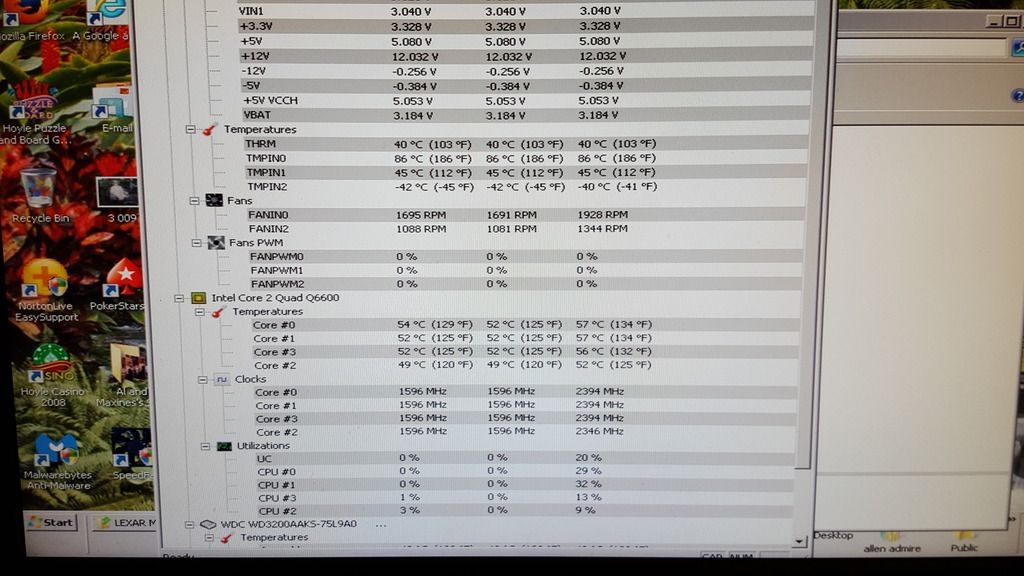
|
bapu
Max Output Level: 0 dBFS
- Total Posts : 86000
- Joined: 2006/11/25 21:23:28
- Location: Thousand Oaks, CA
- Status: offline
Re: In-Law's computer. HD, PSU or Vid problem?
2016/10/10 11:03:26
(permalink)
BTW soens, have you ever trid to put somthing new in front of a 94 year old individual? I'm not about to try that unless all other possibilities have been eliminated and the problem persists.
I''m counting on Jim to give me the definitive answer since I'm using the temp monitoring program he suggested.
|
craigb
Max Output Level: 0 dBFS
- Total Posts : 41704
- Joined: 2009/01/28 23:13:04
- Location: The Pacific Northwestshire
- Status: offline
Re: In-Law's computer. HD, PSU or Vid problem?
2016/10/10 13:50:17
(permalink)
☄ Helpfulby bapu 2016/10/10 14:13:30
*Pffttt...* THAT'S not hot! If you want hot, get a Samsung Galaxy note 7! 
Time for all of you to head over to Beyond My DAW!
|
soens
Max Output Level: -23.5 dBFS
- Total Posts : 5154
- Joined: 2005/09/16 03:19:55
- Location: Location: Location
- Status: offline
Re: In-Law's computer. HD, PSU or Vid problem?
2016/10/10 15:55:18
(permalink)
bapu
BTW soens, have you ever trid to put somthing new in front of a 94 year old individual? I'm not about to try that unless all other possibilities have been eliminated and the problem persists.
... but, but, they have TOUCH screens! Well, OK. It IS your tyme & $$.  My folks are stuck in the '80s when it comes to technostuff. And, yeah, all they do is play cards on the laptop. Wait, you thought I was sErIoUs? What's happening down here?
post edited by soens - 2016/10/10 16:17:51
|
Jim Roseberry
Max Output Level: 0 dBFS
- Total Posts : 9871
- Joined: 2004/03/23 11:34:51
- Location: Ohio
- Status: offline
Re: In-Law's computer. HD, PSU or Vid problem?
2016/10/10 19:52:36
(permalink)
Looks to me like the chipset is overheating...
|
bapu
Max Output Level: 0 dBFS
- Total Posts : 86000
- Joined: 2006/11/25 21:23:28
- Location: Thousand Oaks, CA
- Status: offline
Re: In-Law's computer. HD, PSU or Vid problem?
2016/10/11 11:08:12
(permalink)
Jim Roseberry
Looks to me like the chipset is overheating...
Thanks Jim, I'll check that out the next time I'm over there. Yesterday they said the computer ran all day without a blackout. 
|
craigb
Max Output Level: 0 dBFS
- Total Posts : 41704
- Joined: 2009/01/28 23:13:04
- Location: The Pacific Northwestshire
- Status: offline
Re: In-Law's computer. HD, PSU or Vid problem?
2016/10/12 04:15:41
(permalink)
☼ Best Answerby bapu 2016/10/12 11:12:58
bapu
Yesterday they said the computer ran all day without a blackout.
Them or the computer? 
Time for all of you to head over to Beyond My DAW!
|