jshep0102
Max Output Level: -71 dBFS

- Total Posts : 984
- Joined: 2006/02/21 22:44:35
- Status: offline

Touching SPLAT
I have delved into the world of the touch screen monitor. While I like the things that it can do, it seems Sonar can't do many things other DAWs are doing readily. I'd love to be able to draw in/edit automation by hand, midi editing, clip manipulation - basically all the stuff you'd think you could. I pray these things come to fruition soon, because I will not go back now that I've tried touch. Can anyone shed light on this for me? Thanks much, Shep I found this as of May 2015 in Sound on Sound - 'The one place where it gets a little weird is the Track view. You can move the loop points in the timeline, you can zoom beautifully either horizontally or vertically by using the pinch gesture — but that’s it. You can’t touch any of the clips, you can’t drag them or select them, you can’t use any of the tools, you can’t edit automation or draw in any parameters: none of the mouse actions can be performed with a finger. This is weird, because in any other DAW I’ve tried, you can manipulate everything in the track/project/session/arrange view with a single finger — and they’re not multi–touch enabled.' I'd love to hear from the powers that be what the plans for this implementation are.
post edited by jshep0102 - 2016/10/10 15:51:42
SHEP-ASRock Z97 Pro4 - i7 4790K 4.0ghz - 16 GB DDR3 - Windows 10 Home - Apollo Twin USB Duo - UAD2 Duo - Digimax FS - Focal CMS50 - Raven MTi2 - Slate VMS 1 - Bluebird - Yamaha MOXF8 - Axe Fx Ultra - SPLAT 2017.2
|
joeb1cannoli
Max Output Level: -87 dBFS

- Total Posts : 199
- Joined: 2012/09/22 20:07:26
- Status: offline
Re: Touching SPLAT
2016/10/10 16:24:47
(permalink)
Sonar has been the only DAW that I've ever used, so I have nothing to compare it to.
Do these other DAWs that allow the single finger edit manipulation also allow the multi touch navigation gestures?
I wonder if it's a trade-off. I can imagine touching the screen with 2 fingers for a pinch gesture to zoom in or out and having 2 clips getting moved to were your fingers end up on the screen.
Also, working with touch, how difficult is it to draw automation and line clips up accurately with your finger? I have a hard enough time getting precise fader movements.
http://soundcloud.com/joe-b-10 Windows 10 Pro x64, 6 core, Core i7 , 16GB ram Sonar Platinum , Komplete 8, Ozone 8 Presonus Studio 192 and DP88 ,uad-2 solo
|
jshep0102
Max Output Level: -71 dBFS
- Total Posts : 984
- Joined: 2006/02/21 22:44:35
- Status: offline
Re: Touching SPLAT
2016/10/10 18:06:40
(permalink)
Studio One 3 does for sure. I watched a vid where Steven Slate worked with every facet of a mix I mentioned above with ease. Including automation draws. Start at 2:15 or so to see the editing. https://www.youtube.com/watch?v=yENYeLWkMLE&index=1&list=RDyENYeLWkMLE I LOVE my SPLAT (since S5), but just one day with touch (even outside of DAW) and I cannot accept less than the full enchilada - I won't go back. I don't want hardware, I want more work space. My monitor is my mixer now. Come on, Cake - you can do it!
post edited by jshep0102 - 2016/10/10 18:30:19
SHEP-ASRock Z97 Pro4 - i7 4790K 4.0ghz - 16 GB DDR3 - Windows 10 Home - Apollo Twin USB Duo - UAD2 Duo - Digimax FS - Focal CMS50 - Raven MTi2 - Slate VMS 1 - Bluebird - Yamaha MOXF8 - Axe Fx Ultra - SPLAT 2017.2
|
Anderton
Max Output Level: 0 dBFS

- Total Posts : 14070
- Joined: 2003/11/06 14:02:03
- Status: offline
Re: Touching SPLAT
2016/10/10 19:04:39
(permalink)
Interesting. I tried using "Windows touch" on SOP's mastering page (I don't use it for multitracking), and found it cumbersome. Remember that Slate is not demoing with something like an off-the-shelf Planar, but with a custom controller.
I don't know what the future of touch is for SONAR, but I do think the point mentioned above about how to accommodate multi-touch is crucial.
I use touch for SONAR in conjunction with a mouse - touch for grand gestures and navigation, mouse for detail work. The big advantage for me of working this way is two-handed operation, with one of them being able to do multi-touch gestures.
|
jshep0102
Max Output Level: -71 dBFS
- Total Posts : 984
- Joined: 2006/02/21 22:44:35
- Status: offline
Re: Touching SPLAT
2016/10/10 19:52:21
(permalink)
☄ Helpfulby RVR64 2016/10/15 16:58:40
Thanks for your input, Craig. I have the MTi2 now. In one day I find that it is definitely for me. Seeing the incredible amount of editing that can easily be done, I am chomping at the bit for Sonar to bring itself to the 'touch table' if you will, at the highest level. My Win 10 touch works very well with the Raven. No calibration or setup - perfect plug and play. Unfortunately it leaves me longing for more. And multi touch is one thing - single touch to copy/paste clips, draw automation, etc is even more important imo. This vid shows much more detail, including midi. He also speaks to what he sees as limitations in SOP. https://www.youtube.com/w...RDyENYeLWkMLE&inde
SHEP-ASRock Z97 Pro4 - i7 4790K 4.0ghz - 16 GB DDR3 - Windows 10 Home - Apollo Twin USB Duo - UAD2 Duo - Digimax FS - Focal CMS50 - Raven MTi2 - Slate VMS 1 - Bluebird - Yamaha MOXF8 - Axe Fx Ultra - SPLAT 2017.2
|
John
Forum Host

- Total Posts : 30467
- Joined: 2003/11/06 11:53:17
- Status: offline
Re: Touching SPLAT
2016/10/14 09:43:10
(permalink)
I have a laptop that is also a tablet with touch. It comes with a stylus and woks very well for drawing in automation. Ones finger is really a very poor and imprecise means to do that sort of thing. The act of placing your finger on the screen obscures the point you want to control.
|
tenfoot
Max Output Level: -53.5 dBFS

- Total Posts : 2186
- Joined: 2015/01/22 18:12:07
- Location: Qld, Australia
- Status: offline
Re: Touching SPLAT
2016/10/14 11:06:58
(permalink)
jshep0102
,...but just one day with touch (even outside of DAW) and I cannot accept less than the full enchilada - I won't go back.
I thought I felt the same about touch screens when I first got one. 12 months on and I couldn't tell you when I last actually touched it - too clunky for me. I much prefer a trackball + hardware controller combination, with tablet controller for remote mixing. For my money touch technology has found its niche on small screen devices like tablets/surfaces - at least for now. Horses for courses:)
Bruce. Sonar Platinum 2017-09, Studio One 3.5.3, Win 10 x64, Quad core i7, RME Fireface, Behringer X32 Producer, Behringer X32 Rack, Presonus Faderport, Lemure Software Controller (Android), Enttec DMXIS VST lighting controller, Xtempo POK.
|
mettelus
Max Output Level: -22 dBFS

- Total Posts : 5321
- Joined: 2005/08/05 03:19:25
- Location: Maryland, USA
- Status: offline
Re: Touching SPLAT
2016/10/14 13:16:33
(permalink)
Be judicious of where/how you touch SPLAT and that you have consent. This could come back to haunt you.
ASUS ROG Maximus X Hero (Wi-Fi AC), i7-8700k, 16GB RAM, GTX-1070Ti, Win 10 Pro, Saffire PRO 24 DSP, A-300 PRO, plus numerous gadgets and gizmos that make or manipulate sound in some way.
|
tlw
Max Output Level: -49.5 dBFS

- Total Posts : 2567
- Joined: 2008/10/11 22:06:32
- Location: West Midlands, UK
- Status: offline
Re: Touching SPLAT
2016/10/14 21:37:06
(permalink)
I've tried Photoshop on a touch screen and the iOS apps related to it as well.
You can draw, but the accuracy is poor to hopeless. A finger is too big, has too large a touch area and to make things worse covers up the exact bit of the screen you need to see most. Drawing a line or curve when you can't see the cursor is far from easy.
An inexpensive graphics tablet+pen like a Wacom Bamboo set in "mouse emulation mode" does a much better job in Photoshop (and Sonar).
Sonar Platinum 64bit, Windows 8.1 Pro 64bit, I7 3770K Ivybridge, 16GB Ram, Gigabyte Z77-D3H m/board, ATI 7750 graphics+ 1GB RAM, 2xIntel 520 series 220GB SSDs, 1 TB Samsung F3 + 1 TB WD HDDs, Seasonic fanless 460W psu, RME Fireface UFX, Focusrite Octopre. Assorted real synths, guitars, mandolins, diatonic accordions, percussion, fx and other stuff.
|
Anderton
Max Output Level: 0 dBFS
- Total Posts : 14070
- Joined: 2003/11/06 14:02:03
- Status: offline
Re: Touching SPLAT
2016/10/15 00:47:52
(permalink)
☄ Helpfulby jshep0102 2016/10/15 21:58:31
One point worth mentioning to those who haven't had a chance to work with touch is that with SONAR's knobs and faders, your finger does not have to cover what you're moving. Once you touch a fader, you can slide your finger to the right or left, and still manipulate the control by dragging up and down. With knobs, you can slide your finger up or down, and manipulate the control by moving from side to side. This also works when touching several knobs or faders.
I agree that detailed work with touch is frustrating. Touch is great for turning things on and off, swiping, pinching, and scrolling; it's also good with faders and controls to a lesser extent, depending on the touch surface jitter. For detailed work, I still use a mouse and for speed, keyboard equivalents. However, learning how to use all three fluidly can definitely speed up workflow.
|
ricoskyl
Max Output Level: -84 dBFS

- Total Posts : 327
- Joined: 2015/03/15 13:19:05
- Location: Clarkston, MI USofA
- Status: offline
Re: Touching SPLAT
2016/10/15 00:51:19
(permalink)
tlw
An inexpensive graphics tablet+pen like a Wacom Bamboo set in "mouse emulation mode" does a much better job in Photoshop (and Sonar).
When it comes to the execution of a task, I agree, but as far as integrating a WACOM into my workflow, I found it very awkward to pick up the stylus every time. I never developed the discipline to put it down in the same place every time and found I often had to hunt for it. Not for me. I prefer touch, and agree that a trackball (THUMB-ball to be specific) is best for details. Btw, the thumb oriented trackball controllers let me keep my fingers on the buttons for easier click and drag. This is the style and brand I use, though not the actual model. Mine is no longer on the market, but I prefer it because my hands are huge and clumsy. 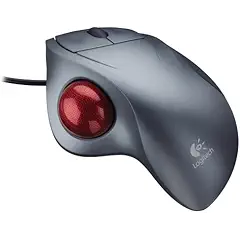
If you want to make enemies, try to change something. -Woodrow T. WilsonTurbulence is a life force. It is opportunity. Let’s love turbulence and use it for change. -Ramsay Clark ----------------------Sonar Platinum Win 10 x64 on HP Pavilion i7 5500 12Gb RAM, Tascam US-16x08, NVidia 840 8Gb vram, Multi-Screen, Multi-Touch
|
tlw
Max Output Level: -49.5 dBFS
- Total Posts : 2567
- Joined: 2008/10/11 22:06:32
- Location: West Midlands, UK
- Status: offline
Re: Touching SPLAT
2016/10/15 10:30:23
(permalink)
I'm a great believer in trackballs rather than mice. They use less space, are at least as accurate and cause far fewer RSI issues. High quality touchpads are also better than mice in my opinion, at least I find them so. Unfortunately most touchpads are anything but high quality, especially the ones built into many laptops and keyboards. Apple's Magic Touchpads are very good, but using them with Windows for any gesture functions means first extracting the relevant drivers from Apple's Boot Camp Windows driver package, or at least it did the last time I checked.
Sonar Platinum 64bit, Windows 8.1 Pro 64bit, I7 3770K Ivybridge, 16GB Ram, Gigabyte Z77-D3H m/board, ATI 7750 graphics+ 1GB RAM, 2xIntel 520 series 220GB SSDs, 1 TB Samsung F3 + 1 TB WD HDDs, Seasonic fanless 460W psu, RME Fireface UFX, Focusrite Octopre. Assorted real synths, guitars, mandolins, diatonic accordions, percussion, fx and other stuff.
|
RVR64
Max Output Level: -90 dBFS

- Total Posts : 6
- Joined: 2015/11/07 20:33:16
- Status: offline
Re: Touching SPLAT
2016/10/15 17:09:37
(permalink)
I think that touchscreen is going to be the ultimate interface with anything else between you and your music serving as a distraction. To be able to touch your clip and move/edit it without having to resort to some other hardware would be awesome. I hope Sonar moves in this direction sooner rather than later.
John
|
gswitz
Max Output Level: -18.5 dBFS

- Total Posts : 5694
- Joined: 2007/06/16 07:17:14
- Location: Richmond Virginia USA
- Status: offline
Re: Touching SPLAT
2016/10/15 21:25:09
(permalink)
☄ Helpfulby jshep0102 2016/10/15 21:54:49
Does anyone other than me have your computer in the same room with the musicians? Touch screen gives silent control while tracking. Th3 Faders Gains Spectral analyzers EQ Compression Expanders - useful for quieting Mics when the band stops Scrolling and zooming to inspect wave forms Touch is useful on other apps too DigiCheck TotalMix And you never forget what the control is mapped to. I do prefer a midi foot controller for enabling stomp boxes, but you can use touch for it. Tends to be a double tap. For example, in the video linked above, at 1:40, the user attempts to solo a track but only sets focus. He then solos a different track. The same sort of thing happens in Sonar. He didn't say out loud, gosh, I though that would solo and it didn't, but to me, it looks like that was his intent. He clicked precisely on the solo button and it didn't solo. At 22 mins he switches to the mouse. Idk... I applaud the Sonar developers who did a slow roll into touch. They have been thinking and adding and tuning touch for years now. I really like it. I look forward to how they will release the ability to work in PRV or with envelopes using touch. I still use the mouse a lot. I expect to continue to use it a fair amount. For me, giving up the mouse provides me no real value. Heck, the mouse isn't precise enough for setting some values. I often double click a param and set it exactly where I want it using the 10 key.
post edited by gswitz - 2016/10/16 10:00:10
StudioCat > I use Windows 10 and Sonar Platinum. I have a touch screen. I make some videos. This one shows how to do a physical loopback on the RME UCX to get many more equalizer nodes.
|
jshep0102
Max Output Level: -71 dBFS
- Total Posts : 984
- Joined: 2006/02/21 22:44:35
- Status: offline
Re: Touching SPLAT
2016/10/15 21:54:04
(permalink)
John
Ones finger is really a very poor and imprecise means to do that sort of thing. The act of placing your finger on the screen obscures the point you want to control.
Did you watch Steven Slate work with SOP, John? Watch at 2:45 and be amazed. Looks like it's a new day for touch on a Raven. I have a very finite amount I can do with Sonar, but I love what I can do. If Sonar was as well implemented with single touch as most other DAWs, I'd be in heaven. Heck, I can't even touch a track or bus to select it in SPLAT. Once Slate puts the Sonar Windows software together, it won't matter if Sonar works on touch or not, if I understand correctly. The Raven software will make Sonar do what Sonar doesn't do with touch.
SHEP-ASRock Z97 Pro4 - i7 4790K 4.0ghz - 16 GB DDR3 - Windows 10 Home - Apollo Twin USB Duo - UAD2 Duo - Digimax FS - Focal CMS50 - Raven MTi2 - Slate VMS 1 - Bluebird - Yamaha MOXF8 - Axe Fx Ultra - SPLAT 2017.2
|
mudgel
Max Output Level: 0 dBFS
- Total Posts : 12010
- Joined: 2004/08/13 00:56:05
- Location: Linton Victoria (Near Ballarat)
- Status: offline
Re: Touching SPLAT
2016/10/16 00:58:00
(permalink)
Remember he's working on the Mac for Studio One. Raven is not available yet on windows except for the beta for Pro Tools.
Sorry. Raven for PC is out of beta for the Pro Tools version.
Mike V. (MUDGEL) STUDIO: Win 10 Pro x64, SPlat & CbB x64, PC: ASUS Z370-A, INTEL i7 8700k, 32GIG DDR4 2400, OC 4.7Ghz. Storage: 7 TB SATA III, 750GiG SSD & Samsung 500 Gig 960 EVO NVMe M.2. Monitors: Adam A7X, JBL 10” Sub. Audio I/O & DSP Server: DIGIGRID IOS & IOX. Screen: Raven MTi + 43" HD 4K TV Monitor. Keyboard Controller: Native Instruments Komplete Kontrol S88.
|
Kamikaze
Max Output Level: -45 dBFS

- Total Posts : 3013
- Joined: 2015/01/15 21:38:59
- Location: Da Nang, Vietnam
- Status: offline
Re: Touching SPLAT
2016/10/16 02:07:01
(permalink)
John
I have a laptop that is also a tablet with touch. It comes with a stylus and woks very well for drawing in automation. Ones finger is really a very poor and imprecise means to do that sort of thing. The act of placing your finger on the screen obscures the point you want to control.
I've wondered about getting a stylus for my touch screen, I'm going to look out for one (Once I get the screen fixed)
|
mudgel
Max Output Level: 0 dBFS
- Total Posts : 12010
- Joined: 2004/08/13 00:56:05
- Location: Linton Victoria (Near Ballarat)
- Status: offline
Re: Touching SPLAT
2016/10/16 05:21:45
(permalink)
Seems I have a lot to catch up on with Slates Raven.
Apparently Sonar and Studio One work out of the box but I need to find out more.
Mike V. (MUDGEL) STUDIO: Win 10 Pro x64, SPlat & CbB x64, PC: ASUS Z370-A, INTEL i7 8700k, 32GIG DDR4 2400, OC 4.7Ghz. Storage: 7 TB SATA III, 750GiG SSD & Samsung 500 Gig 960 EVO NVMe M.2. Monitors: Adam A7X, JBL 10” Sub. Audio I/O & DSP Server: DIGIGRID IOS & IOX. Screen: Raven MTi + 43" HD 4K TV Monitor. Keyboard Controller: Native Instruments Komplete Kontrol S88.
|
jshep0102
Max Output Level: -71 dBFS
- Total Posts : 984
- Joined: 2006/02/21 22:44:35
- Status: offline
Re: Touching SPLAT
2016/10/16 08:14:50
(permalink)
The thing is, support for Sonar to make it function like the video shows (mixing gamer changer) is coming. It's a matter of time for Slate's bakers to get it done. Eventually batch commander will hit for it as well. I think the MTi2 screen alone is a big boost from a Planar or Acer, from talking with Jamey @ SS.
SHEP-ASRock Z97 Pro4 - i7 4790K 4.0ghz - 16 GB DDR3 - Windows 10 Home - Apollo Twin USB Duo - UAD2 Duo - Digimax FS - Focal CMS50 - Raven MTi2 - Slate VMS 1 - Bluebird - Yamaha MOXF8 - Axe Fx Ultra - SPLAT 2017.2
|
AT
Max Output Level: 0 dBFS
- Total Posts : 10654
- Joined: 2004/01/09 10:42:46
- Location: TeXaS
- Status: offline
Re: Touching SPLAT
2016/10/16 10:27:14
(permalink)
Touch is not yet the panacea for all control. To accomplish that, the screens need to be giant, so your fingertip can work as a stylus tip. And the software ain't there either - look how long it took the bakers to figure out how to pick different envelopes on a screen with a mouse. And how is even a smart screen supposed to know which line of several your finger is picking out?
A studio owner I work with tried the smaller Slate but traded up for a board controller - that works better for him. Slate obviously has done some good work figuring out how to make touch work better, and I will love the day I can touch a screen channel and have right-sized knobs and buttons fly-out so I can manipulate a channel like actual physical controllers. Maybe vibrating feedback too like some screens in cars. And cost less than the computer itself. Remember, it took the simple mouse years and a new technology to overcome the limitations of the mechanical mouse and having to clean all the gunk of the revolving ball unless you worked in a clean room.
Until then I'll use a 20+ inch touch screen as a favorite method of controlling some aspects of DAWing, like synths (where touch works very well). I like having my own comfortable distribution of tasks using the keyboard, mouse and screen. When the screens get bigger and cheaper (we seem to have struck a lull in those depts.) I'll re-jigger my methods again to take further advantage. But even then I'll keep a keyboard. My all-in-one with a 23 inch screen still doesn't work best even for typing in the MS password, so I keep its keyboard balanced on my lap for those kind of tasks.
https://soundcloud.com/a-pleasure-dome
http://www.bnoir-film.com/ there came forth little children out of the city, and mocked him, and said unto him, Go up, thou bald head; go up, thou bald head. 24 And he turned back, and looked on them, and cursed them in the name of the Lord. And there came forth two she bears out of the wood, and tare forty and two children of them.
|
mettelus
Max Output Level: -22 dBFS
- Total Posts : 5321
- Joined: 2005/08/05 03:19:25
- Location: Maryland, USA
- Status: offline
Re: Touching SPLAT
2016/10/16 10:37:28
(permalink)
☄ Helpfulby tlw 2016/10/17 19:19:25
+1, people underestimate the number of hot spots SONAR has and how big their finger is. Try editing user preferences for this site on a cell phone (full version of this site on a mobile phone).
The hot spots would have to be selectable by function, similar to cursor selection now. I cannot even imagine splitting a clip using touch with snap to grid off.
ASUS ROG Maximus X Hero (Wi-Fi AC), i7-8700k, 16GB RAM, GTX-1070Ti, Win 10 Pro, Saffire PRO 24 DSP, A-300 PRO, plus numerous gadgets and gizmos that make or manipulate sound in some way.
|
jshep0102
Max Output Level: -71 dBFS
- Total Posts : 984
- Joined: 2006/02/21 22:44:35
- Status: offline
Re: Touching SPLAT
2016/10/16 13:19:29
(permalink)
Help me understand why you'd say this AT and mettelus - did you actually watch the Slate video? It looks as easy as can be with Raven software.
SHEP-ASRock Z97 Pro4 - i7 4790K 4.0ghz - 16 GB DDR3 - Windows 10 Home - Apollo Twin USB Duo - UAD2 Duo - Digimax FS - Focal CMS50 - Raven MTi2 - Slate VMS 1 - Bluebird - Yamaha MOXF8 - Axe Fx Ultra - SPLAT 2017.2
|
gswitz
Max Output Level: -18.5 dBFS
- Total Posts : 5694
- Joined: 2007/06/16 07:17:14
- Location: Richmond Virginia USA
- Status: offline
Re: Touching SPLAT
2016/10/16 19:28:32
(permalink)
Jshep, I watched the video and can honestly say I really wasn't that impressed. It was interesting, but one of many steps in the right direction.
Let me give an example of something Sonar worked hard on. Touch control in the fly out EQ.
You can add nodes, frequency, gain... even q, but q is a trick. I use the nobs for q usually. In general, being able to do this with touch is nice. Solving q is a cool thing. Learning to code it and use it, everyone learns and improves.
What am I saying? It takes time to do things right. I don't want them to hurry. I think they did a great job with the fly out, just in case I wasn't clear. I am only pointing out that something fairly small like that took a lot of thought.
StudioCat > I use Windows 10 and Sonar Platinum. I have a touch screen. I make some videos. This one shows how to do a physical loopback on the RME UCX to get many more equalizer nodes.
|
RVR64
Max Output Level: -90 dBFS
- Total Posts : 6
- Joined: 2015/11/07 20:33:16
- Status: offline
Re: Touching SPLAT
2016/10/17 15:46:28
(permalink)
I did watch and I think that SPLAT should head in this direction asap of be left wishing they had. My grandchildren understand intuitively about touch and, I think they will expect the software they use to respond to touch/multi-touch. The iPad generation is almost here.
|
jshep0102
Max Output Level: -71 dBFS
- Total Posts : 984
- Joined: 2006/02/21 22:44:35
- Status: offline
Re: Touching SPLAT
2016/10/17 16:31:39
(permalink)
gswitz
Jshep, I watched the video and can honestly say I really wasn't that impressed.
That's odd to be unimpressed. Slate/Raven have met the challenge of touch head on and blown everyone out of the water. As well as being one tool, two perfect uses in it saving lots of space. I'm not seeing where you're coming from there. I was hoping to hear the bakers' reps chime in on this as much as anything. I hold hope someone from the A team will make some noise.
SHEP-ASRock Z97 Pro4 - i7 4790K 4.0ghz - 16 GB DDR3 - Windows 10 Home - Apollo Twin USB Duo - UAD2 Duo - Digimax FS - Focal CMS50 - Raven MTi2 - Slate VMS 1 - Bluebird - Yamaha MOXF8 - Axe Fx Ultra - SPLAT 2017.2
|
gswitz
Max Output Level: -18.5 dBFS
- Total Posts : 5694
- Joined: 2007/06/16 07:17:14
- Location: Richmond Virginia USA
- Status: offline
Re: Touching SPLAT
2016/10/18 07:14:19
(permalink)
☄ Helpfulby jshep0102 2016/10/19 18:33:51
Don't take it personally. I am really excited about touch. I work as a mobile tablet programmer for my day job.
The question for me is, 'Will it provide me something better than what I have now?'.
Touch to be silent so I can work the computer while performing or recording in the same room is useful to me now in Sonar.
For an envelope editor or in PRV, it has to beat my current workflow. I didn't think the touch functionality shown in the video you posted would beat my current workflow.
I'm not being judgmental because it's a different product. I use other DAWs as well as Sonar, depending on my current need. My point was lost in my negativity, I think. Sorry about that.
The point was that even when you focus on something small, like the fly-out EQ, it is still possible to struggle with the touch implementation. I described how changing the Q with touch for me was hard in Sonar despite the fact that it is touch enabled to do so. I don't mean with the Q knob either. This is the work-around I use, using the Q knob. but you can put both fingers on the node and spread and contract in a certain way to change Q.
As a user, I haven't become good at it. It's a trick. I practice using it sometimes but usually return to the Q knob.
So, my point is that by trying to touch enable an entire DAW immediately, you end up with lots of cases like Q in the fly-out EQ where it is technically touch enabled, but not in such a way that I would use it.
That was my read on the Slate. That, to me, is what the guy is talking about at the end of the video. The implementation requires a large amount of touch and pause. It's stuff you could get used to, but why? When you are mixing, you can make all the mouse noise you want. You can clackity-clack on the keyboard. Why take your hands off the fast tools that work to move to the slow, imprecise ones?
The learning curve with touch is 2-way. It is both on the part of the users and on the part of the developers. I'm getting better at using touch, as the Sonar developers are finding ways to make it useful.
I look forward to a more complete touch implementation. I kinda suspect that there are branches of the app that have significant touch gestures implemented and that the team tries it out. Craig will own that he has to be pushed down the touch road a little. The guys are like, 'Hey Craig, tried it?' ... 'Uhhh I'm gonna!' :-)
So, Craig gets a build maybe that has some increased touch functionality and plays around and they watch him as he leans back again and puts his hand on the mouse. :P (just a guess here guys).
When I use touch, it is usually my first move after not touching the DAW for a bit. Maybe because I was playing guitar. Then I reach out, make some changes and I'm good. Maybe I reach out, make some changes and switch to the mouse. How often do I move back to touch from the mouse? When? For what?
Touch is great for having guests in the studio, but they aren't going to know complicated gestures or buttons to tap. They tap and use... Synths... Th3... Console View.
An example of something that Sonar does really well is the virtual keyboard you can play using touch. That thing is awesome. Compare that with the Slate video where the guy was tapping tiny keys totally without control. The Sonar keyboard is really awesome.
StudioCat > I use Windows 10 and Sonar Platinum. I have a touch screen. I make some videos. This one shows how to do a physical loopback on the RME UCX to get many more equalizer nodes.
|
AT
Max Output Level: 0 dBFS
- Total Posts : 10654
- Joined: 2004/01/09 10:42:46
- Location: TeXaS
- Status: offline
Re: Touching SPLAT
2016/10/18 10:39:43
(permalink)
Better than watching a video, my favorite studio had a Slate. And the owner traded it in for a hardware controller. Granted, he was an old analog guy, but that goes to show you that your panacea ain't. Different strokes and all that.
Personally, I would love a touch screen big enough for a 1 to 1 analog of a big board, and fine-tuned wave editing, and feedback touch. But right now I'd rather spend that money on more external hardware and a summing mixer to use with them, or FX, or a mic. It is all a matter of priorities, not want. I want it all and the baby Slate monitor looks very cool. But for a $1000 (or 10K) I'll stick with my smaller monitor, keyboard and mouse.
No doubt hardware tech is headed toward integrated touch, but it will take more programming work before it becomes so universal that large touchscreens get cheaper (a few years ago I waited a few years for 20+ inch monitors to cheapen - but those and larger screens haven't fallen much since). That will happen, but slowly I imagine, as Apple etc. makes literacy passé since now you just have to touch a more varied McDonald's cash register icon, not letter. Welcome to the brave new world ;-)
https://soundcloud.com/a-pleasure-dome
http://www.bnoir-film.com/ there came forth little children out of the city, and mocked him, and said unto him, Go up, thou bald head; go up, thou bald head. 24 And he turned back, and looked on them, and cursed them in the name of the Lord. And there came forth two she bears out of the wood, and tare forty and two children of them.
|
jshep0102
Max Output Level: -71 dBFS
- Total Posts : 984
- Joined: 2006/02/21 22:44:35
- Status: offline
Re: Touching SPLAT
2016/10/19 18:33:18
(permalink)
Hi AT, I don't see how it's a better understanding if the guy may not have spent any time learning/setting it up for his personal style like one must. You never saw what is. The vid shows what is. I get why you feel other expenditures more pertinent. I work in a small project studio where most of my hardware needs are met. Except for control. And meeting my ever present space restrictions are the other side of my choice. I hardly consider this a 'dumbing down' if you will, if you were alluding what I was surmising. I appreciate you spelling out why you said what you did. Enjoy!
SHEP-ASRock Z97 Pro4 - i7 4790K 4.0ghz - 16 GB DDR3 - Windows 10 Home - Apollo Twin USB Duo - UAD2 Duo - Digimax FS - Focal CMS50 - Raven MTi2 - Slate VMS 1 - Bluebird - Yamaha MOXF8 - Axe Fx Ultra - SPLAT 2017.2
|