ShawnParsonz
Max Output Level: -90 dBFS

- Total Posts : 4
- Joined: 2016/10/21 06:38:31
- Status: offline

How Do I Eliminate Measure Lines Between Treble And Bass Clefs? (see inserted diagrams)
I am working with standard treble and bass clef notation. It is 4 part harmony with the soprano and the alto in the treble clef and the tenor and the bass in the bass clef. The words are printed in the middle and I have 4 verses. Everything looks good and I now want to print it out. The problem is that the measure bars extend from clef to clef through the center area where the words are. This means that the lines go through the words (See Example 1 below). Normally when there are words, the lines do not extend through the center area (See Example 2 below). How do I remove these lines during printing? Thanks in advance... Example 1 - Currently this is what I get when I print out a finished copy... _______________________________________________________________|_______________|_______________|_______________|_______________||_______________|_______________|_______________|_______________||_______________|_______________|_______________|_______________||_______________|_______________|_______________|_______________|| | | | || | | | || Currently|the lines go fr|m clef to clef |ight through th| words| | | | || | | | ||_______________|_______________|_______________|_______________||_______________|_______________|_______________|_______________||_______________|_______________|_______________|_______________||_______________|_______________|_______________|_______________||_______________|_______________|_______________|_______________| Example 2 - This is what I'm looking for... _______________________________________________________________|_______________|_______________|_______________|_______________||_______________|_______________|_______________|_______________||_______________|_______________|_______________|_______________||_______________|_______________|_______________|_______________||| I am looking for open space between the clefs so | the words will not be interfered with| |_______________________________________________________________|_______________|_______________|_______________|_______________||_______________|_______________|_______________|_______________||_______________|_______________|_______________|_______________||_______________|_______________|_______________|_______________|
post edited by ShawnParsonz - 2016/10/21 10:25:54
|
57Gregy
Max Output Level: 0 dBFS

- Total Posts : 14404
- Joined: 2004/05/31 17:04:17
- Location: Raleigh, North Carolina
- Status: offline
Re: How Do I Eliminate Measure Lines Between Trebel And Bass Clefs? (see inserted diagrams
2016/10/21 09:41:10
(permalink)
Welcome to the forum.
Are the words lyrics, and did you enter them as lyrics? Normally, the lyrics would be at the bottom of the clefs, not in the middle of them.
|
chuckebaby
Max Output Level: 0 dBFS
- Total Posts : 13146
- Joined: 2011/01/04 14:55:28
- Status: offline
Re: How Do I Eliminate Measure Lines Between Trebel And Bass Clefs? (see inserted diagrams
2016/10/21 09:45:22
(permalink)
Shawn Parsons from Pepperell, Ma ?
Windows 8.1 X64 Sonar Platinum x64 Custom built: Asrock z97 1150 - Intel I7 4790k - 16GB corsair DDR3 1600 - PNY SSD 220GBFocusrite Saffire 18I8 - Mackie Control
|
ShawnParsonz
Max Output Level: -90 dBFS
- Total Posts : 4
- Joined: 2016/10/21 06:38:31
- Status: offline
Re: How Do I Eliminate Measure Lines Between Trebel And Bass Clefs? (see inserted diagrams
2016/10/21 10:17:33
(permalink)
==== Are the words lyrics, and did you enter them as lyrics? Normally, the lyrics would be at the bottom of the clefs, not in the middle of them.====
Yes, the words are lyrics...
And not sure what you refer to with the words normally being "under" the clefs... If you pick up any piano book with words and music, standard notation puts the words in the middle between the Treble and Bass clefs like I illustrated in my original post... I currently have them printing in the middle where I want them... its just that the measure lines extend through the white space and overprint them...
|
ShawnParsonz
Max Output Level: -90 dBFS
- Total Posts : 4
- Joined: 2016/10/21 06:38:31
- Status: offline
Re: How Do I Eliminate Measure Lines Between Trebel And Bass Clefs? (see inserted diagrams
2016/10/21 10:31:48
(permalink)
Nope... Shawn Parsons from Cranston RI...
|
57Gregy
Max Output Level: 0 dBFS
- Total Posts : 14404
- Joined: 2004/05/31 17:04:17
- Location: Raleigh, North Carolina
- Status: offline
Re: How Do I Eliminate Measure Lines Between Trebel And Bass Clefs? (see inserted diagrams
2016/10/21 10:40:08
(permalink)
Sorry 'bout that. It's been years since I saw real notation. Was misremembering.
Have you tried splitting the bass and treble parts into separate tracks? Select all the bass notes in the track and drag (or copy) them into another track.
|
ShawnParsonz
Max Output Level: -90 dBFS
- Total Posts : 4
- Joined: 2016/10/21 06:38:31
- Status: offline
Re: How Do I Eliminate Measure Lines Between Trebel And Bass Clefs? (see inserted diagrams
2016/10/21 10:47:20
(permalink)
Yes that's the way I'm doing that now... The separate clefs are in separate tracks...
|
57Gregy
Max Output Level: 0 dBFS
- Total Posts : 14404
- Joined: 2004/05/31 17:04:17
- Location: Raleigh, North Carolina
- Status: offline
Re: How Do I Eliminate Measure Lines Between Trebel And Bass Clefs? (see inserted diagrams
2016/10/22 10:30:39
(permalink)
Put a blank MIDI track between them?
|
chuckebaby
Max Output Level: 0 dBFS
- Total Posts : 13146
- Joined: 2011/01/04 14:55:28
- Status: offline
Re: How Do I Eliminate Measure Lines Between Trebel And Bass Clefs? (see inserted diagrams
2016/10/22 13:20:42
(permalink)
Sorry Shawn (for going off topic).
I know a Shawn Parsons from Pepperell, Ma who played bass.
still does, very well.
Thanks and happy trails.
Windows 8.1 X64 Sonar Platinum x64 Custom built: Asrock z97 1150 - Intel I7 4790k - 16GB corsair DDR3 1600 - PNY SSD 220GBFocusrite Saffire 18I8 - Mackie Control
|
Sixfinger
Max Output Level: -73 dBFS

- Total Posts : 890
- Joined: 2007/09/22 07:55:26
- Location: Branson MO
- Status: offline
Re: How Do I Eliminate Measure Lines Between Trebel And Bass Clefs? (see inserted diagrams
2016/10/22 14:25:22
(permalink)
ShawnParsonz
And not sure what you refer to with the words normally being "under" the clefs... If you pick up any piano book with words and music, standard notation puts the words in the middle between the Treble and Bass clefs like I illustrated in my original post... I currently have them printing in the middle where I want them... its just that the measure lines extend through the white space and overprint them...
I seem to recall a treble clef with the melody, then the lyrics under that. Then the treble and bass clef piano below the lyrics.
Sonar Platinum , ADK Computer -Intel - Penryn Quad Core Q9400 Processor, Windows 7 Home premium 64, RME Fireface UFX, Grace 101 Pre's, A-800 Pro, assorted mics, Strats ,Les Pauls, Mesa Boogies http://lionfeather.com
|
Cactus Music
Max Output Level: 0 dBFS
- Total Posts : 8424
- Joined: 2004/02/09 21:34:04
- Status: offline
Re: How Do I Eliminate Measure Lines Between Trebel And Bass Clefs? (see inserted diagrams
2016/10/22 19:51:15
(permalink)
Yes that's correct. There is normally 3 lines of music.. The lyrics go under the lyric melody, then the treble and bass for the piano underneath. Guitar chords go at the very top over the lyric melody. Notice the piano music is connected which is desired. I've never tried using Sonars Sheet music but I've certainly heard a million complaints about it. Best to use Pro Tools if this is important to you, it includes Sibelius which is good stuff. 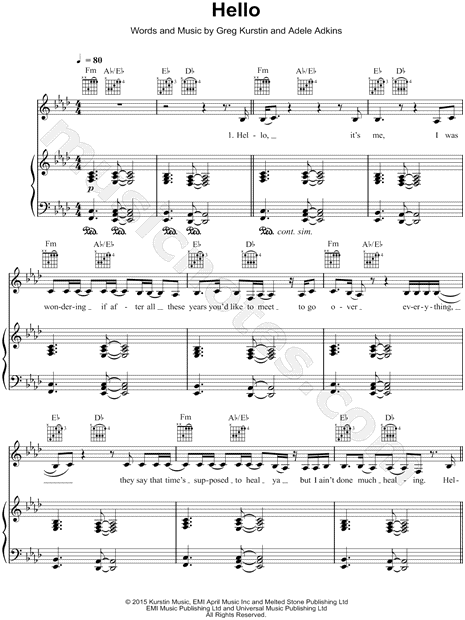
|
PeterMc
Max Output Level: -80 dBFS

- Total Posts : 504
- Joined: 2003/11/12 23:46:34
- Location: Tasmania
- Status: offline
Re: How Do I Eliminate Measure Lines Between Trebel And Bass Clefs? (see inserted diagrams
2016/10/23 03:33:49
(permalink)
Use two tracks. Insert lyrics in the first track. Set each track to whatever clef you want. To get a display like the example Cactus gave, set track 1 clef to treble and track 2 clef to treble/bass. I also set the track name font size to 1 to get rid of track names. Here's a quick example (don't try and sing this at home!)  Cheers, Peter.
i5 6500, H170M, Intel HD 530, 16GB, Focusrite Scarlett 8i6, Win 10 Pro (1803) (64 bit), Cakewalk by Bandlab
|