chamlin
Max Output Level: -85 dBFS

- Total Posts : 260
- Joined: 2004/07/25 16:11:18
- Status: offline
(Old) Rookie Mixing-Export Question
Have a very basic group of tracks. No effects. Just panning and volumes set. Outputs are set to Focusrite USB 2.0 Audio Driver Mon 1. But when I export, the volumes of the tracks are not what I'm hearing when I'm "mixing" it. Is this a pre-fader/post-fader issue? And how can I check and adjust that? What should that be set to when mixing, vs. tracking? Tracks image: http://screencast.com/t/gsuW50VoorExporting Image: http://screencast.com/t/lEUI0mo7mgtThanks! Chamlin
post edited by chamlin - 2016/11/03 11:51:41
|
Cactus Music
Max Output Level: 0 dBFS

- Total Posts : 8424
- Joined: 2004/02/09 21:34:04
- Status: offline

Re: (Old) Rookie Mixing-Export Question
2016/11/01 01:06:15
(permalink)
☄ Helpfulby Steve_Karl 2016/11/01 12:21:49
I always use a master buss. I mute it to double check all is routed there. ( of course I then turn it back on)
I then use EDIT/ SELECT NONE. ( this for some odd reason always works, were "Select all" doesn't always work)
Then FILE EXPORT AUDIO
I use what ever the default export settings must be with one minor change of 32 bit to 16 bit. Has always resulted in the same as what I was listening to in Sonar.
|
chamlin
Max Output Level: -85 dBFS
- Total Posts : 260
- Joined: 2004/07/25 16:11:18
- Status: offline
Re: (Old) Rookie Mixing-Export Question
2016/11/03 00:12:53
(permalink)
Thanks, Johnny. I tried what you suggested but it still keeps doing the same thing. On other songs too. I looked at my "options" --- Meter Options --- Playback Meter Options and confirmed it is set to "post-fader".
Help?
|
Bristol_Jonesey
Max Output Level: 0 dBFS
- Total Posts : 16775
- Joined: 2007/10/08 15:41:17
- Location: Bristol, UK
- Status: offline
Re: (Old) Rookie Mixing-Export Question
2016/11/03 11:19:20
(permalink)
☄ Helpfulby chamlin 2016/11/03 12:28:53
Johnny didn't mention anything about Metering Options, he said to check your routing.
You should be routing Tracks to Busses > Busses to Master Buss > Master Buss to Main Outs.
Use the Main Outs as your Export Source
Make sure your Master Buss and Main Out faders are at 0dB
If you mute your Master Buss you should hear total silence.
YOU need to create the Master Buss, SONAR doesn't do it for you (unless you start from a template which does have one set up)
Edit: the link to your 2nd image is broken.
CbB, Platinum, 64 bit throughoutCustom built i7 3930, 32Gb RAM, 2 x 1Tb Internal HDD, 1 x 1TB system SSD (Win 7), 1 x 500Gb system SSD (Win 10), 2 x 1Tb External HDD's, Dual boot Win 7 & Win 10 64 Bit, Saffire Pro 26, ISA One, Adam P11A,
|
chamlin
Max Output Level: -85 dBFS
- Total Posts : 260
- Joined: 2004/07/25 16:11:18
- Status: offline
Re: (Old) Rookie Mixing-Export Question
2016/11/03 11:53:53
(permalink)
Thanks for that. I'm going to dive into this in the (West Coast U.S.) afternoon. Will make sure what you both described is properly set up (which certainly it isn't) and celebrate... I hope! Fixed the link, though it's somewhat irrelevant as it's just an illustration of what, in part, I'm doing wrong. Exporting Image: http://screencast.com/t/lEUI0mo7mgt
|
John
Forum Host

- Total Posts : 30467
- Joined: 2003/11/06 11:53:17
- Status: offline
Re: (Old) Rookie Mixing-Export Question
2016/11/03 12:15:14
(permalink)
☄ Helpfulby chamlin 2016/11/03 12:28:57
According to that picture you are not exporting but using bounce. Exporting is done from the file menu. Also you have your audio interface as source. I assume that is your hardware outs in Sonar.
|
Bristol_Jonesey
Max Output Level: 0 dBFS
- Total Posts : 16775
- Joined: 2007/10/08 15:41:17
- Location: Bristol, UK
- Status: offline
Re: (Old) Rookie Mixing-Export Question
2016/11/03 12:39:31
(permalink)
I would also make sure you've got a tick mark next to everything in the Mix enables Box.
CbB, Platinum, 64 bit throughoutCustom built i7 3930, 32Gb RAM, 2 x 1Tb Internal HDD, 1 x 1TB system SSD (Win 7), 1 x 500Gb system SSD (Win 10), 2 x 1Tb External HDD's, Dual boot Win 7 & Win 10 64 Bit, Saffire Pro 26, ISA One, Adam P11A,
|
chamlin
Max Output Level: -85 dBFS
- Total Posts : 260
- Joined: 2004/07/25 16:11:18
- Status: offline
Re: (Old) Rookie Mixing-Export Question
2016/11/03 12:57:53
(permalink)
Yes to all of the above. RE: Bounce...I'm 1. highlighting (selecting) tracks to export 2. going to the file menu, selecting export 3. and this is the screen: http://screencast.com/t/eunvu37kEIs that not supposed to say Bounce?
|
John
Forum Host
- Total Posts : 30467
- Joined: 2003/11/06 11:53:17
- Status: offline
Re: (Old) Rookie Mixing-Export Question
2016/11/03 13:09:12
(permalink)
No. Its supposed to say export. The Export Dialog is this 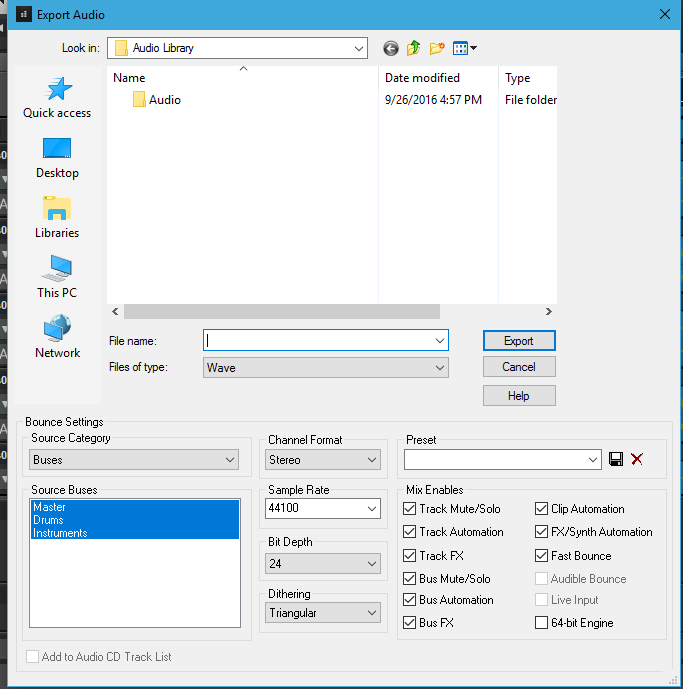
|
John
Forum Host
- Total Posts : 30467
- Joined: 2003/11/06 11:53:17
- Status: offline
Re: (Old) Rookie Mixing-Export Question
2016/11/03 13:16:21
(permalink)
You should setup buses. I have a Master buss plus I like to have sub buses for drums and instruments and vocals and so on. I also use aux buses which return to the master buss.
When you have a master buss all sub buses should out to it. Then when you go to the export dialog select master bus as your source. If every audio track ends up going through that buss that will be what you export.
|
chamlin
Max Output Level: -85 dBFS
- Total Posts : 260
- Joined: 2004/07/25 16:11:18
- Status: offline
Re: (Old) Rookie Mixing-Export Question
2016/12/09 16:26:31
(permalink)
Hi guys, back with this. And so frustrated that I can't get phone support. I have two songs open. They LOOK like they are set up identically. Outputs and paths all the same. 1. highlighting (selecting) tracks to export 2. going to the file menu, selecting export 3. and this is the screen: http://screencast.com/t/eunvu37kEOlder song exports fine with this simple configuration. If I lower the vocal volume of the old track, the exported files reflect that decrease in volume. New song does NOT reflect that. What could lead to that happening??? Thanks, friends.
|
chamlin
Max Output Level: -85 dBFS
- Total Posts : 260
- Joined: 2004/07/25 16:11:18
- Status: offline
Re: (Old) Rookie Mixing-Export Question
2016/12/09 17:38:37
(permalink)
Temporary Fix, but help needed.
So I can function right now and be able to mix/export (until tech support helps straighten me out), I copied a project, deleted the audio tracks. But the "project audio" folder is still the "copied" project folder.
S:\Sonar Song Files\Old Copied Song\Audio
...how do I change the new project's pathway to S:\Sonar Song Files\My New Song\Audio ?
|
thedukewestern
Max Output Level: -83 dBFS

- Total Posts : 387
- Joined: 2008/04/14 12:06:59
- Location: NY
- Status: offline
Re: (Old) Rookie Mixing-Export Question
2016/12/10 00:25:03
(permalink)
The only safe way to move the location of the audio files is to SAVE AS from inside the session as a new project, and choose "copy audio" on the bottom.
As far as exporting - what you are describing sounds like a routing issue. Make sure that all of your tracks in the session are sent to the Master Buss, (or a buss that eventually goes to your master buss)
Some guys have uploaded there session to dropbox, and shared it with others here if they have trouble with something, your welcome to do that. Its hard to pinpoint sometimes where there may be an error, as Sonar is a very capable program with many ways to get a little lost.
Be the first one who thinks that you can Sonar Platinum, Windows 7 64 bit - clean install January 2016, Focusrite Pro 40, Outboard Pres, Native Instruments Komplete, Izotope, PSP, Melodyne, Vegetarian
|
chamlin
Max Output Level: -85 dBFS
- Total Posts : 260
- Joined: 2004/07/25 16:11:18
- Status: offline
Re: (Old) Rookie Mixing-Export Question
2016/12/10 00:34:41
(permalink)
thedukewestern
The only safe way to move the location of the audio files is to SAVE AS from inside the session as a new project, and choose "copy audio" on the bottom. TheDukeWestern! Thank you for that. So simple. And worked! And regarding the routing...the thing is, all my old files work just fine with the OUT being Focusrite USB Audio 2.0 Audio Driver Mon 1. Consistently. And I know I need to learn the whole Master Buss thing, but when I've tried, I've not YET been up to the task, apparently. I'll get there. So... and yes, I agree, Sonar is sooooo capable, I'm sure I'm just not seeing where I tweaked something. :(
|
thedukewestern
Max Output Level: -83 dBFS
- Total Posts : 387
- Joined: 2008/04/14 12:06:59
- Location: NY
- Status: offline
Re: (Old) Rookie Mixing-Export Question
2016/12/10 00:37:13
(permalink)
Im glad that helped. Im not totally certain what your problem is, can you decribe it in detail?
Be the first one who thinks that you can Sonar Platinum, Windows 7 64 bit - clean install January 2016, Focusrite Pro 40, Outboard Pres, Native Instruments Komplete, Izotope, PSP, Melodyne, Vegetarian
|
thedukewestern
Max Output Level: -83 dBFS
- Total Posts : 387
- Joined: 2008/04/14 12:06:59
- Location: NY
- Status: offline
Re: (Old) Rookie Mixing-Export Question
2016/12/10 00:44:14
(permalink)
Buss... its super easy... its a group. A buss is like a funnel,, you just pour stuff into it. In fact your output to your usb is also considered a buss, its just sonar doesnt do anything with that other than allow you to turn it up or down.
Just go through all your channels in your session and set them to master to get started. Thats it. You more than likely did not hear a volume change when you did this before because your master buss is most likely set to zero... where it should be. You may be confused as to WHY you would use a master buss... however... its simple, The reason to do this is so that you can say, eq your entire mix, or maybe use a compressor etc. inside that buss. A buss simply allows you the same flexibility that a channel does, only we can send as many channels as we want to a buss. It also allows you to gauge how loud you actually are mixing.
In Sonar, console view, all your channels are on your left, and all your busses are on your right, and all the way to the right is your output section to your interface. All your signals go from left... to right.
Be the first one who thinks that you can Sonar Platinum, Windows 7 64 bit - clean install January 2016, Focusrite Pro 40, Outboard Pres, Native Instruments Komplete, Izotope, PSP, Melodyne, Vegetarian
|
chamlin
Max Output Level: -85 dBFS
- Total Posts : 260
- Joined: 2004/07/25 16:11:18
- Status: offline
Re: (Old) Rookie Mixing-Export Question
2016/12/10 00:45:31
(permalink)
Have a very basic group of tracks. No effects. Just panning and volumes set. Outputs are set to Focusrite USB 2.0 Audio Driver Mon 1. But in NEW PROJECTS, when I export, the volumes of the tracks are not what I'm hearing when I'm "mixing" it. For example, I can take the vocal volume all the way down, but it's fully present in the video. Tracks image: http://screencast.com/t/gsuW50VoorExporting Image: http://screencast.com/t/lEUI0mo7mgt Older songs export fine with this simple configuration. If I lower the vocal volume of the old track, the exported files reflect that decrease in volume. That's why I'm now having to save old projects AS when creating new projects.
|
chamlin
Max Output Level: -85 dBFS
- Total Posts : 260
- Joined: 2004/07/25 16:11:18
- Status: offline
Re: (Old) Rookie Mixing-Export Question
2016/12/10 00:48:03
(permalink)
thedukewestern
Buss... its super easy... its a group. A buss is like a funnel,, you just pour stuff into it. In fact your output to your usb is also considered a buss.
Just go through all your channels in your session and set them to master to get started. Thats it. You more than likely did not hear a volume change when you did this before because your master buss is most likely set to zero... where it should be. You may be confused as to WHY you would use a master buss... however... its simple, The reason to do this is so that you can say, eq your entire mix, or maybe use a compressor etc. inside that buss. A buss simply allows you the same flexibility that a channel does, only we can send as many channels as we want to a buss. It also allows you to gauge how loud you actually are mixing. Thank you for the easy explanation. So...just setting them to Master is using an pre-existing buss, that is just a core part of any project, in this case, the Master Buss? I'll try this now with an old song that "works", and a new song that hasn't worked. :)
|
thedukewestern
Max Output Level: -83 dBFS
- Total Posts : 387
- Joined: 2008/04/14 12:06:59
- Location: NY
- Status: offline
Re: (Old) Rookie Mixing-Export Question
2016/12/10 00:49:20
(permalink)
☄ Helpfulby chamlin 2016/12/10 01:02:27
Im wondering if your exports sound different because in the export dialog you dont have any of the boxes checked?
Be the first one who thinks that you can Sonar Platinum, Windows 7 64 bit - clean install January 2016, Focusrite Pro 40, Outboard Pres, Native Instruments Komplete, Izotope, PSP, Melodyne, Vegetarian
|
thedukewestern
Max Output Level: -83 dBFS
- Total Posts : 387
- Joined: 2008/04/14 12:06:59
- Location: NY
- Status: offline
Re: (Old) Rookie Mixing-Export Question
2016/12/10 00:51:47
(permalink)
chamlin
Thank you for the easy explanation. So...just setting them to Master is using an pre-existing buss, that is just a core part of any project, in this case, the Master Buss? I'll try this now with an old song that "works", and a new song that hasn't worked. :)
Absolutely... and say... maybe you want to .... brighten up the whole mix... now you have a place to do it... or ... compress the whole mix just a touch. The master buss is the the happenin hotspot in town that all the kids wind up at to party=-)
Be the first one who thinks that you can Sonar Platinum, Windows 7 64 bit - clean install January 2016, Focusrite Pro 40, Outboard Pres, Native Instruments Komplete, Izotope, PSP, Melodyne, Vegetarian
|
thedukewestern
Max Output Level: -83 dBFS
- Total Posts : 387
- Joined: 2008/04/14 12:06:59
- Location: NY
- Status: offline
Re: (Old) Rookie Mixing-Export Question
2016/12/10 00:53:42
(permalink)
Be the first one who thinks that you can Sonar Platinum, Windows 7 64 bit - clean install January 2016, Focusrite Pro 40, Outboard Pres, Native Instruments Komplete, Izotope, PSP, Melodyne, Vegetarian
|
chamlin
Max Output Level: -85 dBFS
- Total Posts : 260
- Joined: 2004/07/25 16:11:18
- Status: offline
Re: (Old) Rookie Mixing-Export Question
2016/12/10 01:05:34
(permalink)
This is thankfully solved. Yes, the key boxes were TRACK MUTE/SOLO and TRACK AUTOMATION. Really grateful for your help.
And I do NOT know why the box checking didn't do anything when BRISTOL JONESY suggested that above.
You guys are the best. AND, btw, once I got this working right, I also tested everything with the MASTER BUSS and it works as well. Now I'm a friggin' professional, right? :)
Thanks to all.
|
thedukewestern
Max Output Level: -83 dBFS
- Total Posts : 387
- Joined: 2008/04/14 12:06:59
- Location: NY
- Status: offline
Re: (Old) Rookie Mixing-Export Question
2016/12/10 01:12:38
(permalink)
☄ Helpfulby Bristol_Jonesey 2016/12/10 03:15:20
chamlin
This is thankfully solved. Yes, the key boxes were TRACK MUTE/SOLO and TRACK AUTOMATION. Really grateful for your help.
And I do NOT know why the box checking didn't do anything when BRISTOL JONESY suggested that above.
You guys are the best. AND, btw, once I got this working right, I also tested everything with the MASTER BUSS and it works as well. Now I'm a friggin' professional, right? :)
Thanks to all.
Its saturday night kid - you can be anything you want =-)
Be the first one who thinks that you can Sonar Platinum, Windows 7 64 bit - clean install January 2016, Focusrite Pro 40, Outboard Pres, Native Instruments Komplete, Izotope, PSP, Melodyne, Vegetarian
|