AdamGrossmanLG
Max Output Level: -62 dBFS

- Total Posts : 1436
- Joined: 2014/07/13 03:40:34
- Status: offline
Synth Rack Changes Really Sucks
So i spent a long time getting my screensets in my template just right with the synth rack in the browser to the right, and now with the new changes, the synth rack is no longer there by default.
I have to hit some awkward CTRL+SHIFT+S to get it open, and then when i go back to my locked screensets, it goes off screen again!!!!
This is getting SUPER frustrating. What is the benefit of not having the synth rack in the browser? This is really screwing up my workflow.
|
Zargg
Max Output Level: 0 dBFS

- Total Posts : 10666
- Joined: 2014/09/28 04:20:14
- Location: Norway
- Status: offline

Re: Synth Rack Changes Really Sucks
2016/12/03 13:46:58
(permalink)
Hi. I must say that I like the opportunity to be able to move the Synth Rack to the Multi Dock, or to a separate monitor. I have more controllers / space at my disposal when I undock it from the Browser.
I guess we work differently...
All the best.
Ken Nilsen ZarggBBZWin 10 Pro X64, Cakewalk by Bandlab, SPlat X64, AMD AM3+ fx-8320, 16Gb RAM, RME Ucx (+ ARC), Tascam FW 1884, M-Audio Keystation 61es, *AKAI MPK Pro 25, *Softube Console1, Alesis DM6 USB, Maschine MkII Laptop setup: Win 10 X64, i5 2.4ghz, 8gb RAM, 320gb 7200 RPM HD, Focusrite Solo, + *
|
ralf
Max Output Level: -86 dBFS

- Total Posts : 205
- Joined: 2010/11/27 05:36:43
- Status: offline
Re: Synth Rack Changes Really Sucks
2016/12/03 14:02:23
(permalink)
It was possible before to move the Synth Rack out of the Browser. What is new, is that the place of the Synth Rack in Browser is now taken by the Notes tab, and the Synth Rack has its own dockable window. Considering that this breaks existing layouts in templates and screensets, I have to agree that this was not a good decision.
|
TranceCanada
Max Output Level: -87 dBFS

- Total Posts : 198
- Joined: 2014/01/29 10:41:44
- Location: Canada
- Status: offline
Re: Synth Rack Changes Really Sucks
2016/12/03 14:02:30
(permalink)
SilverBlueMedallion
So i spent a long time getting my screensets in my template just right with the synth rack in the browser to the right, and now with the new changes, the synth rack is no longer there by default.
I have to hit some awkward CTRL+SHIFT+S to get it open, and then when i go back to my locked screensets, it goes off screen again!!!!
This is getting SUPER frustrating. What is the benefit of not having the synth rack in the browser? This is really screwing up my workflow.
I totally agree with you, I use the synth rack a lot, and the media browser and with the new set up I find it's more clunky than necessary, I don't like using the Multi-dock for too many things and found it more convenient to have it a part of he browser instead of sitting under it taking up space from the media browser. I'd rather have the new notes thing be removable and able to move around where you want and keep the synth rack where it was, I'd rather use keyboard command B to bring it up than CTRL+SHIFT+S
Cakewalk: Sonar Platinum x64 (Lifetime), Producer X3e, Producer X2 Soft Synths: Z3TA+2, Rapture Pro, Xpand2, Serum System 1: HP Envy23, Win10 x64, Core i7-3770 3.1Ghz, 8GB Ram System 2: Microsoft Surface Pro 3, Win10 x64, Core i5-4300U 1.9Ghz/2.5Ghz, 4GB Ram Audio: M-Audio M-Box Mini 2 Controllers: Edirol PCR-M80
|
Anderton
Max Output Level: 0 dBFS
- Total Posts : 14070
- Joined: 2003/11/06 14:02:03
- Status: offline
Re: Synth Rack Changes Really Sucks
2016/12/03 14:06:29
(permalink)
If you use assignable controls with the Synth Rack (which to me was always a major benefit), the changes are a huge improvement.
I think the simplest way to make everyone happy would be to move Notes where the Synth Rack currently sits in the Browser, and vice-versa. But I would not want it to go back to the way it was, where I had to undock the Browser to access the assignable controls.
|
bitflipper
01100010 01101001 01110100 01100110 01101100 01101

- Total Posts : 26036
- Joined: 2006/09/17 11:23:23
- Location: Everett, WA USA
- Status: offline
Re: Synth Rack Changes Really Sucks
2016/12/03 14:08:27
(permalink)
☄ Helpfulby Keni 2016/12/05 02:05:20
I love being able to float the synth rack in a separate window, like I could in 8.5. All they need to do now is make sure SONAR remembers where I've put it instead of docking it every time the program is opened. I'm sure that's a trivial fix, and after that I'll have no complaints at all.
 All else is in doubt, so this is the truth I cling to. My Stuff
|
abacab
Max Output Level: -30.5 dBFS

- Total Posts : 4464
- Joined: 2014/12/31 19:34:07
- Status: offline
Re: Synth Rack Changes Really Sucks
2016/12/03 14:47:16
(permalink)
I prefer it the new way. There may be a few adjustments to make, but it's a big improvement.
DAW: CbB; Sonar Platinum, and others ...
|
auto_da_fe
Max Output Level: -56.5 dBFS

- Total Posts : 1866
- Joined: 2004/08/04 21:32:18
- Status: offline
Re: Synth Rack Changes Really Sucks
2016/12/03 15:13:59
(permalink)
Wow thanks for this thread or I would have never found the synth rack.
JR
HP DV6T - 2670QM, 8 GB RAM, Sonar Platypus, Octa Capture, BFD2 & Jamstix3, Komplete 10 and Komplete Kontrol Win 10 64 SLS PS8R Monitors and KRK Ergo https://soundcloud.com/airportface
|
mixmkr
Max Output Level: -43.5 dBFS

- Total Posts : 3169
- Joined: 2007/03/05 22:23:43
- Status: offline
Re: Synth Rack Changes Really Sucks
2016/12/03 15:38:37
(permalink)
So...after you insert a synth and finish with the properties page, the synth rack just seems like a list...which you can't even rename. So...I can turn off the synth with it. Is that the big deal? I guess if you have 50 synths and a measly computer, that might be useful. So... who still freezes their synths? 8 instances of Omnisphere and Keyscape?
|
AdamGrossmanLG
Max Output Level: -62 dBFS
- Total Posts : 1436
- Joined: 2014/07/13 03:40:34
- Status: offline
Re: Synth Rack Changes Really Sucks
2016/12/03 17:11:01
(permalink)
Anderton
If you use assignable controls with the Synth Rack (which to me was always a major benefit), the changes are a huge improvement.
I think the simplest way to make everyone happy would be to move Notes where the Synth Rack currently sits in the Browser, and vice-versa. But I would not want it to go back to the way it was, where I had to undock the Browser to access the assignable controls.
i never actually understood assignable controls. I know what they are, but never use them. I just open up the VST and move knobs around on my controller. Is the only benefit to assignable controls in the synth rack so that you don't have to open the synth?
|
chuckebaby
Max Output Level: 0 dBFS
- Total Posts : 13146
- Joined: 2011/01/04 14:55:28
- Status: offline
Re: Synth Rack Changes Really Sucks
2016/12/03 17:13:21
(permalink)
SilverBlueMedallion
Anderton
If you use assignable controls with the Synth Rack (which to me was always a major benefit), the changes are a huge improvement.
I think the simplest way to make everyone happy would be to move Notes where the Synth Rack currently sits in the Browser, and vice-versa. But I would not want it to go back to the way it was, where I had to undock the Browser to access the assignable controls.
i never actually understood assignable controls. I know what they are, but never use them. I just open up the VST and move knobs around on my controller. Is the only benefit to assignable controls in the synth rack so that you don't have to open the synth?
Absolutely. But if you are only using 1 or 2..not as much a benefit. but still convenient. especially if you do a lot of control automation.
Windows 8.1 X64 Sonar Platinum x64 Custom built: Asrock z97 1150 - Intel I7 4790k - 16GB corsair DDR3 1600 - PNY SSD 220GBFocusrite Saffire 18I8 - Mackie Control
|
Glyn Barnes
Max Output Level: -0.3 dBFS

- Total Posts : 7564
- Joined: 2009/06/10 05:12:31
- Location: A Stone's Throw from the Line
- Status: offline
Re: Synth Rack Changes Really Sucks
2016/12/03 17:37:37
(permalink)
I like the change. I am not totally used to it yet but I never really liked it being a browser tab.
I normally hate layout changes at first but this one makes a lot of sense.
|
Amicus717
Max Output Level: -79 dBFS

- Total Posts : 555
- Joined: 2014/12/30 08:48:49
- Location: Canada
- Status: offline
Re: Synth Rack Changes Really Sucks
2016/12/03 17:53:08
(permalink)
Everything I do involves synths, pretty much. If I have less than 6 or 7 synths inserted into a project, I'm running lean and light.
But I've never used the assignable controllers, don't really see a reason for them, and really don't like the new change to the rack. At all.
Am I missing some advantage to the assignable controllers?
Sonar Platinum, Windows 10 Pro 64, Core i7-5820K Haswell-E CPU, 32GB DDR4 RAM, RME Babyface, Adam F7 monitors, Mackie MCU
|
Anderton
Max Output Level: 0 dBFS
- Total Posts : 14070
- Joined: 2003/11/06 14:02:03
- Status: offline
Re: Synth Rack Changes Really Sucks
2016/12/03 17:55:31
(permalink)
SilverBlueMedallion
i never actually understood assignable controls. I know what they are, but never use them. I just open up the VST and move knobs around on my controller. Is the only benefit to assignable controls in the synth rack so that you don't have to open the synth?
That's one benefit, but the big one for me is when using a control surface. The synth rack just makes it sooo easy to assign hardware controls, including devices like footpedals, to synth parameters. This can be done on a really informal, scratch pad-type basis so you can work really fast. It was a PITA to have to undock the Browser to make this happen and now when a synth shows up in the multidock, you can see a ton of controls if you're so inclined.
|
AdamGrossmanLG
Max Output Level: -62 dBFS
- Total Posts : 1436
- Joined: 2014/07/13 03:40:34
- Status: offline
Re: Synth Rack Changes Really Sucks
2016/12/03 18:27:05
(permalink)
Anderton
SilverBlueMedallion
i never actually understood assignable controls. I know what they are, but never use them. I just open up the VST and move knobs around on my controller. Is the only benefit to assignable controls in the synth rack so that you don't have to open the synth?
That's one benefit, but the big one for me is when using a control surface. The synth rack just makes it sooo easy to assign hardware controls, including devices like footpedals, to synth parameters. This can be done on a really informal, scratch pad-type basis so you can work really fast. It was a PITA to have to undock the Browser to make this happen and now when a synth shows up in the multidock, you can see a ton of controls if you're so inclined.
but cant you use ACT or even simple MIDI CC# in each synth window?
|
Anderton
Max Output Level: 0 dBFS
- Total Posts : 14070
- Joined: 2003/11/06 14:02:03
- Status: offline
Re: Synth Rack Changes Really Sucks
2016/12/03 20:00:09
(permalink)
☄ Helpfulby abacab 2016/12/03 22:11:52
You could, but I find the assignable controls to be much faster and easier.
|
Amicus717
Max Output Level: -79 dBFS
- Total Posts : 555
- Joined: 2014/12/30 08:48:49
- Location: Canada
- Status: offline
Re: Synth Rack Changes Really Sucks
2016/12/03 22:19:38
(permalink)
bitflipper
All they need to do now is make sure SONAR remembers where I've put it instead of docking it every time the program is opened. I'm sure that's a trivial fix, and after that I'll have no complaints at all.
That would help a lot.
Sonar Platinum, Windows 10 Pro 64, Core i7-5820K Haswell-E CPU, 32GB DDR4 RAM, RME Babyface, Adam F7 monitors, Mackie MCU
|
SteveStrummerUK
Max Output Level: 0 dBFS
- Total Posts : 31112
- Joined: 2006/10/28 10:53:48
- Location: Worcester, England.
- Status: offline
Re: Synth Rack Changes Really Sucks
2016/12/04 07:32:00
(permalink)
I'm probably missing the point here (nothing unusual there then) but I just opened my Synth Rack [Ctrl+Shift+S] and dragged it into the Browser. When I toggle the Browser on and off the Synth Rack opens and closes inside it, just like it did before, but now as a separate pane rather than a tab. I actually prefer this as I have instant access to the Synth Rack and whatever Browser Tab I decide to have showing. 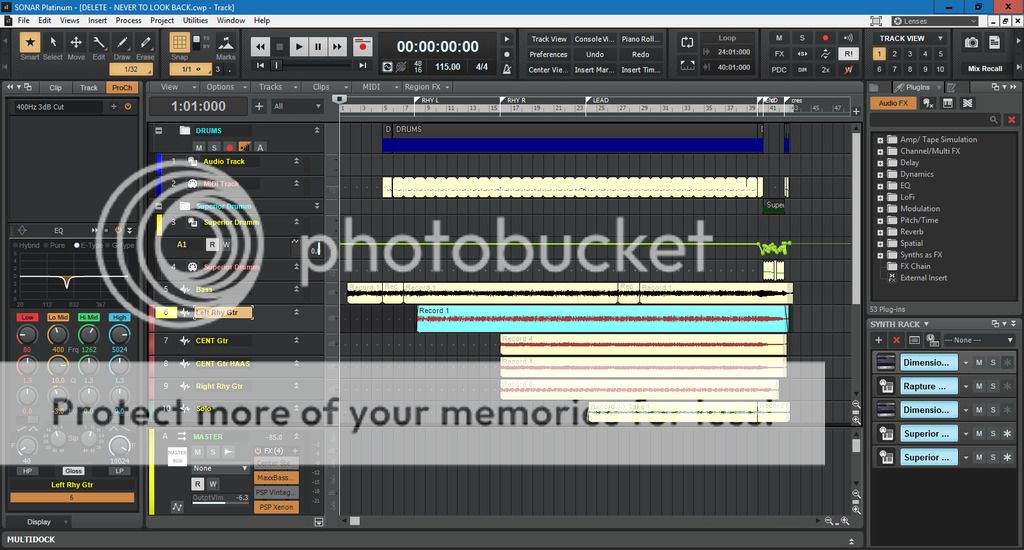 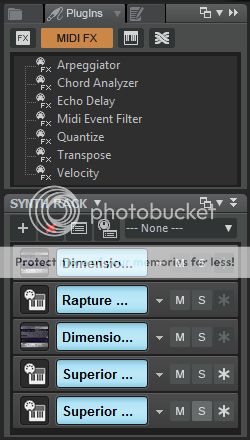
|
Glyn Barnes
Max Output Level: -0.3 dBFS
- Total Posts : 7564
- Joined: 2009/06/10 05:12:31
- Location: A Stone's Throw from the Line
- Status: offline
Re: Synth Rack Changes Really Sucks
2016/12/04 09:55:56
(permalink)
SteveStrummerUK
When I toggle the Browser on and off the Synth Rack opens and closes inside it, just like it did before, but now as a separate pane rather than a tab.
I actually prefer this as I have instant access to the Synth Rack and whatever Browser Tab I decide to have
I don't think your missing the point, I think you have got it. The more I see this the more I like it.
|
AdamGrossmanLG
Max Output Level: -62 dBFS
- Total Posts : 1436
- Joined: 2014/07/13 03:40:34
- Status: offline
Re: Synth Rack Changes Really Sucks
2016/12/04 17:23:00
(permalink)
Anderton
You could, but I find the assignable controls to be much faster and easier.
Anderton
You could, but I find the assignable controls to be much faster and easier.
The problem though with Assignable Controls in the synth rack though is that if you have the same CC# mapped to different synths, it will control all those synths, not just the one selected (as if you were doing basic MIDI Learns in each individual synth) Also I notice too that when you play the track back, it does not play the movements you just recorded unless the MIDI CC# is learned in the softsynth itself...
|
Anderton
Max Output Level: 0 dBFS
- Total Posts : 14070
- Joined: 2003/11/06 14:02:03
- Status: offline
Re: Synth Rack Changes Really Sucks
2016/12/04 20:47:40
(permalink)
I not sure you understand how synth rack automation works, it uses VST automation so is subject to the rules of having the R and W buttons selected correctly. Also you can choose where the automation appears. I've never seen one control affecting more than one synth because there's a direct mapping between the synth knob you turn and the synth with which it's associated.
It's a pretty deep topic and I would recommend checking out the help, I don't have the time right now to explain it in depth. The key is not to apply "standard automation thinking" to Synth Rack controls; after doing the automation, unfold the automation lanes to see what happened.
The subject in general would probably make a good "Friday's Tip of the Week," though, or fodder for my Sound on Sound column. This is one of those situations where at least for me, the time invested in learning how to use this feature has paid off.
|
AdamGrossmanLG
Max Output Level: -62 dBFS
- Total Posts : 1436
- Joined: 2014/07/13 03:40:34
- Status: offline
Re: Synth Rack Changes Really Sucks
2016/12/04 21:18:21
(permalink)
Anderton
I not sure you understand how synth rack automation works, it uses VST automation so is subject to the rules of having the R and W buttons selected correctly. Also you can choose where the automation appears. I've never seen one control affecting more than one synth because there's a direct mapping between the synth knob you turn and the synth with which it's associated.
It's a pretty deep topic and I would recommend checking out the help, I don't have the time right now to explain it in depth. The key is not to apply "standard automation thinking" to Synth Rack controls; after doing the automation, unfold the automation lanes to see what happened.
The subject in general would probably make a good "Friday's Tip of the Week," though, or fodder for my Sound on Sound column. This is one of those situations where at least for me, the time invested in learning how to use this feature has paid off.
Thanks for attempting to explain. I think a Friday tip on this topic would be cool. I feel the documentation is not that great in this area. For me, one knob is controlling all the knobs you see turning here: https://youtu.be/JoNkyonZllo I am using the came knob for those settings as I dont have many knobs, BUT i feel it should only control the synth I am actively playing, kinda like when you do standard MIDI Learn functions inside a VST softsynth. It doesn't effect other synths in the project.
|
SuperG
Max Output Level: -63 dBFS

- Total Posts : 1371
- Joined: 2012/10/19 16:09:18
- Location: Edgewood, NM
- Status: offline
Re: Synth Rack Changes Really Sucks
2016/12/05 02:31:44
(permalink)
For my two cents, I'll say that the new synth rack is a big plus, there's better choices for docking. I recently started playing around with synth automation, it's quite powerful. You can do some wild things, like grouping an output control to a fader and make your own gain rider.
|